
Bulk Ad Upload
Bulk upload ads to Google Ads, dozens at a time.
Pick ads from your Segwise Asset Library, choose the campaigns and ad groups they belong in, check every placement, and upload them in one go. Ads you make in Segwise are already there, so there is no downloading, re-uploading or clicking through ad groups one by one. Meta is coming soon.
View as Markdown

Trusted by performance marketing and creative teams at















What does Segwise Bulk Ad Upload do?
Segwise Bulk Ad Upload sends up to 20 images and 20 videos from your Asset Library to Google Ads ad groups in one go. You pick the ads and ad groups, Segwise checks each asset against Google's specs, and nothing uploads until you confirm. It never creates ads or changes budgets. Meta is coming soon.
From the library to your ad groups in four steps
Step 1
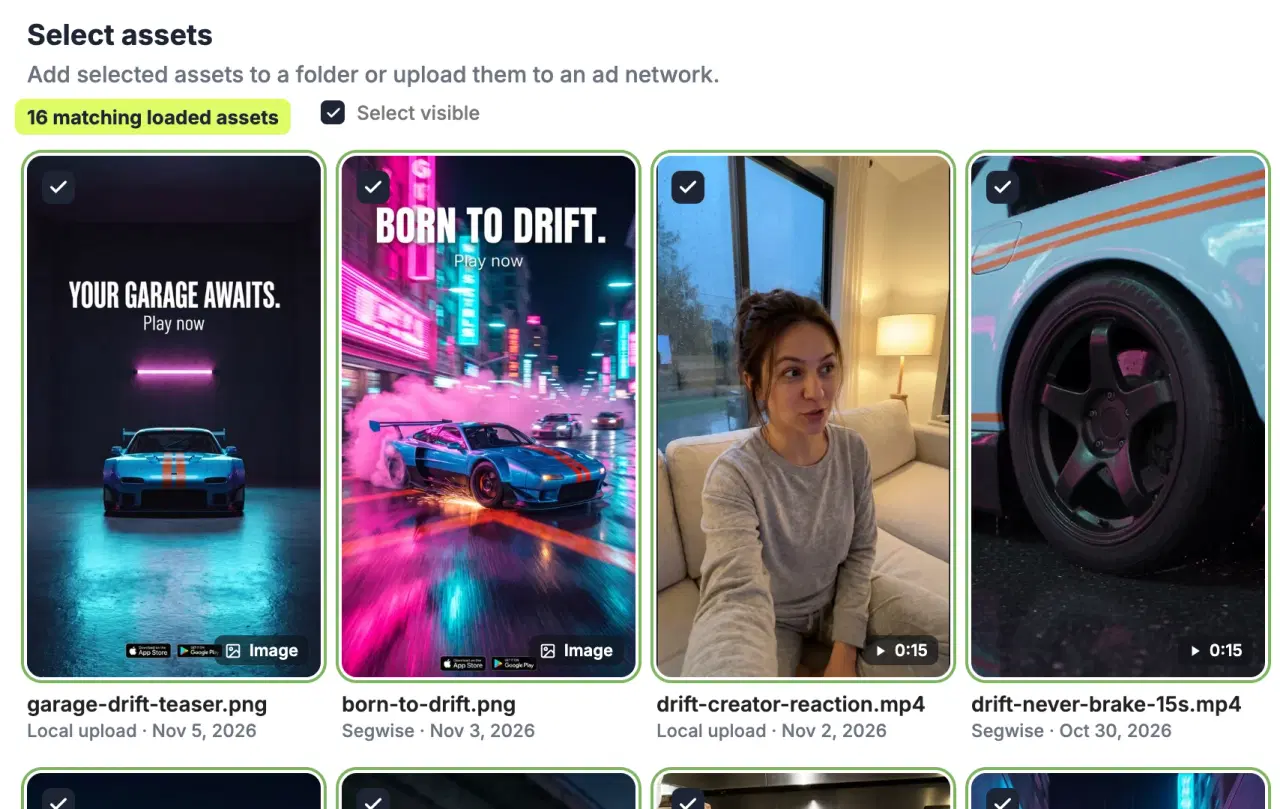
Select every ad you want to ship
Search the library, then use Select visible to take everything that matches. In the example, sixteen ads (ten images and six videos) are selected in one click instead of sixteen.
Step 2
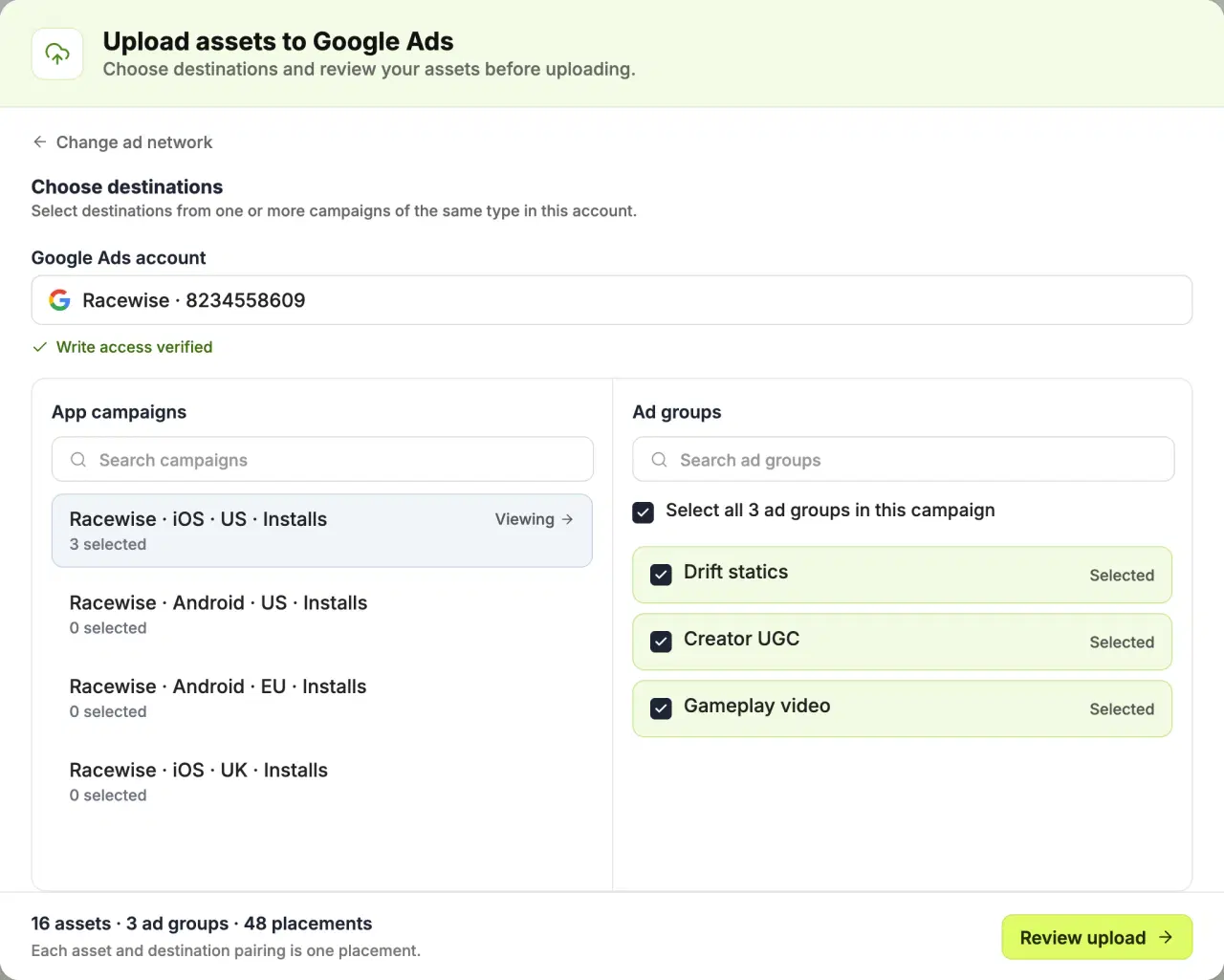
Choose ad groups across campaigns
Connect your Google Ads account and Segwise checks you have write access before you go on. Browse your App campaigns and pick ad groups in as many campaigns as you need; your picks stay selected as you move between them. Every asset in every ad group is one placement, and you see the running total as you go.
Step 3
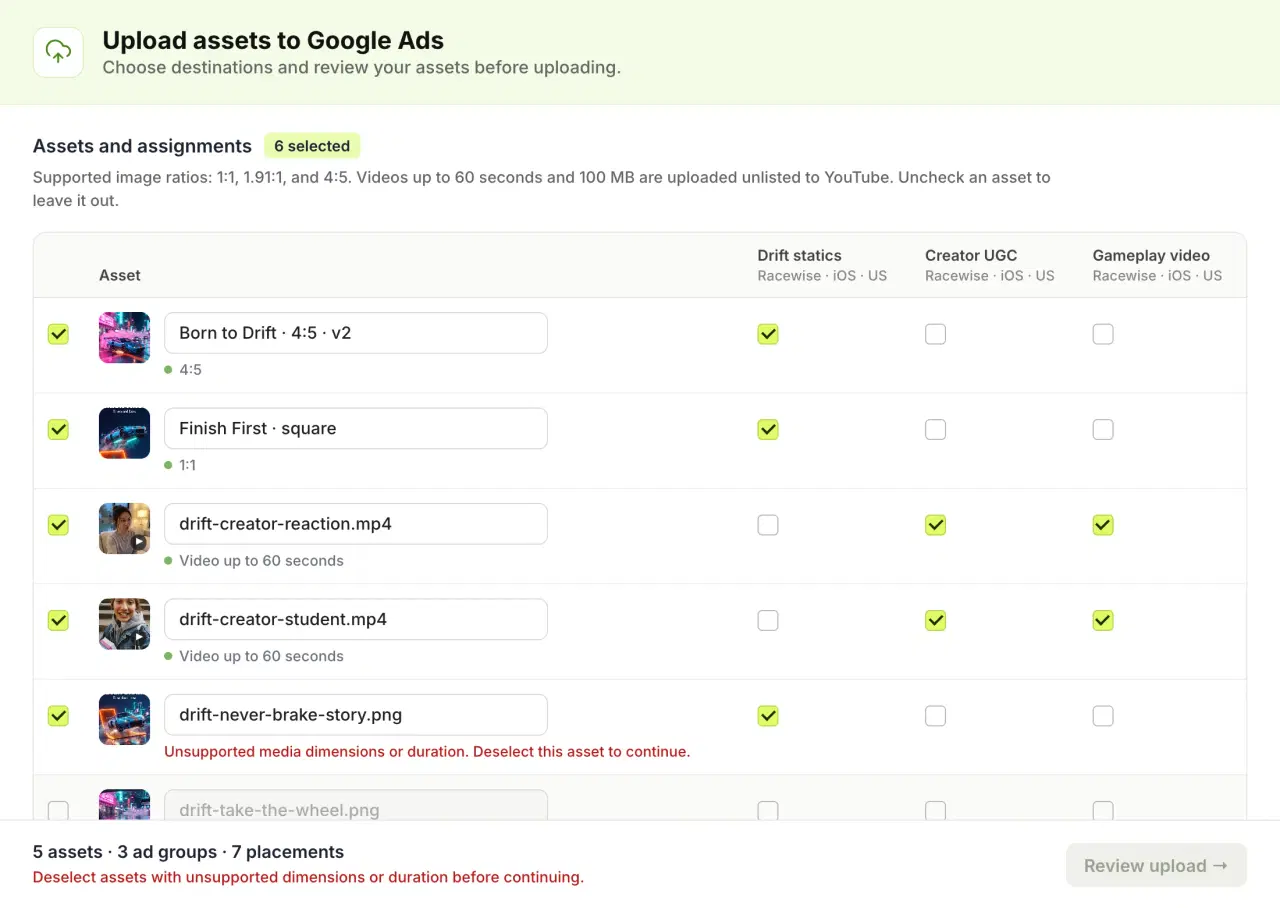
Catch the wrong specs before Google does
Before anything is sent, Segwise checks every asset against Google's specs: images in 1:1, 1.91:1 or 4:5, and videos up to 60 seconds. Anything that will not fit is flagged so you can leave it out. You can also rename each asset for the upload and choose exactly which ad groups each one goes to.
Step 4
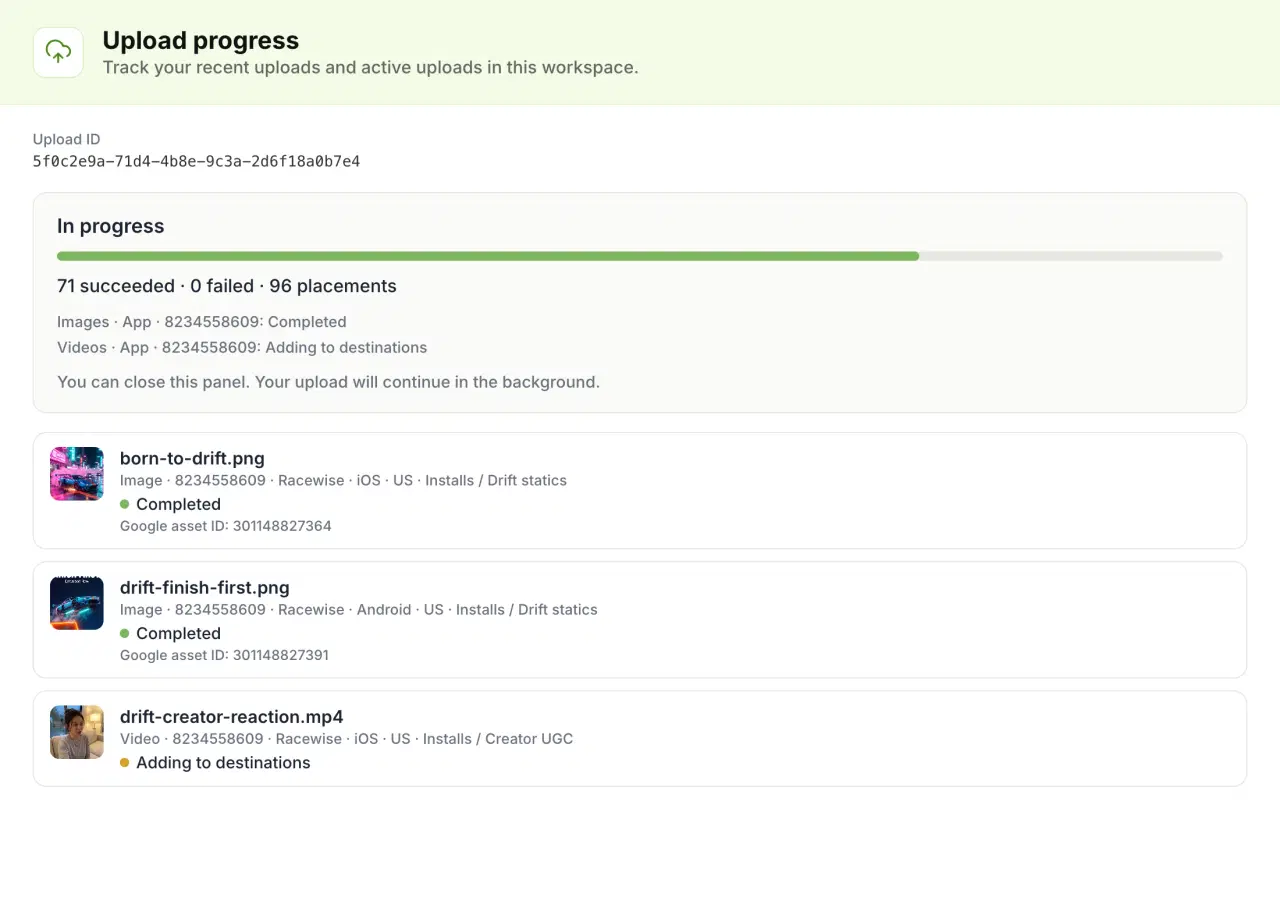
Upload, then watch every placement land
Review the full list and upload. Each placement moves from queued to completed with its Google asset ID, and videos go up as unlisted YouTube videos, the way Google Ads needs them. Close the panel and the upload keeps going. If a placement fails, you see why and retry only the failed ones.
Why UA teams upload from Segwise
Less busywork in launch week
No downloading from one tool and uploading to another, ad group by ad group. Pick, check, upload.
You make every call
Nothing goes up until you choose the ad groups and confirm the review. Segwise does the grunt work of getting files into place.
A failed placement is not a restart
See what failed and why, retry just those placements, and keep a full history of every upload in the workspace.
Frequently asked questions
Something else? Book a demo and ask us directly.
How do I bulk upload ads to Google Ads?
Select the ads in your Segwise Asset Library and choose Upload to Google Ads. Pick your connected account, choose ad groups across your App campaigns, deselect anything that fails Google's specs, review every placement and confirm. Segwise then uploads the assets and adds them to those ad groups.
Which ad networks does bulk upload support?
Google Ads today, with Meta coming soon. From the Asset Library you can upload to Google App campaigns. A single ad you generate in Segwise can also go to a Performance Max or App campaign from the screen where you review it, with images resized into square, landscape and portrait formats.
Does Segwise create or launch ads for me?
No. Segwise uploads your images and videos and adds them to the ad groups you choose. Your campaigns, bids and budgets stay as you set them, and nothing is uploaded until you confirm.
How many ads can I upload at once?
Up to 20 images and 20 videos per upload, into as many as 25 ad groups, with up to 100 placements each for images and videos. A placement is one asset in one ad group, so 16 ads in 6 ad groups is 96 placements.
What happens if an asset does not meet Google's specs?
Segwise checks each asset before upload. Images need a 1:1, 1.91:1 or 4:5 ratio and videos need to be 60 seconds or shorter. Anything that does not fit is flagged, and you leave it out before continuing.
How are videos uploaded?
Google Ads serves video from YouTube, so Segwise uploads each video, up to 60 seconds and 100 MB, as an unlisted YouTube video and adds it to your chosen ad groups.
What if part of an upload fails?
You see the status of every placement and the reason any one failed. Select the failed placements and retry them as a new upload; the ones that succeeded stay as they are.
How much does Segwise Bulk Ad Upload cost?
Bulk Ad Upload is included in every Segwise plan, and plans start at $999 a month for up to $250K in monthly ad spend. Teams spending under $50K a month qualify for startup pricing at $499 a month, and above $250K pricing is custom. Every plan includes every feature; plans differ only by ad spend and support. Book a demo, and if Segwise is a fit, the sales team can set up a 7-day trial.
See an upload to your own Google Ads account in a demo.
Book a 30-minute demo and we'll walk through your own creative data with you.