
Integration Docs
Integration Guide
Connect StackAdapt to Segwise
Follow these steps to connect StackAdapt to Segwise and unlock AI-powered creative analytics across your campaigns.
Step 1: Fetch the API key from the StackAdapt Dashboard
- You can get the API Key from the dashboard or request from the Stackadapt team.
Step 2: Connect with StackAdapt
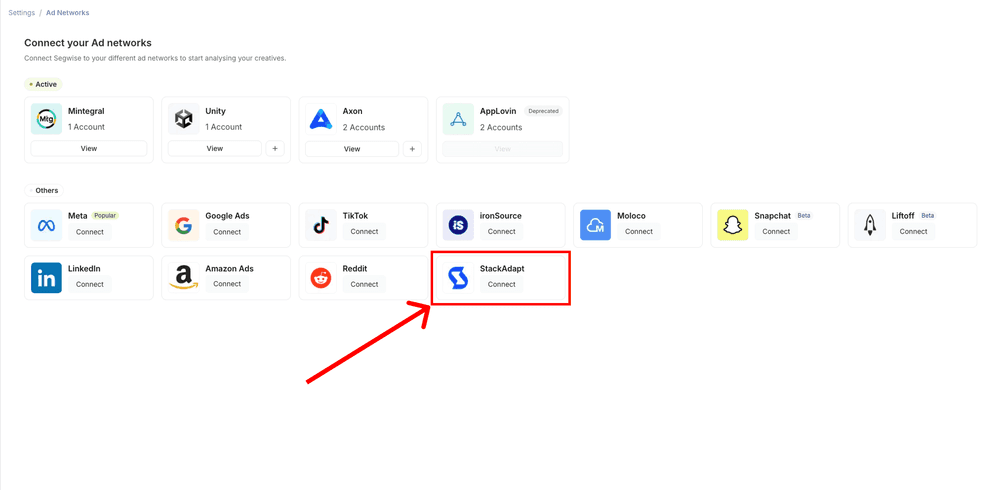
- In your Segwise dashboard, go to Settings -> Ad Networks
- Click on Connect under StackAdapt
Step 3: Enter API Key
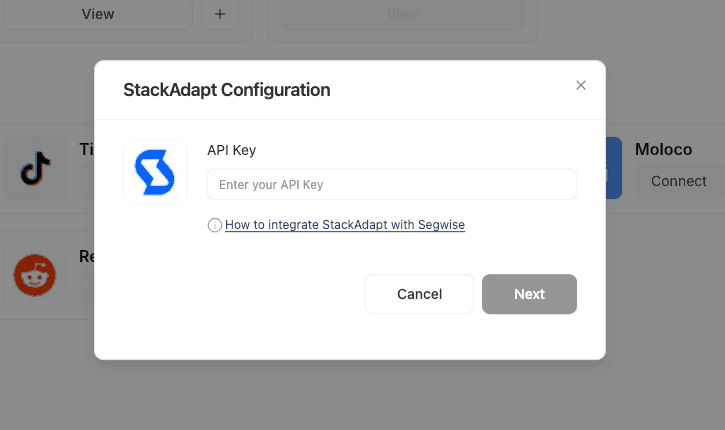
- Enter the API key on Segwise.
- Once entered, click Next
Ready to analyze your StackAdapt creatives?
Connect your data and let Segwise tag, analyze, and surface your winning creatives.


