
Are you wasting ad dollars on clips and thumbnails that look good but don’t make sales?
You need clear answers, fast. Right now, your data may live in different places, tests take too long, and it’s hard to tie a single creative to real revenue. That means slower decisions, more wasted production time, and missed chances to scale what actually works.
The right ecommerce analytics tools fix that. They pull ad and shop data together, tag creative assets, and show which versions move buyers, not just clicks. A recent industry study that analyzed 1.1 million creative variations and $2.4 billion in ad spend shows how much creative-level measurement now drives smarter testing and faster wins.
In this blog, we'll quickly compare five leading ecommerce analytics tools, show what each does best for creative work, and give a simple checklist so you can pick the one that helps your team stop guessing and start scaling winners.
What are Ecommerce Analytics Tools?
Think of ecommerce analytics tools as the systems that collect and show the story behind every click, visit, and purchase on your site or app. They pull together data from your ads, store, and product pages so you can see which creative ideas actually drive real customers and real revenue. These tools can track product views, add-to-cart events, purchases, and user journeys, and often let you group that data by ad creative, campaign, or audience.
Instead of guessing which thumbnail or opening shot worked, you get numbers that show what worked and why. Some tools focus on raw event data and funnels; some stitch ad platform and sales data into a single view; and others add session replay or creative-level recommendations. The end goal is the same help you link a creative change to a measurable business outcome.
Why Ecommerce Analytics Tools Matter for Creative Strategists
When you design and test ads, you need to know which ideas drive real results, not just which one gets likes. The right ecommerce analytics tools let you:
Link a creative asset to sales and return on ad spend so you can prove what works.
See performance across ad platforms and your shop in one place so you don’t chase partial signals.
Speed up decisions by surfacing failing assets earlier and backing winners faster.
Those are practical gains: fewer wasted production hours, clearer briefs, and faster learning loops. Platforms that focus on creative impact help you measure creative quality and predict which assets may perform before you spend more budget.
Beyond their strategic value, these tools deliver concrete advantages that directly impact how creative teams operate day-to-day.
Also Read: Top Creative Analytics Tools for Successful Ad Campaigns 2025
Key Benefits Creative Teams Get From Ecommerce Analytics Tools
Below are the core benefits you can expect when your data is connected and structured the right way:
See which creatives actually drive value (not just clicks): You’ll be able to connect a creative to downstream results (installs, purchases, LTV) so you focus on what grows revenue, not what just gets attention. This is the single biggest shift from “likes” to dollars.
Shorten your test-to-decision cycle: Tools that ingest ad and product data quickly let you run smaller, faster tests and make decisions in days instead of weeks. Faster turns mean less waste and faster scaling of winners.
Use cohorts and retention to judge creative quality: Instead of judging a creative only by install rate, you can see whether users acquired by that creative come back and buy again. That helps you pick creatives that bring higher-quality users.
Operate safely under modern privacy rules: Many analytics platforms now support privacy-safe attribution and aggregated reporting methods. That keeps measurement useful even as platforms tighten user-level data access. You’ll want tools that support these newer flows so your results stay reliable.
Make creative decisions collaborative and repeatable: Good tools let you tag creatives, share dashboards, and export insights so the same tests and naming conventions scale across campaigns and teams. That prevents the “one-off” problem and turns creative wins into repeatable playbooks.
Taken together, these benefits help you move from isolated metrics to connected insights. And when your insights are clearer, your creative decisions become more confident, consistent, and aligned with real business growth.
With those benefits in mind, it helps to look at the platforms that actually enable this level of insight.
List of Top 5 Ecommerce Analytics Tools To Look For
If you manage ad creatives across channels, you know performance often depends on the creative itself. the hook, the visual, the message. That’s why choosing the right ecommerce analytics tools matters. You don’t just need reports. You need clear insight into which creative elements drive installs, conversions, and ROAS.
Below are the top 5 ecommerce analytics tools to consider in 2026, starting with the one built specifically for creative-level performance decisions:
1. Segwise
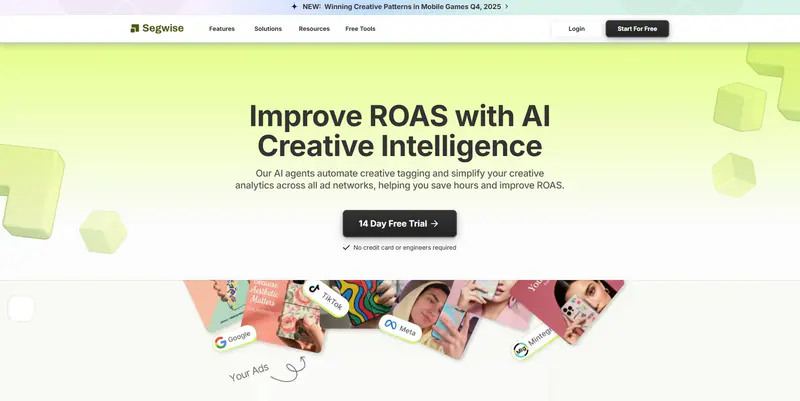
Segwise is a creative intelligence platform that analyzes your ad creatives (images, videos, audio, and interactive ads) to identify which creative elements are tied to better performance metrics such as installs, conversions, ROAS, CPA, LTV, etc. It reads each asset and applies fine-grained tags so you can spot patterns across all your ad sources and creative types. This helps you test creative ideas faster and quickly cut underperforming versions.
Because Segwise automates creative tagging and maps creative traits to KPIs, you can quickly see which hooks, visuals, or audio cues move installs, CTR, or ROAS. It also tracks competitor creatives, surfaces creative fatigue and new trends, and can generate new ad ideas based on patterns that actually correlate with performance, so you can test and scale winning concepts faster.
Segwise is built to make creative decisions faster. It turns your ad assets into measurable signals so you can spot what’s working and replicate it without waiting for long manual tagging or heavy engineering.
Key features:
Automated creative tagging: AI reads each creative and applies consistent tags (visual elements, hook type, CTA style) so you can compare assets at scale.
Competitor tracking: pull competitor creatives (from Meta only) to spot trends and gaps you can test.
Custom tagging: add or refine tags that align with how your team describes visuals or messaging, so reports reflect your workflow.
AI creative generation: automatically generate new creative variants based on patterns that correlate with better performance.
Cross-network mapping: unite creative-level data from multiple ad platforms and attribution providers to compare like-for-like.
Best for:
When you need reliable, asset-level creative metrics, fast creative tagging, and a way to spot creative fatigue and winning patterns across ad networks. Segwise is the clearest match for those goals.
Pros:
Saves time by automating tagging and mapping creative traits to results.
Let's you see which creative elements (visuals, hooks, CTAs) move key metrics.
Includes competitor creative tracking so you can spot trends to test.
Cons:
Focused specifically on creative analytics, it’s not intended as a one-stop BI tool for every marketing metric.
Reporting templates are geared toward creative performance rather than full enterprise finance dashboards.
If you want to centralize all datasets in a single-warehouse-first workflow, you can still pair Segwise with your analytics stack.
Pricing:
Segwise offers a free trial and custom pricing tailored to your ad footprint and integrations. Contact them for a plan that matches the number of networks and assets you manage.
2. Improvado

Improvado is a marketing data platform that focuses on data extraction, normalization, and centralized reporting. It connects hundreds of sources, harmonizes naming and taxonomies, and feeds dashboards or warehouses, enabling teams to build cross-channel reports. If your top need is centralized marketing data plumbing and enterprise dashboards, Improvado is a strong fit.
Key features:
500+ source connectors: pulls ad, analytics, CRM, and commerce data into one place.
Data normalization & templates: standardizes channel naming and offers report templates for common KPIs.
Custom mappings & CSV import: bulk-edit naming data and taxonomy for consistent reporting.
Automated updates and product releases: frequent connector additions and product improvements keep integrations current.
Best for:
Better if your main need is enterprise-level data centralization, long-run attribution reporting, or feeding a BI warehouse, not the quickest route if you only want creative asset-level analysis.
Pros:
Strong at centralizing many data sources for reliable reporting.
Good for multi-geo and multi-brand reporting.
Cons:
Lacks built-in, automatic asset-level creative tagging and competitor creative tracking that you’d want for fast creative decisions.
Often requires more setup and data-mapping effort than a plug-and-play creative tool.
An enterprise focus may make it heavier than needed for smaller teams.
Pricing:
Improvado uses custom pricing based on the number of connectors, data volume, and service level. You’ll request a quote for exact numbers.
3. Mixpanel

Mixpanel is a product and user-behavior analytics platform built around events and user journeys. It helps teams measure funnels, retention, and cohort behavior for apps and web products. It’s great when you need deep event-level analysis tied to product usage.
Key features:
Event-based tracking and funnels: track user flows and conversion steps with flexible event definitions.
Retention & cohort analysis: see how user groups behave over time and which experiences encourage return.
Session replay & impact reports: understand user sessions and measure the impact of metrics.
Warehouse connectors: sync events to a data warehouse for deeper BI work.
Best for:
Choose Mixpanel when your priority is product behavior, retention analysis, or detailed event funnels, not if your primary need is creative asset-level ad comparisons.
Pros:
Very flexible event model for tracking detailed user paths.
Offers product-focused insights that help prioritize features and flows.
Cons:
Lacks native, automated creative-level tagging tied to ad performance across multiple networks.
Event-based pricing can grow expensive with high event volumes.
For cross-network creative A/B insight, you’ll need extra pipelines or tools.
Pricing:
Mixpanel has a free tier and event-based paid plans; billing scales with monthly events and feature needs. See Mixpanel pricing for details and to estimate costs for your event volume.
4. Google Analytics 4

Google Analytics 4 (GA4) is Google’s event-driven analytics platform for websites and apps. It offers a free core product that tracks events and user properties, and an enterprise-level paid version for customers with very large needs. GA4 is powerful for site and app measurement, audience building, and linking to Google Ads.
Key features:
Event-based model: flexible event parameters let you capture custom signals from pages and apps.
Cross-platform analytics: measure users across web and mobile in the same property.
Built-in audience exports: connect audiences to Google Ads for targeting.
Custom dimensions and metrics: extend the schema when you need extra detail.
Best for:
Pick GA4 when you need reliable website/app measurement, audience creation, and Google Ads linking, not when your priority is automated asset-level creative insight across ad networks.
Pros:
Free to start for most teams; broad ecosystem and integrations with Google Ads and BigQuery.
Strong for measurement and audience exports.
Cons:
Not focused on automatic asset-level creative tagging or competitor creative tracking across ad platforms.
Learning curve for structuring events and parameters for consistent creative-level reporting.
Sampling and limits can make some cross-channel ad analyzes harder without BigQuery exports.
Pricing:
GA4 standard is free. Enterprise (Google Analytics 360/enterprise arrangements) is available for high-volume or enterprise customers; enterprise pricing varies and is provided by Google upon request.
5. Optimizely

Optimizely is an experimentation and personalization platform built for running A/B tests, feature flags, and personalization across web and mobile. It helps teams run controlled experiments and measure the impact of changes on key business metrics. Optimizely focuses on testing and delivery rather than creative-level ad analytics.
Key features:
Full-stack experimentation: run tests in frontend, backend, and mobile environments.
Built-in stats engine & reporting: reduce false positives and measure metric impact.
Personalization & feature flags: roll out tailored experiences and control features via flags.
Experimentation dashboards and calculators: tools for planning and measuring tests.
Best for:
Use Optimizely if your focus is on web or product experiments and controlled tests of UX or features, not if you mainly need creative asset insights for ad campaigns.
Pros:
Robust testing platform with strong developer SDKs and stats tools.
Helpful for rolling out features and measuring real user impact.
Cons:
Not built for automated asset-level creative tagging or cross-network competitor creative analysis.
Licensing and usage models can be complex for broad personalization and experimentation needs.
You may need engineering resources to integrate experiments deeply across platforms.
Pricing:
Optimizely uses customized pricing based on your product needs, traffic, and feature set. Request a quote for exact pricing.
Each tool above solves a different problem. Some focus on centralized reporting. Others specialize in product analytics or experimentation. But if your priority is understanding which creative assets actually drive revenue, asset-level visibility is what makes the difference.
After reviewing each platform in detail, a side-by-side view makes the differences easier to see at a glance.
At a Glance
Pick the tool that aligns with how you make decisions. When creative performance is clear, scaling becomes much simpler. Seeing the landscape is helpful, but the final decision depends on how your team actually works and what outcomes matter most.
Also Read: AI Ad Analysis Tools in 2025: Find What Drives Creative Success
How to Choose the Right Ecommerce Analytics Tools for Your Creative Workflow
Choosing the right ecommerce analytics tools is not about picking the most popular platform. It is about finding the system that fits how you test, launch, and scale creative work. Below is a simple, practical checklist you can skim quickly and use right away.
Start with the Outcome You Need: Before looking at features, be clear about what decision you want the tool to help you make. Are you trying to connect creatives to revenue? Improve retention? Compare performance across channels? When you define the outcome first, it becomes much easier to eliminate tools that don’t support that goal.
Make Sure It Connects Creative to Revenue: The tool should let you see how a specific ad version performs beyond clicks. You want to trace performance from impression → click → purchase or install → repeat behavior. If the tool stops at surface metrics, it won’t help you make confident, creative decisions.
Check Integration With Your Ad Platforms: Your data must flow smoothly from the platforms where you run ads. Look for direct integrations with major platforms like Google Ads, Meta, TikTok, and mobile attribution providers. Without strong integrations, reports will be delayed or incomplete, and you’ll spend time fixing data instead of improving performance.
Confirm It Handles Modern Privacy Measurement: Measurement has changed, especially for mobile and iOS. The tool should support aggregated reporting and privacy-safe attribution methods. This ensures your numbers stay stable and usable even when user-level tracking is limited. If a vendor cannot clearly explain how they handle privacy rules, that’s a red flag.
Evaluate Reporting Speed: Creative testing depends on timing. Some tools update data proactively. Others batch reports daily. If you run high-volume campaigns, daily updates may be enough. If you iterate quickly, faster reporting helps you adjust before wasted spend builds up.
Look for Clear Event Tracking: You need visibility into the actions that matter most. Make sure the tool tracks important ecommerce events like product views, add-to-cart actions, purchases, installs, and subscription starts. It should also allow custom event tracking if your funnel has unique steps.
Review Dashboard Clarity: If reports are confusing, they won’t get used. Look for clean dashboards that show performance by creative, campaign, and channel in one place. You should be able to understand results at a glance without digging through complex filters.
Check Data Accuracy and Matching: Reliable decisions require clean data. Ask how the platform matches ad clicks to purchases or installs. Check whether there are discrepancies between this tool and your existing analytics system. A small difference is normal, but large gaps signal setup problems.
Understand the True Cost: Pricing should match your growth plans. Some platforms charge by event volume, seats, or integrations. Estimate your cost not just today, but at 2–3 times your current traffic. You want predictable pricing as your campaigns scale.
Test Before You Commit: A short trial can reveal a lot. During the first week, connect one campaign and verify that revenue, installs, and creative names appear correctly. If the setup feels overly technical or unclear, it may slow your team down later.
The right ecommerce analytics tools should feel like support, not extra work. When your data flows smoothly, your reports are clear, and your metrics connect to real business results, your creative decisions become easier and more confident.
Final Thoughts
Choose ecommerce analytics tools that make creative choices measurable, speed decision cycles, and give you clear, cross-channel visibility so your team can turn insights into repeatable wins. The right platform connects creative elements to downstream revenue, surfaces which variants to stop or scale fast, and frees creative teams to test with confidence instead of guessing. When measurement is precise, your creative roadmap becomes the fastest path to predictable growth.
To bring that level of creative clarity to your ecommerce workflows, ask yourself how well your current tools connect creative performance to revenue and how well they integrate data across networks, attribution providers, and dashboards.
Segwise is a creative intelligence platform that unifies creative data across 15+ ad networks and major MMPs, automatically tags and analyzes visuals, text, and audio, and helps teams identify what drives ROAS, purchases, and lifetime value. Beyond analytics, it offers data-backed creative generation and competitive creative tracking so you can iterate faster and stay ahead. With no-code integrations that bring all your ecommerce ad and performance data together, Segwise delivers a scalable system for ecommerce creative strategy.
Start a Free Trial of Segwise to shorten your creative test cycles, make revenue-backed creative decisions, and grow long-term value.