
What if the creative elements you think are working are actually the ones quietly killing your ROAS?
When your team is shipping dozens or hundreds of ads across networks every month, it becomes nearly impossible to know which hooks, dialogs, visuals, or formats are actually driving results. And without that visibility, you end up scaling the wrong creatives, missing early fatigue signals, and wasting spend long before you realize what went wrong.
This is where AI-powered creative tagging changes the game. And while there are many platforms available, Segwise is leading the way in making it work for UA and performance marketing teams. This blog explores creative tagging and how leading platforms use it to uncover the exact elements driving your ad performance, so you can finally get clarity across your user acquisition funnel.
What is Creative Tagging?
Creative tagging is the process of labeling key elements, such as hooks, dialog, characters, colors, formats, CTAs, and visual styles, within your ads. By tagging these elements, you can see how each part of your creative affects ROAS, CPA/CPI, CTR, and overall quality.
Instead of guessing why a creative works, tagging helps you connect performance back to specific elements, so you can scale winning patterns and avoid repeating what doesn’t convert.
Here are the cases when creative tagging becomes essential for your team:
Your team spends hours manually tagging or reviewing creatives instead of optimizing campaigns.
You miss early fatigue signals because you can’t track performance by creative element.
You struggle to understand why one ad wins and a similar one fails.
Your creative briefs rely on opinion instead of element-level performance data.
Once you know what creative tagging is, it’s easier to see why traditional or manual tagging methods simply can’t keep up.
Also Read: Creative Tagging Tools That Can Boost Your Ad Campaign ROI in 2025
Why Traditional Tagging Fails at Scale
Traditional tagging breaks the moment your creative volume grows. When you’re launching new ads every week across multiple networks, teams, and markets, manual tagging simply can’t keep up. It limits how fast you can optimize your user acquisition.
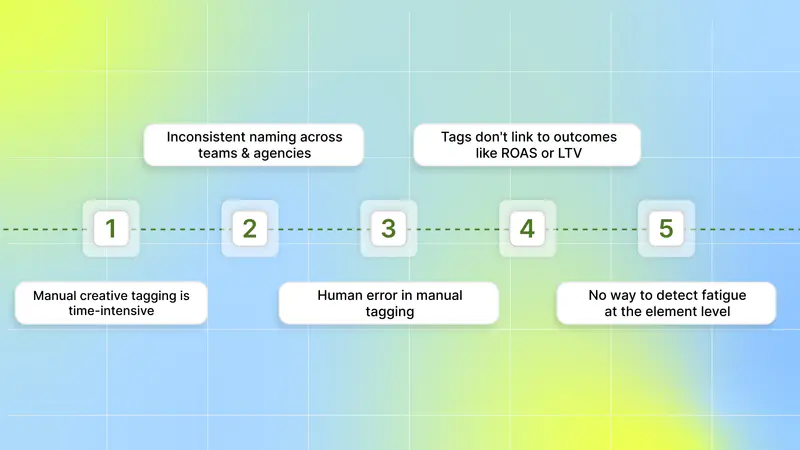
Here are the most significant reasons traditional tagging holds you back:
Manual creative tagging is time-intensive; teams spend 20+ hours per week tagging creatives to understand what's working.
Inconsistent naming across teams and agencies makes it hard to track what’s actually being tested or repeated.
Human error in manual tagging leads to inconsistent categorization and unreliable insights.
Tags aren’t connected to outcomes like ROAS or LTV, so you can’t see which elements truly drive quality users.
No way to detect fatigue at the element level, meaning you catch performance drops only after your budget is already wasted.
With these challenges out of the way, the next step is understanding how tagging accelerates your creative cycle.
How Creative Tagging Improves Creative Iteration Speed
Creative iteration moves faster when you’re not guessing why a creative worked or failed. With clear tags on the elements inside your ads, you instantly know everything without waiting for weeks of trial and error.
Here’s how creative tagging improves iteration speed:
You quickly identify winning creative elements to recreate in your next batch.
You stop wasting time analyzing full creatives and focus only on the elements that actually move your KPIs.
You reduce back-and-forth between UA and creative teams because insights are clear and easy to share.
You shorten the time from “insight” to “new variation” since every test is based on specific elements.
You avoid repeating underperforming patterns because you can see exactly what hasn’t worked across networks.
This lets you produce better creative variations faster, scale proven ideas, and stay ahead of fatigue across your campaigns.
To put everything into context, here’s what the creative tagging process looks like.
Also Read: Creative Fatigue: Understanding and Managing Ad Performance
How Creative Tagging Works
Creative tagging follows a structured process that helps you turn your ad assets into clear, measurable data. Instead of reviewing creatives manually or relying on assumptions, you follow a workflow that shows you which elements inside your ads actually influence UA performance.

Here’s how the general workflow works:
Data ingestion: You collect all your creative and performance data in one place, including videos, images, copy, and user interactions such as clicks, installs, conversions, or signals.
AI/ML analysis: Your creatives are automatically scanned, and each asset is tagged with specific elements. These may include visuals, hooks, audio/emotion, and format.
Performance correlation: Each tag is linked to your UA metrics, such as CPI, CTR, ROAS, IPM, and user quality, so you can see which elements improve performance and which hurt it.
Visualization & insights: Dashboards or reports display clear patterns, such as “Close-up shots improve persuasion” or “Humorous voiceovers drive higher engagement.”
Actionable optimization: You use these insights to refine your creative strategy, repeat winning elements, avoid low-performing patterns, and build new variations that are more likely to succeed.
This workflow helps you move from creative decisions based on gut feeling to decisions backed by clear, consistent, and testable data across all your user acquisition campaigns.
Once you understand how creative tagging fits into your workflow, the next challenge is choosing a platform that can actually support your scale and creative volume.
How to Choose the Best Creative Tagging Platform
When you’re managing high creative volume across multiple ad networks, the right tagging platform can make or break your optimization speed. You need a tool that provides accurate insights, integrates with your existing workflow, and helps you scale winning creatives without guesswork.

Here are the key factors to choose the best creative tagging platform:
Accuracy of AI tagging: Ensure the platform can correctly identify all creative elements across all your formats.
Support for all ad types: Your tool should tag all ad formats for your mobile games, DTC brand, or subscription app ads.
Performance connection: Choose a platform that maps every tag to UA metrics so that you can act on the main drivers of performance.
Ease of integration: You should be able to connect Meta, Google, TikTok, Snapchat, and MMPs without complicated setup or engineering support.
Custom tagging flexibility: Your UA and creative teams should have the freedom to create custom tag categories.
Cross-team usability: Insights should be easy to understand and share, so your UA team, creative team, and agency partners all work from the same source of truth.
Speed of insight: The best platforms show you winning patterns instantly, helping you iterate on creatives faster and avoid wasted spend.
Scalability: Make sure the tool can handle hundreds or thousands of creatives per month as your production volume increases.
This checklist makes it easier for you to evaluate platforms and choose one that can truly support your user acquisition goals.
Once you know what to look for in a platform, the next step is looking for a leading platform that actually delivers those capabilities in practice.
Also Read: Why Creative Tagging Matters for Mobile Game Marketers in 2025
How Segwise Creative Tagging Beats Alternatives to Improve Ad Results
Most tools stop at basic tagging or surface-level reporting, which leaves you guessing why certain creatives work and others fail. Segwise creative tagging goes deeper by connecting creative elements directly to performance, giving you clearer insights and faster optimization.
Here are the reasons Segwise outperforms the alternatives:

1. The Only Platform That Tags Playable Ads
If you run user acquisition campaigns for mobile games, DTC brands, or subscription apps, playables are a huge part of your funnel. Not a single tool tags interactive elements inside a playable, but Segwise can.
You can finally see which actions, buttons, gameplay moments, or tutorial cues in your playable ads drive conversion. This gives you a level of insight that other tagging tools simply cannot provide.
2. Multimodal AI That Identifies Tags and Creatives
Most tools only tag static visuals or rely on naming conventions. With Segwise, you can tag everything inside your creatives across your campaigns using multimodal AI. These creative elements include:
Hook dialogs.
Characters.
Colors.
Audio components.
This lets you understand your creative performance in depth, which other platforms don’t offer.
3. Tag-to-Metric Mapping That Shows What Actually Drives ROAS
Segwise goes further than tagging by mapping every tag to your core UA metrics, such as IPM, CTR, and ROAS.
You see exactly which creative elements bring high-value users, which ones fatigue first, and which combinations repeat across winning ads. This means no more assumptions about why a creative performed or failed.
4. Nomenclature Tagging That Works With Your Existing Workflow
With nomenclature tagging, you can extract tags from your existing naming conventions and standardized file names. With this, you can maintain your current creative workflow while automatically pulling insights from the naming systems you already use.
5. Custom Tag Systems Built for Your Brand, Not a Generic Template
Many tools give you a fixed list of tags. With this platform, you can customize your tags for specific elements that are unique levers to your creative performance. You can build tag groups for:
Product categories.
Creative themes.
UGC styles.
Seasonal campaigns.
Game mechanics and more.
This makes your tagging accurate, consistent, and directly tied to your UA strategy, not a generic framework that doesn’t fit your brand.
With the advantages of stronger tagging systems in mind, it’s equally important to follow a few best practices to get the most accurate insights.
Tips for Better Creative Tagging
Creative tagging becomes far more useful when you follow a structured approach instead of tagging randomly or using too many labels. A clear tagging system helps your UA and creative teams get consistent insights and build better-performing variations faster.
Here are tips for better creative tagging:
Use clear, consistent tag names that everyone on your UA and creative teams can understand at a glance.
Tag creative elements that match your testing strategy, such as hooks, themes, characters, offers, gameplay moments, or value props.
Avoid tagging everything; too many tags create noise and slow down your analysis.
Review tag performance regularly to see which elements consistently win and which ones fatigue quickly.
Align your tags with campaign goals, whether you're optimizing for installs, retention, purchases, or subscriptions.
Update your tagging system as your strategy evolves, especially when you launch new products, game features, offers, or creative concepts.
These simple tips help you create a clean, reliable tagging structure that improves decision-making and speeds up your creative iteration cycle.
Conclusion
Creative tagging gives you the clarity you need to understand what truly drives your ad performance. By breaking your creatives into measurable elements, you can see which creatives actually help you reach your goals and which ones quietly hurt your ROAS. It speeds up creative iteration, prevents wasted spend, and gives your UA and creative teams a shared system to make better decisions.
If you want this workflow for creative tagging, Segwise helps UA and performance marketing teams understand which creative elements drive performance. It connects creative elements (hooks, dialogs, visuals, formats, etc.) directly to business outcomes (ROAS, CPA/CPI, LTV, IPM, conversion rates), so teams start scaling creatives with data-backed confidence.
Here are the key steps in the Segwise creative tagging workflow:
You connect all the ad networks you’re running: Meta, Google, TikTok, Snapchat, MMPs, CDPs, and more.
Segwise pulls all your creatives and performance data into a single, clean, unified dashboard, so you don’t have to download or organize anything manually.
Every creative is automatically tagged for variables like hook scenes, dialogs, characters, colors, audio elements, and other visual or textual components across videos, images, text ads, and playables.
Each tag is mapped to performance metrics such as IPM, CTR, and ROAS.
You get a clear tag report, where you can see the performance of your tags across ad networks, and you can see which tags/creative elements/creative variables are driving performance, and which ones are dragging performance down.
You can also cluster your assets based on tags, which lets you group creatives that share similar elements. For example, all videos that use a specific hook.
This helps you compare patterns easily and understand how certain creative themes perform across networks, so your creative strategy becomes more focused and data-driven.
So, are you ready to understand which creative elements drive your results?
Start your free trial today and turn your ad creatives into a data-backed growth engine!
FAQs
1. What kinds of ad elements should be tagged for deeper insights?
Marketers typically tag visuals, audio components, hooks, CTAs, emotions, characters, and formats to understand which creative parts are driving engagement or conversions.
2. What should a UA team consider when choosing a creative tagging tool?
Key factors include AI capabilities, ease of integration, performance metric mapping, cross-platform dashboards, and custom tagging flexibility.
3. Can creative tagging help reduce experimental wastage in UA campaigns?
Yes, by showing which creative aspects consistently underperform, tagging helps avoid spending budget on variations unlikely to drive results.