
You lose money when ads miss the right people, when videos fail to hold attention, or when it’s unclear which placements bring installs or signups. You need clearer data, quick creative tests, and tools that help you make changes without slowing down.
TikTok Ads Manager brings planning, setup, and reporting into one place so you can adjust fast. You can define who sees your ads by interests, behavior, device type, and other signals. This gives you tighter control over reach and helps you push spend toward users who are more likely to act.
Tracking tools like Pixel and the Events API record installs, signups, and purchases, sending that data back into your campaigns so the system learns what drives real outcomes. You can run formats that feel like regular feed posts with active likes and comments, or turn existing creator clips into ads without losing social proof.
New AI-based creative tools let you quickly produce multiple video versions, helping you test hooks, scenes, and lengths with less manual effort. For accurate cost tracking, leading attribution partners now support SAN (Self-Attributing Network) / SRN (Self-Reporting Network) connections, making it easier to match installs and ad spend across platforms and compare returns with confidence.
In this blog, we'll walk through how the tool cuts weak spend, speeds up creative testing, supports reliable tracking, and helps you shape stronger campaigns. We'll cover setup, core features, and steps you can apply right away.
What is TikTok Ads Manager?
When you use TikTok Ads Manager, you get a tool that lets you plan, run, and track ads on TikTok all from a single platform.
Rather than doing ads from the app’s “Promote” button, Ads Manager gives you more control. It includes precise audience targeting (by age, location, interests, device, behavior), real-time reporting, and multiple ad formats.
For someone working on mobile app marketing or performance-driven campaigns, this means you can target ads precisely to the users you want and measure how well those ads drive installations, signups, or purchases.
Why Create a TikTok Ads Manager Account?
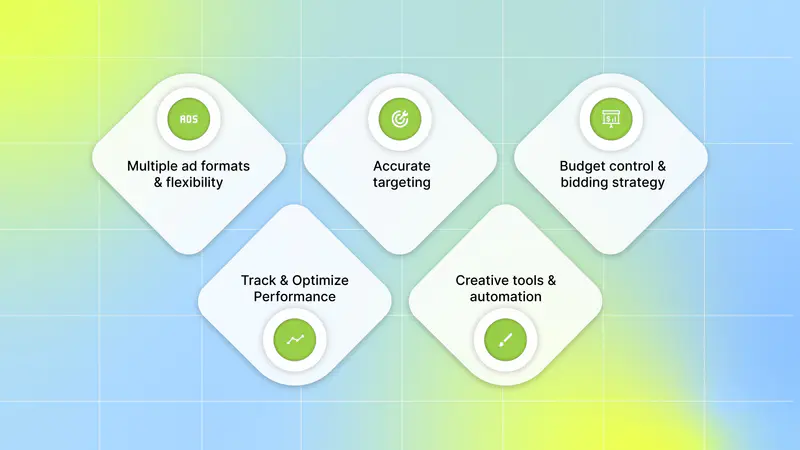
If you care about efficient user acquisition, conversions, and smart ad spend, Ads Manager offers advantages that matter right now:
Multiple ad formats and flexibility: You can run in-feed videos, full-screen ads, carousel/image ads, or even boost existing organic posts from creators (so-called “Spark Ads”).
Accurate targeting: Ads Manager lets you define who sees the ads by age, gender, location, interests, device type, and behavior. You can also use custom or lookalike audiences to reach users similar to your existing customers.
Budget control and bidding strategy: You can choose daily or lifetime budgets. Bidding types include cost-per-click (CPC), cost-per-thousand impressions (CPM), cost-per-view (CPV), or optimized CPC. This gives you options depending on whether you want more reach, installs, conversions, or views.
Performance tracking and optimization: With a built-in analytics dashboard, you can monitor clicks, impressions, conversions, cost per install (or cost per acquisition), and more. This helps you test different creatives, targeting, or bidding, and learn what works best.
Creative tools and automation: As of 2025, TikTok added AI-driven creative tools to generate or edit video ads and repurpose existing content across different formats. That can speed up production and reduce effort while maintaining high quality.
If you want to grow your mobile app, increase installs, conversions, or engagement, Ads Manager helps you build targeted, trackable, scalable campaigns. Once the benefits are clear, the next question is how to get everything up and running so you can start experimenting with real campaigns.
Also Read: TikTok Creative Center: A Practical Guide for Advertisers
How to Create a TikTok Ads Manager Account
If you're ready to start using Ads Manager for your campaigns, here’s how to set it up step-by-step (desktop recommended):
Go to TikTok’s official Ads Manager signup page and register for an advertizer account. Provide your business name, website (or app details), billing country, and any other relevant business information.
Once registered, set up a payment method in account settings to fund your campaigns.
If you're promoting a website or app conversion, install the tracking tool (TikTok Pixel or Events API) to track user actions such as installs, purchases, or signups. That data helps you optimize campaigns.
To launch your first campaign, click “Create Ad” in the dashboard, select your campaign objective (e.g., app install, website visit, conversions, or awareness), then define your target audience, budget, and schedule.
Upload your creative, whether images, videos, or content made with TikTok’s creative tools. Select the ad format (single video, carousel, etc.), add a clear call to action (e.g., “Install Now” or “Learn More”), and submit. TikTok will review your ad, and once it is approved, your campaign will begin.
After setting up, regularly check your real-time analytics. Test multiple creatives, tweak targeting or budget as needed, and optimize based on performance. Once the account setup is complete, understanding how TikTok’s delivery system determines which ads perform best can inform your decisions during setup.
How TikTok’s Algorithm Influences Campaign Performance
Behind the scenes, TikTok’s own recommendation system plays a big role in which ads succeed. Understanding how it works helps you design smarter campaigns:
Native feed + user behavior = high chance of engagement: The system pushes ads that blend into the feed, so material that feels like everyday TikTok posts often earns stronger reactions. A quick hook with relatable scenes and timely audio or captions helps keep viewers engaged.
Conversion-focused delivery optimizes toward real results: Choosing a conversion goal prompts the system to reach users most inclined to complete that action based on their history and live signals. With tracking active through pixel or API, the system learns which placements and creatives drive meaningful actions, guiding spend toward stronger outcomes.
Using real content through Spark Ads increases authenticity and engagement: Organic or creator-led clips used as ads retain likes, comments, and shares, signaling strong activity to both users and the system. Ads that behave like standard TikTok posts tend to feel more trustworthy and spark faster responses.
Algorithm favors freshness and frequent testing: Interests shift often, so a steady flow of creative variations, new hooks, different lengths, updated captions keeps you aligned with what people react to now. When creative aligns with natural TikTok behavior through honest visuals and a clear value cue, the system can more effectively push the ad to the right audience.
If you align your ads with how real users engage on TikTok, using honest visuals, a native feel, and clear value, the algorithm helps you reach the right audience at scale. Understanding how the system distributes ads gives you insight into what kind of creative tends to stand out, which directly informs how to develop stronger concepts.
Building Stronger Campaigns With Better Creative Decisions

When you build ads, creative choices matter as much as targeting or budget. Here’s a practical way to use what you know and build campaigns that perform:
Use Spark Ads or boost existing content when possible: If an organic post already resonates, promoting it keeps the existing interaction history and often reduces acquisition costs. This format typically feels more like a standard post, which encourages smoother engagement.
Use automated tools to multiply creative variants: AI-based editors and built-in templates help produce many creative versions quickly, shifting intros, overlays, or lengths. This gives you a wider pool of options to find the version that attracts stronger responses without heavy manual work, helping expand reach with less effort.
Feed good data into conversion tracking so optimization works: Set tracking to send key events such as installs or signups so the system can tune delivery toward meaningful outcomes rather than surface-level metrics. Pair this with structured A/B tests around creative and targeting, then grow the pieces that show real improvement.
Set clear testing rules and avoid ad fatigue: Adjust one element at a time, gather enough data, and shut off weak performers. This builds a repeatable approach for future campaigns. Rotate creatives often so your ads stay fresh and continue to hold attention.
By mixing steady creative testing with accurate tracking and native-feeling visuals, you build campaigns that stay strong over time and adjust smoothly as your goals change. Once your creative approach is in place, supporting tools can make the process smoother by providing better insight, structure, and feedback.
Also Read: Tracking TikTok Ads Benchmarks: What’s a Good CTR?
Helpful Tools That Pair Well With TikTok Ads Manager
Below are three categories of tools that make the Ads Manager setup more powerful. Each item explains how you can use it with TikTok Ads Manager and why it matters for campaigns that scale.
Creative Analytics Platforms
Use these when you want objective, creative feedback and a clear score or tag system for assets before or after launch:
1. Segwise.ai

Segwise is an AI-first creative analytics platform that uses multimodal AI to tag every creative element and map those tags to real ad outcomes, providing a high-resolution view of what in your ads actually drives installs and value.
Key features:
Automated element-level tagging (hook scenes, first dialogues, headlines, characters, influencer traits, CTA text, CTA dialogue, audio cues) so you can see which pieces of an ad correlate with ROAS, IPM, CTR, and CPA.
Active creative fatigue tracking and alerting so you spot drop-offs early and refresh before performance falls too far.
Cross-network competitor and trend signals that surface what’s working across platforms.
No-code connectors and a quick TikTok account flow, so creative + performance data join in one place.
How it works with TikTok Ads Manager:
You grant Segwise read access to selected TikTok ad accounts; Segwise pulls campaign and creative-level data, tags every element, and shows which elements drive installs or value. It flags fatigued creatives and ranks variants by their likely business impact. Use its top-ranked elements to choose what to test or scale inside TikTok Ads Manager, so your budget goes to ideas that actually move the needle.
2. VidMob

VidMob is a creative data platform that scores ads and links creative quality to likely performance.
Key features:
Creative scoring and quality checks to compare assets before you spend.
Predictive signals that help estimate which creatives will perform.
How it works with TikTok Ads Manager:
You upload or point VidMob to your creative assets, use its scores to pick the best candidates, then run those candidates inside TikTok Ads Manager’s automated tests. The goal is to reduce early waste and scale variants that match platform patterns.
MMP's for Attribution
These partners measure installs and events and send reliable conversion data back so you can optimize with clear cost and value signals.
1. AppsFlyer

AppsFlyer is a widely used attribution partner with published guides for connecting TikTok’s SAN and advanced SRN flows.
Key features:
Partner guides and SRN/SAN integration support to help set up TikTok connections.
How it works with TikTok Ads Manager:
Use AppsFlyer to centralize installs and post-install events, enable the TikTok SAN/SRN integration, and confirm cost postbacks so ROAS in your reports lines up with spend in Ads Manager.
2. Adjust

Adjust provides official TikTok SAN support, link tokens, and reporting flows for reliable campaign attribution.
Key features:
TikTok SAN setup steps, link tokens, and SAN vs non-SAN reporting guidance.
How it works with TikTok Ads Manager:
Follow Adjust’s TikTok for Business (SAN) setup, paste the Adjust link token in TikTok Events Manager, and enable data sharing. Adjust the attributes, install, and return events to a format compatible with Ads Manager optimization.
TikTok moved many app integrations to a SAN/SRN model; top MMPs now publish step-by-step SAN guides and link-token flows. Confirm your MMP is configured for the SAN connection and has cost postbacks enabled so your ROAS and cost metrics align.
Collaboration and Workflow Tools
These keep your team aligned from brief to final cut and make review and approval faster and less error-prone:
1. Figma
Figma is the central design tool for templates, frames, and now richer AI editing and design-to-code connectivity.
Key features:
Shared design files, templates, and new AI features to speed edits and create variations.
How it works with TikTok Ads Manager:
Keep your creative frames and templates in Figma, export platform-sized frames or hand them into a creative automation tool, then run the resulting variants in TikTok Ads Manager tests. This shortens handoffs and keeps creatives aligned with format best practices.
2. Frame.io
Frame.io centralizes video files and high-precision feedback, so reviewers can comment on exact frames.
Key features:
Time-stamped comments, collections, high-fidelity previews, and tight editor integrations.
How it works with TikTok Ads Manager:
Use Frame.io to collect frame-accurate feedback and lock final cuts. Export approved edits directly to your creative analytics tool or upload them to TikTok Ads Manager for testing, reducing rework, and shortening the launch window.
If you are trying to grow installs and scale spend without wasting budget on bad creative or unclear measurement, TikTok Ads Manager, plus the tools above, lets you iterate faster and judge results with clearer data. You get trend signals, automated creative testing, and central measurement so you can pick winners and move budget with confidence.
Also Read: How to Combat Creative Fatigue with AI Solutions
Conclusion
TikTok Ads Manager gives you the control to run experiments, measure outcomes, and scale ideas that move business metrics with precise audience targeting, campaign-level reporting, and built-in AI creative helpers for faster asset production. Pairing that platform control with methodical creative analysis turns noisy signals into clear actions, so you spend on winners and shorten the path from test to repeatable growth.
Segwise tightens the bridge between creative insight and action inside TikTok Ads Manager: its multimodal AI maps element-level tags to outcomes, surface frame-by-frame attention drops, and uses context-aware agents to propose TikTok-ready variant recipes ranked by likely impact.
You can add custom tags and brand nomenclature so alerts, fatigue thresholds, and prioritization align with your team’s workflows, helping you select and launch the handful of experiments most likely to improve IPM, CTR, or ROAS.
Segwise identifies high-performing creative elements from your TikTok campaigns and generates data-backed variations, turning top-ranked insights into ready-to-test versions in Ads Manager, rather than relying on guesswork.
Use Segwise.ai to close the gap between what your creatives show and what your campaigns earn. Start a Free Trial to connect a TikTok Ads account, tag your creatives, and surface the elements that drive installs and value.
FAQ's
1. What tracking options does TikTok Ads Manager offer, and why do they matter?
TikTok Ads Manager uses the TikTok Pixel and the Events API to track installs, signups, and purchases, enabling campaigns to optimize for real outcomes.
2. What are Spark Ads, and how do they help performance?
Spark Ads let you promote real organic or creator posts (keeping likes/comments), preserving social proof, and typically increasing engagement and trust.
3. Can TikTok Ads Manager help me test creatives faster?
Yes, built-in AI creative features can automatically generate and reformat video variants, allowing you to test hooks, lengths, and scenes with less manual editing.
4. How does TikTok handle attribution and cross-platform cost matching?
TikTok supports SAN/SRN flows with major MMPs (such as AppsFlyer and Adjust), ensuring installs, events, and cost postbacks align between TikTok and your attribution platform.
5. What ad types, budgeting, and setup steps should I know first?
In Ads Manager, you can run in-feed videos, full-screen videos, carousels, or Spark Ads; set daily/lifetime budgets and bidding types; and, during account setup, connect the Pixel/Events API to start measuring conversions.