
Updated August 2026. Meta product and attribution facts re-verified 31 August 2026.
Meta Ads Library vs Segwise: The Short Answer
The Meta Ad Library is free and public and shows you a competitor’s ad creative, ad copy, CTA and run dates. It carries no performance data. Segwise Competitor Tracking pulls those same Meta ads, tags every creative element with multimodal AI and sets the result against your own performance data.
One caveat stated plainly up front: Segwise competitor tracking is currently Meta only, with more platforms in development. Segwise’s own-account creative analytics covers 15+ ad networks and MMPs, but the competitor feed is Facebook and Instagram today.
If you're running paid campaigns at scale, you've probably spent time scrolling through Meta Ads Library looking for creative inspiration or tracking what your competitors are doing. It's free, it's accessible, and it shows you almost every active ad on Facebook and Instagram.
But here's what it doesn't tell you: which creative elements actually drive performance.
That gap between creative visibility and performance intelligence is exactly where most UA managers and performance marketers get stuck. You can see your competitors' ads, but you can't see why they're running them or whether those creatives are actually working.
This breakdown compares Meta Ads Library with Segwise Competitor Tracking, two different approaches to the same problem. One gives you just transparency; the other, actionable intelligence.
Key Highlights
The Meta Ad Library is free, public and needs no login. It shows competitor ad creative, copy, CTA, run dates and platforms, but no performance data whatsoever for commercial ads. That is the honest gap Segwise Competitor Tracking fills.
Segwise competitor tracking is currently Meta only (Facebook and Instagram), with more platforms in development. Your own creative analytics in Segwise spans 15+ ad networks and all four MMPs.
Segwise tags competitor creatives, revealing which elements and strategies are trending in your market.
Automated competitor tracking across Meta saves time over manual browsing, and the creative patterns it surfaces are applicable to campaigns you run on every network.
Segwise combines competitor data with your own campaign performance for deeper cross-platform analysis.
Alerts for new competitor creative launches help you quickly spot and react to emerging trends.
Understanding the Meta Ads Library
Meta Ads Library is Meta's public database of ads running across Facebook, Instagram, Messenger, and Audience Network. It was built primarily for ad transparency, letting anyone see what advertisers are running, who's paying for it, and when it launched.
For digital advertising, it's become the default place to check out competitor creatives. If you want to know what creative approach a competitor is testing this week, you search their brand name and scroll through their active campaigns.
Key Features of Meta Ads Library
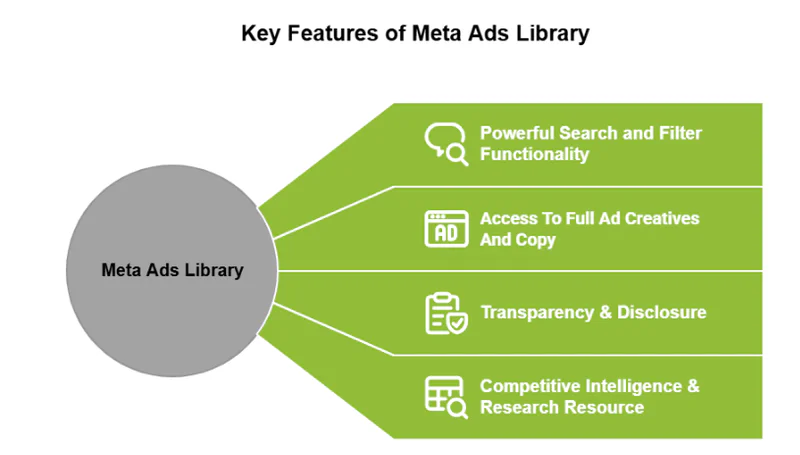
The tool is straightforward. You search by advertiser name or keyword, filter by platform (Facebook ads, Instagram ads), country, or ad type, and you get a list of active creatives.
Each listing shows you the creative asset itself, ad copy, CTA, when it started running, and which platforms it's live on. For political ads, there's additional disclosure information, such as spend ranges and impressions.
You can't filter by performance metrics, creative elements, or trends over time. It's basically a searchable archive, good for ad transparency, not built for strategic analysis.
It is worth being exact about the one place the Ad Library does show numbers, because it is routinely overstated. Spend ranges and impression ranges appear only for political, electoral and social-issue ads, where regulation requires the disclosure. For ordinary commercial advertising, which is what almost every competitor you care about is running, there is no spend, no impressions, no CTR, no conversion data and no indication of whether an ad is working. A competitor’s ad being live tells you they have not turned it off yet. That is genuinely useful signal, and it is the outer limit of what the Ad Library gives you.
Benefits of Using Meta Ads Library for Advertisers
Meta Ads Library works well for quick competitor checks. If you're launching a new campaign and want to see how others in your space are positioning their offers, it's a fast way to gather creative references.
It's also helpful for lead generation research. You can see what hooks and angles competitors are using in their Facebook ads lead generation campaigns, which gives you a starting point for your own messaging.
And because it's free and requires no login, anyone on your team can access it, from media buyers to creative strategists.
But the limitations become obvious when you're managing paid ads at scale. You're stuck manually browsing, screenshotting, and trying to remember what changed from last week. There's no tagging, no performance data, and no way to systematically track creative trends.
What Meta Itself Now Reports Below the Ad Level (2026 Update)
A correction to a claim this post used to lean on, and which is still repeated across a lot of marketing content: it is no longer true that Meta shows you nothing below the ad level.
On 11 July 2025 Meta shipped Creative Breakdown in Ads Manager. It reports asset-level metrics for each individual image or video inside a flexible-format or Advantage+ Creative ad: delivery status, reach, impressions, cost per result, amount spent, engagement rate and link CTR. Before it existed you genuinely could not get performance data on those creative enhancements at all. If you have not looked since 2025, look again, because it closes a real gap.
What it still does not do is the part that decides creative strategy:
Asset-level, not element-level. You learn that video B beat video A. You do not learn that the difference was the first three seconds, the voiceover style, the on-screen CTA or the character in the hook. You cannot connect a granular creative element to a bottom-of-funnel KPI like ROAS or LTV.
Table view only. Bar and trend charts are disabled for Creative Breakdown, so you cannot see an asset’s trajectory over time at a glance.
It does not work on Dynamic Creative ads, which is exactly where many teams do their highest-volume creative testing. Dynamic Creative has its own separate, older element breakdown.
Informational, not prescriptive. Meta explicitly advises against using Creative Breakdown to manually pause underperforming assets, because aggregate metrics cannot override real-time algorithmic delivery. It tells you what happened; it does not tell you what to do.
Meta only. There is no cross-network view. You cannot compare the same creative concept as it ran on Meta, TikTok, Google and your app networks.
It cannot read playables. Interactive and playable creative, a large share of mobile game UA spend, is a blind spot.
And it applies only to your ads. None of it is available for a competitor. The Ad Library and Creative Breakdown never meet.
Three Meta changes that break your 2025 benchmarks
If you are comparing creative performance year over year, three things moved and they matter more than most teams have registered:
Attribution changed on 3 March 2026. Click-through attribution now counts link clicks only, with other interactions reclassified as engage-through, and the video-view threshold dropped from 10 seconds to 5 seconds. The practical consequence: any CTR or ROAS benchmark you pulled from Ads Manager in 2025 is not comparable to what you are reading now. Rebaseline before you conclude a creative has declined.
Advantage+ Shopping is now Advantage+ Sales (renamed January 2026), and the Advantage+ framework was extended across sales, app installs and lead gen. Legacy ASC and AAC campaigns can no longer be created via the Marketing API, so any internal tooling or agency script still calling for them needs updating.
Andromeda, Meta’s ads-retrieval engine, expanded across all campaign types in 2026, which means creative quality — copy specificity, visual intent — now functions as a targeting variable rather than just a conversion-rate variable. Creative decisions move delivery, not only performance.
For scale context: Meta reported Family Daily Active People of 3.60 billion on average for June 2026, with advertising revenue of $59.363B in Q2 2026, up 27% year over year. Older posts quoting 3.3–3.4 billion are out of date.
Exploring Segwise Competitor Tracking
Segwise approaches competitor tracking from a different angle: instead of just showing you what's live, it tells you what creative variables your competitors are betting on.
The Competitor Tracking Agent pulls competitor creatives from Meta, applies the same multimodal AI that tags your own ads — character type, background setting, first dialogue, hook style, CTA text, visual style, audio tone — and gives you tag count analysis, trend tracking and gap analysis against your own creative library.
Scope, stated plainly: Segwise competitor tracking currently covers Meta only (Facebook and Instagram). More platforms are in development. What is not limited to Meta is everything Segwise does with your own data: creative analytics across 15+ ad networks and MMPs, including Google, TikTok, Snapchat, YouTube, Axon (AppLovin), Unity Ads and Mintegral, plus AppsFlyer, Adjust, Branch and Singular.
Competitor tracking is one of four agents in the platform. The Creative Tagging Agent handles multimodal tagging of video, audio, image and text, including playable ads, which Segwise is the only platform to tag. The Creative Strategy Agent (AI Chat) is an always-on creative strategist you can ask anything, in plain language, about your creative performance, your tags, your custom metrics and your competitor tracking data, and it will answer or build the report for you. The Creative Generation Agent then produces net-new statics, video including AI UGC-style ads, playables and scene-by-scene storyboards, grounded in the winning patterns the other agents found. That last step is the one the Ad Library cannot participate in at all: you can act on a competitive gap the same day you spot it.
It's built for performance marketers who need to move faster and efficiently than "let me manually browse the ads library again this week."
Core Features of Segwise Competitor Tracking

Competitor Creative Tracking
Tag and monitor all competitor creatives across Meta in one centralized platform.
Identify which creative variables competitors prioritize and invest in.
Creative Gap Analysis
Generate tag count reports to see which creative elements competitors use most frequently.
Compare competitor trends against your own strategy to uncover missing creative elements.
Identify high-priority or frequently tested approaches competitors use that you haven’t yet tested, based on their investment and run-time.
Creative Trend Monitoring
Track new creative experiments and emerging hooks from competitors.
Analyze trending creative angles and evaluate potential applications for your own campaigns.
Understand what’s currently performing well within your industry vertical.
Competitive Creative Intelligence
Integrate competitor insights with your own creative tagging data.
Use these insights to guide future creative testing and iteration cycles.
Build a stronger creative strategy informed by real competitor performance trends.
Advantages of Segwise for Digital Marketers
The main advantage is systematic creative intelligence. Instead of browsing Meta ads manually and taking notes, you're working with structured data that tells you exactly which creative variables are showing up most in competitor campaigns.
That makes it easier to spot emerging trends before they saturate your market. If three competitors start testing a new ad concept within the same two-week window, you know something's working or at least worth testing yourself.
Segwise also connects this competitor analysis back to your own creative tagging. If you see a competitor going heavy on a specific creative variable that's already performing well in your campaigns, you can double down. If they're testing something you haven't tried, you can fast-track it into your creative pipeline.
For paid online marketing teams running hundreds of creative iterations per month, this removes a lot of guesswork from the creative strategy process. To be precise about the mechanism: the competitor feed is Meta, but the creative intelligence it feeds into is cross-network. You spot an angle a rival is investing in on Meta, check it against your own tag-to-metric data across every network you buy on, and decide whether to test it on Meta, TikTok, Axon or all three.
Where the Meta Ad Library Genuinely Wins
This is not a fair fight in one direction, and pretending otherwise would be silly. There are things the Ad Library does that Segwise does not and will not:
It is free, and it is free forever. No contract, no trial clock, no procurement. That is not a small thing when you want a second opinion at 11pm before a campaign goes live.
No login, no account, no ad spend required. Anyone on the team, or outside it, can open it. A brand-new brand with zero spend history has the same access as a Fortune 500 advertiser.
Complete coverage of active Meta ads. It is Meta’s own transparency database, so it is authoritative on what is actually running. No third-party tool has a more complete view of live Meta ads than Meta.
Regulatory disclosure that no commercial tool replicates. Political, electoral and social-issue ads carry funding-entity, spend-range and impression-range data. For compliance work, journalism or public-interest research, the Ad Library is the source and there is no substitute.
It is the right tool for a one-off look. Checking five competitors before a brainstorm does not justify a platform. Just open the Ad Library.
The line is volume and repeatability. Manual browsing works fine until it is a weekly job across dozens of competitors, at which point you are paying for it in analyst hours instead of software.
What Each One Costs
Meta Ad Library: free, public, no account needed.
Segwise: quoted per account rather than sold from a public price list, with a 7-day free trial and no credit card required. The trial automatically backfills up to two weeks of historical data so you can check tag accuracy against creatives you already know the results of; paid accounts backfill up to three months. No-code setup takes about five minutes per source.
Meta Ads Library vs Segwise Competitor Tracking: Feature Comparison
Here's how they stack up:
The core difference: Meta Ads Library gives you visibility. Segwise gives you visibility plus strategic context.
Practical Use Cases for Each Tool
When to use Meta Ads Library:
You're launching a new product and want to see how 5-10 competitors are positioning similar offers in their Facebook ads and Instagram ads. You need creative references fast and don't need performance tracking.
Or you're doing ad transparency research: checking compliance, seeing political ad spend, or verifying that a competitor's claims match what they're actually advertising.
When to use Segwise Competitor Tracking:
You're a UA manager at a mobile game and your competitors are launching 50+ new creatives every week. You need to know which creative hooks are trending in your vertical without manually checking the ads library every day.
Or you're running a DTC brand with aggressive paid ads spend across Meta, Google, and programmatic. You use Segwise to analyze competitor strategies on Meta, then apply those data-backed insights to inform your creative sprints across all platforms.
Or you're an agency managing multiple clients in the same space. You need a scalable way to monitor competitor creative strategies across accounts and deliver those insights in client reports without spending hours screenshotting ads.
Segwise also helps with cross-platform digital advertising workflows, where you're running campaigns beyond just Meta, by connecting creative insights across your own 15+ ad networks and MMPs.
The Meta ads pros and cons come down to accessibility versus depth. Segwise centres on whether you need strategic creative intelligence or just basic ad transparency.
Conclusion: Which Tool Should You Choose?
If you're doing occasional competitor research or need to reference a few creatives before a campaign brainstorm, the Meta Ads Library is fine. It's free, fast, and gives you the visibility you need for ad transparency checks.
But if you're managing paid ads at scale, like running 30+ creatives per month, testing across multiple platforms, or operating in competitive verticals where creative trends shift weekly, manual browsing doesn't cut it.
That's where Segwise Competitor Tracking makes a difference. You're getting automated creative tagging, cross-platform creative intelligence, and tag-based analysis that shows exactly which creative variables your competitors are prioritizing. More importantly, you're connecting that competitor intel to your own performance data so you can make faster, better-informed creative decisions.
For performance marketing teams at mobile games, subscription apps, DTC brands, or agencies managing multiple accounts, Segwise turns competitor tracking from a manual research task into a systematic competitive advantage.
Ready to move beyond basic ad library browsing? Segwise unifies your creative data from 15+ ad networks and MMPs, tags every creative element, maps those tags to actual performance metrics, and generates the next round of creative from what wins.Start tracking what really matters.
Frequently Asked Questions
Does the Meta Ad Library show how well a competitor’s ads are performing?
No. For commercial ads it shows the creative, the copy, the CTA, the run dates and the platforms, and nothing about spend, impressions, CTR or conversions. Spend and impression ranges appear only on political, electoral and social-issue ads, where disclosure is a regulatory requirement. The longest-running ad in a competitor’s account is a reasonable guess at their best performer, but it is a guess.
Is it true that Meta gives you no data below the ad level?
Not any more. Meta launched Creative Breakdown on 11 July 2025, which reports asset-level metrics for each image or video inside a flexible-format or Advantage+ Creative ad. The accurate 2026 criticism is narrower: it is asset-level rather than element-level, table view only, does not work on Dynamic Creative, is explicitly informational rather than prescriptive, has no cross-network view, cannot read playables, and covers only your own ads.
Which platforms does Segwise competitor tracking cover?
Meta only today, meaning Facebook and Instagram, with more platforms in development. Segwise’s analytics on your own creative data covers 15+ ad networks and MMPs.
Why are my 2026 CTR and ROAS numbers not matching last year’s?
Very likely the 3 March 2026 attribution change. Click-through attribution now counts link clicks only, with other interactions reclassified as engage-through, and the video-view threshold moved from 10 seconds to 5 seconds. Benchmarks carried over from 2025 Ads Manager data are not comparable and should be rebaselined before you read a decline into them.
Is Advantage+ Shopping still called that?
No. It was renamed Advantage+ Sales in January 2026 and the Advantage+ framework now extends across sales, app installs and lead gen. Legacy ASC and AAC campaigns can no longer be created through the Marketing API, which matters if you have internal tooling still referencing them.
Is the Meta Ad Library free?
Yes, entirely. It is public, requires no login and no ad spend, and it is Meta’s own transparency database, so nothing has a more complete view of live Meta ads. For occasional competitor checks it is the right tool and you should use it.
When is a competitor tracking platform actually worth paying for?
When the work becomes repeatable. Checking a handful of rivals before a brainstorm does not justify software. Monitoring dozens of competitors weekly, spotting which creative variables they are concentrating spend behind, and joining that to your own tag-to-metric data across every network you buy on is the point at which manual browsing costs more in analyst time than the tool does.
Can Segwise turn a competitive insight into an actual ad?
Yes. The Creative Generation Agent produces net-new statics, video ads including AI UGC-style video, playables and scene-by-scene storyboards built on the winning patterns identified across your data and your competitors’. Generated creatives are auto-tagged and tracked once live, so their results feed straight back into the same intelligence layer.
How We Compared These Tools
Meta product, attribution and scale facts in this post were re-verified on 31 August 2026: Creative Breakdown and its documented limitations from Meta Ads Manager coverage dated 11 July 2025; the 3 March 2026 attribution change, the January 2026 Advantage+ Sales rename and the Andromeda rollout from 2026 Meta platform-update reporting; and Family Daily Active People of 3.60 billion (June 2026 average) plus Q2 2026 advertising revenue of $59.363B from Meta’s own Q2 2026 results, published 29 July 2026. Ad Library behaviour was checked directly. Where a number is not published — competitor spend on commercial ads, for instance — this post says so rather than estimating it.
Written by the Segwise team, who build creative intelligence for mobile game studios, DTC brands, subscription apps and performance agencies across Meta, TikTok, Google, Axon and the major MMPs. We have tried to be straight about what the free tool does better than ours.