
The best GetCrux alternatives in 2026 are Segwise for tag-level creative analytics across every network and MMP, Motion for DTC teams that want an always-on AI creative analyst, and Foreplay for creative reporting that isn’t priced on ad spend. Seven more (Vidmob, CreativeX, Smartly, Pencil, Atria, Hawky and Adnova) are compared below with current pricing.
TL;DR: Key Takeaways
GetCrux is not analytics-only any more. It runs three AI agents, Creative Analyzer, Audience Analyzer and Creative Generator, and the generator auto-publishes to Meta, Google and TikTok. If a roundup tells you GetCrux only analyses, it’s out of date.
But pre-launch testing and MMP data are gated. Creative generation is on every GetCrux plan, including Starter. Pre-flight testing and MMP integrations start at the Professional tier, which is custom-priced.
GetCrux pricing (Oct 2026):Starter $1,500/month for up to $100K monthly ad spend; Professional and Enterprise custom. No free plan.
Funding is a $2.6M seed. GetCrux announced the round in February 2024, with Y Combinator taking part.
Pick by the decision you need to make. Tag-level diagnosis across networks and MMPs → Segwise. Always-on AI analyst on DTC data → Motion. Cheap research and reporting → Foreplay or Adnova. Enterprise brand-quality governance → CreativeX or Vidmob. Media automation at scale → Smartly.
GetCrux Alternatives at a Glance (2026)
Tool | Best for | Key feature | Pricing (Aug 2026) |
|---|---|---|---|
GetCrux (baseline) | Teams wanting analysis, generation and auto-publish in one loop | Three agents plus auto-publish to Meta/Google/TikTok | Starter $1,500/mo (up to $100K/mo ad spend); Professional & Enterprise custom; no free plan |
Segwise | Mobile app, gaming and DTC teams that need tag-level creative intelligence and generation from it | Multimodal tagging including playable ads, mapped to ROAS/IPM across 15+ networks and all five MMPs | 7-day free trial; from $499/mo |
Motion | DTC and consumer-app teams spending $50k+/mo | A dedicated always-on “Runneth AI brain” that pre-watches your creatives; Slack-native briefs | $750/mo Starter · $1,200/mo Pro · Growth custom |
Foreplay | Creative strategists and agencies who refuse ad-spend-based pricing | Swipe file + Spyder competitor scraping + Lens analytics, plus a public API (June 2026) | $59/mo Basic ($49 annual) to $459/mo Agency ($389 annual); Enterprise custom |
Vidmob | Global enterprise brands standardising creative measurement across markets | Vidmob360: creative intelligence delivered as MCP services and APIs into Claude/Gemini/ChatGPT | Not publicly listed: enterprise contract |
CreativeX | Global CPG/pharma brand teams auditing creative quality and compliance | Creative Quality Score plus Datalink interoperability framework (3 Dec 2025) | Not publicly listed: enterprise annual contract |
Smartly | High-spend paid social and CTV advertisers | Smartly Synapse AI orchestration layer (22 June 2026) across Creative, Media and Intelligence suites | Not publicly listed: percentage of managed media spend plus a monthly minimum |
Pencil | The cheapest self-serve AI ad generation, and separately, global enterprise brands | Generates complete ads with brand guidelines applied automatically | $14/mo Core (50 generations) · $55/mo Growth (250) · Pro custom. Owned by The Brandtech Group. |
Atria | Deciding what to make from data before generating anything | Raya AI creative-strategist agent + 25M+ ad library + review mining | $129 / $479 / $959 per month billed annually; Enterprise custom |
Hawky | Teams that want an agent to actually run spend against a KPI | Performance Agent + Creative Agent sharing a “FeatherDB” memory layer | Not publicly listed: per brand, subscription minimum plus KPI-tied upside |
Adnova | Meta-first ecommerce teams wanting research, tracking and bulk launching cheaply | Creative Analytics 2.0 across 14 dimensions + 75M-ad library + bulk ad launcher | Free tier; $119 to $399/mo billed annually ($150 to $499 month-to-month) |
If you are actively looking for GetCrux Alternatives, it usually means one thing: you already believe creative drives results, but the tool you use today is slowing decisions down. You may see patterns, tags, or reports, yet still struggle to act fast enough before performance drops.
The market already includes tools that score ads before launch, generate many variations from templates, or link creative signals to live campaigns, but each tool combines these features uniquely to meet different needs.
You need options that let you cut setup time, get clear, action-ready signals, and keep top creative running without constant manual fixes. Effective tools reduce the time needed for testing and enable you to allocate your budget more efficiently to successful campaigns.
In this blog, we'll walk through the strongest GetCrux Alternatives for 2026, explain how each one differs in workflow focus, and help you decide which option fits your current testing and scaling needs.
What is GetCrux?
GetCrux is a creative analytics platform that uses AI to scan video and image ads, identify visible elements such as text, visuals, pacing, and themes, and link those elements to performance outcomes. Its main role is to help you understand which creative attributes correlate with results across your ads.
As of 2026 that positioning has hardened into three named AI agents, and it is worth being current about them because a lot of older roundups still describe GetCrux as analytics-only:
AI Creative Analyzer: breaks ads into elements, finds patterns in winners, and writes brand-aligned creative briefs and scripts.
AI Audience Analyzer: mines comments, reviews and competitor ads for objections and untapped creative angles.
AI Creative Generator: generates creatives from scratch, runs brand-compliance checks, and auto-publishes straight to Meta, Google and TikTok. Pre-screening creative before spend sits here too.
Its connector set is genuinely broad and unusually mobile-aware: Meta, Google, TikTok, YouTube, LinkedIn, X, Pinterest, Snapchat, Reddit, AppLovin, Moloco, The Trade Desk, Criteo and DV360, plus BI (Power BI, Tableau), warehouses (Snowflake, Databricks) and, from its Professional plan, attribution and MMP sources (AppsFlyer, Adjust and Singular, plus Northbeam and Triple Whale). Copilot, its natural-language Q&A layer, is on every paid tier; Custom Workflows are Enterprise-only.
GetCrux Pricing in 2026: And the Detail That Catches People Out
GetCrux publishes its entry pricing, which is more than most of this category manages. The tiers are keyed to monthly ad spend:
Starter:$1,500/month for up to $100K in monthly ad spend and up to 2 ad accounts.
Professional: custom, contact sales, for $100K to $1M in monthly ad spend.
Enterprise: custom, contact sales, for over $1M in monthly ad spend.
Two details matter more than the headline number. First, MMP integrations and pre-flight testing start at Professional, which is the custom-priced tier, so the Starter plan whose price you can read has no MMP data. Creative generation is included from Starter (1,000 credits). Second, Starter only covers up to 2 ad accounts and $100K a month in ad spend. There is no free plan, and no free trial is listed; every plan starts with a demo call.
For context on company stage: GetCrux announced a $2.6M seed round in February 2024, with Y Combinator taking part.
That foundation is useful, but it does not automatically make it the best fit for every workflow or growth stage.
Why You Might Look for Getcrux Alternatives
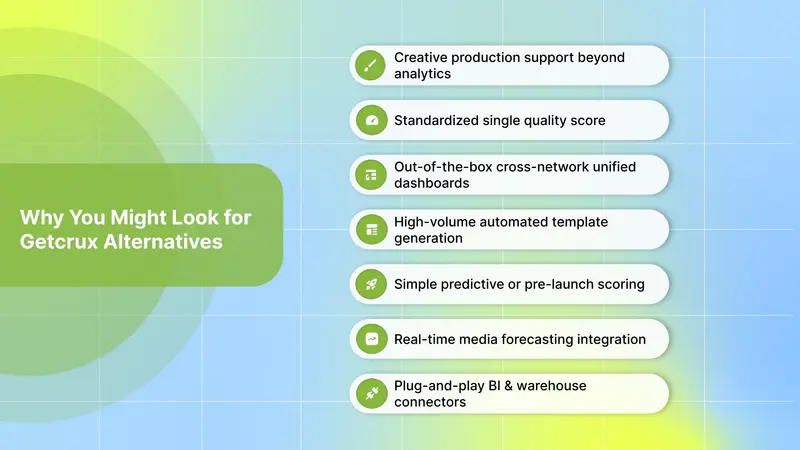
If you are researching GetCrux alternatives, the intent is usually not that GetCrux “does nothing,” but that it does some things well while leaving specific gaps. The reasons below focus only on those gaps where other platforms tend to go deeper or operate differently:
Creative production support beyond analytics: GetCrux focuses on tagging, pattern detection, and generating creative variations from insights. Public descriptions do not position it primarily as a managed creative production partner with editorial teams or studios. Some competing tools emphasize built-in creative production services to help execute campaigns end-to-end.
Standardized single quality score: GetCrux breaks down creative elements and links them to performance, but it does not foreground a single, standardized “creative quality score” that many teams use to check readiness or compare assets at a glance. Competitors highlight scores or benchmarks to simplify cross-team decisions.
High-volume automated template generation: GetCrux does generate creatives and auto-publish them, and generation is included from its Starter plan, so that is not a gap. Creative automation tools that focus on templates and bulk personalization at scale are positioned differently. In those offerings, automated template systems are core to producing thousands of personalized assets quickly, which some teams require beyond insight-to-variation workflows.
Real-time media forecasting integration: GetCrux’s core value is creative intelligence, not live media planning or forecasting. Tools that tightly combine creative insights with real-time spend forecasting or budget optimization position this as part of their value proposition, which is a different workflow emphasis from purely creative analysis.
Entry price and gated MMP data: GetCrux’s published Starter tier is $1,500/month for up to 2 ad accounts and $100K in monthly ad spend. MMP integrations and pre-flight testing only unlock at the custom-priced Professional tier. If you want a lower entry price, or MMP data in the plan you can see the price of, several alternatives below are structured differently. Foreplay, for instance, explicitly refuses to price on ad spend at all.
These points reflect where other creative analytics and generation tools position themselves in the market compared to what GetCrux publicly emphasizes. There are practical differences in focus and workflows, not value judgments, intended to help you match a tool to what you need right now.
Also Read: 5 Best Creative Automation Tool Picks for 2025
Best GetCrux Alternatives to Consider in 2026
The tools below are among the strongest GetCrux alternatives for 2026, each offering a distinct operational perspective on creative analytics, generation, and execution. Rather than treating them as one-to-one replacements, this comparison highlights how they differ in workflow depth, iteration speed, and control over creative decisions, helping you pinpoint the option that best fits your team, stack, and execution style.
1. Segwise

Segwise is an AI-powered creative analytics platform designed to help you understand exactly which creative elements drive results and to act on those insights quickly. It focuses on tag-level performance analysis, fatigue detection, competitor visibility, and AI-driven creative iteration across 15+ ad networks and MMPs, including Meta, Google, TikTok, Snapchat, YouTube, Axon (AppLovin), Unity Ads, Mintegral and IronSource, plus all five major MMPs: AppsFlyer, Adjust, Branch, Singular and Kochava. Setup is no-code and takes about 5 minutes per source.
What makes Segwise stand out is its direct focus on the operational side of creative decision-making. Instead of stopping at insights, it helps you validate ideas fast, monitor creative fatigue early, and replace underperforming assets using data-backed signals. This makes it especially strong when creative speed and clarity matter more than layered workflows.
In practice, Segwise works well when you need to keep winning creatives live, spot drop-offs early, and launch replacements without heavy setup or long onboarding cycles.
Key Features:
Tag-Level Creative Performance Analytics: Auto-tags creative elements such as hook scenes, first dialogues, headlines, characters, influencer traits, CTA text, CTA dialogue, audio cues, and maps those tags to metrics like ROAS, IPM, CTR, and installs using both ad network and MMP data.
AI-Driven Creative Generation (Creative Generation Agent): Generates net-new, data-backed creatives, static images, video ads including AI UGC-style video, and interactive playables, built around the winning tags its own analytics identified rather than generic AI guesses. It also produces scene-by-scene video storyboards, lets you refine outputs by prompting, and exports in each network’s aspect ratios (1:1, 4:5, 9:16, 16:9). Every generated creative is auto-tagged and tracked once live, so its performance feeds straight back into the intelligence that produced it.
Creative Strategy Agent (AI Chat): An always-on AI creative strategist with full context across your account: creative performance, tags, competitor data, custom metrics, fatigue patterns and asset clusters. Ask “which hook style drove the most installs last month?” or “what’s different about my top 5 creatives versus my bottom 5?” in plain language and get an answer instantly, with no dashboard to build first. It will also generate a daily summary or a stakeholder report on demand and hand back a shareable link, and read an existing report back to you with a recommendation on what to do next.
Playable (Interactive) Ad Tagging: Segwise tags playable ads, which almost nothing else in this comparison does: a hard requirement if a meaningful share of your installs comes from playable inventory on AppLovin or Mintegral.
Creative Fatigue Tracking & Alerts: Detects declining performance with configurable thresholds and issues alerts so you can refresh or replace assets before budget is wasted.
Competitor Creative Tracking: Ingests competitors’ ads on Meta, applies custom tags, and surfaces gaps and trends you can test against.
Cross-Platform Visual Asset Grouping: Recognizes and groups visually similar creatives (including playables and other formats) across networks to provide a consistent view for apples-to-apples comparison.
Best For:
Segwise is a strong fit when your priority is steady, scalable creative wins with minimal manual tagging. It’s purpose-built to reduce the time from insight to a new test and to keep high-performing assets in market.
Why it stands strong against GetCrux:
Features | Segwise | GetCrux |
|---|---|---|
Tag-level performance dashboards tied to MMP + network data | “Tag-Level Performance Optimization” connects creative element tags directly to ROAS, IPM, and CTR using both ad network and MMP data. | Maps tags to KPIs and supports MMPs, framed within a broader insight → generation → execution workflow. |
Low-friction no-code trial for validation | Publicly offers a free trial, no credit card required, and no engineering setup needed. | Publishes a Starter tier at $1,500/mo for up to $100K monthly ad spend, with no free plan or free trial; Professional and Enterprise are custom. Generation is on every plan, but pre-flight testing and MMP integrations only unlock at Professional. |
Fatigue detection with configurable thresholds | It highlights custom fatigue criteria and cross-network monitoring with alerts. | Describes fatigue prediction and refresh suggestions as part of the insight-to-generation loop. |
Playable ads & cross-network clustering called out explicitly | Docs mention tagging for playables and clustering similar assets across networks for unified analytics. | Supports multimodal tagging and clustering, with emphasis on taxonomy control and scale. |
Pricing:
7-day free trial via free trial, with no credit card and no engineering setup. Segwise starts at $499/month for advertisers spending up to $250K/month, with a special 50% discount for startups spending under $50K/month. Historical data is backfilled automatically the moment you connect a source: up to 2 weeks on the trial and up to 3 months on paid plans, so there is something to analyse on day one rather than waiting for fresh data. Connecting every source takes 10 to 15 minutes.
Limitations:
Competitor tracking currently covers Meta (Facebook and Instagram) only, with additional platforms in development. And if you run only a handful of creatives a month, tag-level analytics is heavier machinery than the problem calls for.
2. VidMob

VidMob combines creative analytics with a managed production network. It scores creative assets, diagnoses what to change, and offers production resources to act on those insights. This blend helps you go from “what’s working” to “make a better version” without outside coordination.
The change to know about: on 10 June 2026 Vidmob launched Vidmob360, moving from a standalone SaaS app to a composable intelligence layer delivered through MCP services and APIs: so creative data flows into AI assistants (Claude, Gemini, ChatGPT) and enterprise tooling rather than living only in a Vidmob dashboard. Phase 1 is live; Phase 2 adds more AI agents later in 2026. Its measurement stack runs on 40+ proprietary AI models trained on 18M assets from 300,000+ ad accounts, with 12+ channel connectors covering roughly 95% of North American media buys, and the company reports $200M+ raised to date.
Key features:
Creative scoring & diagnostics: AI scores video and social creatives and highlights actionable fixes.
Managed production and creative services: Access to editors and production partners who can implement changes.
APIs & data exports: Feed creative signals into your analytics stack or dashboards.
Best for:
Best suited if your main need goes beyond analytics and you want built-in creative production support. This works well when execution resources and managed services matter more than rapid, self-serve testing and iteration.
How it compares to GetCrux:
Features | VidMob | GetCrux |
|---|---|---|
Creative Scoring API / system integration | Public documentation describes a Creative Scoring API and workflows that push scores into internal systems (DAM, dashboards). | Provides AI tagging and KPI mapping, but does not publish a Creative Scoring API for programmatic scoring into client systems in the same documented way. |
In-flight scoring and interpretability | Docs explain how active creatives are scored and diagnosed across campaign lifecycles, plus how to interpret those scores to optimize live campaigns. | Offers in-platform insights and predictive scoring, but VidMob documents an API + scoring workflow for integration with enterprise tooling. |
Pricing:
Not publicly listed. There is no pricing page on vidmob.com. This is a demo-only enterprise contract with an undisclosed billing basis: workable if you have a procurement process, a non-starter if you want to test something this week.
Limitations:
No AI creative generation product: Vidmob measures and interprets, it does not produce your next ad, which is the opposite of GetCrux’s direction of travel. It is built for large global brands rather than performance-marketing velocity, and there is no playable-ad support or MMP-grade app attribution.
3. CreativeX

CreativeX centers on measurement and a standardized approach to creative quality. It provides a reproducible Creative Quality Score that links creative clarity and composition to outcomes such as ROAS and brand lift, helping you set a consistent benchmark for creative readiness.
Key features:
Creative Quality Score (CQS): A single, research-backed metric to compare assets across channels.
Research-backed benchmarks: Reports and evidence tying CQS to performance lifts.
Integrations for media activation: Connects creative measurement to campaign activation workflows across Meta, Instagram, TikTok, YouTube, Google Display, Snapchat, X and Amazon Ads.
Datalink (launched 3 December 2025): A creative-data interoperability framework that unifies fragmented creative-intelligence sources into one dashboard, with launch partners including Kantar Link AI, DAIVID, Dragonfly AI, Amplified and Adverteyes.
Creative Lifecycle and Inclusive Representation: End-to-end measurement of content usage and waste, plus diversity measurement across content at scale. Named customers include Nestlé, Bayer, Mars, Heineken, PepsiCo, Colgate-Palmolive and P&G.
Best for:
Best fit if you prioritize a standardized creative quality score and research-driven benchmarks. This is helpful when you want a single metric to guide reviews rather than hands-on creative iteration and testing.
How it compares to GetCrux:
Features | CreativeX | GetCrux |
|---|---|---|
Explicit Creative Quality metrics & reports | Support docs list Creative Quality Score, Quality Spend metrics, and reporting tailored to quality-driven measurement. | Offers creative tagging and performance mapping, but CreativeX documents explicit “creative quality” KPIs (quality spend, creative quality rate). |
Real-time monitoring & compliance at scale | Case studies and docs show automated monitoring and compliance workflows for large global teams. | Emphasizes tagging → generation → publish workflow and enterprise options, while CreativeX foregrounds asset-quality governance. |
Pricing:
Not publicly listed. No pricing page exists on creativex.com: enterprise annual contracts via “Get a demo” only, with an undisclosed billing basis.
Limitations:
This is not a performance-marketing tool and not for SMBs. There is no AI creative generation, no playable support, no MMP attribution and no self-serve entry point. Its funding is also old news: the $25M Series B was announced in June 2022, not recently, and it was formerly Picasso Labs.
4. Smartly

Smartly, the company now presents as “Smartly” rather than “Smartly.io”, though the domain is unchanged, is an ad operations and automation platform that ties creative templates and testing to live campaign optimization. It offers predictive budget allocation and real-time automation, enabling you to use creative performance signals to influence how budget flows across campaigns.
Key features:
Predictive Budget Allocation: AI-assisted and rule-based systems reallocate budget across ad sets to minimize CPA and maximize conversions.
Creative automation & templates: Scale personalized creative variants and test them in the market.
Real-time optimization rules: Automate pause/scale and bidding decisions based on live data, including Connected TV across 200+ streaming services.
Smartly Synapse (launched 22 June 2026): An AI orchestration and memory layer beneath Smartly’s agents that synthesises campaign data, business context and user input, coordinates action across channels, and learns from every campaign to sharpen future recommendations. Announced around Cannes Lions 2026.
Scale: Manages $7B+ in ad spend across 800+ brands, with Samsung, Spotify, Uber, Ralph Lauren, Tripadvisor and Foot Locker among named customers.
Best For:
Best choice if your focus is on large-scale campaign automation, real-time budget allocation, and media operations. It makes sense when spend optimization and ad delivery control outweigh the need for deep creative experimentation.
How it compares to GetCrux:
Features | Smartly | GetCrux |
|---|---|---|
Dynamic Creative Optimization (DCO) across channels | Product docs describe DCO and automated personalization across Google and social channels, as well as real-time creative assembly for audiences. | Provides automated creative generation and publishing, but Smartly documents a mature DCO suite built for large-scale personalization and real-time delivery. |
Large-scale creative production + channel execution | Smartly lists suites for creative automation, cross-channel management, and campaign execution at scale. | GetCrux emphasizes creative generation + publishing; Smartly frames deep DCO and cross-channel activation as core product strengths. |
Pricing:
Not publicly listed: “Get a Demo” only, with no pricing page on smartly.io. Per user reports the basis is a percentage of managed media spend with a monthly minimum: users report a minimum that rose to around €2,500, and one reports a €50,000/month minimum spend requirement. There is no free trial and no free plan. Treat those figures as user-reported and directional rather than vendor-confirmed.
Limitations:
The percentage-of-spend model explicitly rules out small budgets: Smartly is a poor fit below serious spend, and cost rises as you scale rather than staying flat. Tag-level creative diagnosis is not the core product, and there is no playable-ad support or app-UA story.
5. Pencil

Pencil is a GenAI ad creation platform that focuses on fast ad generation, predictive scoring, and easy launch workflows. Its distinguishing claim is that it generates complete ads rather than isolated components, with your brand guidelines applied automatically.
Ownership matters here: Pencil has been part of The Brandtech Group since August 2023 and now runs as two products: self-serve Pencil at trypencil.com, and enterprise Pencil Pro sold through Brandtech. Both are live; a 2025-era post claiming Pencil was absorbed and no longer exists is wrong, and so is calling it an independent startup. Its current model stack includes Claude (Fable 5 / Sonnet 5) for copy, Gemini Omni Flash and Nano Banana 2 Lite for image and video, and ElevenLabs for AI voiceover.
Key Features:
AI ad generation: Create images, short videos, and copy variations quickly from prompts or templates.
Predictive performance scores: Estimates which variants are likely to do well and gives quick triage guidance.
Launch & track: Direct publishing and tracking for major social platforms.
Best For:
Best option if high-velocity idea generation is a priority. This suits workflows where producing many AI-generated concepts quickly matters more than granular performance diagnostics or lifecycle management.
How it compares to GetCrux:
Feature / Evidence point | Pencil (what docs show) | GetCrux (what docs show) |
|---|---|---|
Rapid, template-based generative ad production | Product pages include AI agents and template engines across its Editor, Canvas and Workflows surfaces, with AI voiceovers reusable across all three, plus the ability to quickly generate multiple ad variations and video edits. Pencil Pro adds an Adobe Firefly Services integration and Google Cloud model access. | Offers high-volume generation and brand-safe templates; Pencil documents specific editor integrations and generation workflows aimed at fast production. |
Predictive performance & brand-library usage | Help docs explain how Pencil’s models use a brand library and claim predictive scoring/benchmarks to guide generation. | GetCrux uses predictive scoring and continuous learning loops, but Pencil documents explicit brand-library integration and editor unification for rapid production. |
Pricing:
Core $14/month ($11 billed annually, 50 generations/month) · Growth $55/month ($44 annually, 250 generations) · Pro custom (unlimited, “Get a Demo”). Annual billing is roughly 20% cheaper. Pencil Pro, the enterprise product, has no published pricing at all: contact sales via Brandtech. That $14 entry price is the lowest of any tool in this comparison.
Limitations:
Generation-metered, so heavy testing pushes you up tiers quickly. No playable ads, no MMP attribution, and no tag-level cross-network creative diagnosis: it is a generator with predictive scoring, not a creative analytics platform, so it does not replace what GetCrux’s Analyzer does. Pencil’s marketing references a Gartner “Cool Vendor” designation whose year and report we could not verify.
6. Motion
Motion is the creative analytics tool most DTC and consumer-app teams benchmark against, and in 2026 it repositioned from dashboard to AI agent. Every paid tier now includes Motion’s always-on Runneth AI brain, a dedicated VM that pre-watches and analyses your creatives before you ask it anything.
Key features:
Ad leaderboard and creative analytics with AI tags and AI-generated tasks, so the tool proposes the next iteration rather than only reporting the last one.
Slack-native workflow: ask in Slack and it ships briefs, hooks and reports back; daily and weekly routines, iteration finders and alerts run unprompted.
Inspo: competitor tracking with Brand Intel and boards, built on Meta’s Ad Library. It replaced the older Creative Research suite and needs a paid plan.
Attribution integrations (Northbeam, Google Analytics), first-pass video QA on Pro, plus full data and MCP access.
Best for:
DTC and consumer-app performance teams spending $50k+/month who want creative analytics plus an always-on AI analyst and can absorb a four-figure monthly floor.
How it compares to GetCrux:
Both are agentic now, but they point in different directions. GetCrux’s agents end in publishing a creative; Motion’s end in a brief, a hook, a static ad or a report waiting in Slack before your Monday call.
Pricing:
$750/month Starter (up to $50k/mo ad spend) · $1,200/month Pro (over $50k/mo) · Growth custom (over $125k/mo). Seats are unlimited on every tier; no annual pricing is published.
Limitations:
The floor is high: four figures a month before you have tested anything. Motion is DTC- and ecommerce-shaped rather than mobile-game UA: no playable-ad tagging, and MMP-centric app attribution is not its home turf. Pricing is tiered by ad spend, so cost rises with your media budget.
7. Foreplay
Foreplay is the affordable end of this category, and deliberately so: its analytics product, Lens, was marketed as “the only analytics tool that doesn’t charge you based on your ad spend.” A public API shipped on 18 June 2026.
Key features:
Swipe file and ad library with AI-powered content style filters and tagging.
Spyder: automatic competitor ad-library scraping and brand tracking (15 brands on Basic/Workflow, 50 on Agency, unlimited on annual).
Lens: creative analytics with performance dashboards, creative leaderboards, test performance charts and password-protected shareable reports.
Briefs on every tier, plus white-label share boards and board duplication for client work.
Best for:
Creative strategists, DTC brands and agencies who want research, briefing and reporting in one place at a price that stays flat as media spend grows.
How it compares to GetCrux:
This is the clean pricing contrast on the list. GetCrux’s Starter is $1,500/month; Foreplay’s top published tier is $459/month for up to ten seats regardless of what you spend. Foreplay won’t generate or auto-publish creative, and its analytics are shallower, but for a team whose complaint about GetCrux is the bill, it is the most direct answer.
Pricing:
Basic $59/month ($49 annually, 1 seat) · Workflow $175/month ($149 annually, up to 5 seats) · Agency $459/month ($389 annually, up to 10 seats) · Enterprise custom. Extra seats $20 each. 7-day free trial, no card required up front, with a 14-day money-back guarantee after the first charge.
Limitations:
Built for creative reporting and inspiration rather than full-funnel performance linkage: no unified cross-network plus MMP mapping, and no playable-ad tagging. Lens is brand-capped (1 brand on Workflow, 10 on Agency), and there is no creative generation at all.
8. Atria
Atria is built around deciding what to make before anything gets generated: hooks, angles and review language first, output second.
Key features:
Radar analytics: grades ads A to D on ROAS, CTR, hook rate and retention, with prescriptive fixes rather than raw charts.
Raya AI agent: reported as launched February 2026 and trained on $5B+ of ad spend; auto-tags creatives, monitors competitors and generates weekly ad concepts unprompted. (The date is third-party-reported, not confirmed on a vendor press page.)
25M+ ad library for Meta and TikTok with semantic search by messaging angle and creative theme.
Review Mining: extracts ad angles and customer language from Amazon, Google and uploaded reviews. Plus an MCP server and REST API, currently advertised as free and unlimited.
Best for:
DTC and ecommerce performance marketers and agencies running Meta and TikTok who want creative strategy grounded in customer language, not bulk template output.
How it compares to GetCrux:
GetCrux mines your account data; Atria also mines your customers’ words. Review Mining is a genuinely different input, and Atria publishes every price on its ladder rather than gating the interesting tier behind sales.
Pricing:
Core $129/month, Plus $479/month, Business $959/month, all billed annually, plus custom Enterprise. Competitor tracking is capped at 50 to 200 brands depending on tier. Be careful with older write-ups: several still quote a cheaper ladder that Atria’s own pricing page no longer shows.
Limitations:
No playable-ad support and no MMP-grade app attribution, so mobile game UA teams hit a wall. Meta- and TikTok-shaped, and the jump from Core to Plus is steep once you track more than a couple of brands.
9. Hawky
Hawky has repositioned from creative analytics platform to agentic performance marketing, and it is the most execution-heavy option here: its agents don’t advise, they run the spend. (No dated press release exists for that repositioning: this is its current site positioning as of August 2026.)
Key features:
Performance Agent: manages Meta, Google and YouTube campaigns 24/7 against a real KPI (CPA or ROAS), reallocating budget and pausing underperformers.
Creative Agent: generates on-brand creatives weekly from winning patterns and competitor strategy, routed through approval workflows. Statics today; video is listed as coming soon. Separately, Creative Studio (live July 2026) generates images and video.
FeatherDB: a shared memory layer across both agents holding brand guidelines, winning creatives, competitor insight and decision history.
AI Copilot and approval gates: natural-language Q&A on campaigns and creatives, with configurable human control over what the agents may do. 100+ integrations including Meta, Google Ads, HubSpot, Salesforce and AppsFlyer.
Best for:
Performance teams and agencies that want an agent to actually run Meta, Google and YouTube spend against a KPI rather than report on it, and are comfortable with a performance-linked commercial model.
How it compares to GetCrux:
GetCrux automates the creative; Hawky automates the creative and the buying. If your complaint about GetCrux is “it tells me things and I still have to go execute,” this is the other end of that spectrum.
Pricing:
Not publicly listed. Three packages (Dashboards, Ask, Auto-pilot), all contact-sales. Per the vendor’s own FAQ it is priced per brand, scaling with creative volume and questions asked, with no per-seat fees and unlimited users on every tier. The homepage describes it as a subscription minimum plus KPI-tied upside.
Limitations:
No published pricing. Its autonomous Creative Agent is statics-only, though Creative Studio generates images and video. No playable-ad support. The KPI-tied commercial model suits some teams and is an immediate no for other procurement departments.
10. Adnova
Adnova is the cheap, operational option: creative research, competitor tracking and bulk ad launching in one tool at a low three-figure price. (Mind the domain: adnova.ai; the similarly-named adnova.marketing is an unrelated ad network.)
Key features:
Creative Analytics 2.0: AI reports analysing creative performance across 14 dimensions.
Inspirations and Detective: a searchable library of a claimed 75 million ads, plus competitor launch tracking with strategy extraction.
Bulk Ad Launcher: launch 100+ ads at once across platforms, the capability most analytics tools lack entirely.
Creative Hub, Scenes and templates: asset review and feedback, AI creative tagging with asset splitting for video production, and 1,000+ pre-built Meta static templates for Canva and Figma.
Best for:
Hands-on Meta-first ecommerce brands and small agencies that want research and operational throughput in the same tool, at a price they can approve without building a business case.
How it compares to GetCrux:
It is an order of magnitude cheaper, publishes every price, and gets ads live in bulk. What it will not do is generate creative, which GetCrux includes from its Starter plan.
Pricing:
Free tier (1 workspace, 1 user, $25K monthly ad spend limit) · Plus $119/month billed annually ($150 month-to-month) · Growth $249/month annually ($309 monthly) · Pro $399/month annually ($499 monthly) · Enterprise custom. Standalone add-ons: Ad Launcher $79/month, Creative Hub $39/month, Scenes $69/month.
Limitations:
Adnova is not a generative tool: there is no AI image or video generation product, so do not shortlist it as a like-for-like replacement for GetCrux’s Creative Generator. It is Meta-centric, with no playable support and no MMP-grade app attribution. We could not verify a launch date for Creative Analytics 2.0.
Choosing among these alternatives comes down to how much control, speed, and structure you need across creative insight, production, and optimization, setting the stage for evaluating the right GetCrux alternative for your goals.
Also Read: AI Ad Analysis Tools in 2025: Find What Drives Creative Success
How to Choose the Right GetCrux Alternative for Your Workflow?

Choosing the right GetCrux alternative depends on what you need most from creative analytics today and what will still matter in 2026. Use the checks below to narrow it down fast:
1. Can you connect creative insights to performance results?
Creative analytics should help you understand why certain ads perform better, not just what they look like.
What to check:
Whether creative elements (hooks, visuals, CTAs, formats) are analyzed alongside performance metrics
Whether the platform supports attribution or performance data from ad platforms or measurement tools
Why this matters:
You need clarity on which creative elements are actually contributing to installs, conversions, or revenue so you can scale the right ideas.
2. Does the platform help you spot creative fatigue early?
Creative performance often declines over time, especially when spend scales.
What to check:
Visibility into performance trends over time
Signals or insights that highlight when creatives start losing effectiveness
Why this matters:
Early visibility helps you refresh or rotate creatives before performance drops impact results.
3. How detailed is the creative breakdown?
Surface-level insights are rarely sufficient when testing many variations.
What to check:
Whether the tool breaks creatives into multiple elements (visuals, messaging, structure)
Whether insights are consistent across different formats and channels
Why this matters:
Deeper breakdowns make it easier to understand what to repeat, what to change, and what to stop using.
4. Can insights be shared or reused across your workflow?
Creative insights are more useful when they are easy to apply across multiple dashboards.
What to check:
Export options for reports or insights
Compatibility with internal reporting or analytics workflows
Why this matters:
This helps align creative, performance, and decision-making across teams without duplication of effort.
5. Does the tool support scale without adding complexity?
As testing volume grows, manual analysis becomes harder.
What to check:
Ability to analyze large numbers of creatives consistently
Features that reduce repetitive manual review
Why this matters:
A tool should save time as volume increases, not create more work.
6. How easy is it to evaluate the platform before committing?
Choosing the wrong tool can be costly.
What to check:
Availability of demos, trials, or proof-of-value periods
Clarity on setup requirements and onboarding effort
Why this matters:
You want confidence that the tool fits your needs before making a long-term decision.
Start with your most pressing need, evaluate tools against the points above, and choose the one that fits your workflow today and remains useful as your scale increases.
Also Read: Creative Optimization in 2025: Actionable Insights Report
Conclusion
Choose among Getcrux alternatives based on how quickly they turn creative signals into clear next actions and how well they fit your data stack and testing cadence. Some platforms add faster validation loops, simpler integrations, or automated creative iterations on top of tagging those operational differences. When you need to cut manual steps and keep ROAS consistent as volume grows, they matter. Run a short, focused pilot on your highest-spend campaigns to confirm the match before scaling.
Segwise stands out by focusing on execution clarity; its multimodal AI automatically tags creative elements and maps them to performance metrics, surfaces configurable fatigue alerts, tracks competitors’ creatives, and generates data-backed creative variations in multiple formats, all within a unified interface.
If your goal is to make faster decisions with less manual effort, start a free trial at Segwise and see real campaign signals in action before committing.
FAQ's
1. Why do teams search for GetCrux alternatives?
Teams often seek GetCrux alternatives when they want faster creative decisions, simpler workflows, a lower entry price, or MMP data and mobile gaming networks on their entry plan.
2. Are GetCrux alternatives meant to replace GetCrux completely?
Most GetCrux alternatives are not direct replacements. They focus on specific needs such as creative speed, production support, automation, or standardized scoring rather than covering every part of GetCrux’s workflow.
3. Do GetCrux alternatives support both image and video ads?
Many GetCrux alternatives support analysis or generation of image and video ads, though the depth of analysis and supported formats can vary by platform.
4. Can GetCrux alternatives work for both small teams and large advertisers?
Yes, but suitability varies. Some tools are built for self-serve teams that run frequent tests, while others are designed for large brands with complex approval and reporting needs.
5. What should you check before choosing a GetCrux alternative?
Consider how quickly you can gain insights, how easy it is to act on them, which platforms are supported, and whether the tool fits your current testing volume and team setup. Then check two specifics that catch buyers out: whether pricing is flat or multiplies per integration or per unit of ad spend, and whether the features you actually want are in the tier whose price is published.
6. How much does GetCrux cost in 2026?
GetCrux publishes one price: a Starter tier at $1,500/month for teams spending up to $100K a month on ads, with up to 2 ad accounts. Professional ($100K to $1M a month in ad spend) and Enterprise (over $1M a month) are both custom, contact-sales. There is no free plan, and no free trial is listed; every plan starts with a demo call.
7. Does GetCrux generate creatives, or only analyse them?
Both. Its AI Creative Generator produces creatives from scratch, runs brand-compliance checks and auto-publishes to Meta, Google and TikTok, and it also pre-screens creative before spend. Generation is on every GetCrux plan, including Starter (1,000 credits). Pre-flight testing starts at the custom-priced Professional tier.
8. Which GetCrux alternative is best for mobile game and app UA?
Segwise. It unifies 15+ ad networks and all five major MMPs (AppsFlyer, Adjust, Branch, Singular, Kochava), and it tags playable (interactive) ads, while none of Motion, Foreplay, Atria, Vidmob, CreativeX, Smartly, Pencil, Hawky or Adnova list playable ad tagging. GetCrux itself is a reasonable second here, given its AppLovin and Moloco connectors (Professional plan) and MMP support from Professional.
9. Which of these tools publish their pricing openly?
Pencil ($14 to $55/mo), Foreplay ($59 to $459/mo), Adnova (free tier, then $119 to $399/mo annually), Atria ($129 to $959/mo billed annually), Motion ($750 to $1,200/mo) and GetCrux ($1,500/mo Starter) publish their prices. Segwise starts at $499/month for advertisers spending up to $250K/month, with a special 50% discount for startups spending under $50K/month. Vidmob, CreativeX, Smartly and Hawky all quote on request.
How We Evaluated These Tools
Methodology. This comparison was rebuilt in August 2026 by reading each vendor’s own pricing and product pages, then cross-checking dated press releases for product launches, acquisitions and repositionings. Every dollar figure here was read off a vendor pricing page or marketplace listing; where a vendor publishes no price we say “not publicly listed” rather than estimating one. Where a launch date could not be confirmed on a vendor page (Atria’s Raya, Adnova’s Creative Analytics 2.0, Hawky’s agentic repositioning) we say so in the entry rather than printing a date we can’t stand behind. Pricing in this category moves fast; re-verify before you sign anything.
About the author. Written by the Segwise team, who build creative intelligence infrastructure for mobile app, gaming and DTC advertisers and work daily inside live UA accounts across Meta, Google, TikTok, Axon (AppLovin), Unity Ads and Mintegral, connected to AppsFlyer, Adjust, Branch, Singular and Kochava. Segwise appears first in this list: that is our bias, stated plainly, which is also why every alternative here carries its real published pricing and a limitations section written to be useful rather than flattering.