
Image-to-video (I2V) means feeding a static creative or screenshot into a generative model and getting motion back, and for app UA teams that means turning your top-performing static into 5 to 10 motion variants for the cost of a coffee instead of a shoot day. The catch: each model has its own quirks, costs, and failure modes, so a tactical workflow matters more than picking the "best" tool.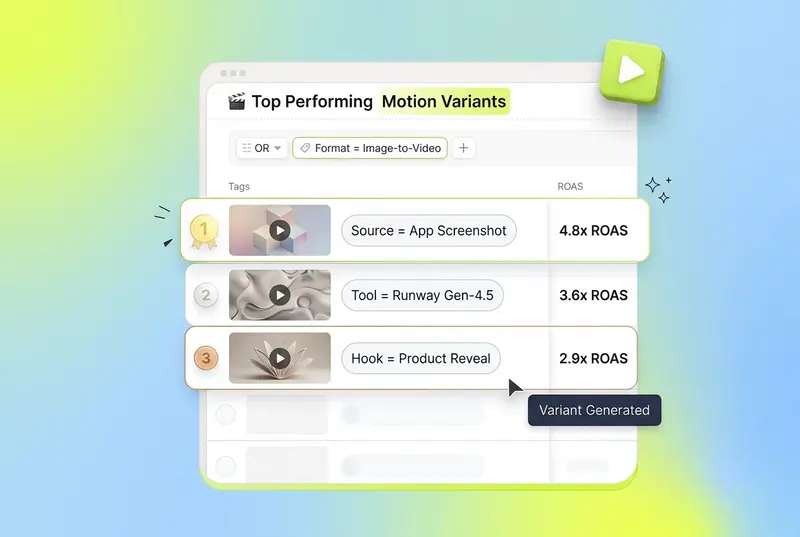
Why image-to-video is suddenly essential for app UA
Video already eats the budget. Video ads now account for roughly 60% of total mobile ad budgets, according to Segwise's 2026 mobile UA playbook. That spend depends on creative refresh velocity. Teams running a biweekly testing cycle on Meta see roughly 22% better cost efficiency than teams testing monthly, which means you need a steady stream of new motion variants without paying full production rates for each one.
Image-to-video tools collapse that production gap. You take a winning static, a fresh app screenshot, or a brand asset, and generate motion in 30 to 90 seconds. For a casual game studio, that can mean spinning a single hero shot into ten motion hooks before lunch. For a DTC brand, it can mean animating the product hero off your PDP into a vertical Reels asset overnight.
The tradeoff is quality control. Models hallucinate. Logos warp. Hands grow extra fingers. UI text turns into nonsense. Without a workflow, you waste hours generating clips that never make it into a campaign. The rest of this post covers the seven tools worth knowing in 2026, the prompt-to-polish workflow that keeps drift in check, the failure modes you will hit, and where humans still have to sit in the loop.
Key Takeaways
Image-to-video is the fastest way for app UA teams to turn statics, screenshots, and product photos into testable motion variants without a shoot.
The seven tools worth knowing in 2026 are Runway Gen-4.5, Pika 2.x, OpenAI Sora 2, Kling 2.1 / 3.0, Luma Ray2, Higgsfield, and Google Veo 3.1, and each fits a different point on the cost / quality / control curve.
API costs span a wide range: Runway Gen-4.5 sits at roughly $0.12 per second of video, Sora 2 at $0.10/sec for 720p, Veo 3.1 Fast at $0.15/sec, Veo 3.1 Standard at $0.40/sec, and Luma Ray2 Std at roughly $0.32/sec, per the Runway API pricing page and the Veo 3 pricing breakdown.
The workflow that actually ships ads has four stages: image prep, motion prompt, composite, and polish. Skipping any one of them is the most common reason output never makes it to test.
The most common failure modes are character drift, UI text corruption, brand logo distortion, physics breaks, and over-motion. All five have specific fixes documented in Magic Hour's 2026 character consistency guide.
Humans still need to sit in the loop on creative direction, brand-safety QA, attribution-aware variant selection, and reading the Segwise creative tagging dashboard to learn which motion patterns actually drove installs.
What "image-to-video" actually means in 2026
Image-to-video is the workflow where you upload a still image (a static ad, a UI screenshot, a product hero, a generated key frame) and an AI model produces a short video clip animating that image. Most production-grade tools generate 5 to 10 second clips at 720p or 1080p, with 16:9, 9:16, and 1:1 outputs ready for Meta, TikTok, Reels, AppLovin, and YouTube Shorts.
The 2026 generation of image-to-video models has converged on three input controls: the reference image (mandatory), a text prompt describing motion / camera / scene change, and optional motion references (a video clip or keyframes). Some tools add lip sync, sound effects, and "swap" features for changing characters or objects mid-clip. Pika's 2026 feature set lists Modify Region, Pikadditions, Pikaswaps, and Pikaframes as the primary controls beyond the base prompt.
For app UA, this matters because nearly every static asset you already have, including app store screenshots, product photography, and key art, can become a motion ad without a shoot. The economics flip from "I need a video" to "I have a thousand stills, which ones should I animate?"
Tool comparison: the seven image-to-video models worth using for app ads

Here are the seven tools every UA or creative team should know in 2026, with the tradeoffs that matter for ad workflows.
Runway Gen-4.5: Best for production-grade image-to-video with API control
Runway is the most production-friendly of the bunch for a marketing org. The API exposes imageToVideo with model gen4.5, ratios up to 1280:720, and durations of 5 or 10 seconds, per the Runway API documentation. Pricing on the API is 12 credits per second of gen4.5 and 5 credits per second of gen4_turbo, with credits at $0.01 each, per the Runway API pricing page. That works out to $0.12/sec for Gen-4.5 and $0.05/sec for the turbo model.
Runway has a dedicated advertising and marketing program that includes 10 technical modules and agency-vetted workflows, which gives marketing teams a structured ramp. The Gen-4 Aleph model handles video-to-video (style transfer, edit on top of an existing clip) at 15 credits per second.
Use Runway when you want predictable motion, clean camera moves, and a real API to build into a creative pipeline. It is the closest thing to "production-grade" in the I2V category.
Pika 2.x: Best for fast creative effects and short-form social
Pika is the tool most creative strategists already know. The 2026 lineup adds Modify Region (paint over an area and change just that part), Pika Effects (Melt, Inflate, Cake, Explode), Pikaswaps (replace a character or object), and Pikaframes (set start and end frames), per the Pika Labs 2026 tutorial by Fahim AI. Standard plan starts at $10/month with 700 credits, Unlimited at $35/month, and Pro at $70/month with commercial rights.
Pika is fastest for quick "what if I made the product melt into the table" or "what if the character did the cake effect" experiments. It is less consistent on physics and identity preservation than Runway or Veo, but for vertical hooks under 5 seconds, the speed-to-creative ratio is hard to beat.
OpenAI Sora 2: Best for cinematic realism and synchronized audio
Sora 2 generates video with synchronized audio, which is unusual in this category. API pricing is $0.10 per second for 720p Sora 2, $0.30 per second for Sora 2 Pro at 720p, and $0.50 per second for Sora 2 Pro at 1024p, per the OpenAI Sora 2 pricing notes. Durations of 10, 15, and 25 seconds are supported. Subscription access is $20/month for Plus and $200/month for Pro.
Note: starting January 10, 2026, the Sora consumer app is gated to Plus and Pro subscribers only, so plan around the API if you are running this in a creative pipeline. Sora 2 is the strongest pick when you need cinematic motion with believable physics, like a product genuinely tipping over and pouring liquid, instead of stiff "cinemagraph" motion.
Kling 2.1 / 3.0: Best for image-to-video as a primary use case
Kling has reputationally been the strongest image-to-video model in 2026 reviews. The 3D face and body reconstruction tech reduces the warping distortion that plagues simpler tools, which matters when you are animating real product photography or character art. Standard generations cost roughly 2 credits per second, Professional generations roughly 7 credits per second, with paid plans starting at $6.99/month per the Kling pricing breakdowns aggregated for 2026.
Kling shines on long-form clips (up to 10 seconds at 1080p) and lip sync, which makes it a good pick for short app ad narrative hooks where a character talks to camera.
Luma Ray2: Best for photorealistic atmospheric clips
Luma's Ray2 line is built for photorealism and 4K HDR output via its Hi-Fi Diffusion tech. API pricing on Luma is $0.32 per million pixels generated, with Ray2 Flash at 11 credits/sec and Ray2 Std at 32 credits/sec, per Luma's pricing learning hub. Subscription tiers run $30/month Plus, $90/month Pro, $300/month Ultra.
Use Luma for atmospheric brand creative where physics and lighting realism carry the spot, like a glass of beverage condensing on a wood counter, sunset through a window, etc. It is less ideal for character-driven UA hooks because of cost.
Higgsfield: Best for multi-model orchestration in one interface
Higgsfield is more of an orchestration layer in 2026 than a single model. It bundles Sora 2, Kling, Veo, Seedance, and others under one credit system. Plus tier is $34/month with 1,000 credits, Ultra at $84/month with 3,000 credits scalable to 9,000, per the Higgsfield pricing page. On Higgsfield, Kling 3.0 costs around 6 credits per video while Sora 2 and Veo 3.1 cost 40 to 70 credits per video.
Use Higgsfield when your creative team wants to A/B different models on the same input image quickly without juggling five separate accounts.
Google Veo 3.1: Best for high-fidelity output with native audio
Veo 3.1 is Google's flagship and is available both via the Google AI Studio subscriptions and the Vertex AI API. Per-second pricing is $0.15 for Veo 3.1 Fast (with audio) and $0.40 for Veo 3.1 Standard (with audio), per the Veo 3 pricing guide. On Runway's API, Veo 3.1 (audio) is 40 credits/sec and Veo 3.1 Fast (audio) is 15 credits/sec, per the Runway pricing page. Subscription access starts at $7.99/month for Google AI Plus.
Veo 3.1 is one of the few models that can generate native synchronized audio, which is useful when you want UGC-style ads with actual ambient sound or voice instead of overlaying audio in post.
The four-stage image-to-video workflow

This is the workflow that actually produces ads worth testing. Skipping a stage is the single biggest reason teams burn credits and never ship.
Stage 1: Image prep
Start with the right input. The model can only animate what is in the frame, and bad inputs produce bad clips. Three rules:
Use 1024px or larger source images. Smaller inputs amplify model artifacts.
Crop to the aspect ratio you intend to deliver (9:16 for TikTok, 1:1 for Meta feed, 16:9 for YouTube). Cropping after generation often kills the framing.
Remove or simplify text. Models hallucinate text more than any other element. Anything you want preserved as legible text should be added in post.
For app UA specifically, the highest-leverage inputs are: a frame of real gameplay (for casual or hyper-casual titles, real gameplay almost always beats cinematic, with median CTR of 4.27% on iOS vs 3.34% for stylised trailers per the 2026 mobile UA playbook), a clean product hero on a brand-color background, an app store screenshot, or an AI-generated hero image you have already pre-cleaned.
Stage 2: Motion prompt
The motion prompt is where teams under-invest. A vague prompt produces ten-second clips of nothing happening. A strong motion prompt names: subject behavior, camera move, lighting, and a negative prompt.
A reliable prompt structure:
[Subject behavior]. [Camera direction]. [Lighting / time of day]. [Negative prompt: blurry, distorted, deformed hands, extra fingers, low quality]
Example for a casual game static showing a character at a puzzle board:
The character taps the puzzle piece into place, eyes light up, board glows briefly. Slow push-in on the character's face. Bright midday lighting, clean. Negative: warped face, deformed hands, extra fingers, blurry text, distorted UI.
Pika's 2026 prompt shortcuts cover the same beats: include "camera pan left" or "zoom in" for camera movement, "cinematic" or "anime" for style, and "static camera, subtle movement" when you want the model to mostly leave the frame alone.
Stage 3: Composite
Generated clips almost never ship as-is. Composite means dropping the AI-generated motion clip into your editor (Premiere, CapCut, AE) and layering on the things the model cannot do well: brand logos, legible CTAs, app icon, app name, app store badges, captions, sound design.
This is also the stage where you cut. Most models generate 5 to 10 seconds. Most performing ad hooks live in the first 2 to 3 seconds. Trim aggressively, then test.
Stage 4: Polish
The final stage is upscaling, color matching across multiple clips, and "brand-safety polish" (inspecting frame-by-frame for warped logos or hands). Use Pika Pro's 1080p mode or Topaz Video AI for upscaling drafts you used Turbo / Fast tiers to generate. Color match across all clips in a campaign so the test reads as one creative system.
Common failure modes and how to fix them

Every team running image-to-video at scale runs into the same five problems. Here is what each looks like and what actually fixes it.
The Magic Hour playbook puts it well: "troubleshoot inputs one variable at a time. If a clip drifts, do not rewrite everything at once. Start by checking whether the reference image changed, then examine the prompt wording."
If a clip looks bad, change one variable at a time: reference image, then prompt, then duration. Rewriting all three at once means you learn nothing about which knob actually fixed the problem.
Cost and speed benchmarks

Here is what each tool actually costs at API tier in April 2026, normalized to a 5-second 720p generation.
Sources: Runway API pricing, Veo 3 pricing 2026, Sora 2 pricing, Kling 2026 pricing, Luma Dream Machine pricing.
For UA workflows, the practical implication is: draft on the cheapest tier (Gen-4 Turbo or Kling Standard at under $0.10 per clip), then re-run only the winners on the premium tier (Gen-4.5, Sora 2 Pro, or Veo 3.1 Standard). Running everything on premium is how teams blow through $1,000+ in API credits in a week without shipping more ads.
Where humans still need to be in the loop
Image-to-video is fast, but the workflow still has four points where a human has to sit in the chair.
Creative direction. A model has no opinion on whether the hook works for your audience. UA managers and creative strategists still own the brief: which audience, which proposition, which hook, which CTA. The model executes the hook; it does not invent it.
Brand-safety QA. Frame-by-frame inspection for warped logos, distorted product, weird hands, accidental text, or content that violates platform policy. A 30-second QA pass per clip is cheap; a paused account is not.
Attribution-aware variant selection. You generated 50 motion variants. Which 5 do you actually push live? That decision needs creative-level performance data: which hooks drove installs at target ROAS, which fatigued in 3 days, which cluster of similar variants is over-saturated. This is where a creative analytics layer like Segwise's unified creative dashboard earns its keep, especially because it integrates across Meta, Google, TikTok, Snapchat, YouTube, AppLovin, Unity Ads, Mintegral, IronSource, and the four MMPs (AppsFlyer, Adjust, Branch, Singular) so you see motion variant performance in one place.
Iteration on what the data says. Image-to-video lets you produce variants fast, but the production speed has to be matched by feedback velocity. Without auto-tagging and fatigue tracking, teams keep generating clips off intuition rather than what is actually working. Segwise's Creative Tagging Agent automatically tags every creative element (hooks, CTAs, characters, visual styles, emotions, audio components) across video, audio, image, and on-screen text, including playable ads, and the Creative Strategy Agent maintains full context across that data so you can ask in plain language which motion patterns drove installs.
For a casual game studio testing 30 motion variants a week, this is the difference between burning $5K of UA spend on declining clips and catching fatigue 4 days earlier. According to Segwise's positioning, teams using this kind of creative intelligence layer save up to 20 hours per week on tagging and analysis and report up to 50% ROAS improvement by catching fatigue early and identifying winning patterns faster.
Image-to-video for app ads, in 2026 and beyond
The takeaway: image-to-video is not a single tool decision. It is a workflow decision. Pick the right model for the input (Runway Gen-4.5 for production reliability, Pika for short-form effects, Sora 2 / Veo 3.1 for cinematic realism, Kling for character-driven hooks, Luma for atmospheric brand work, Higgsfield for orchestration). Run a four-stage flow (image prep, motion prompt, composite, polish). Watch for the five common failure modes. Keep humans in the loop on direction, QA, and variant selection.
Done that way, image-to-video collapses the "from concept to testable hook" cycle from days to under an hour for most UA use cases. Done badly, it is an expensive way to generate clips no one will run.
Frequently Asked Questions
What is image-to-video and why does it matter for app UA?
Image-to-video is the AI workflow where you upload a still image (a static ad, app screenshot, product photo, or generated hero) and a model produces a short motion clip animating it. For app UA managers, it matters because video already accounts for roughly 60% of mobile ad budgets, and image-to-video collapses the production cost of new motion variants from a shoot day to dollars per clip. Combined with a creative intelligence layer like Segwise, teams can produce, test, and learn from motion variants in days instead of weeks.
Which image-to-video tool is best for app ads in 2026?
It depends on the use case. Runway Gen-4.5 is the most production-friendly with a real API and predictable motion, Pika is fastest for short social effects, OpenAI Sora 2 and Google Veo 3.1 lead on cinematic realism with synchronized audio, Kling is the strongest pure image-to-video model for character-driven hooks, Luma Ray2 is the photorealism specialist, and Higgsfield is the orchestration layer that bundles multiple models. Most app UA teams pair a fast / cheap model for drafts (Gen-4 Turbo or Kling Standard) with a premium model for finals, and then use Segwise to tag and track which motion variants actually drive installs.
How much does image-to-video cost per ad in 2026?
API pricing in April 2026 ranges from roughly $0.05 per second (Runway Gen-4 Turbo) at the cheap end up to $0.50 per second (Sora 2 Pro at 1024p) at the premium end. A typical 5-second 720p hook costs $0.25 on Gen-4 Turbo, $0.50 on Sora 2 standard, $0.75 on Veo 3.1 Fast, and $2.00 on Veo 3.1 Standard, per the Runway API pricing page and the Veo 3 2026 pricing guide. For UA workflows, draft cheap and re-render only the winners on premium tiers.
What is the difference between image-to-video and text-to-video for ads?
Text-to-video starts from a written prompt and generates a clip from scratch, while image-to-video starts from a reference image you provide and animates it. For app UA, image-to-video is usually the better fit because you already have the input you want to use (a static ad, a screenshot, or product photography) and you need the output to look like that asset rather than a model's generic interpretation of a prompt. Text-to-video is better for early concepting where no static yet exists.
How do I keep characters consistent across multiple AI video clips?
Three techniques, per Magic Hour's 2026 character consistency guide: keep the identity description in the prompt verbatim across clips so the model does not reinterpret the face; export a clean frame from clip one and use it as the reference image for clip two (frame chaining); and keep lighting and camera distance consistent because dramatic lighting changes cause the model to reconstruct features differently. For UA campaigns, building a small reference set (front, three-quarter, and side angles of the same character) reduces drift further.
Can I use AI image-to-video output directly as an ad without editing?
In most cases, no. Generated clips need a composite pass to add legible text, brand logos, app icon, and a CTA, and a polish pass to upscale, color-match, and QA frame-by-frame for warped logos or distorted hands. Models hallucinate text and warp logos because they treat them as pixels to interpolate, not protected assets. The "AI ad" you scroll past on TikTok or Reels was almost certainly assembled in Premiere or CapCut on top of an AI base.
How do I tell which AI-generated motion variant is actually driving installs?
You need creative-level performance data, not just campaign-level metrics. A creative intelligence platform like Segwise auto-tags every creative element (hooks, CTAs, visual styles, characters, emotions, audio components) across video, audio, image, and on-screen text, then maps each tag to install and ROAS data. Because Segwise integrates with Meta, Google, TikTok, Snapchat, YouTube, AppLovin, Unity Ads, Mintegral, and IronSource, plus AppsFlyer, Adjust, Branch, and Singular, you see which motion patterns drove installs across every platform in one place. Without that layer, teams keep guessing about which AI clips worked and which burned budget.
How fast can I produce ad-ready motion variants with image-to-video?
For a single 5-second clip, expect 30 to 90 seconds of generation time on Runway Gen-4.5, Sora 2, or Veo 3.1 Fast, plus another 5 to 15 minutes for composite and polish. End-to-end, a creative strategist working a tight workflow can produce 5 to 10 ad-ready motion variants per hour. The bottleneck is rarely generation speed; it is brief, prompt iteration, and brand-safety QA.