
For UA Managers and Creative Strategists, understanding what competitors are doing is critical. The Meta Ads Library is your secret weapon, a transparent goldmine of current and past ads.
Simply scrolling through thousands of creatives won't cut it when you operate at scale. Extracting, tracking and organizing often turns into a time-consuming, frustrating, manual spreadsheet nightmare.
The truth is, you can automate this entire process. We need to shift from manually tracking every ad to leveraging the library’s built-in power, streamlining your workflow, and ensuring accurate, scalable creative tracking without the tedious, hands-on tracking.
Key Highlights
Meta Ads Library is a public resource, but turning its vast data into actionable creative insights often gets stuck in tedious manual tracking.
The inefficiency of manual tagging is slow, inconsistent, and error-prone. It fragments data and wastes marketing team resources and time.
Leveraging Meta Ads Library’s powerful search filters (like campaign objectives, ad formats, and advertiser names) is the first step toward automation.
Compliant, specialized third-party tools are essential for compiling and analyzing creatives accurately and at scale, as Meta's API access for commercial ads is limited.
Effective automation provides scalable, accurate competitor creative tracking and frees up performance marketers to focus on strategy and optimization.
Understanding the Meta Ads Library and Its Role in Creative Tracking
The Meta Ads Library serves as a centralized ad database that documents all active and inactive ads running across Facebook and Instagram. For us, this transparency is powerful. Think of it as a comprehensive ad archive of the competitive landscape. Since Meta archives all ads regardless of performance or status, marketers can use this platform to monitor trends, identify high-frequency creatives, and gain visibility into a competitor’s strategy. The ability to search and filter through this data, rather than manually tag your own or rival ads, is the foundation of automated creative tracking.
Challenges of Manual Tagging in Creative Tracking
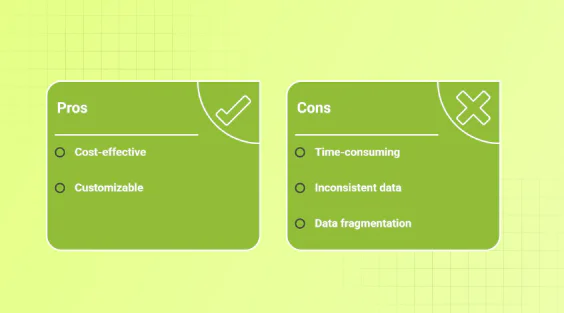
If your team is still wrestling with spreadsheets, manually classifying every competitor’s digital ad seen in the library, you know the pain points well:
Time Sinks: Sifting through vast volumes of competitor creatives takes significant time and pulls resources away from higher-value strategic work.
Inconsistency and Errors: Human error is inevitable. Different team members might tag the same creative differently, leading to inconsistent data that's impossible to analyze reliably.
Data Fragmentation: When tags aren't standardized, consolidating insights across different ad campaign efforts becomes difficult, hindering timely optimization.
The goal here is scalability and accuracy. Relying on manual tagging prevents both, making automation an essential next step for any serious performance marketer. This is exactly the problem that AI-powered solutions address, helping teams streamline Creative Tagging and Analytics.
Step-by-Step Guide to Using Meta Ads Library for Automated Creative Tracking
Automating your creative tracking starts by leveraging the existing filtering power of the Meta Ads Library. The secret lies in treating the Library’s search functionality as your initial, high-level tagger.
Here is a practical process for capturing relevant ad insights efficiently:
Access and Identify: Go to the Meta Ads Library and select your target geographical market or country.
Filter Aggressively: Use the built-in filters (advertiser name, ad format, objective) to narrow down results to only the most relevant ad campaign creatives.
Review and Refine: Quickly review the filtered creatives to ensure relevance, then move to extraction.
Automate Extraction: Use a compliant third-party tool (which leverages internal scraping or human-in-the-loop collection) to reliably pull the ad details automatically. Note: Broad, programmatic Meta API access for commercial ad data is generally unavailable.
This approach cuts out the step of manually labelling every single creative, giving you scalable insights.
Setting Up Your Search Parameters in Meta Ads Library
If you’re running a subscription app, searching the Meta Ads Library for "all ads" is inefficient. You need precision. Start by defining your core competitors and the specific types of online advertising you care about.
Effective filtering is key:
Country: Focus only on markets relevant to your current ad campaign launch.
Advertiser Name: Input 3-5 of your top competitors.
Campaign Objective/Ad Type: Filter by specific formats (e.g., "Video Ads" or "Carousel").
Best Practices for Maximizing Insights from Meta Ads Library

Simply gathering data isn't enough; you must transform it into an actionable strategy. To maximize your competitive intelligence from the Meta Ads Library, you need discipline.
Here are the best practices:
Focus on Longevity: Pay attention to recent advertising campaigns that have been running for a long time. Longevity often suggests high performance, a strong signal you should investigate.
Categorize by Variable: Once extracted, organize your competitor's ads by key variables (e.g., CTA type, core concept, character) to spot patterns, not just individual ad performance. This is typically the most time-consuming step; automated tools like Segwise eliminate this manual work by applying AI tagging to competitor creatives instantly.
Audit Frequency: Schedule consistent exports via API or tool integration to keep your dataset comprehensive.
Integrate Findings: Use the insights to generate better creative briefs. If every competitor is running a vertical video with user-generated content, you know that it is a format worth A/B testing.
This rigorous approach ensures you move past surface-level analysis and leverage online ads data to sharpen your own creative strategy.
Understanding Ad Transparency and Its Impact on Creative Tracking
Ad transparency is the policy that makes the Meta Ads Library a publicly available, searchable database. This move means that platforms like Meta provide open access to active and inactive ads, which is a massive win for marketers.
The impact of this high degree of fb ads transparency is twofold:
Reduced Guesswork: You can see exactly what your competition is messaging and testing, allowing for data-driven creative decisions instead of assumptions.
Scalable Data Handling: Transparency means that managing large, dynamic datasets is the biggest hurdle. This reinforces the need for automated tracking and organization tools to avoid manual errors and keep creative insights current.
Essentially, Meta's transparency forces better competitive tracking; if you aren't automating your data extraction, your rivals likely are.
Conclusion: Implementing Automated Creative Tracking for Better Campaign Performance
The Meta Ads Library is an indispensable resource for understanding the digital ads landscape, but relying on manual processes is a bottleneck. Automated creative tracking by leveraging Meta's own transparency and API features transforms how UA managers approach ad campaign optimization.
By adopting systematic filtering and automated data extraction, you eliminate the errors and time waste associated with manual tagging, enabling faster identification of winning competitive trends. This gives you scalable, actionable intelligence that drives smarter decision-making and better ROI.
It's time to stop treating the Ads Library like a passive database and start using it as an automated, proactive creative tracking dashboard.