
To test ad creatives on Unity Ads, create a Creative Testing campaign with two or more creative packs, one a proven control, in the country you plan to scale. Budget about $100 per pack in tier 1 markets, run at least a week until each pack has 20,000 impressions, then shortlist on IPM and confirm the winner on D7 ROAS.
The test tells you which pack won. It doesn't tell you which part of it won, or whether it will hold up on your other networks. Segwise is an AI creative analytics and creative generation platform that tags the hooks, end cards and CTAs in each pack, including playables, and maps them to IPM and ROAS, so you can see why a winning pack won and carry it to AppLovin and Meta.
This guide pulls together what Unity spreads across more than ten help pages and two guides: how the test campaign works, the exact setup, the budgets and stop rules, how to read the numbers, and the mistakes Unity itself warns about. It also covers two things Unity's pages don't: what a 20,000-impression test can and can't detect, and how to check a Unity winner against the rest of your networks. If you are new to testing on gaming networks, start with our guide to mobile game creative testing at scale.
TL;DR
- If you want a clean A/B read on Unity: run a separate Creative Testing campaign next to your main campaign, with 2 to 4 packs, one control, the same targeting and a bid at or above your main campaign's bid.
- If you are setting a budget: start at $100 per pack in tier 1 countries and $50 to $100 in tier 2 and 3, then check it against your CPM (the math is below).
- If you are deciding when to stop: wait at least 7 days and until every pack has 20,000 impressions, then run a sample size check. Small gaps need far more volume.
- If you are picking a winner: shortlist on IPM, then let D7 ROAS and retention settle it. A pack can win on IPM and lose on ROAS.
- If you test on several networks: keep separate benchmarks per network and compare creative elements, not raw IPM, across them.
How does Unity's creative testing feature help optimize UA performance?
A normal Unity campaign is built to win installs, not to compare creatives on equal terms. That makes it a poor lab: a new pack can sit in Exploration, or in the Attention status Unity uses for packs gathering impressions slowly, before it ever gets a fair read. The Creative Testing goal fixes this. According to Unity's introduction to Creative Testing campaigns, these campaigns "are designed to test creative performance rather than optimize for installs" and give "each creative pack a fair opportunity to serve impressions."
How Creative Testing improves your Unity UA results
That design helps your UA performance in five concrete ways:
- New packs get a fair hearing. Delivery is balanced across packs, so a slow starter isn't killed by the algorithm before you see its numbers. Counts won't be exactly equal, but they will be close enough to compare.
- Exploration gets shorter. Every pack goes through an exploration period while Unity learns which audiences respond. Unity says a test campaign "can significantly decrease the time needed for exploration," and adding a control pack shortens it further, so winners reach your main campaign sooner.
- Your main campaign stays clean. Unity's own guide to building and scaling creatives recommends running test campaigns "separately alongside your main campaign" to measure conversion rate and IPM "without disrupting the performance of your main campaign."
- You can test combinations. Because packs bundle a video with an end card, you can build packs from the same assets in different pairings and learn which video and end card combination converts best in a market.
- You learn where a pack works. You can test one country per campaign or several in one, so you find out which markets a concept fits before it takes scale budget.
What a Unity Creative Testing campaign doesn't do
A test campaign is billed on impressions (CPM, using what Unity calls tCPI bidding), not installs. Its test overview reports pack-level numbers: status, conversion rate, starts, clicks, installs and spend. That shows which pack converts best on Unity, but the overview doesn't break a pack into its elements or show retention. You fill those two gaps with your MMP data and an element-level read, explained later in this guide.
What is a creative pack on Unity Ads?
A creative pack is the unit Unity tests. Per Unity's creative packs documentation, it is "a bundle of creative assets that make an ad," and there are three types:
| Pack type | What's in it | Good for testing |
|---|---|---|
| Video and static end card | A video plus an image end card with a call to action | Hooks, gameplay depiction, video length |
| Playable | A standalone interactive ad | Core mechanic, tutorial style, difficulty |
| Video and playable end card | A video followed by an interactive end card | Whether interactivity lifts conversion over a static end card |
Every new asset goes through human moderation before it can serve. Each pack then shows a status: Live, Paused, Exploration (still finding its audience) or Attention (live but gathering impressions slowly).
Unity creative pack specs that trip teams up
The specs that most often trip teams up, from Unity's video specifications and playable specifications:
- Video: 60 seconds or less, H.264 MP4, 16:9 landscape or 9:16 portrait, 10 MB recommended and 100 MB maximum. Every video ad must include an end card. Upload both orientations if you can, because Unity says that "yields better optimization." Long videos of 30 to 60 seconds are still a beta.
- Playable: one minified
index.htmlunder 5 MB with every image, sound and video inlined, running on Android 5 or later and iOS 13 or later. It must be one responsive build for portrait and landscape, support MRAID 3.0 (the standard ad interface for in-app rich media), make no network requests while it runs, and open the store only after gameplay and a player tap. - iOS creatives: show only the Apple App Store logo.
- Gambling themes: Unity requires a managed account, and moderation rejects gambling creatives from unmanaged advertisers.
For more on judging interactive ads, see why CTR is the wrong metric for playables.
How do you set up a Creative Testing campaign on Unity Ads?
These steps follow Unity's setup guide and required campaign settings. None of them needs a third-party tool.
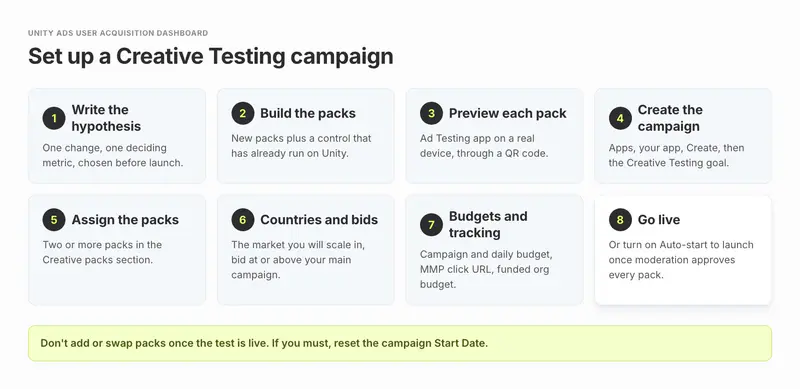
Step 1: Write the hypothesis
Unity's best practices page says tests work best "when used to test a theory or hypothesis." For example: "A near-miss overtake in the first three seconds will beat our garage-reveal opening on IPM." Pick the deciding metric now, before you see data.
Step 2: Build the packs
Change one thing per pack. Include a control: a pack that has already run in Unity's network. Unity's scaling guide suggests using the best pack from your main campaign. Without a control, Unity warns, the test is "much slower."
Step 3: Preview every pack in the Ad Testing app
Unity's Ad Testing for Unity Ads app (iOS and Android) shows the ad on a real device through a QR code. The file URL must end in .html, iOS URLs must use https, and a self-hosted file needs the Access-Control-Allow-Origin: * header. A playable that works locally but shows a blank screen usually still points to an asset by path or URL.
Step 4: Create the campaign
In the User Acquisition dashboard, go to Apps, open your app's Campaigns page, select Create, choose the Creative Testing goal and select Next. Unity's setup page describes this flow on an Android app, so if you plan to test iOS creatives, confirm the goal is offered for your iOS app before you build the plan around it.
Step 5: Assign two or more packs
In the Creative packs section, select Assign, tick your packs, and save.
Step 6: Add countries and bids
Test in the market you will scale in. Unity's scaling guide says to set the bid "equal to or above" your main campaign's bid for that country, and to use automatic bidding if the country is new to you.
Step 7: Set the budgets and tracking
Enter a campaign budget and a daily budget, add your MMP's Click URL (the Start, or impression, URL is recommended but optional) and make sure your organization budget has funds.
Step 8: Go live, or turn on Auto-start
Auto-start launches the campaign as soon as moderation approves every pack. It switches itself off if a creative is rejected or if you add or remove packs, so check the campaign status after any change.
How much budget does a Unity creative test need?
Unity gives two layers of guidance. The dashboard shows a minimum campaign budget and minimum daily budget for each campaign, based on billing type, number of creatives and countries, and Unity's budget best practices say CPM-billed campaigns should start at those minimums. On top of that, the scaling guide gives a per-pack figure:
| Market | Unity's suggested budget per pack | Bid |
|---|---|---|
| Tier 1 countries (highest cost) | $100 | Equal to or above your main campaign's bid |
| Tier 2 and 3 countries | $50 to $100 | Same rule; automatic bidding if the country is new |
Unity's budget rules for test campaigns
Three more budget rules from Unity's pages:
- Campaign budget at least five times the daily budget, so exploration isn't cut short.
- Budgets run on a seven-day rolling window, not a hard daily cap. Set the daily budget to your weekly target divided by seven.
- A daily budget always needs a campaign budget set next to it.
Check Unity's $100 per pack against your own CPM
A Creative Testing campaign charges per 1,000 impressions, so the real cost of a pack is: impressions needed ÷ 1,000 × your CPM. Unity's $100 buys 20,000 impressions only if your effective CPM is $5 or less. If your CPM in that market is $10, the same 20,000 impressions cost $200 per pack.
Worked example: budgeting a Born to Drift test
Born to Drift, a racing game, wants to test three new video openings against its current best pack in the US. That's 4 packs × 20,000 impressions = 80,000 impressions. At Unity's $100 per pack the floor is $400. At a $10 CPM the test really needs $800, so a $400 cap would stop each pack near 10,000 impressions, which is too few for the gaps they care about, as the next section shows. Set the campaign budget from the impression target, not from the per-pack rule of thumb alone.
Spend pack budget on stronger drafts: Segwise lets you score image and video drafts against the ads already winning in your account, with a run-or-hold verdict and reasons, before they take a paid pack slot. Start a free trial.
How long should you run a Unity Ads creative test?
Unity gives three stop signals in different places, and they don't quite match:
- The Manage Creative Testing campaigns page says to run "until you deliver at least 20 thousand impressions for each creative pack," or to use a sample size calculator.
- The scaling guide says to run "for at least one week" and reach "at least 10,000 starts or 100 installs per creative pack." Unity counts a start as an impression.
- The exploration status page says a pack's exploration "may last from a few hours to up to 12 days," and that conversion rate isn't reliable until it ends.
At an IPM of 10, the guide's two bars are the same thing: 100 installs takes 10,000 impressions. The docs' 20,000-impression bar is the stricter one, so use it.
When to stop a Unity creative test: our rule of thumb
Stop when all three are true. At least 7 days have passed. Every pack has 20,000 impressions and none is still in Exploration. A sample size check says the gap between your leader and the control is bigger than the noise.
How big a gap can a Unity creative test detect?
That last check matters more than most teams expect. Unity points to Evan Miller's sample size calculator; we ran the same standard math (95% confidence, 80% power) for typical game IPMs:
| Your baseline IPM | Smallest gap you can call at 10,000 impressions per pack | At 20,000 impressions per pack | Impressions per pack to call a 20% gap |
|---|---|---|---|
| 5 | 64% | 44% | 86,000 |
| 10 | 43% | 30% | 43,000 |
| 20 | 30% | 21% | 21,000 |
All figures are rounded and assume two packs compared head to head.
So a 20,000-impression test at an IPM of 10 can reliably spot a pack that converts about 30% better than the control. If your new opening is only 10% better, the test will most likely call it a tie, and that's a correct answer, not a failed test. Two practical takeaways: test bigger differences (a new concept or format, not a color tweak) when your budget is small, and don't add packs you can't afford to fill. Unity's own creative testing guide gives the same advice for small budgets: "Test fewer variables with bigger differences."
Planning impressions for iOS and Android separately
If you run on both platforms, remember that Unity treats iOS and Android as separate environments, and a pack learns on each one independently. Plan impressions per platform, not in total. For the iOS measurement side, see how to test creatives under SKAN.

How do you read Unity creative test results: IPM, CPI and ROAS?
The quickest view is the overview table in the Creative packs section of the test campaign. It shows each pack's status, conversion rate, starts, clicks, installs and spend. For a deeper cut, open the Reporting dashboard and add the Creative Testing campaign goal dimension, per Unity's page on analyzing test results. Unity leaves the deciding metric to you, so use this order:
Read IPM first
IPM is installs per 1,000 impressions (installs ÷ starts × 1,000). Unity's creative testing guide calls it the metric that "isolates creative performance better than most," because all packs are shown to the same audience at the same time. This is your shortlist.
Use CPI second, as a check
In a CPM-billed test, CPI is not a bid you set. It is spend ÷ installs, so it mostly mirrors IPM. Use it to estimate what the pack will cost at scale, not to pick the winner.
Use click rate and conversion rate to explain why
A pack with a strong click rate but weak installs often has a mismatch between the ad and the store page. A pack with weak clicks has a hook problem.
Let D7 ROAS and retention decide
Unity's guide is blunt: "A creative can win on IPM and lose on ROAS, usually because it attracted players the game didn't retain." Pull D7 (and later D28) ROAS for each pack's installs from your MMP. A test with 100 to 200 installs per pack gives a rough ROAS read, so treat it as a check against a clear loser, not a precise ranking.
What each Unity test outcome means, and what to do next
| What you see | What it usually means | What to do |
|---|---|---|
| Higher IPM, D7 ROAS in line with the control | A real winner | Move it to your highest-scale campaign |
| Higher IPM, clearly lower D7 ROAS | It attracts players who don't stay or pay | Keep the hook, fix what it promises; retest |
| Same IPM as the control | No detectable difference at this volume | Call it a tie; test a bigger change |
| Uneven distribution warning on a pack | Packs differ in age rating or start date | Fix the cause or remove the pack, then re-read |
What are the most common Unity creative testing mistakes?
Most of these come straight from Unity's own warnings. Each one quietly breaks the comparison.
- Adding or swapping packs mid-test. Unity says this "can lead to inaccurate and misleading results." If you must, edit the campaign's Start Date to the day of the change. That resets the report data so all packs start level.
- Mixing a sensitive pack into the test. A pack with gambling or violent themes can get a higher age rating in moderation, which narrows where it can serve and triggers the Uneven distribution warning.
- Running several test campaigns at once. They compete for the same impressions, so each takes longer to fill. Unity recommends keeping the number of concurrent tests low.
- Too many packs for the budget. There is no limit on packs, but each one dilutes the rest. Running a multivariate grid on an A/B budget is, in Unity's words, "a common mistake."
- Skipping the control. Tests with only new packs are much slower, and you have no baseline to say "better than what."
- Testing in a cheap market and scaling in an expensive one. Unity's advice is to test where you will run.
- Calling it in hours. Exploration can take up to 12 days, and early leaders often reverse.
- Changing two things at once. Unity's scaling guide: change one thing per iteration "so you can replicate it."
- Comparing Unity IPM with Meta IPM. Unity's guide says the same creative "will produce different IPM and CPI on Unity Ads and on a social network." Keep separate benchmarks per channel.
- Shipping a playable that calls the network. Any asset loaded by URL at runtime breaks the ad. Inline everything.
What do you do with the winning pack?
A test only pays off when the winner reaches real spend. Unity's scaling guide gives clear rules for the main campaign:
- Put the winner in your highest-scale campaign, because optimization happens at campaign level.
- Keep at most 8 creatives in learning at once. Add 4 to 6 new ones every three days until you reach about 30 in the campaign.
- Review every two weeks on share of impressions. Remove creatives with under 10% share, but never more than 20% of total share in one go, and give a low-share creative at least 10 days after learning before you cut it.
- Iterate one change at a time. If video 1 with end card 1 wins, try video 1 with a new end card, then a new video with end card 1, then a shorter cut of video 1.
- Watch for fatigue. When a winner's IPM slides while spend holds steady, it is wearing out. That is your trigger to queue the next test.
How does Unity creative testing fit a cross-network test plan?
Unity is rarely the only network in a game's mix. Many game teams also buy on Meta, Google, TikTok, AppLovin (Axon), Mintegral or Moloco, and each one has its own test tool and its own idea of a winner. Unity's Creative Testing campaign answers one question well: which of these packs converts best on Unity. A cross-network plan needs three more answers.
Is this a winning idea or a winning pack?
Unity reports at pack level. If a near-miss hook wins on Unity, you want to know whether that hook also wins on AppLovin and Meta, where the same idea runs as different files. That needs the same element tags on every network's ads, so you compare "near-miss hook" with "garage reveal" across channels instead of comparing raw IPM between networks, which Unity warns against.
Which creative test runs on which network?
A simple order that works for most game teams, as a rule of thumb:
| Step | Where | Why |
|---|---|---|
| Score drafts before any spend | Pre-launch review | Cut weak files before they cost test budget |
| Test concepts and formats | Unity Creative Testing, one per key market | Equal delivery, cheap A/B read, playables and video in one place |
| Test the same concepts on social | Meta or TikTok test setups | Different audience and format rules; see our Meta ads creative testing guide |
| Compare elements across networks | Your analytics layer, joined with MMP data | Find the hooks and mechanics that win everywhere, not just on one network |
| Scale and watch fatigue | Each network's main campaigns | Refresh when a winner's IPM slides |
Do you need a tool for cross-network creative testing?
Not always. If you run Unity and one other network and launch fewer than about 20 new creatives a month, Unity's dashboard, your MMP and a shared sheet with consistent naming are enough. A cross-network tool starts to pay once two of these are true: you buy on three or more networks, you launch 20+ new creatives a month, playables are a real part of your mix, or you need D7 ROAS by creative element rather than by ad. For a side-by-side of the options, see our list of creative testing tools.

Where does Segwise fit with Unity creative testing?
Segwise doesn't replace Unity's test campaign, and it doesn't buy media or change your Unity bids. It reads the results of every test and live campaign across your networks and makes them comparable. Unity is one of its connected networks. Setup is no-code: some networks sign in with OAuth, while Unity, AppLovin, Mintegral and Moloco ask you to paste an API key from that network's dashboard, as the Unity setup guide shows.
Segwise features that extend a Unity creative test
- Cross-network, element-level analysis. Segwise's creative tagging labels hooks, characters, scenes, on-screen text, end cards and CTAs on every ad, then Creative Analytics maps each tag to IPM, CPI and ROAS across Unity, Meta, Google Ads, AppLovin (Axon), Mintegral, Moloco and the rest. Creative clustering links the same creative across networks, so you see one concept's full result instead of five separate ones. With an MMP connected (AppsFlyer, Adjust, Branch, Singular or Kochava), D7 ROAS sits next to each element. This is also how you track creative across Facebook, Google and Unity in one view.
- Playable tagging. Segwise is the only platform that tags playable ad elements. It plays each playable end to end, the way a player would, and tags the core mechanic, tutorial style, hook scene, first-level difficulty, end card and CTA. So when a playable pack wins your Unity test, you can see which part of it to keep in the next one.
- Fatigue tracking.Fatigue alerts flag a sustained drop in a creative's metrics or spend share, with thresholds you set, by email or Slack, per network or across all of them.
- Pre-flight testing before test budget.Pre-flight Testing scores up to 10 images or short videos out of 100 against the ads already winning in your account, with a run-or-hold verdict and the reasons. Use it to decide which drafts deserve a slot in the Unity test.
- Competitor tracking. Segwise's competitor tracking tags rivals' ads from the Meta (Facebook and Instagram), TikTok, LinkedIn and Google ad libraries in one place. Use it to see which hooks rival games keep running before you pick test concepts.
- New variants from your winners. The Creative Generation Agent lets you make statics and videos up to 30 seconds, including AI UGC-style ads, from your own winning patterns, so the next Unity test starts from what already works. New playables and CTV spots come as managed services, built and polished by the Segwise team.
You can use each agent on its own, or do it all in one place by chatting with the Segwise agent: ask how your ads are performing, see what competitors are running, and make new ads from your winners.


What Segwise doesn't do in Unity creative testing
Limitations to know: Pre-flight takes images and short videos, not playables, and it doesn't fix a weak draft for you; your team reworks it and re-scores. Pre-flight and element analysis need at least one connected ad network to compare against. And Segwise reads Unity's results; the equal-delivery A/B test itself still runs in Unity.
A gaming result, and what Segwise costs
For a gaming example, WGT (World Golf Tour) joined its MMP and network data in Segwise and reports that its early concept-to-test cycle went from 2 to 3 weeks down to 2 to 3 days, per the WGT case study. Segwise starts at $499/month for advertisers spending up to $250K/month, with a special 50% discount for startups spending under $50K/month, and includes a 7-day free trial. The trial imports 14 days of history and paid plans import 3 months, so recent Unity tests show up from day one.
How to run your next Unity Ads creative test
Unity's Creative Testing campaigns give every pack a fair share of impressions, which makes them the cleanest place on Unity to compare creatives. Change one thing per pack, include a control, and set the budget from the impressions you need rather than from the per-pack figure alone. Stop only after 7 days, 20,000 impressions per pack and no pack left in Exploration, then shortlist on IPM and let D7 ROAS decide. Before your next test, write the hypothesis and choose the control pack it will be judged against.