Choose Layer if your bottleneck is producing game art, video and playables: a self-serve workspace that says it has 500+ AI models, plus a playable agent, from $10/month. Choose Segwise if your bottleneck is knowing which ads win: it tags every creative across 15+ ad networks and five MMPs, then generates ads from the winners.
Segwise is an AI creative analytics and creative generation platform that helps UA and creative teams find the creative elements that drive installs and revenue, then turn those patterns into new statics, videos and playables. Layer calls itself "the agentic creative engine" and is built to make assets. Its own UA managers page says Layer replaces the design ticket, "not your ad platforms or attribution tools." Put simply, Layer focuses on making assets, while Segwise focuses on measuring creative against revenue and making more of the winners.
TL;DR
If you need more assets, faster: Layer. It puts hundreds of image, video, 3D and audio models in one workspace, adds a self-serve playable builder that returns a first version in minutes, and plugs into Photoshop, Blender, Unity and Unreal. Pricing is usage-based from $10/month with no seat fees.
If you need to know which ads earn money: Segwise. It plays, watches and tags each live ad, joins each element to spend and MMP revenue across networks, alerts you when a winner fatigues, and scores new creatives out of 100 before you spend.
If playables are your main format: both make them. Layer's builder is self-serve. Segwise plays and tags the playables you already run, then builds new ones around the winning mechanics as a managed service.
If you have the budget for two tools: make assets in Layer, measure them in Segwise, and brief the next round from what actually won.
Segwise vs Layer at a glance
How well does Layer support AI-powered UA creative for mobile games?
On production, very well. Layer's UA page pitches the jobs a UA manager actually files tickets for: ad variations, video hooks, localized creatives, app store screenshots and playables. You describe the asset, pick a model and export sized files for each network. Its playable agent builds from a store link, a screenshot, a gameplay clip, a prompt or your own reference set, returns a "first version in minutes", and exports MRAID HTML5 for AppLovin, Meta, TikTok, Google UAC, Unity and other MRAID networks. Playable creation is included in your plan and paid in Creative Units. Style training (a LoRA or a "Reference Set") keeps characters "on-model in every variant", as Layer puts it, which is a real problem for game studios.
On measurement, Layer is light, and its own pages show it:
Performance data is read mostly through chat. Layer connects Meta, Google Ads, TikTok, AppLovin and Chartboost so its agent can answer questions like "which creatives had the lowest cost per install?" Its Meta help article says the agent "reads your ads; it does not create, edit, pause or pay for anything". Layer's UA page also lists "Winner Pattern Analysis" and "Cross-Channel Insights" under "Campaign Analytics Integration", saying Layer "helps you build institutional knowledge about what drives installs". We found no help article showing a standing, tagged library of your live ads joined to revenue.
Short windows. Layer's AppLovin help article says "AppLovin reports cover only the last 45 days."
Network numbers, not MMP revenue. Layer's agent reads what each network reports, including ROAS on Meta: its Meta help article suggests asking "How did spend and ROAS change for the summer campaign between the last two weeks?" We found no AppsFlyer, Adjust, Branch, Singular or Kochava connector on any Layer page, though. So you get each network's own view, not MMP-attributed D7 revenue or LTV per creative, joined across all your networks in one place.
Playables after launch. Asked about behavioural data for the mini-game behind a playable, Layer's FAQ says it "doesn't instrument tracking SDKs, but the mechanic can be designed to surface the signals your data team wants: retry rate, session length, difficulty quit points." Layer designs for measurement, and your own stack does the measuring. We found no Layer page that tags a live playable's mechanic or end card against install or revenue data.
Fatigue. Layer's answer to fatigue is to generate "20+ fresh variations" before a winner declines. That is useful, but it is a production answer. We found no fatigue alert or detector.
Pre-launch scoring checks brand fit. Layer's UA page says "Score each variant against your brand rules before it ships, then build the next round from the winners." That keeps output on-brand. We found no page that scores a variant against your account's past performance before spend.
So the honest answer is: Layer supports AI UA creative strongly for making it and only partly for judging it.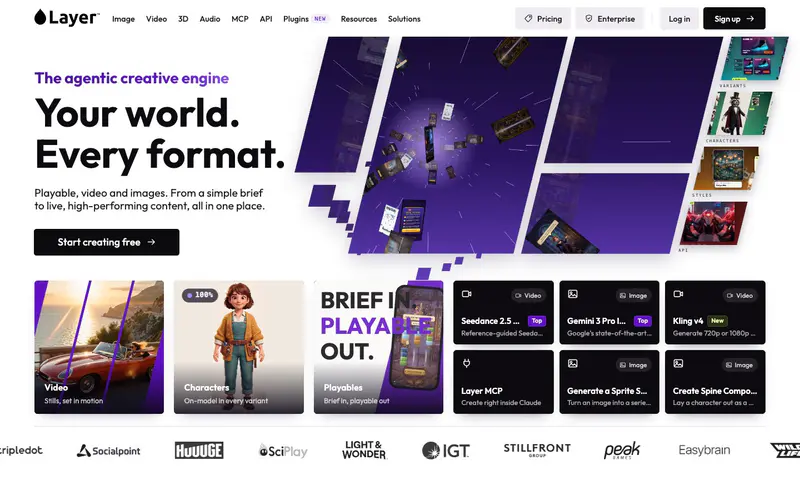
What is a creative intelligence layer, and why is it Segwise's edge?
A creative intelligence layer is the system that turns every ad you run into structured data: each hook, character, CTA, mechanic and end card is tagged and tied to spend, installs and revenue, so the next brief rests on evidence instead of taste. Our guide to creative intelligence covers the idea in depth. Here is how Segwise delivers it, and where it goes further than Layer documents:
It tags all your creative, automatically, whoever made it. Segwise's creative tagging watches video, listens to audio, reads on-screen text and plays playables end to end, then applies 20+ standard tags plus your custom and naming-convention tags. Ads made in Layer, by an agency or in-house are all analysed the same way.
It joins creative to revenue across networks. Data comes in through no-code integrations from 15+ ad networks (Meta, Google Ads, TikTok, Snapchat, AppLovin (Axon), Unity, Mintegral, Moloco, Liftoff and more) and five MMPs, so every tag maps to IPM, CPI, ROAS, LTV and custom events. The MMP is optional, but for games it is usually where the truth lives.
It catches decline early.Fatigue tracking flags a sustained drop on thresholds you set, for example a 20% ROAS decline over 7 days, by email or Slack, per network or across all of them.
It scores before you spend.Pre-flight Testing scores up to 10 new images or videos out of 100 against the ads already winning in your account, with a run-or-hold verdict and the reasoning behind it.
It answers in plain English. The Creative Strategy Agent holds context across every ad, tag, competitor ad and custom metric, so "what do my top 5 playables share that my bottom 5 don't?" takes a minute, not an afternoon of spreadsheets.
It lets you generate from the winners. The Creative Generation Agent lets you turn your winning patterns into new statics, videos up to 30 seconds (including AI UGC-style ads) and playables, each with a "Why this ad" explanation. Once live, they are tagged and tracked like everything else.
You can use each agent on its own, or do it all in one place by chatting with the Segwise agent: ask how your ads are performing, see what competitors are running, and make new ads from your winners.
Named results show what this looks like in practice. WGT, a golf game, says its early concept-to-test cycle got 5x faster, from 2 to 3 weeks down to 2 to 3 days, once MMP and network data sat in one view, according to its case study. Influence Mobile reports D7 ROAS up 10%. Both results are customer-reported.
Playables: Layer's self-serve builder vs Segwise's managed service
Both tools make playable ads, so this is the closest head-to-head in the comparison.
Layer hands your team the builder. You bring a brief, play what the agent returns and tell it what to change; Layer says most studios reach a publish-ready playable in a single session. It suits a UA team that wants to try many mechanics quickly and has someone to drive the tool. You can also make video and static variants from the same playable.
Segwise starts from the data. Its tagging agent plays every playable you already run and tags the core mechanic, tutorial style, hook scene, first-level difficulty, end card and CTA, then matches each element to IPM, CPI and ROAS. Playable generation is a managed service: generation agents build net-new playables around your winning elements, and the Segwise team polishes, tests and delivers each one to the specs of AppLovin, Meta, Unity Ads, Mintegral or Moloco. You ask for changes, and nothing runs until you approve it. Once live, the new playable is played and tagged too, so each round is better informed. Segwise's mobile gaming page lets you play sample playables made this way, and our guide on how to tag playable ads shows the element list in detail.
The trade-off is control versus evidence. Layer is faster if you want to iterate yourself today. Segwise is the better fit if you want to know which mechanic to build next and don't want an engineer or designer driving a builder. For the wider field of playable makers, see our playable ad generation tools roundup and the walkthrough on generating playable ads with AI.
Pricing: what Segwise and Layer actually cost
Segwise: Segwise starts at $499/month for advertisers spending up to $250K/month, with a special 50% discount for startups spending under $50K/month, and includes a 7-day free trial. Every feature is on every plan, including playable generation, Pre-flight Testing and fatigue tracking, with unlimited seats. Plans differ by monthly ad spend band and support level.
Layer:Layer's pricing page says "There are no seat fees, feature gates, or plans." You buy Creative Units (CUs): subscriptions begin at $10/month for 300 CUs and rise by $60 per 1,000 CUs. Unused units expire each billing period, with up to 10% rolling over. Each model has its own rate.
Here is a worked month for a game studio on Layer, using the rates on its pricing page. Treat it as a rough estimate, since your model mix will differ:
Playables, 3D and heavier video models add more on top, because Layer charges units for intensive agent actions such as playable ads. The takeaway: a light month on Layer costs very little, and a heavy production month can cost about the same as Segwise's entry plan. The two bills buy different things, though. Layer's scales with how much you generate, while Segwise's is tied to your ad spend band and includes the analytics.
Which should you choose? A decision rule
Use this rule of thumb. It is a starting point, not a law.
When Layer alone is enough
Layer alone is enough when you run one or two networks, have no MMP, and your problem is that assets arrive too slowly. You will judge winners in each network's own dashboard.
When to add Segwise
Add Segwise once 2 of these 5 are true:
You buy on 3 or more ad networks.
You have an MMP and care about D7 ROAS more than CPI.
You launch 20 or more new creatives a month.
A winner has fatigued for a week or more before anyone noticed.
Your team argues about which ads won because the numbers live in different places.
When Segwise alone can cover it
Segwise alone can cover it when your volume comes mostly from iterating winners (statics, video including AI UGC-style ads, and playables) and you don't need 3D, audio or engine assets.
Where Layer genuinely wins
Layer is the stronger product in several places, and if these matter most, pick it:
Breadth of models. Layer's UA page says it "aggregates 500+ AI models" across image, video, 3D and audio (its model menus list fewer by name). Segwise generates ad creative, not general art.
3D and game assets. Layer makes textured meshes from one image, then retextures, remeshes, rigs and animates them. Its October 19 changelog added skyboxes, isometric and hex game tiles, and stretchable UI kits that export to Unity and Godot. Segwise does none of this.
Image and audio editing. Background removal, inpainting, relighting, camera-angle changes, vectorizing, music, sound effects and voice cloning all sit in one place.
Plugins. Layer works inside Photoshop, Figma, Premiere Pro, After Effects, DaVinci Resolve, Blender, Maya, Unity and Unreal. Segwise has no creative-tool plugins.
Self-serve playables and a generative MCP. You can build a playable yourself in one session, and Layer's MCP can generate assets from Claude, Cursor or Codex. Segwise's playables are a managed service and its MCP is read-only.
Entry cost. A free account and a $10 subscription are a far lower bar than Segwise's plan.
Segwise has real limits of its own: its entry price is far higher, pushing finished assets straight to ad networks is not live yet, its MCP can't generate anything, and playables and CTV spots depend on the Segwise team's turnaround rather than a button you press.
How to run Layer and Segwise together, or switch
Running both is quick to set up:
Connect your data to Segwise. Setup is no-code: follow the step-by-step integration guides. Some networks, such as AppLovin, Mintegral and Moloco, ask you to paste an API key from their dashboard. The trial imports up to 14 days of history; paid plans import up to 3 months.
Let the tagging finish. Segwise tags your existing ads, so winning hooks, mechanics and end cards show up within hours.
Brief Layer from the winners. Take the top elements from Segwise's reports or the Creative Strategy Agent into your Layer brief or Reference Set.
Score before you spend. Run the new batch through Pre-flight Testing (up to 10 at a time) and launch the ones marked run.
Watch and repeat. New ads are tagged automatically once live, and fatigue alerts tell you when to brief the next round.
Switching from Layer to Segwise for ad creative is simpler than it sounds, because Layer does not hold your performance history; your networks and MMP do. Download the Layer assets you want to keep, then time any downgrade to the end of a billing period, since unused Creative Units expire with only 10% rolling over. Layer lets subscribers adjust their tier monthly; check any annual enterprise terms before you cancel. Keep Layer for 3D, art and engine work if you still need it.
If your next decision is which networks to build playables for, our playable ad specs by network guide compares each network's file rules side by side.