The Segwise MCP is a remote server at mcp.segwise.ai/mcp that lets Claude, ChatGPT, Cursor, Codex and Grok Bot answer questions from your Segwise data: creative performance across your connected networks, tags, MMP post-install events, stored competitor ads and saved reports. Every Segwise account can use it. You add the URL in your AI tool and sign in with your own Segwise login.
Ask ChatGPT about your ads without it and you get answers built from whatever export you pasted in, and an export has no idea which hook, scene or CTA sits inside each ad. Segwise is an AI creative analytics and creative generation platform that tags the hooks, scenes, on-screen text and CTAs in every ad you run and joins those tags to spend, ROAS and your MMP's install and trial events. Through the MCP you can ask Claude "which hook angle brought the cheapest trials on TikTok in the last 30 days?", see the ads behind the answer, and brief your next batch around that angle.
TL;DR
- UA managers: ask which creatives are losing ROAS, which hook angles bring the cheapest trials, and where spend is going by network, with MMP events joined.
- Creative strategists: ask what your top 10 ads share that your bottom 10 don't, and which angles your tracked competitors run that you don't.
- Agencies: if you can access more than one Segwise organization, the MCP lists them and asks which one to query.
- What it won't do: change campaigns, budgets, tags or reports, browse the web, or make ads. Ad generation through the MCP is coming soon; today you make ads inside Segwise.
What is the Segwise MCP?
MCP, the Model Context Protocol, is "an open-source standard for connecting AI applications to external systems," according to the official MCP documentation. An MCP server is the piece on the other end: it tells your AI tool which actions it can call and returns the results.
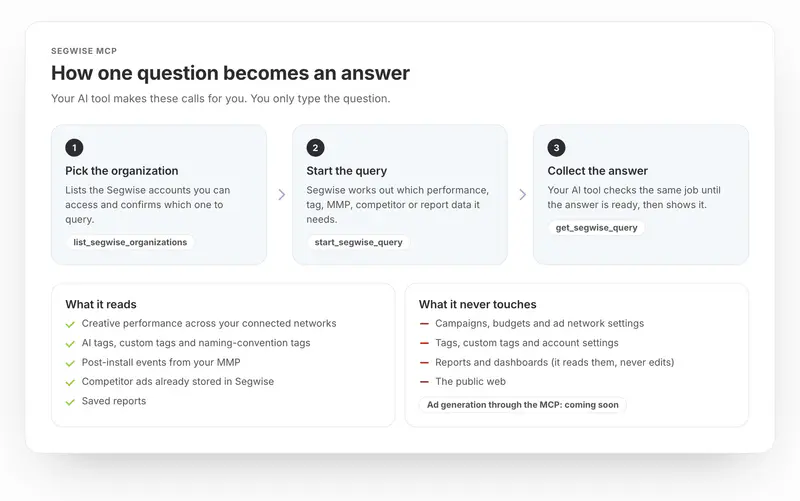
The Segwise MCP is Segwise's server. Your AI tool sends it a plain-English question and Segwise works out which of your tagged creative data it needs. You never pick tables or write queries.
The three tools behind every answer
Your AI tool calls these three tools for you, but knowing them explains what you see on screen.
| Tool | What it does |
|---|---|
list_segwise_organizations | Lists the Segwise organizations you can access and confirms which one to query |
start_segwise_query | Starts a temporary background job for your question and returns a job ID; it may save conversation history so you can ask follow-ups |
get_segwise_query | Checks that job and returns the answer when it is ready |
Listing organizations and fetching answers only read data. Starting a query creates a job and may keep conversation history, but per the Segwise MCP setup guide it "cannot change your campaigns or advertising data."
How long does an answer take?
Segwise doesn't publish a typical response time. Its setup guide says "deeper questions can take several minutes," and your AI tool keeps checking the same job until the answer lands, so plan for a short wait on cross-network questions with MMP events.
What data can you query through the Segwise MCP?
Anything already in your Segwise account, across five areas:
| Area | What you can ask about | Example question |
|---|---|---|
| Creative performance | Impressions, clicks, installs, spend, CPI, CTR, CVR, ROAS and custom events, by network and date range | "Which creatives spent more than $5,000 last month with below-average ROAS?" |
| Tag-level insights | Segwise's AI tags, your custom tags and tags from your naming conventions | "Which tags show up in my low performers and almost never in my winners?" |
| Post-install and MMP data | Attribution and post-install metrics from your MMP, including AppsFlyer, Adjust, Branch and Singular, mapped to creatives and tags | "Which hook angle brings the cheapest trials?" |
| Competitor research | Competitor ads already stored in Segwise from the Meta, TikTok, LinkedIn and Google ad libraries | "Which angles do my tracked competitors run that are missing from my mix?" |
| Saved reports | Reports your team saved in Segwise, which it can summarise but not edit | "Summarise my saved Q3 creative report for a leadership update." |
Competitor answers come from the catalog stored in Segwise, not the open web, and never include a rival's private spend or ROAS. A network you haven't connected won't show up in any answer.
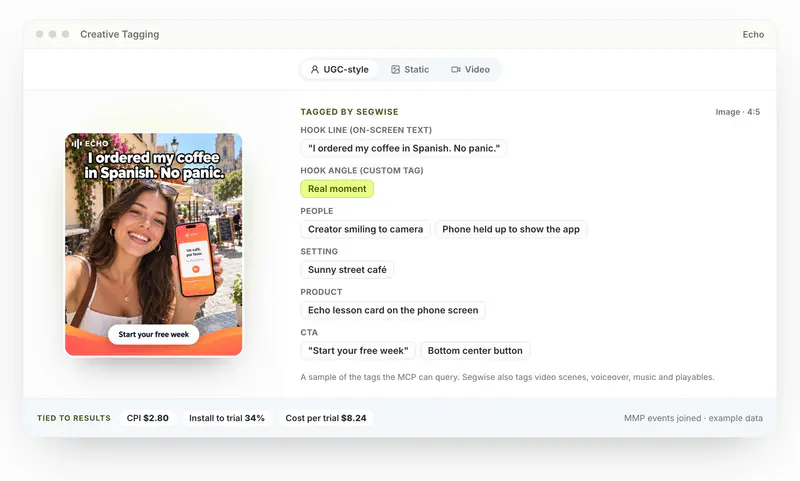
The tags are what make this different from pasting an export into a chat. Segwise's Creative Tagging reads each ad and labels its hook line, people, setting, product and CTA, then ties those labels to the ad's results. That is the layer your AI tool queries when you ask "which hooks work?"
Example questions by role
The questions that pay off are the ones a dashboard makes slow: anything that joins tags, networks and post-install events in one answer.
For UA managers: find the spend that isn't earning
- "Which of my top creatives are starting to decline on ROAS?"
- "How is my spend split across networks, and how does creative performance differ on each?"
- "Rank my hook angles by cost per trial across all networks for the last 30 days, using AppsFlyer trial events. Include CPI."
That last one is where an MMP join changes the decision. In this example with Echo, a sample app, the free-week offer has the cheapest installs at $1.90 CPI but the most expensive trials at $10.56, because only 18% of its installs start a trial. The real-moment UGC-style hook costs more per install and brings trials at $8.24.

Rank angles by what they earn: Segwise tags every ad's hook and joins it to your MMP's trial and purchase events, so it lets you ask Claude or ChatGPT which angle to fund next and get the answer by cost per trial, not CPI. Book a demo.
For creative strategists: find the pattern behind the winners
- "What do my top 10 creatives by ROAS have in common? Compare their hook and CTA tags with my lowest performers."
- "Which of my playables has the best IPM, and what mechanic does it use?"
- "Which messaging themes appear most often in my stored competitor ads?"
Ask the MCP to show its working, as the setup guide puts it: request the creatives or tags behind any claim so you can check the answer in Segwise itself. If you want to go deeper on competitor research from Claude, our guide to spying on competitor ads with Claude and MCP covers that workflow.
For agencies: confirm the account before you ask
If you work across more than one Segwise organization, list_segwise_organizations returns the ones you can access and, per the setup guide, your AI tool "confirms which account to query before it asks anything." Each request is checked against your organization access, and query jobs and their results stay with the user and AI tool that started them.
- "Give me the five creatives I should talk about in this week's review, and why."
- "Summarise my saved monthly report for this client in five bullet points."
- "Which opening hooks got the cheapest results on Meta in the last 30 days? Show the ads behind each one."

Which AI clients does the Segwise MCP work with?
Five, per Segwise's setup guide: Claude, ChatGPT, Cursor, Codex and Grok Bot. Each person on your team connects separately with their own Segwise login. What differs is where you add the server and which plan of the AI tool allows it.
| Client | Where you add it | Plan notes from the client's own docs (checked Nov 24, 2026) |
|---|---|---|
| Claude | Customize, then Connectors, then Add custom connector | Anthropic's help center lists Free, Pro, Max, Ultra, Team and Enterprise. Free is limited to one custom connector. On Team and Enterprise, an Owner adds it first, then each member connects |
| ChatGPT | Plugins on the web, the plus button, then Add custom MCP server with OAuth | OpenAI's help center lists Business and Enterprise/Edu, and says Pro users can connect custom MCP servers with read and fetch permissions. On Business, only admins and owners create the plugin |
| Cursor | The Add to Cursor button on the setup guide, or a segwise entry in your MCP config | Sign in through the browser from Cursor's MCP settings |
| Codex | MCP servers in settings, Streamable HTTP transport | CLI users run codex mcp login segwise after adding the server |
| Grok Bot | Paste Segwise's setup prompt into a conversation | Grok Bot guides you through the custom MCP connection |
On a company plan, ask your workspace admin first: Segwise's guide notes that "workspace settings may require an administrator to add or allow the connection."
How do you get access to the Segwise MCP?
You don't request it. The MCP is included with every Segwise account, so access comes down to three prerequisites:
- A Segwise account. Segwise starts at $999/month for advertisers spending up to $250K/month; startups spending under $50K/month pay $499/month (limited eligibility).
- At least one connected ad network or MMP, so there is data to query.
- An MCP client from the table above, on a plan that allows custom connectors.
Connect it in Claude
- In Claude, open Customize, then Connectors, choose Add, then Add custom connector.
- Name it Segwise and enter
https://mcp.segwise.ai/mcpas the remote MCP server URL. - Choose Connect, sign in with your Segwise account, and turn Segwise on for your conversation from the Connectors menu.
Connect it in ChatGPT
- Open Plugins in ChatGPT on the web, select the plus button, then Add custom MCP server.
- Name it Segwise, enter the same URL, and choose OAuth authentication.
- Install the plugin, sign in to Segwise, and type @Segwise in a conversation before your question.
Check the connection with one question
Ask your AI tool to list your Segwise organizations. If it returns your account names, it works. Then try the first question Segwise suggests: "Which creatives had the best ROAS in the last 30 days? Include their spend and the tags they have in common."
The setup guide also has a copy-paste setup prompt for each client that checks the connection for you.
How to write questions that get usable answers
Vague questions return blended averages. Segwise's guide lists five habits, and they map to one sentence pattern you can reuse:
"For [network], over [date range], rank [tag group] by [metric], and show the creatives behind the top and bottom result."
Tip: "Which hooks work?" averages Meta and TikTok together; "Which hooks work on TikTok in the last 14 days?" gives you something you can act on.
- Name the date range. "Last 7 days" beats "recently".
- Use your own tag names. If your team set up a custom tag like "Hook angle", say it.
- Say which network you mean, to avoid a blended number that hides the real story.
- Start broad, then drill in. Top creatives by ROAS first, then a follow-up on the two worth a closer look.
- Ask for the evidence. The creatives or tags behind the claim.
What the Segwise MCP can't do, and what to use instead
The MCP answers questions. It does not act on them. It cannot create or edit reports and dashboards, change campaigns, budgets, tags or account settings, generate ads, push anything to an ad network, or search the web. Ad generation through the MCP is coming very soon and brief writing through it is planned, but neither is live today.

When to use something else
- To change campaigns from an AI tool, use the network's own server. Meta's ads MCP server lets an AI agent "create and edit ads, ad sets, and campaigns." Pair it with the Segwise MCP: one says what is working, the other makes the change you approve. Our explainer on Meta's and Google's ads MCP servers covers what each one can read and change.
- To write a brief today, use the Creative Strategy Agent inside Segwise, which writes briefs and new hooks from your winning patterns.
- To make the next ad, use the Creative Generation Agent, which lets you make statics and videos up to 30 seconds, including AI UGC-style ads, from your own winning patterns. Your team reviews every ad before it ships.
You can use each agent on its own, or do it all in one place by chatting with the Segwise agent: ask how your ads are performing, see what competitors are running, and make new ads from your winners.
When you don't need the Segwise MCP
Rule of thumb: connect it once two of these are true. You buy on 2 or more ad networks. You launch 20 or more new creatives a month. You answer creative questions for 3 or more people or clients each week. You need MMP events such as trials or D7 ROAS next to creative tags.
If you run one network with a dozen ads, an export pasted into ChatGPT or Claude, or the network's own MCP, will cover most questions. Our comparison of ChatGPT vs Claude for Meta ads covers that lighter setup, and our guide to connecting Meta and Google Ads data to ChatGPT or Claude compares exports, connectors and MCP servers. And if your team doesn't work in an AI assistant at all, the chat inside Segwise answers the same questions without a connector. For the wider picture of how AI assistants fit into paid media work, see our AI copilot guide for performance marketing.
How to start with the Segwise MCP this week
The Segwise MCP puts your tagged creative data, MMP events, competitor catalog and saved reports inside Claude, ChatGPT, Cursor, Codex or Grok Bot, and it reads that data without changing anything in your ad accounts. If you already use Segwise, add the mcp.segwise.ai/mcp server in your AI tool, sign in, and ask for your top creatives by ROAS over the last 30 days with the tags they share. Then follow up on the two ads that surprise you. If you don't use Segwise yet, a demo will show you what your own creative data can answer.