
SaaS creative fatigue is rarely a frequency problem. It is a visual reset problem. UI products have a tiny surface area of visual novelty (the same dashboard, the same buttons, the same screen recording), so swapping the hook while keeping the same UI shot does not reset cognitive freshness for the viewer. For SaaS UA teams, that means real fatigue fixes have to change the dimension the brain actually re-processes: the visual frame, the format, the social-proof framing, or the segment voice, not just the words on top.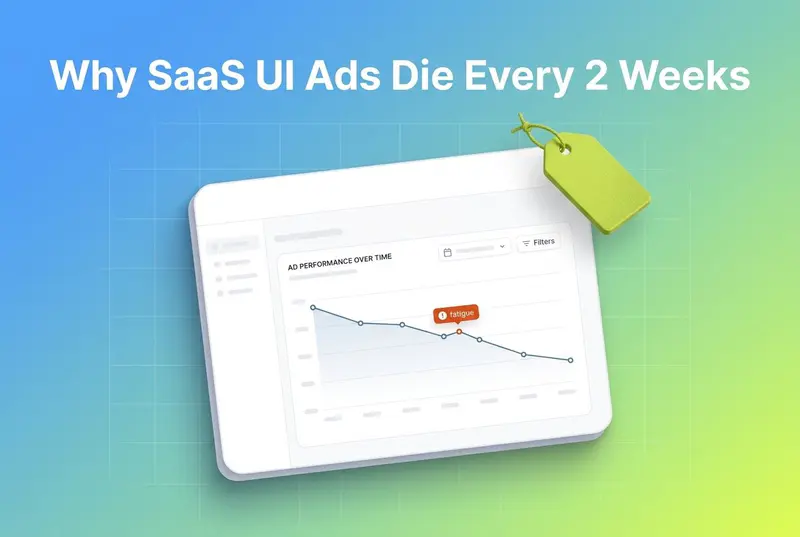
If you run paid social for a SaaS product, you have lived this. A winning ad holds for ten to fourteen days, then cost per result climbs. You write three new hooks, slap them over the same product demo, relaunch, and nothing resets. Spend keeps drifting. You blame frequency. You expand the audience. The decline continues anyway.
The frequency story is incomplete. According to AdAmigo, conversion likelihood drops about 45% after roughly four exposures, and click-through rates can fall 40% to 55% once frequency clears five. That is real. But it does not explain why a fresh hook over a recycled dashboard barely buys you a few extra days, while a genuinely new visual treatment can run for weeks. The gap is cognitive, not arithmetic.
This piece breaks down why SaaS UI ads fatigue differently from DTC or gaming ads, which dimensions actually reset the freshness clock, and how to use a refresh matrix to pick the right move instead of guessing. The honest version: most SaaS teams are refreshing the one dimension that does not matter and ignoring the four that do.
Also read 8 Best AI Ad Creative Tools Compared for 2026
Key Takeaways
SaaS UI ads have a small visual novelty surface. Familiar screens process with high perceptual fluency, so the brain stops paying attention faster, even when the copy changes (Frontiers in Psychology).
Swapping the hook over the same UI shot rarely resets fatigue. The dominant visual stays constant, so cognitive freshness does not reset.
The mere exposure effect follows an inverted-U: early views build liking, then tedium takes over (Frontiers in Psychology). UI ads hit the downslope sooner because there is less to re-explore.
Frequency thresholds still apply: fatigue signals tend to start around a frequency of 2.5 to 3.0 for cold audiences (AdAmigo).
Jon Loomer argues there is no universal refresh schedule. Fatigue is driven by budget, audience size, and number of ad variations, so refresh on performance, not the calendar (Jon Loomer).
The four dimensions that actually reset SaaS UI fatigue: visual frame, format type, social-proof framing, and customer-segment voice. The 2026 SaaS UI Refresh Matrix below maps each one.
Tools that tag creative at the element level can show which dimension a fatigued ad is not changing, which is usually the whole problem.
What SaaS Creative Fatigue Actually Is
Creative fatigue is the performance decline that sets in when an audience sees the same ad too many times. Motion describes it as the digital version of a jingle stuck on repeat: catchy, then grating. Jon Loomer ties the definition to cost, not impressions. In his framing, fatigue is real only when cost per result climbs, and Meta flags it in the Delivery column as "Creative Fatigue" when cost per result hits roughly double its past level (Jon Loomer).
That is the general definition. SaaS adds a twist most fatigue guides skip.
Most fatigue advice was written for DTC and gaming. Those categories have huge visual range. A skincare brand can shoot the product on a beach, on a bathroom shelf, in a hand, in a flatlay, across ten skin tones and five lighting setups. A mobile game has characters, levels, win moments, fail moments, and playable demos. Their visual novelty surface is wide.
SaaS UI products do not have that. Your hero asset is a screen. The dashboard looks like the dashboard. The buttons look like the buttons. You can re-record the same flow a dozen ways and it still reads as the same product to a scrolling viewer. The visual novelty surface is narrow by nature.
So when a SaaS ad fatigues, teams reach for the lever that feels obvious: rewrite the hook. New headline, new first line, same screen recording underneath. Performance barely moves. This is the core trap, and the reason has more to do with how the brain processes familiar images than with frequency math.
Why UI Ads Fatigue Faster: The Cognitive Reason
Here is the part the frequency tables miss.
When you see a familiar image, your brain processes it faster and with less effort than a new one. Researchers call this perceptual fluency, and that ease of processing is what makes a familiar stimulus feel pleasant at first. It is the engine behind the mere exposure effect, where repeated exposure to a stimulus raises how positively people rate it.
But fluency has a dark side. The relationship between exposure and liking follows an inverted-U curve. Early views increase liking through positive habituation. Then tedium sets in, and liking falls (Frontiers in Psychology). The same fluency that made the ad feel comfortable is what makes it invisible once the novelty drains.
Now apply that to a UI ad. The dominant visual is a dashboard the viewer has already processed. There is very little new information left to extract on view three or four. The brain reaches the tedium downslope of that inverted-U faster, because there was never much to explore in the first place. A DTC ad with a new scene, a new face, or a new setting still gives the brain something fresh to process. A recycled UI shot does not.
This is also why the hook swap fails. Research on the mere exposure effect found the effect held only for the parts of an image that attention actually landed on. In a SaaS video, attention is pulled to the moving screen, not the static caption. Change the caption and leave the screen, and you have changed the part the viewer was not focused on. The dominant visual stays familiar, so cognitive freshness never resets. You did work. You did not reset anything.
That is the heart of it: for SaaS UI ads, fatigue is a visual reset problem wearing a frequency costume.
The Four Dimensions That Actually Reset SaaS UI Fatigue
If the hook is not the reset lever, what is? Four dimensions actually move the freshness needle for SaaS UI ads. The trick is knowing which one a fatigued ad has left untouched.
1. Visual frame
The visual frame is what the viewer's attention lands on first. For SaaS, that is usually a screen recording or a UI mockup. Resetting it means changing what fills the frame, not what is written over it.
Options that genuinely reset perceptual fluency: a talking-head founder shot, a hand holding a phone with the product on it, a whiteboard or hand-drawn explainer, a problem-state scene before the product even appears, or a metaphor visual that represents the outcome instead of the interface. The product can still show up. It just should not be the first and only thing the eye processes.
2. Format type
Format is the structural container. Static image, carousel, talking-head video, screen-capture demo, meme, UGC-style clip. Rotating across static, video, and UGC keeps messaging fresh by varying the format and resetting the novelty factor without touching the value proposition. For SaaS, format switching is one of the highest-leverage resets because it changes the whole processing pattern, not one element inside it.
3. Social-proof framing
Same product, different proof. A logo wall, a single customer quote, a number ("cut reporting time 40%"), a star rating, a named case study, a "trusted by X teams" line. Each reframes who the product is for and why it is credible. Swapping the proof type changes the emotional read of the ad even when the screen behind it is identical.
4. Customer-segment voice
Who is the ad talking to, and in whose words. A founder-led voiceover, a finance-team angle, an ops-team angle, a developer angle. The same dashboard described by a CFO versus an engineer reads as two different ads. Segment voice is the dimension SaaS teams under-use most, partly because it takes audience clarity to write convincingly for each persona.
The reason these four work and the hook swap does not: each one changes a dimension the brain re-processes from scratch. The hook, sitting over an unchanged screen, does not.
The 2026 SaaS UI Refresh Matrix
Use this to diagnose a fatigued SaaS ad and pick a reset that will actually land. Find the symptom, check which dimension you have not changed recently, then apply the matching move.
A few rules that make the matrix work in practice:
Change one dimension at a time when you can, so you learn which reset did the work.
Resting a fatigued ad for 30 to 45 days can recover 60% to 70% of its original performance once audience composition shifts (AdAmigo).
Refresh on performance signals, not a fixed calendar. Jon Loomer is blunt that there is no universal schedule, because budget, audience size, and ad count all change the timeline (Jon Loomer).
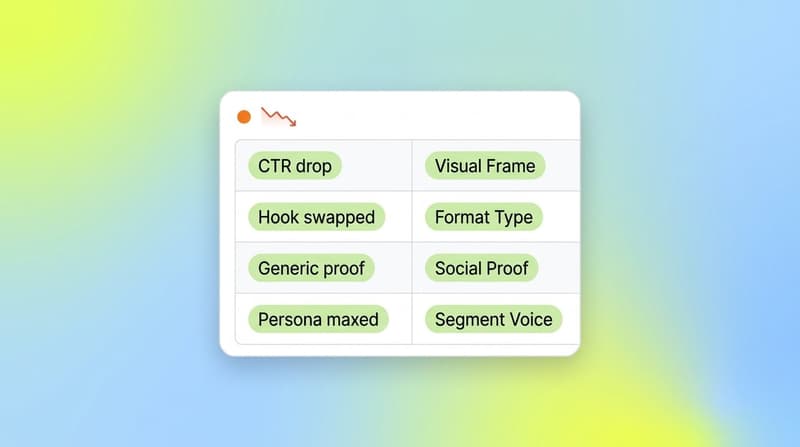

How to Spot Which Dimension You Are Not Changing
The matrix only helps if you know what you have actually been varying. Most teams think they are refreshing creative. In reality they are cycling hooks over a frozen visual frame and calling it new creative.
This is where element-level creative tagging earns its place. If every ad is tagged by its visual frame, format, proof type, and segment voice, you can look at a fatigued cluster and see the constant. Usually it is glaring: twelve "new" ads, twelve different captions, one screen recording underneath all of them.
Segwise uses multimodal AI to tag every creative element across video, audio, image, and text: hooks, CTAs, visual styles, on-screen text, voiceover style, and more. Because every tag maps to performance metrics, a SaaS team can see at a glance which dimension a fatigued ad is holding constant, and therefore which lever it has not pulled. Its creative fatigue tracking monitors continuous performance decline across Meta, Google, TikTok, Snapchat, YouTube, Axon, Unity Ads, Mintegral, and IronSource, with MMP data from AppsFlyer, Adjust, Branch, and Singular, so the fatigue alert and the "what stayed the same" diagnosis live in one place.
That combination, fatigue detection plus element-level tagging, is what turns the refresh matrix from a nice idea into a repeatable workflow. You stop guessing which dimension to reset because the data shows which one you froze.
A Practical Refresh Workflow for SaaS UI Ads
Pulling it together, here is a sequence that respects the cognitive reality instead of fighting it.
Watch performance, not the calendar. Use a CTR drop with flat CPM as your early fatigue signal, since that pattern points to creative rather than targeting (Motion).
Before touching the copy, ask what the dominant visual is and whether it has changed across your recent variations. If it has not, that is your reset target.
Pull the matrix. Match the symptom to the dimension and apply the matching move.
Reset the visual frame or format first, since those carry the most cognitive weight for UI products. Save copy tweaks for last.
Test one dimension at a time so you can attribute the recovery.
Rest, do not delete, ads that doubled in cost. Bring them back after 30 to 45 days when the audience has turned over.

This is the same point from the top, said differently: for a UI product, the freshness clock resets when you change what the brain re-processes, and the screen recording is almost never that thing.
Conclusion
SaaS creative fatigue looks like a frequency problem and behaves like a visual reset problem. Because UI products have such a thin layer of visual novelty, the familiar dashboard hits cognitive tedium fast, and another hook over the same screen does almost nothing to reset it. The fixes that work change the dimensions the brain actually re-processes: the visual frame, the format, the social-proof framing, and the segment voice. The hook is the lever everyone pulls and the one that matters least.
The hard part is not the matrix. It is seeing which dimension your "new" ads have been quietly holding constant. If you want that visible automatically, Segwise's creative tagging and fatigue tracking map every element to performance across your ad networks and MMPs, so the dimension you froze stops hiding. Teams use it to cut manual tagging work and act on fatigue before spend leaks.
Frequently Asked Questions
What is SaaS creative fatigue and why does it happen faster for UI products?
SaaS creative fatigue is the performance decline that hits when an audience has seen your product ad too often. It happens faster for UI products because the hero visual is usually a screen, and screens have a narrow visual novelty surface. The brain processes the familiar dashboard with high perceptual fluency, reaching the tedium phase of the mere exposure curve sooner than a DTC or gaming ad with richer visual range (Frontiers in Psychology).
Why does changing the hook not reset my SaaS ad's fatigue?
Because the hook is rarely where attention lands in a SaaS video. The eye follows the moving screen, not the static caption. Research on the mere exposure effect found it held only for the parts of an image that attention actually fixed on (Frontiers in Psychology). Swap the caption and keep the screen, and you have changed the part the viewer was ignoring, so cognitive freshness does not reset.
How often should SaaS teams refresh ad creative?
There is no universal schedule. Jon Loomer argues refresh timing depends on budget, audience size, and how many ad variations you run, so you should refresh on performance signals rather than a fixed date (Jon Loomer). As a rough anchor, many Meta advertisers see fatigue signals begin around a frequency of 2.5 to 3.0 on cold audiences and rotate creative every 7 to 14 days (AdAmigo).
What is the difference between refreshing a creative and creating a new concept?
Refreshing means tweaking small elements like a hook, headline, or CTA to regain attention. Creating a new concept means rethinking the visual frame or format entirely (Motion). For SaaS UI ads, small refreshes that leave the screen recording intact tend to underperform, so a true concept change to the visual frame or format usually resets fatigue more reliably.
How do I figure out which dimension my SaaS ads keep holding constant?
Tag your creatives at the element level: visual frame, format, proof type, and segment voice. When you compare a fatigued cluster, the constant dimension stands out. Tools that do this differ in coverage. Segwise uses multimodal AI to tag video, audio, image, and text elements and maps each tag to performance, while platforms like AdAmigo lean more toward automated frequency and budget control. Element-level tagging is what surfaces the dimension you froze.
my saas ad died after two weeks even though I changed the copy, what now
Stop changing copy. If two weeks of new captions over the same demo did not help, the constant is your visual frame or format. Replace the screen-first open with a founder talking-head or a problem-state scene, or move from a screen-capture video to a static carousel. Then rest the original ad for 30 to 45 days before reusing it (AdAmigo). A fatigue tracker can confirm whether the decline is creative or targeting before you rebuild.
Does audience size affect how fast SaaS UI ads fatigue?
Yes. Smaller audiences saturate faster because your budget reaches the same people sooner, pushing frequency up (Jon Loomer). B2B SaaS audiences often run small, so single assets wear out quickly. Expanding the audience buys time, but it does not fix a frozen visual frame, so pair audience expansion with a genuine creative reset rather than treating either one as a standalone fix.