The fastest way to resize ad creatives for every platform in 2026 is to design once at each feed's native aspect ratio (9:16, 4:5, 1:1, 1.91:1, 2:3) and adapt every version to a placement's exact pixel spec. Segwise, Smartly, and Canva cover the three ways teams do this: Segwise generates data-backed ads from your performance across 15+ networks and exports each one, video or static, in any aspect ratio you need, Smartly automates enterprise paid-social production, and Canva handles quick manual resizing with Magic Resize.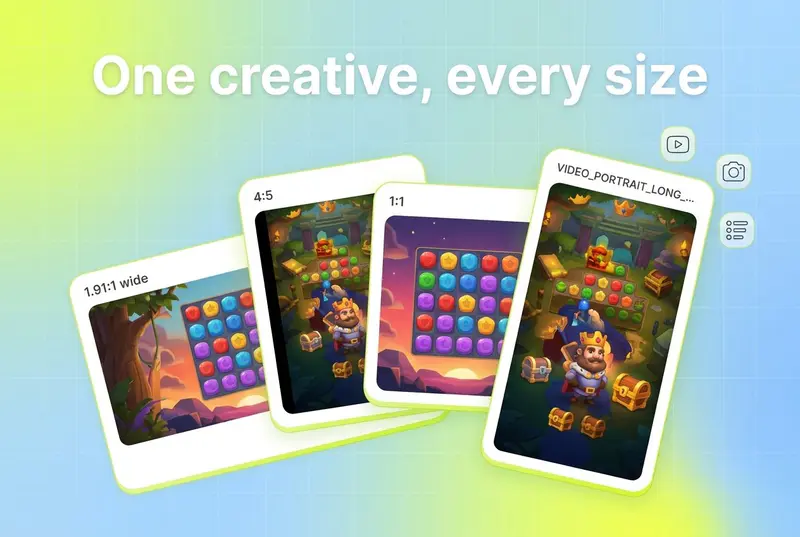
To resize ad creatives for every platform, start from the native aspect ratio each feed uses: 9:16 for TikTok, Reels, Stories, YouTube Shorts, and Snapchat; 4:5 or 1:1 for Meta and LinkedIn feeds; 2:3 for Pinterest; and 1.91:1 for display and link placements. Then export each version at its exact pixel size instead of cropping one master file. Segwise is an AI creative analytics and creative generation platform that helps UA and creative teams find their winning creative patterns and turn them into on-brand statics, videos, and playables, then exports each asset, video or static, in any aspect ratio you need. That makes resizing a byproduct of generation rather than a separate manual chore.
This guide gives you the full 2026 spec table for every major platform, the step-by-step resizing workflow, how to stay on-brand across sizes, and the tools that automate the whole thing.
TL;DR
Every major ad platform maps to one of five aspect ratios: 9:16, 4:5, 1:1, 1.91:1, and 2:3. Get the ratio right and the pixel size follows.
Full-screen 9:16 is the highest-leverage format. TikTok reported a 91% lift in conversions for 9:16 video over letterboxed video framed by black bars (TikTok For Business, 2023), and Google reports more than a 35% increase in conversions on Shorts when a vertical video asset is added to a Demand Gen campaign (Google Ads Help).
Resizing is not cropping. Text, logos, and focal points shift between ratios, and safe zones differ by placement, so a naive crop can bury your CTA behind the UI.
Manual editors like Canva and Adobe Express fit small teams and one-off jobs; automated platforms like Segwise, Smartly, Celtra, and The Brief fit teams shipping dozens of variants a week.
Segwise exports every generated ad, video or static, in any aspect ratio you need, so the resize step folds into the generation step.
Resizing tools compared at a glance
Here are the ten tools covered in this guide, with what each is best for and its verified 2026 pricing. Full reviews follow further down.
Why resizing ad creatives correctly matters for performance
A single performance campaign in 2026 spans more surfaces than most teams realise. One product launch might run on Meta feed and Reels, Instagram Stories, TikTok, YouTube in-stream and Shorts, LinkedIn, Reddit, Pinterest, Snapchat, and a handful of mobile UA networks. That is roughly nine platforms and well over a dozen distinct placements, each with its own frame.
When you drop a horizontal or square file into a vertical feed, the platform either letterboxes it with black bars or auto-crops it, and both hurt. The creative reads as recycled, the focal point drifts, and viewers scroll past. The performance gap is measurable. TikTok found that video shot in 9:16 delivered a 91% lift in conversions compared with video that did not match the screen and ran with black bars (TikTok For Business, 2023). Google reports that adding a vertical video asset to a Demand Gen campaign produces more than a 35% increase in conversions on Shorts (Google Ads Help).
The takeaway is not "make everything vertical." It is that each placement has a native frame, and creative built for that frame beats creative squeezed into it. Resizing done right means the message, the logo, and the CTA all survive the move from one ratio to the next.
The master ad size and aspect ratio table for every platform (2026)
This is the reference. Design your master asset at the largest native ratio you will need (usually 9:16 for video, 1080 x 1920 px), then adapt down to each placement below. Sizes are the recommended production dimensions; aspect ratio is the durable spec to build against.
Two rules make this table easier to live with. First, the five ratios that cover almost everything are 9:16, 4:5, 1:1, 1.91:1, and 2:3. Second, always build the vertical 9:16 master first, because you can crop down to 1:1 and 4:5 far more cleanly than you can stretch a landscape file up to full-screen.
How to resize a creative for every platform, step by step
You do not need a design degree for this, but you do need the source file and a checklist. Here is the workflow.
Before you start: have the layered source file (PSD, Figma, or the project file), your brand kit with fonts and logo, and the list of placements you are actually buying. Resizing to formats you will never run is wasted effort.
Build the 9:16 master. Design the full-screen vertical version first at 1080 x 1920 px. Keep logos, key text, and the CTA inside the center 80% so nothing collides with platform UI.
Map your placements to ratios. Using the table above, list every placement you are running and the ratio it needs. Most collapse into 9:16, 4:5, 1:1, 1.91:1, and 2:3.
Adapt, do not crop blind. For each ratio, reposition the focal point, resize text so it stays legible, and re-lay the logo and CTA. A face that was centered in 9:16 will sit too high in a 1:1 crop.
Check safe zones per placement. TikTok, Reels, Stories, and Shorts all reserve edges for captions, profile icons, and buttons. Keep critical elements away from the bottom 15% and the right edge.
Export at the exact pixel size. Match the recommended size for each placement rather than uploading one oversized file and letting the platform downscale it.
Preview in-app before launch. Upload to each ad manager and view the placement preview. This is where you catch a clipped CTA or a headline that wrapped to three lines.
How to tell a step went wrong: if the ad manager shows black bars, your ratio is off. If the preview crops your logo or CTA, your safe zones are off. If text looks fuzzy, you exported below the recommended resolution. Fix the source, not the export.
Manual vs automated resizing: which approach fits
For a handful of placements and a slow calendar, manual resizing in an editor is fine. The moment you are shipping variants across nine platforms every week, manual work becomes the bottleneck, and version drift creeps in: an old logo here, last quarter's offer there.
Manual tools like Canva and Adobe Express are cheap, familiar, and good for one-off jobs or small teams. Automated platforms take a master concept, or the data on what is already winning, and produce every placement version at once. Segwise sits at the far end of that spectrum: instead of resizing an existing file, it generates new data-backed ads from your winning patterns and exports each one, video or static, in any aspect ratio you need, then tracks how they perform once live through its creative analytics.
The honest trade-off: manual tools give you pixel-level control at the cost of time; automated tools give you speed and consistency at the cost of some hands-on nuance. Most scaling teams end up with both, using an automated platform for volume and a manual editor for the hero creative.
How to keep creatives on-brand when you resize
Resizing is where brands quietly fall apart. The logo gets stretched, the color drifts after a re-export, the font substitutes because it was not embedded. A few habits prevent it.
Work from a locked brand kit. Fonts, colors, and logo files defined once, reused everywhere. Canva, Adobe Express, and The Brief all enforce brand kits; Segwise generates against your brand guidelines so the output is on-brand by default.
Reflow, do not stretch. Never scale a logo or type non-proportionally to fill space. Reposition and re-lay instead.
Keep a safe-zone template per ratio. A reusable overlay that marks the caption bar and button areas for each placement saves you from re-checking every time.
Review at 100%. Zoom to full size before export to catch soft logos and pixelated edges.
Version once, adapt many. Change the offer or hook in the master, then regenerate every size, so no stale variant survives.
Keep the winners, resize the winners Resize the creatives your data says are working, not every asset you own, and re-check performance per placement after launch since a hook that wins on TikTok can stall in a 1:1 feed.
The best tools to automate ad creative resizing in 2026
Ten tools, grouped loosely from generation-first platforms to manual editors and developer APIs. Pricing is from each vendor's own page, in USD, verified in September 2026.
1. Segwise - Best for data-backed ads exported in any aspect ratio
Segwise reads the creative and performance data you already have across 15+ ad networks and MMPs, finds the elements that are winning, and helps you turn them into new statics, videos, and playables. Its creative generation agent auto-exports each asset in whatever aspect ratio a placement needs, so resizing is not a separate step: it happens as the ad is generated, on-brand, with a "why this ad" rationale attached.
Best for: UA and creative teams who want every generated ad exported in the aspect ratio each placement needs, grounded in what is actually performing.
Key features: Generation across statics, video, playables, and AI UGC-style video; export in any aspect ratio for video and statics; multimodal tagging that maps creative elements to performance; auto-tracking once an ad goes live across 15+ networks.
Pricing: Segwise starts at $499/month for advertisers spending up to $250K/month, with a special 50% discount for startups spending under $50K/month. 7-day free trial, no credit card.
Limitations: Competitor tracking is Meta only today, and the platform is built for teams running paid acquisition, not for one-off graphic design.
Resize as you generate, not after With Segwise, formatting to each placement happens during generation from your winning patterns, so resizing stops being a separate manual step.

2. Smartly - Best for enterprise paid-social creative at scale
Smartly is a paid-social automation platform used by large advertisers to produce and adapt creative across Meta, TikTok, Pinterest, and Snapchat. Its creative tools use templates and rules to spin one concept into many placement-ready versions.
Best for: Enterprise teams and agencies running high-volume paid social who want production and media buying in one system.
Key features: Template-driven dynamic resizing, bulk creative production, and media buying automation.
Pricing: Custom / on request. Smartly does not publish standard rates.
Limitations: Priced for large budgets, and heavier to onboard than a lightweight editor.
3. Celtra - Best for large in-house creative teams and DCO
Celtra focuses on creative automation and dynamic creative optimization, letting big teams generate high volumes of ads and variants faster than by hand.
Best for: Enterprise brands with a central creative function producing omnichannel campaigns.
Key features: AI-led creative automation, DCO, and format scaling across channels.
Pricing: Custom / on request. Celtra uses bespoke pricing based on scale and features rather than rate cards.
Limitations: Enterprise focus means it is more than most small teams need.
4. The Brief (formerly Creatopy) - Best for design teams producing many size variants
The Brief, the platform previously known as Creatopy, is built to generate and adapt ads at scale. You can import PSD and Figma files, then resize and animate across formats automatically.
Best for: Design and marketing teams that need hundreds of size and format variations from one design.
Key features: Automatic multi-size generation, PSD and Figma import, Magic Animator, and intelligent resize.
Pricing: Custom / on request on the current site, with a free trial and no credit card required.
Limitations: Public pricing is no longer listed, so you need to talk to sales for a firm number.
5. Rocketium - Best for ecommerce and retail-media creative ops
Rocketium automates high-volume creative production for paid social, product pages, and retail media, pairing AI agents with human review to move from brief to assets in hours.
Best for: Ecommerce and retail-media teams producing large batches of on-spec assets fast.
Key features: Bulk creative automation, multi-format and multi-size output, and expert review.
Pricing: Custom / on request. Rocketium directs buyers to a demo rather than a public price.
Limitations: Built for volume operations, so it is overkill for a small ad account.
6. AdCreative.ai - Best for fast conversion-focused ads in every size
AdCreative.ai generates conversion-focused ad creatives, banners, and variations across formats from a brand kit, aimed at producing every ad size you need quickly.
Best for: Small and mid-size teams that want AI-generated ads in all the standard sizes without a designer.
Key features: Generate every ad size and variation from templates, product photoshoots, and text copy.
Pricing: Starter from $39/month (lower on annual billing). Free trial available.
Limitations: Output leans generic, so hero creatives still benefit from human polish.
7. Canva - Best for small teams and quick manual resizing
Canva is the most widely used design tool for marketers, and its Magic Resize feature turns one design into multiple platform dimensions in seconds.
Best for: Small teams and solo marketers doing hands-on design and occasional resizing.
Key features: Magic Resize across preset sizes, brand kits, huge template library, and background remover.
Pricing: Free plan available; Canva Pro from $15/month on annual billing. Magic Resize requires Pro.
Limitations: Resizing is manual and per-design, so it does not scale to hundreds of automated variants.
8. Adobe Express - Best for solo creators and brand-kit resizing
Adobe Express offers a One-click Resize feature that adapts an asset for multiple channels in the same file, with Adobe's design pedigree behind it.
Best for: Solo creators and small teams already in the Adobe ecosystem.
Key features: One-click Resize for multiple formats, brand kits, and Firefly AI generation.
Pricing: Free plan available; Premium at $9.99/month.
Limitations: Best for individual and small-team output rather than automated bulk production.
9. Bannerbear - Best for developers automating images via API
Bannerbear is an API-first tool that generates and resizes images and videos programmatically, so engineering teams can build resizing into their own workflows.
Best for: Developers and ops teams automating image generation and resizing at scale.
Key features: REST API, template-based image and video generation, integrations, and workflows.
Pricing: Automate plan from $49/month. Free trial with 30 API credits, no credit card.
Limitations: Requires technical setup, so it is not a point-and-click tool for marketers.
10. Pencil - Best for AI ad generation across image and video
Pencil, part of the Brandtech Group, generates AI ad assets across image and video formats by aggregating multiple AI models under enterprise governance.
Best for: Brands and agencies that want AI-generated ad variants across formats with model choice.
Key features: Multi-model text-to-image and text-to-video generation, plus a Pro tier for advanced video.
Pricing: Custom / on request. Public price tiers are not listed on the site.
Limitations: Generation-focused, so placement-perfect specs still need a review pass.
How to choose the right resizing approach
Match the approach to your volume, your team, and where your data lives.
If you run paid acquisition and want every generated ad exported in the aspect ratio each placement needs, start with Segwise. Segwise starts at $499/month for advertisers spending up to $250K/month, with a special 50% discount for startups spending under $50K/month. It generates from your winning patterns and exports in any aspect ratio, video or static, so the resize step folds into generation and every asset is tracked once live.
If you ship more than roughly 10 new variants a week across 4 or more platforms, move to an automated platform like Smartly or Celtra for production plus automation at enterprise scale (custom pricing).
If your bottleneck is a design team drowning in size requests, The Brief or Rocketium turn one design or brief into hundreds of on-spec versions.
If you need AI-generated ads in all the standard sizes on a modest budget, AdCreative.ai delivers them from $39/month.
If you spend under about $10K/month or produce fewer than 10 variants a week, a manual editor is enough: Canva Magic Resize (from $15/month) or Adobe Express One-click Resize ($9.99/month).
If resizing should live inside your own product or pipeline, Bannerbear does it through an API from $49/month.
If you run just one or two placements once in a while, you may not need a dedicated tool at all: a free Canva or Adobe Express plan covers occasional resizing at no cost.
The dividing line is simple: manual editors for control and low volume, automated platforms for scale and consistency, and a generation-first platform like Segwise when you want the winning creative and its correctly-sized exports to come from the same place.
What to do next
Resizing ad creatives for every platform in 2026 comes down to five aspect ratios, correct safe zones, and a workflow that adapts rather than crops. For most teams the practical answer is a mix: a manual editor like Canva or Adobe Express for hero creatives, and an automated platform for the long tail of placements. If you run paid acquisition at any real volume, Segwise collapses generation and resizing into one step by turning your winning patterns into on-brand ads exported in any aspect ratio you need, across 15+ networks, and tracking each one once it goes live. That is the difference between resizing as a chore and resizing as a byproduct of making better ads.
FAQ
What is the best aspect ratio for ad creatives across platforms?
There is no single best ratio, but five cover almost every placement: 9:16 for TikTok, Reels, Stories, YouTube Shorts, and Snapchat; 4:5 and 1:1 for Meta and LinkedIn feeds; 1.91:1 for display and link ads; and 2:3 for Pinterest. Build your master in 9:16, then adapt down. Tools like Canva handle this manually, while Segwise auto-exports each generated ad in whatever ratio a network requires.
How do I resize one ad for multiple platforms without losing quality?
Start from a high-resolution layered source, adapt the layout for each ratio instead of cropping one flat file, and export at each placement's exact recommended pixel size rather than letting the platform downscale. Manual tools like Adobe Express One-click Resize and Canva Magic Resize do this per design; automated platforms like Smartly and The Brief produce every size at once, and Segwise exports each generated ad in any aspect ratio you need, so quality and layout stay consistent.
Is it better to resize an existing ad or create a new one for each platform?
For a quick campaign, resizing a strong master is fine if you adapt the layout per ratio. For scale and performance, building placement-native creative wins, since TikTok reported a 91% conversion lift for native 9:16 over letterboxed video (TikTok For Business, 2023). This is where a generation-first tool helps: rather than resizing, Segwise generates new ads from your winning patterns and exports each in the aspect ratio the placement needs, while editors like Canva focus on adapting what you already have.
What are the 2026 ad sizes for Meta, TikTok, and Google?
Meta feed is 4:5 at 1080 x 1350 px, Stories and Reels are 9:16 at 1080 x 1920 px, and carousel is 1:1 at 1080 x 1080 px. TikTok in-feed is 9:16 at 1080 x 1920 px. Google responsive display needs a 1.91:1 landscape (1200 x 628), a 1:1 square (1200 x 1200), and ideally a 4:5 portrait. The full cross-platform table above covers LinkedIn, Reddit, Pinterest, Snapchat, YouTube, and the mobile UA networks. Segwise exports generated video and statics in any of these aspect ratios.
Can AI tools automatically resize ad creatives for every placement?
Yes. AI and automation tools now handle multi-size output natively. Canva Magic Resize and Adobe Express One-click Resize cover manual resizing; Smartly, Celtra, The Brief, and Rocketium automate bulk variants for larger teams; and Segwise generates data-backed ads and exports each one, video or static, in any aspect ratio you need, so the resizing happens as part of generation.
How do I keep my brand consistent when resizing ads?
Lock a brand kit with defined fonts, colors, and logo files, reflow layouts instead of stretching, keep a safe-zone template for each ratio, and review at full size before export. Canva, Adobe Express, and The Brief enforce brand kits during design, and Segwise generates against your brand guidelines so every resized export stays on-brand without manual policing.
Which resizing tool is best for a small team on a budget?
For small teams, Canva (free, or Pro from $15/month) and Adobe Express (free, or Premium at $9.99/month) offer the cheapest manual resizing, and AdCreative.ai generates ads in every size from $39/month. If the goal is paid-acquisition performance rather than design, Segwise starts at $499/month for advertisers spending up to $250K/month, with a special 50% discount for startups spending under $50K/month. It replaces resizing with data-backed generation that exports in any aspect ratio.