
Pre-flight ad testing helps you choose which ads deserve a paid test. Check the placement, compare the creative with relevant reference ads, and brief one revision. Then use a paid experiment to see whether the challenger clears your purchase-cost target. On Meta or TikTok, an early score can help choose a candidate; the buying decision needs observed purchases.
Segwise is a creative analytics and generation platform that scores an image or short video and explains its verdict against named references. Setup for this app walkthrough. Use the configuration described in Segwise’s Pre-flight product FAQ: connect the ad network first, then the mobile measurement partner (MMP). Check a recent day’s network spend and reconcile a mature purchase cohort against your chosen attribution source. If you only have network data, confirm which benchmarks your workspace offers before promising an account-specific score. A reference labelled “measured by spend” identifies ads that attracted budget. You still need purchase data to judge their economics. Segwise connection instructions
Which pre-launch checks help you choose an ad to test?
Will the creative fit this placement? Check the actual export for each placement on your media plan. A feed image can clear the requirements for one placement while its aspect ratio rules out another. Segwise flags placement mismatches and explains why. A separate brand review can catch a missing disclosure, an unapproved claim or an out-of-date logo. CreativeX’s guide to brand checks
What will people notice first? If the question is whether an offer gets lost behind a headline, an attention model can help the designer choose a layout. Smartly assesses attention, emotion and composition. Brainsight shows where a viewer is likely to look on a display ad. If you want to know how the ad compares with the creatives that drew spend in your account, look at the reference ads behind its score. Smartly’s pre-flight guide · Brainsight’s display ad example
Will this ad beat what we run today? That takes a paid experiment. Before launch, choose the outcome that would justify a switch, such as cost per purchase. After launch, give the new ad and the current winner a fair comparison on that outcome. Guide to creative testing tools
How to read an ad score against your own winners
In Segwise’s published Pulse fitness example, the new Train Hard ad is a polished gym image with a headline across it. It earns 41/100, Hold, with high confidence. The gym setting looks right for the brand. All eight reference winners open on a person, including the Rest Day video. The headline takes up the very first frame where those ads give viewers someone to watch.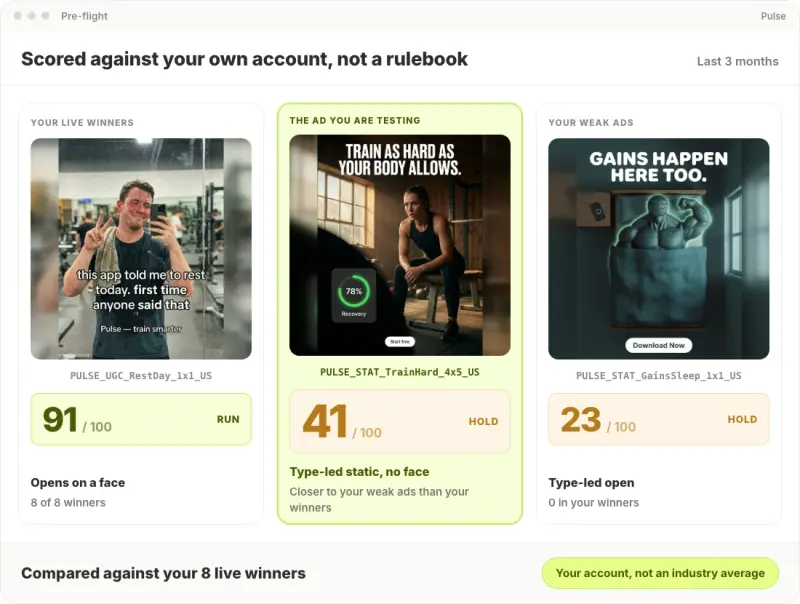
Example data. Rest Day is a live reference ad. Train Hard is the new candidate.
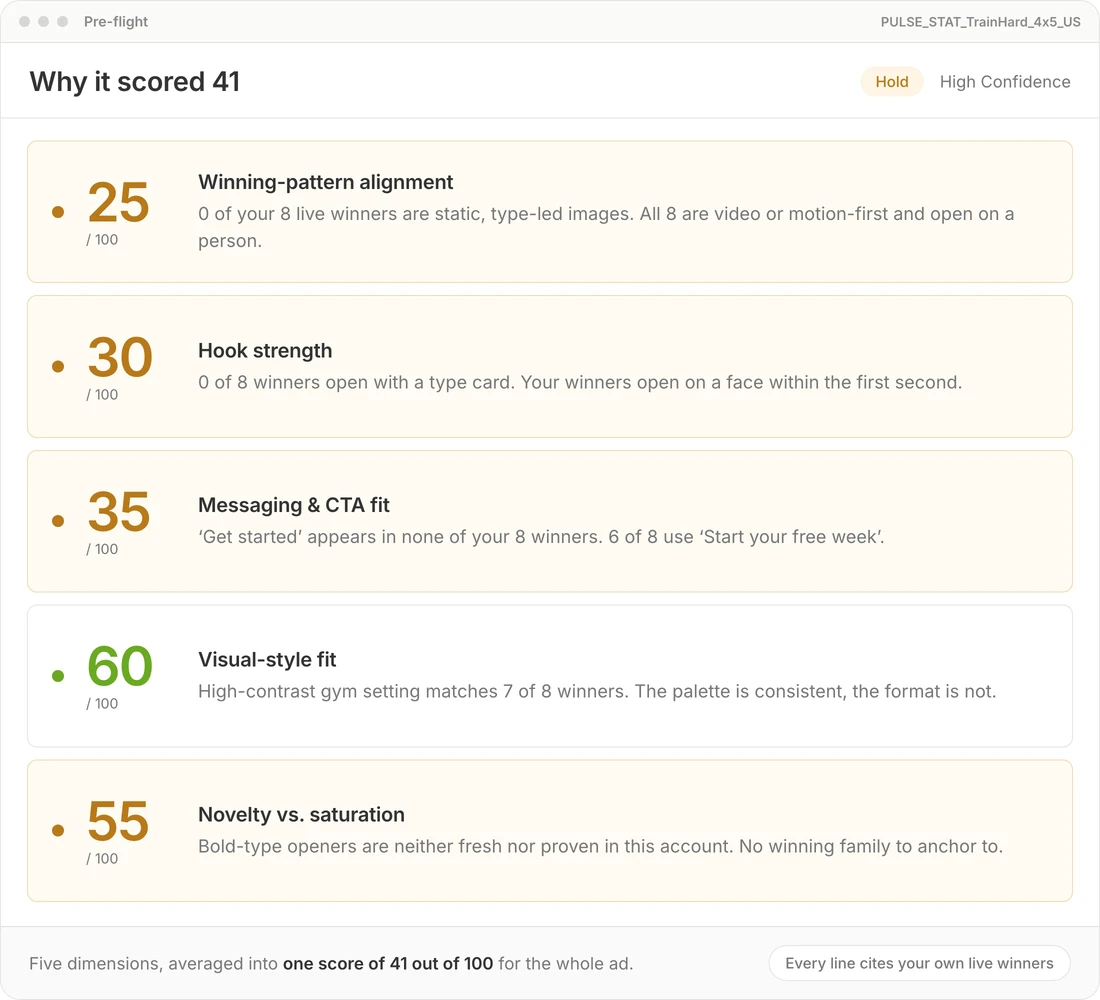
The detailed Pulse scorecard gives the underlying reference counts for all five rows. The first three cues to check are the opening frame, motion and offer wording. See the published scorecard below. High confidence applies to that account evidence. It gives the designer a reason to revisit the opening. On this scale, 41 measures fit to the references. Only paid delivery can establish actual return on ad spend (ROAS).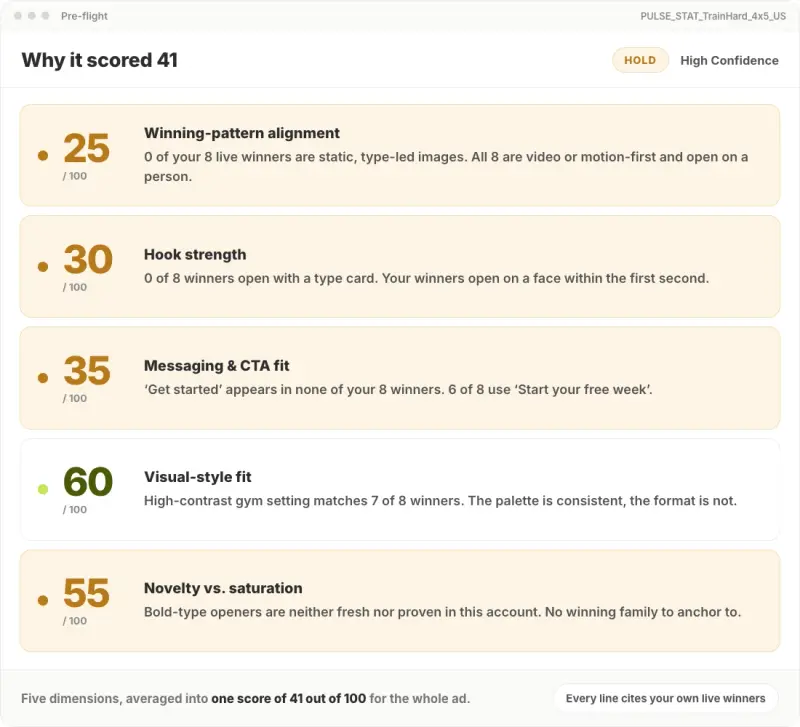
Review your next batch: Segwise lets you inspect the winning ads behind a score before you brief the next cut. Book a demo.
How to turn ten scores into a designer brief
Say your agency delivers six images and four short videos. If your total budget covers two test arms, reserve one for the current ad and shortlist one challenger. If you can fund two new concepts first, budget separately to test the strongest against the incumbent. Choose the network and ad group you want to compare, or use the full account for a broader reference set. Upload all ten together. Segwise accepts JPG, PNG and WebP images, plus MP4, MOV and WebM short videos. With enough reference data, each asset gets a score out of 100, a confidence level, an explanation and a Run, Refine or Hold verdict. If your card explicitly identifies tracked competitors as the basis, record that lower-confidence comparison in the brief. Treat the result as directional and keep the cited competitor examples separate from your own winners. If it says “Not enough data,” review the asset manually or give it a small paid test.
Start with the Run candidates that fit the intended placements. For a new-versus-new screen, choose two distinct openings that answer the same question. For a challenger-versus-control test, keep your incumbent as the other arm. For a Refine verdict, assign the smallest edit the evidence supports. For a Hold, read the references before spending design time. A deliberate departure from past winners can still deserve a test if someone can say what the team hopes to learn.
Revision note for the Train Hard designer:
Keep the high-contrast gym setting. Open on the athlete’s face, as Rest Day does, and start with the athlete already moving. Swap “Get started” for the specific introductory offer shown on the landing page. Send back the revised cut for approval. For the paid hook test, export a second cut that differs only in its opening.
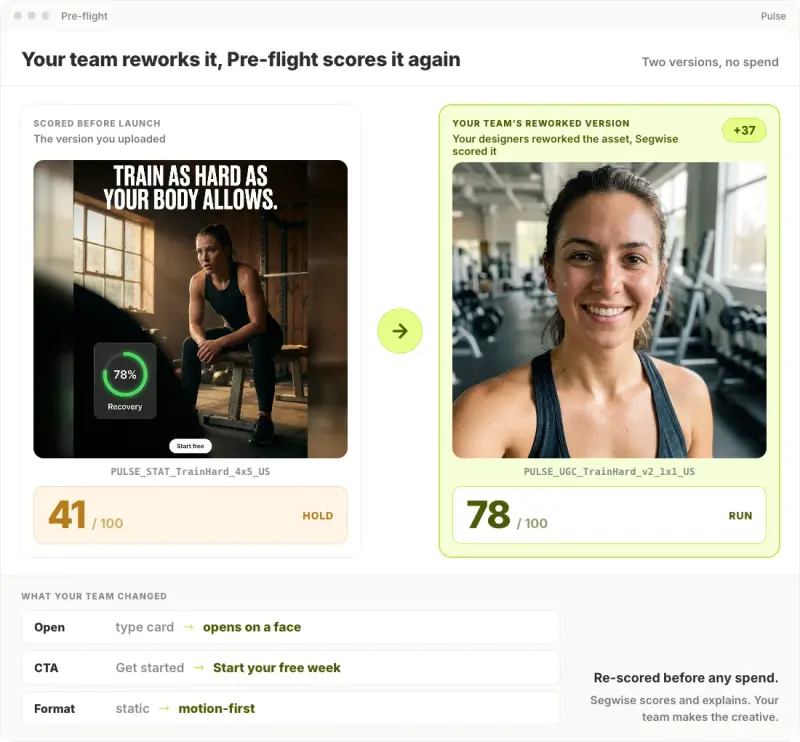
Example data. The revised Train Hard ad earned 78/100 and a Run verdict. Both scores preceded any spend on those versions.
The designer makes the edits and uploads the new version for scoring. The creative lead approves the asset and the buyer sets up the paid test. The score change supports giving the revision a test slot. Because the rework changed the opening, format and call to action together, the team still needs a controlled test to learn which change mattered.
A Meta testing framework from shortlist to scale
Compare new ads with each other
If the question is “Which opening sells the same offer?”, give both ads the same body, offer and call to action. In Meta Ads Manager, set up an A/B test with creative as the variable. Keep the audience, placement and objective consistent so Meta can compare the variants across separate audience groups. A product demo versus a testimonial can also make a good test, but the result tells you which complete concept won. Meta’s A/B testing guide
Five Meta campaign setups for testing new ads
When screening a batch in a live campaign, choose the setup around the decision you need to make. A campaign budget, an ad-set budget and a bidding goal control different parts of delivery. Some of these choices can be combined.
1. Advantage+ sales campaign with all candidates together. Put the new ads in one ad set within an Advantage+ sales campaign. This is a practical way to see which ads attract delivery while the campaign optimizes for sales. An ad that receives little spend still has an open question about its performance. Meta’s guide to Advantage+ sales campaigns
2. Campaign budget with one creative per ad set. Give each ad its own ad set and use Advantage+ campaign budget, formerly campaign budget optimization (CBO). Meta distributes the shared budget across ad sets as it finds opportunities. Compare spend alongside cost per purchase. A lightly delivered ad may need a separate test before you drop it. Meta’s campaign budget guide
3. Ad-set budgets with one concept per ad set. Group each concept’s variants in their own ad set and choose a budget for each set. Buyers often call this ad-set budgeting (ABO). Setting equal budgets gives each concept the same planned allowance. Check actual spend and impressions before comparing results, since delivery can differ across sets and among variants.
4. Campaign budget with one ad set per concept. Put all testimonial variants in one ad set and all product demos in another, then share a campaign budget across both sets. Read spend and cost per purchase at the concept level first. Open the ads within each set to see whether one execution accounted for most of the result.
5. Cost-cap bidding with one ad set per concept. Add this bidding constraint to a compatible budget setup when the business has a target average acquisition cost. For a concept with little delivery, a tight goal can leave the creative question unresolved. Individual purchases can cost more than the goal. Check that each concept has enough purchases to judge it. Use Meta’s A/B test when you need to isolate a creative change. Meta’s bid-strategy documentation
Challenge the current winner
Before launch, pick a purchase definition, attribution window and decision margin. Suppose a buyer will switch only with evidence of at least a 10% reduction in cost per acquisition (CPA). If the simultaneous control costs $50 per purchase, that margin is $45. If it costs $40, the margin is $36. A separate break-even ceiling still applies.
Plan the spend as well as the calendar. Ask the measurement owner to size the two-arm experiment for that margin using historical purchases per dollar, the gain you realistically expect beyond 10%, your chosen power and the tolerable false-positive rate. A rate-ratio superiority planner is appropriate for independent purchase counts with fixed spend. If reaching the required volume costs more than the campaign can afford, screen fewer challengers or keep the exercise exploratory. Set the readout date after the final cohort’s conversion window. How to plan a two-rate test with a superiority margin
When should the challenger get more budget?
Use the lower confidence bound on the saving. The buyer wants evidence for the full 10%. In the worked example, the control spends $100,000 and records 2,000 purchases ($50 each). The alternative outcomes below use the same fixed spend and the same attribution window. They are illustrative, separate possible readouts.
How the analyst gets the interval. Divide purchases by spend in each arm and compare the challenger rate to the control rate. For example, in base R, ci <- poisson.test(c(2250, 2000), T=c(100000, 100000))$conf.int gives the two-sided exact interval for the purchase-rate ratio. 100 * (1 - 1/ci) converts its endpoints to percentage savings in CPA. Substitute 2,400 for 2,250 to reproduce the second row. Positive values mean lower cost per purchase. R documentation for the two-sample rate test
This calculation assumes independent purchase counts, fixed exposure in dollars and a constant underlying purchase rate within each arm over the test. Apply the method chosen in the experiment plan. If repeat buyers, clustered assignment, adaptive spend or modeled conversions make those assumptions implausible, have the analyst use uncertainty estimates that respect the actual randomization. If Ads Manager gives only a winner probability and you cannot obtain a defensible interval for relative CPA, record the margin test as inconclusive and keep the control.
A TikTok testing framework for different hooks
Write a few openings for one concept. For a fitness app, one cut might open on a runner asking, “What do you do on a rest day?” Another might open on a coach demonstrating the first recovery stretch. In TikTok Ads Manager, use Split Testing and select Creative Assets so each audience group sees one version. Use the same footage after the opening, the same offer and the same end card. When budgeting, check the estimated testing power. TikTok recommends at least 80% power and a run of at least seven days. TikTok’s split-test planning guide · TikTok’s guide to split-testing variables
Read the live result in two steps. First, see whether people stayed through the opening. Then look at the business outcome you chose for the test. Suppose the coach holds more viewers, but TikTok identifies the runner as the winner on cost per subscription. If both openings were new, the runner has earned the next test against your incumbent. Replacing your current winner still requires that direct comparison and enough budget for it. If the runner was already the incumbent, retain it. If the challenger beat the incumbent in this split, move spend only when its cost clears your predeclared business rule. For an inconclusive split, keep the current ad and record which comparison remains open. How to interpret hook rate
What belongs in the next creative brief?
Once the ads run, use Segwise’s creative analytics to compare results by hook, format or call to action. Put the original verdict beside the paid result and the version people actually saw. If a Hold candidate won, save the ad and the reason you tested it anyway. If a Run candidate lost, note where the response fell away. When you brief the next batch, give the designer the reference ad, the element to keep and the one thing you want to learn. How to write a data-backed creative brief