Mobile app marketing with paid ads comes down to four calls: buy on one or two channels first (Meta, Google App campaigns, TikTok or Apple Ads), optimize each campaign for the deepest in-app event you can buy about 50 times a week, judge every ad on trial starts and D7 ROAS from your MMP, and fund the learning phase before you scale.
The hard part is the creative. Ad networks report clicks and installs per ad, while the trials and subscriptions that pay the bills sit in your mobile measurement partner (MMP). Segwise is an AI creative analytics and creative generation platform made for that split: it tags the hook, offer, on-screen text, visuals and audio in every ad you run on Meta, Google, TikTok and your other networks, then joins those tags to each ad's spend and installs and to the trial and subscription events in AppsFlyer, Adjust, Branch, Singular or Kochava. Connect the Segwise MCP to Claude or ChatGPT and you can ask "which hook type brought our cheapest trial starts last month?" and get the answer from your own tagged data, then make the next batch of ads from those patterns in Segwise.
This guide is for non-game consumer and subscription apps: fitness, language learning, finance, rewards, dating, productivity. If you market a game, our mobile game marketing strategies guide covers that world. Platform details here were checked against each platform's own docs as of November 2026.
TL;DR
If you are launching: set up your MMP or the platform SDKs and confirm install, registration, trial and purchase events fire before you spend a dollar.
If you are choosing channels: start on one channel, Google App campaigns for an Android-first app or Meta for an iOS-first app. Apple Ads and TikTok make good second channels, TikTok once you can ship new vertical videos every week.
If you are choosing an event: pick the deepest event you can buy about 50 times a week per Meta ad set. For most subscription apps that is trial start, not subscription.
If you are setting a budget: multiply your cost per event by the platform's rule (50 results a week on Meta, 10x target CPA a day on Google). A two-channel test on trial start costs roughly $5,200 a month at a $10 cost per trial.
If you are judging creative: rank ads by cost per trial and D7 ROAS, not CPI or CTR, and give iOS data a few days to land.
How do you market an app with paid ads in 2026?
You market an app with paid ads by picking a channel that fits your platform, telling that channel which in-app event matters, feeding it a steady supply of different creative, and measuring results on revenue events in your MMP. The order matters more than the channel count: a channel that can't see your in-app events, or has nothing new to show, won't improve however many others you add.
Which paid channels fit a consumer or subscription app?
Two notes on the table. Google's App campaign docs say you "provide text, images, videos, and HTML5 assets" and Google builds the ads across its properties, so you control inputs, not placements. Apple Ads charges per tap and matches ads to people "based on a direct signal of their intent", meaning their search term, which makes it a strong test for iOS apps with real search volume, though its reach is capped by how many people search.
A launch sequence that works for a first app campaign
Instrument events first. Install your MMP SDK (or the Meta, Google and TikTok SDKs) and confirm install, registration, trial start and purchase or subscribe events arrive in each ad platform.
Start on one channel. Use the platform you are strongest on: Google for Android, Meta for iOS. Running two channels on a small budget splits the learning both need.
Pick one optimization event. Use the decision rule in the next section.
Launch with several genuinely different concepts. Different hooks, offers and formats, not five color swaps of one ad.
Measure on MMP events. Compare ads on cost per trial and early ROAS, then cut, keep or remake.
Add a second channel once the first spends its budget steadily at an acceptable cost per event. Our UA channel strategy guide covers when each network earns a place.
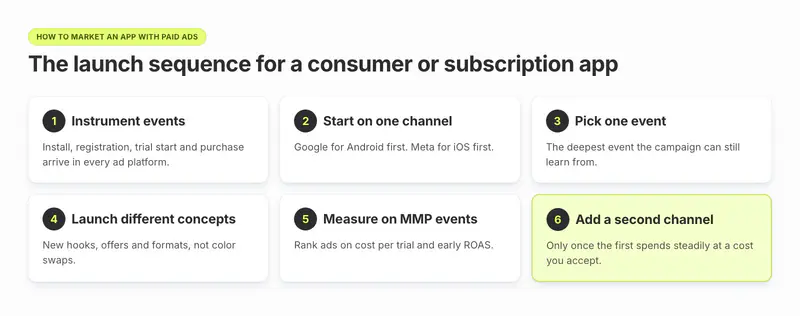
A rule of thumb: stay on one channel until it can absorb your budget at a stable cost per event for two to three weeks. A second channel added before that mostly adds noise.
Which events should you optimize your app campaigns for?
Optimize for the deepest event in your funnel that each platform can see often enough to learn from. The deeper the event, the better the users, but the fewer the signals, and a campaign starved of signals never leaves learning.
The ladder for most consumer and subscription apps looks like this: install, then registration or onboarding complete, then trial start, then first purchase or subscription, then value (revenue).
The volume rule each platform publishes
Meta: ad sets leave the learning phase "after about 50 results in the week after the ad set's last significant edit", according to Meta's learning phase page. If an ad set can't reach that on your event, it shows "Learning limited".
Google:App campaign docs warn that "making changes to an active campaign before reaching 100 conversions can disrupt campaign learning", so pick an event you can reach 100 of without touching the campaign.
TikTok: offers App Event Optimization for in-app events and value-based optimization for purchases. Its value-based optimization tips for apps (the version updated May 2026) call 50 conversions "the most significant indicator of passing the learning phase" and ask for at least 7 days of learning without budget or target changes.
So the decision rule is: take your weekly budget per ad set, divide by your cost per event, and climb the ladder only as far as the answer stays at or above 50. At $1,000 a week and a $10 cost per trial you can afford 100 trials, so trial start works. At a $40 cost per subscription you get 25, so subscription doesn't yet.
Trial start or subscription for a subscription app?
Start on trial start (or registration if trials are rare), because it fires often and arrives inside the first day or two, which also suits iOS measurement windows. Move to subscription or value once a campaign reliably buys about 50 subscriptions a week. If your trial-to-paid rate differs a lot between ads, keep watching subscription in the MMP even while you optimize for trial: that is where creative quality shows up.
Custom events and value optimization on Meta
Meta's app event optimization page says you can optimize for custom app events but not for conversion value, because custom events carry no value parameter. If you want value optimization, send purchases and subscriptions as standard events with a value. Meta also asks you to "send all conversion events", not just the one you optimize for.
Value optimization on Google and TikTok
Google's App campaigns support Target ROAS. Google's guide to setting a first Target ROAS says to start a new campaign or a new app on Maximize Conversions or Target CPA, and switch to Target ROAS once volume is stable, typically 30 or more conversions in 30 days. The same page says Target ROAS expects Firebase or Google Play Codeless as the conversion source and that third-party tools may have limitations, so if your events come only from an MMP, check that before you plan on value bidding. TikTok's value-based optimization tips, as of the May 2026 version, suggest a daily budget of 30x your CPA when you switch on value bidding for in-app purchases. Treat value bidding as step two, after event optimization works.
How do you measure creative performance for apps?
Measure creative on the in-app events that make money, joined from your MMP to each ad, and look at the elements inside the ads, not only the ad names. CPI and CTR tell you which ad is cheap to install; they don't tell you which ad brings people who pay.
Judge ads on trial starts and early ROAS, not installs
The ad with the lowest cost per install is often the one that attracts the least committed users. A "free week" offer pulls cheap installs from people who never intended to pay, while a hook showing a real moment of use costs more per install and converts better downstream. You only see this when each ad's network data (spend, impressions, installs) sits next to its MMP events (trials, subscriptions, D7 revenue).
In the demo account above, the cheapest install is the costliest trial. Segwise Creative Analytics puts each ad's network results (spend, installs, CPI) on the same row as its MMP events (trial starts, subscriptions, D7 revenue) and its tags, so the call it settles is a concrete one: which offer to stop funding, and which hook to brief next. The subscription apps page describes the same mapping for "trial conversions, tier upgrades, retention data", so you can also rank ads by the subscribers they bring who upgrade or renew.
Rank your ads by cost per trial: Segwise lets you sort every ad by trials, subscriptions and D7 ROAS from your MMP, see which hooks and offers the top ones share, and make new ads from them. Book a demo.
Tag the elements, not just the ads
Once you have ranked ads, the useful question is what the winners share. Tag each ad by its hook (the first two seconds), offer, format, on-screen person or not, and call to action, then compare cost per trial by tag. Doing this by hand in a spreadsheet works for a few dozen ads and breaks at a few hundred.
Segwise's Creative Tagging agent tags every image and video you run, down to the background, the people on screen, the CTA text and position, and the objects in frame, and maps each tag to metrics such as ROAS, CPA and IPM, with your team free to review and adjust tags. That turns a hunch like "ads that open on a face get cheaper trials than type-led statics" into a question you can ask the Segwise agent and settle from your own data.
Influence Mobile, which runs paid UA for its rewards app Rewarded Play, moved this analysis into Segwise. Segwise tagged every creative and tied each tag to performance, so the creative lead could show which elements were driving day-one ROAS and turn that into clearer briefs. The team reports that ads built from those findings lifted D7 ROAS about 10% and D1 ROAS about 9%, and that roughly a third of monthly spend now goes to those ads, according to the Influence Mobile case study. CEO Daniel Todd: "Before, if our creative lead said something would work, we kind of just had to trust him. Now he can show you exactly what's driving it, and our briefs are a lot clearer."
Give iOS data time before you call a winner
On iOS, most installs are measured through Apple's privacy frameworks rather than user-level data. Apple's AdAttributionKit docs describe three conversion windows (days 0 to 2, 3 to 7 and 8 to 35) and a random delay of 24 to 48 hours for the first postback and up to 144 hours for later ones. Apple also says the device "may limit the data" in postbacks to protect crowd anonymity, so small campaigns get less detail.
In practice:
Judge iOS ads on events that fire in the first window, such as trial start, and wait at least three days after launch.
On Meta, choose Aggregated Event Measurement (AEM) or SKAdNetwork (SKAN) per iOS campaign. Meta's page says AEM gives "7-day click attribution settings", while SKAN needs the event added to your SKAN setup in Events Manager.
Since 9 October 2024, Meta sends AEM reporting to MMPs, so your MMP can show more of your Meta iOS results.
For iOS-specific test design, see our guide to testing creatives on iOS with SKAN.
When is a creative test finished?
A rule of thumb: call a test only when each ad has bought at least 20 to 30 of your optimization event, or after seven days on iOS, whichever comes later. Fewer events than that and the ranking flips week to week.
What budget do you need for app ads?
You need enough budget for each campaign to buy the platform's learning volume on your chosen event. That is a floor, not a target: below it, the algorithm guesses.
Budget floors from each platform's own rules
The Google ratios come from Google's App campaign best practices. The $10 and $40 costs are example figures; use your own.
Worked example: a language-learning app on two channels
Say a language app pays about $10 per trial start and $40 per paid subscription.
Optimizing for trial start: Meta at about $71 a day plus Google at $100 a day is about $171 a day, or roughly $5,200 a month.
Optimizing for subscription: Meta at about $286 a day plus Google at $400 a day is about $686 a day, or roughly $20,900 a month.
The same app, the same two channels, and a fourfold difference in the minimum budget. This is why most subscription apps start on trial start and move down the funnel as spend grows.
Budget rules of thumb by monthly spend
These are rules of thumb from the floors above, not platform requirements.
Once you spend at the top two bands, ask whether paid social is adding users you would not have got anyway. Our incrementality guide for app marketing shows how to test it.
What creative works for consumer and subscription apps?
Ads that show the app solving one problem in the first seconds tend to beat ads that list features. A few patterns hold across most non-game apps:
One benefit per ad. "Ten minutes a day" or "Order coffee in Spanish", not both.
Show the product in use. A phone screen, a real moment, a result.
Mix formats by placement. Vertical video for Reels and TikTok, statics for feeds, and store-listing assets for Apple Ads.
Test offers separately from hooks. A free week can make trials cheaper while raising churn at the same time; keep it as its own variable.
Refresh in batches. On Meta, each new ad affects learning, so add new concepts in groups. Our Meta Advantage+ app campaigns guide covers refresh timing.
Where Segwise helps you keep up with creative volume
Most app teams run out of new ads before they run out of budget. Once you know which hooks and offers bring trials, the Creative Generation Agent lets you make statics and videos up to 30 seconds, including AI UGC-style ads, from those winning patterns, exported in the sizes each network needs. Before any of them get spend, Pre-flight Testing lets you upload up to 10 creatives at a time and scores each one out of 100 against the ads already winning in your account, with a run-or-hold verdict and the reasons, so you can pick which ones go into the next Meta batch. After launch, fatigue tracking watches each winner for a sustained drop and alerts you by email or Slack when one starts to slide. You can use each agent on its own, or do it all in one place by chatting with the Segwise agent: ask how your ads are performing, see what competitors are running, and make new ads from your winners.
Andrew, founder of Mega Rewards, put the team effect this way: "Our creative design team now has direct creative tag-level visibility they didn't have before, giving them real-time access to close the loop on performance."
When do you need a creative analytics tool, and when don't you?
You don't need one if you run a single channel with a handful of ads a month: the ad platform's reporting plus your MMP dashboard is enough, and a spreadsheet can hold the tags.
You probably do once two of these are true:
You buy on two or more networks.
You launch more than about 20 new ads a month.
Your trial and subscription data lives in an MMP that nobody joins to individual ads.
Your creative team waits on media buyers to learn what worked.
What Segwise doesn't do: it doesn't buy media or change your campaigns, Pre-flight Testing needs connected ad network data to benchmark against, and history import goes back up to 3 months. Setup is no-code; most networks connect by sign-in and a few (AppLovin, Mintegral, Unity, Moloco) ask for an API key. An MMP is optional, but for app teams it is where the trial and subscription events come from. The Segwise MCP is available to every Segwise account and works with Claude, ChatGPT, Cursor, Codex and Grok Bot: it reads your Segwise data and answers questions, so a growth lead can ask "which offer had the best trial-to-paid rate on TikTok this month?" from their own AI tool, but it can't change your campaigns or ad data. Segwise starts at $999/month for advertisers spending up to $250K/month; startups spending under $50K/month pay $499/month (limited eligibility).
What to do this month to grow a subscription app with paid social
Pick one channel that fits your platform, optimize it for the deepest event you can buy about 50 times a week, and budget from that number rather than from a round figure. Then rank every ad on cost per trial and early ROAS from your MMP, find the hooks and offers the winners share, and make your next batch from them. Your single next step: list your cost per install, per trial and per subscription for the last 30 days, and use the budget table above to see which event your current spend can support.