
Advantage plus is Meta's AI for sales, app and leads campaigns: it runs your budget, audience and placements, and can rewrite your creative. Let it run budget, audience and placements. Set hard limits with account controls. Review every creative enhancement before you publish, and turn off the ones that change your offer, your copy or your product.
Once Advantage+ controls delivery, the hard part is seeing which of your creatives it funds, and why. Segwise is an AI creative analytics and creative generation platform that tags the hooks, visuals and text in your Meta ads and maps them to spend share and ROAS, so you can see which creative choices Advantage+ favours and whether they pay back.
TL;DR
- DTC brands on the sales objective: use the Advantage+ sales campaign with Campaign budget, Advantage+ audience and Advantage+ placements. Keep existing customers out with a custom audience exclusion, since Meta removed the existing customer budget cap.
- Brand-sensitive or regulated accounts: turn off Enhance CTA, the text enhancements and the generative image tools. Opt out of "Test new creative features" in Advertising settings.
- Agencies running many clients: set age, location and placement limits once per ad account with account controls. They apply to every campaign and don't switch Advantage+ off.
- Anyone asking "is it better than manual?": Meta's own figures say yes, and an independent incrementality study says it depends on the brand. Run your own A/B test with equal budgets.
What is Advantage+ on Meta in 2026?
Meta describes Advantage+ as "a suite of products that helps advertisers maximise performance by using AI to optimise campaigns in real time." In practice it comes in two shapes, listed on Meta's Advantage+ features page:
- End-to-end campaigns. Advantage+ sales campaigns, Advantage+ app campaigns and Advantage+ leads campaigns. These apply AI to budget, audience and placements together. Meta's Advantage+ marketing page notes that sales campaigns were "formerly known as Advantage+ shopping campaigns."
- Single-step features. You can switch these on one at a time: Advantage+ audience, Advantage+ placements, Advantage+ campaign budget, Advantage+ creative, Advantage+ catalog ads and Advantage+ destination.
The names have changed, and Ads Manager now uses plain labels. "Advantage+ campaign budget" appears as Campaign budget or Budget with Advantage+ on. "Advantage+ audience" appears as Audience with Advantage+ on. Custom audiences, lookalikes and detailed targeting now act as suggestions that Meta can go beyond.
The bigger change is that there is no separate "manual vs Advantage+" choice any more. When you pick the sales, app promotion or leads objective, you "no longer need to choose between running a manual or Advantage+ campaign," according to Meta's guide to turning on Advantage+ creative. You start with Advantage+ on, and narrowing a setting switches it off for that section. Meta is rolling out a similar recommended setup to the traffic, awareness and engagement objectives.
Advantage+ app campaigns follow the same on/off logic. This guide uses the sales objective for its examples.
How do you set up an Advantage+ campaign, step by step?
These steps follow Meta's page on creating a campaign in the Advantage+ campaign experience.
Step 1: Open Ads Manager and click + Create
Choose the sales, app promotion or leads objective, then Continue and OK. You'll see "Advantage+ On" in the top right.
Step 2: Check the campaign score
It appears on the right after you pick an objective and predicts how optimised the setup is. It's a prediction, not a promise of results.
Step 3: Pick a budget strategy
Campaign budget keeps Advantage+ on, with one ad set or several, and so do optional ad set spending limits. Ad set budgets across several ad sets turn it off.
Step 4: Set the audience
Use Controls for hard limits (location, minimum age, custom audience exclusions, languages). Use Add suggestions for the people you expect to buy. Unticking Use as a suggestion can switch Advantage+ off.
Step 5: Leave placements broad
Excluding a placement or opting out of mobile or desktop turns Advantage+ off. If you must exclude one, Meta's Allow limited spend to excluded placements option can still spend up to 5% of budget on each excluded placement when it expects better results.
Step 6: Build the ad
Upload your creative, then open Enhancements and the Advanced preview before you publish. The next two sections cover what to check.
Step 7: Publish
Then leave the ad set alone while it learns. Meta says ad sets usually leave the learning phase "after about 50 results in the week after the ad set's last significant edit," and edits during learning reset it. Meta's learning phase page explains both rules.
Two settings from older guides no longer exist. The existing customer budget cap for Advantage+ sales campaigns is gone. Meta's workaround is to add a custom audience exclusion of your customers, or to split the campaign into two ad sets and put a spending limit on the one aimed at customers, as set out in Meta's guide to replicating the cap.
What should you automate, and what should you keep control of?
Automate the things Meta's system sees better than you do: who is likely to convert right now, where, and how much to spend there. Keep control of anything that would be a business or brand mistake if the AI got it wrong.
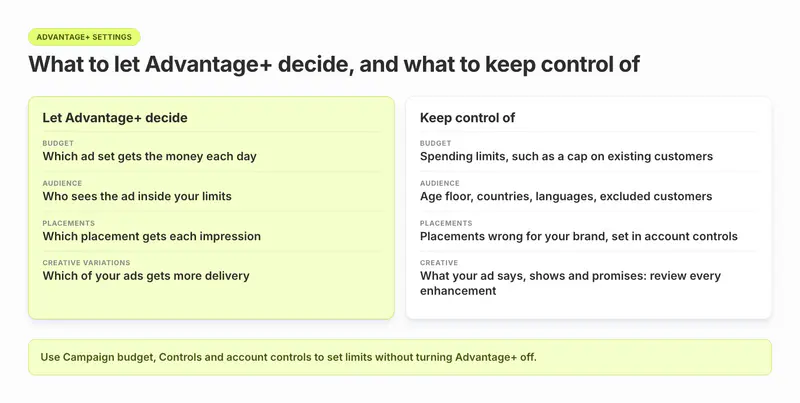
| Area | Let Advantage+ decide | Keep control of | How, without turning Advantage+ off |
|---|---|---|---|
| Budget | Which ad set gets the money each day | Caps on spend for a segment, such as existing customers | Campaign budget plus ad set spending limits |
| Audience | Who sees the ad inside your limits | Age floor, countries, languages, excluded customers | Controls, or account controls for the whole account |
| Placements | Which placement gets each impression | Placements that are wrong for your brand | Account-level placement controls |
| Creative variations | Which of your ads gets more delivery | What your ad says, shows and promises | Review and turn off enhancements per ad, or in bulk |
| New features | Nothing by default | Untested creative features | Untick "Test new creative features" |
Use account controls for rules that never change
If you can't show ads to under-18s, or can't ship to some countries, set it once in Advertising settings. Meta's on/off rules page says "using account-level controls will not affect your campaign's Advantage+ state." These controls apply to every campaign in the ad account, and Meta is still rolling them out, so you may not see them yet.
Read campaign budget results at the campaign level
Meta warns that campaign budget "may not spend your budget equally for each ad set" and that you should "analyse results at the campaign level, rather than at the ad set level." Both lines are on Meta's Advantage+ campaign budget page. An ad set that gets little spend hasn't failed. Meta simply found cheaper results elsewhere.
When should you turn Advantage+ off? A decision rule
This decision rule is a rule of thumb, not a Meta rule. Start from Meta's learning line of about 50 results a week. Give each ad set, and each arm of a test, a weekly budget of at least 50 times your target CPA. Below that, consolidate into one ad set on Campaign budget instead of splitting.
Worked example: at a $40 target CPA, one ad set needs about 50 × $40 = $2,000 a week, or roughly $285 a day. A $3,000 weekly budget supports one ad set, not two. An A/B test of Advantage+ against manual needs about $4,000 a week across both arms.
Above that line, turn Advantage+ off for a section only when one of these is true:
- a legal or brand rule forbids an audience or placement, and account controls can't express it;
- you need different bid strategies or schedules per ad set, which only ad set budgets allow;
- you are deliberately running a manual version as the control arm of a test.
Otherwise keep it on, and spend your effort on creative. Meta's own best-practice list for Advantage+ sales campaigns asks for "a wide variety of diverse creative assets," on its Advantage+ sales campaigns page.
Put your effort into creative: Segwise lets you tag every hook, visual and CTA in your Meta ads and map each one to spend share, CPA and ROAS, so you know which elements to make more of. Start a free trial.
Which Advantage+ creative enhancements should you turn off?
Advantage+ creative changes your ads to versions Meta expects "your audience is more likely to interact with." Meta's Advantage+ creative page lists 31 enhancements, says "some enhancements may be turned on by default," and warns that "the media and text that you upload may be adjusted." Which ones appear depends on your ad format, placements and whether you use a catalog.
Sort them into three groups.
Enhancements to turn off unless you've checked every preview
These can say something you didn't write or promise something you don't offer:
- Enhance CTA (AI). It can swap your CTA for a pre-written one and add dynamic text "such as 'X% off' or 'Free delivery'." Turn it off if you don't run standing discounts or free delivery.
- Text generation, Text improvements and Enhance media text (AI). These write new headlines and primary text (up to five variations), lift phrases out of your copy, or rephrase your text overlays. Turn them off for regulated claims, legal wording or a strict brand voice.
- Show summaries (AI). It adds a brief AI-generated summary of your selling points or products. That's another piece of AI-written copy you didn't approve.
- Image generation, Background generation and Add animation (AI). They create new images, backgrounds or motion from your product shots. Meta automatically adds an AI info label when you use them to "create or significantly edit an image or video," as Meta's AI info page puts it. Turn them off if the product must look exactly as it is.
- Relevant comments. Meta picks comments on the ad to surface. Turn it off if your comment section needs moderating.
Enhancements to review in preview before you decide
These change framing or add content from your site:
- Visual touch-ups and Video touch-ups (AI). Visual touch-ups crops or expands your media with generated pixels to fit more placements. Video touch-ups crops or expands your video to 9:16 or 4:5. Check faces, hands and on-screen text in each preview. Better still, upload your own vertical and 4:5 cuts.
- Show spotlights and Reveal details over time. Both pull text and images from your website or app store page. Make sure that page is current.
- Add music (AI), Translations (AI) and Add overlays (AI). Fine for some brands. Turn them off if you have licensed audio, your own localisation or brand overlay rules.
- Add product tags. It may be turned on by default. Check the tags match the right products.
Advantage+ enhancements that are usually safe to leave on
These are usually safe to leave on: Adjust brightness and contrast, Flex media, Highlight carousel card, Dynamic description, Profile end card and Video subtitles (AI). Video subtitles currently works only for single video ads with English voiceovers on Instagram Reels.
How to turn enhancements off
These steps come from Meta's page on turning off Advantage+ creative enhancements.
- While building the ad: in Ad creative, open Enhancements and switch off the ones you don't want. Check the For review tab. It lists enhancements that will switch on for the first time when you publish.
- Then open Advanced preview (click Expand on the ad preview) and go to the Advantage+ creative tab. Meta notes that "some enhancements can only be turned off in Advanced preview." Check both places.
- After publishing: tick the ads on the Ads tab, click Edit, go to the Advantage+ creative section and click Edit.
- In bulk: tick several ads of the same format, open the menu next to Edit, choose Advantage+ creative, then Edit all selected ads. Meta's bulk-edit page has the full steps.
- Stop new features arriving: go to Advertising settings > Creating ads > Creative features and untick Test new creative features, as Meta's opt-out page describes.
One more setting is easy to miss. Optimise text per person lets any line of your text appear anywhere in the ad, next to any other line. To turn it off for an image ad, you have to switch off visual touch-ups, relevant comments, add overlays and text improvements, or toggle off All optimisations, according to Meta's page on that setting.
Tip: If you need a clean read on which creative works, turn off the text and visual enhancements for the test period. Otherwise you are judging Meta's versions of your ads, not your ads.
Does Advantage+ shopping (now sales) beat manual campaigns?
There is no single answer. Meta's numbers say yes on average. An independent incrementality study says it depends on the brand.
What Meta's own figures say about Advantage+ sales campaigns
- "Advertisers who used Advantage+ sales campaigns saw 9% improvement in cost per conversion, on average," on Meta's Advantage+ sales campaigns Help Center page.
- "20% improved CPA when using Advantage+ sales campaigns" and "7% improved CPA when using Advantage+ app campaigns," on Meta's Advantage+ marketing page. The footnotes for those figures were not visible on the page when we read it.
- For leads, "in early testing, leads campaigns that had Advantage+ on delivered on average 14% lower cost per lead and 10% lower cost per qualified lead" than with Advantage+ off, from Meta's Advantage+ leads page.
Meta's two pages give different sales figures (9% and 20%). Both measure cost per conversion as Meta reports it, not incremental sales.
What an independent incrementality test found
Haus, a measurement company that sells incrementality testing, published lessons from 640 Meta incrementality experiments in July 2025. In head-to-head tests, 58% of brands saw higher incremental ROAS on manual campaigns, and Advantage+ won for 42%. On average, Advantage+ "drove 12% lower DTC iROAS at 18% lower daily spend". It was 9% ahead at the midpoint of the tests, then fell behind. Haus also found Advantage+ over-reported its results relative to manual campaigns by 12 percentage points on average. Treat these as 2025 figures: a July 2026 editor's note on the report says a re-run reversed its findings on Meta's Incremental Attribution setting, and the note does not mention the Advantage+ versus manual figures.
How to settle Advantage+ vs manual for your account
Use Meta's A/B test, which shows each version to a separate group so "nobody sees both." Meta recommends "using the same budget for both versions" and advises against testing by switching campaigns on and off. Both points come from Meta's A/B testing page. Run the same creative in both arms. Judge on your own revenue or MMP data, not only on Ads Manager's reported ROAS. Meta asks for about 50 results a week per ad set to finish learning, so give each arm at least 50 times your target CPA a week, as in the decision rule above. For more on test design, see our Facebook ad creative testing best practices.
How do you see what Advantage+ is doing with your creative?
Meta gives you five views. None of them shows results by individual enhancement: we found no Help Center page describing a breakdown that splits performance by enhancement.
Advanced preview, before launch
The Advantage+ creative tab shows sample versions of each enhancement. The Placements tab shows the variations Meta predicts will suit different people. Meta says these previews "do not represent an exhaustive list" of what may run.
Ad creative breakdown in Ads Reporting
Select Ad creative under Popular breakdowns to see results, spend and cost per result for each creative. Add placement or age breakdowns to see where and to whom each one was delivered. Meta's creative-level reporting page explains the setup. Meta is still rolling this view out.
Audience segments breakdown
Define your engaged audience and existing customers in Advertising settings > Audience segments, then choose Breakdown > By demographics > Audience segments. You can then see how much of an Advantage+ sales campaign reached new people versus existing customers. Meta's audience segments reporting page walks through it.
Placement and media type breakdowns
Under By delivery, these show where Advantage+ placements sent your budget and whether images or videos carried it.
Campaign score and opportunity score
These show which Advantage+ settings Meta thinks you are missing. They are recommendations, not results.
What Meta's creative reporting can't tell you
Two limits matter for creative decisions. Meta's breakdowns use statistical modelling when conversion data is missing. And if you used audience suggestions, the results can include people outside them: Meta's example is that ads suggested for women "could also deliver to men." Clean conversion tracking makes every one of these views more reliable; see our guide to the Meta Pixel and Conversions API updates.
What none of these views tells you is why. Ads Manager shows that Advantage+ moved spend to one video. It doesn't show that the video opens on a face, or that its first line is a price.
How Segwise shows which creatives Advantage+ favours
Segwise Creative Analytics connects to your Meta account (an OAuth sign-in, no code) and tags every hook, visual, CTA and line of text in your ads with multimodal AI. Then it maps each tag to spend share, CPA and ROAS, including your MMP data if you use one. Meta's breakdowns tell you which ad won. Segwise helps you see which elements Advantage+ keeps putting money behind, and whether they also earn it back.

Asking why your top Advantage+ creatives win
You can ask the Creative Strategy Agent in plain language why your top five Advantage+ creatives differ from your bottom five. The Creative Generation Agent lets you make statics and videos up to 30 seconds, including AI UGC-style ads, from your own winning patterns. The output is network-ready for your team to review and upload. You can use each agent on its own, or do it all in one place by chatting with the Segwise agent: ask how your ads are performing, see what competitors are running, and make new ads from your winners.
The performance agency HiveMinds used this approach on a refreshed credit card campaign for Jio Financial Services and, according to its customer-reported case study, cut CPA by 25% on Meta.
What Segwise can't see inside Advantage+
Limitations: Segwise works from the data Meta reports, so it can't see inside a single Advantage+ creative enhancement any more than Ads Manager can. It also doesn't change your campaign settings. Segwise starts at $499/month for advertisers spending up to $250K/month, with a special 50% discount for startups spending under $50K/month, and includes a 7-day free trial.
Watching for fatigue on the ads Advantage+ funds most
Because Campaign budget can put most of the spend behind one winning ad, that ad may tire sooner than it would in an evenly split setup, so watch for tired ads. Segwise Fatigue Tracking flags a sustained drop in a creative's metrics or spend share by email or Slack. Our guide to Meta ads creative fatigue covers the signs. For how budget, structure and creative fit together as you grow spend, read how to scale Facebook ads in 2026.
What to settle in Advantage+ before your next launch
Hand Advantage+ your budget, audience and placements, and keep hard limits in account controls instead of switching sections off. Check every creative enhancement in Advanced preview, and switch off any that could change your offer, your copy or your product. When you compare Advantage+ with manual, use Meta's A/B test and judge on incremental results, not Ads Manager ROAS alone. Before your next launch, open Enhancements on each ad and decide which ones stay on.
A checklist before you publish any Advantage+ ad

- Objective is sales, app promotion or leads, and "Advantage+ On" shows in the top right.
- Campaign budget is selected. Any customer cap is set with a spending limit or an exclusion.
- Hard limits (age, countries, placements) live in account controls or audience Controls, not in suggestions.
- Every enhancement in Enhancements, For review and Advanced preview has been checked.
- Enhance CTA and the text enhancements are off unless every preview is on-brand and true.
- "Test new creative features" is unticked if you need predictable ads.
- Audience segments are defined so you can see new versus existing customer reach.
- You have a plan to judge results on incremental revenue, not only Ads Manager ROAS.
If you're a creative strategist working inside Advantage+, our creative strategist's guide to Meta ads covers briefing and testing in more depth.