
If your Meta ads stopped working overnight, check, in order: an Ads Delivery incident on metastatus.com, missing events in Events Manager, a failed payment or rejected ads, the Last significant edit column, a CPM jump on every ad, and one high-spend ad sliding while the rest hold. If Meta's status page is clear, the cause is in your account.
The hard part is that Ads Manager shows the drop at the campaign level, where one tired ad and a platform problem look the same. Segwise is an AI creative analytics and creative generation platform that checks every ad on every connected network against your fatigue rule each day and alerts you in Slack and email when one slips, so you can see in one view whether the drop is one ad or the whole account.
TL;DR
If every account you manage dropped in the same hour: it's probably Meta. Check the Ads Delivery line on Meta's status page and change nothing until it reads resolved.
If spend and clicks look normal but purchases or installs fell to near zero: it's tracking. Fix the Pixel, the Conversions API or your MMP, not the ads.
If ads show as paused or rejected: it's billing or policy, and it's fixed in Billing and payments or Account Quality, not in the campaign.
If you edited something in the last week: the ad set is probably relearning. Wait for about 50 results before you judge it.
If CPM rose on every ad at once: it's the auction, and this is Black Friday week. Judge the full week, not one day.
If one ad carrying a big share of spend is sliding while the rest hold: it's creative fatigue. Add fresh ads before you pause it.
Is Meta down, or is it your account?
Meta does go down, about once a month on average. Meta's own status history for Ads Manager lists 13 resolved Ads Delivery incidents between November 24, 2025 and November 23, 2026. The most recent one, logged on September 23, 2026, lasted about an hour and 23 minutes from Meta's first notice to its update saying it had "recovered from an earlier outage impacting ad delivery across our platform."
An outage that runs for several days would be unusual, so a drop that lasts that long points to your account first. A platform problem has a recognisable shape:
It starts at the same hour across every campaign, not gradually.
It hits unrelated ad accounts at once. Agencies have an edge here: if three clients in different verticals dropped in the same hour, look at Meta first.
metastatus.com shows a disruption on Ads Delivery, Ads Reporting or Ads Creation and Editing. Reporting incidents matter too: they can make results look like they fell when delivery was fine.
If only your account dropped, and the status page reads "No known issues", the cause is inside your account. The next five checks find it.
What should you check first? The 15-minute triage
Stop at the first check that explains the drop. The order runs from causes that need no action to the one that needs new creative, so you don't rebuild ads to fix a broken Pixel.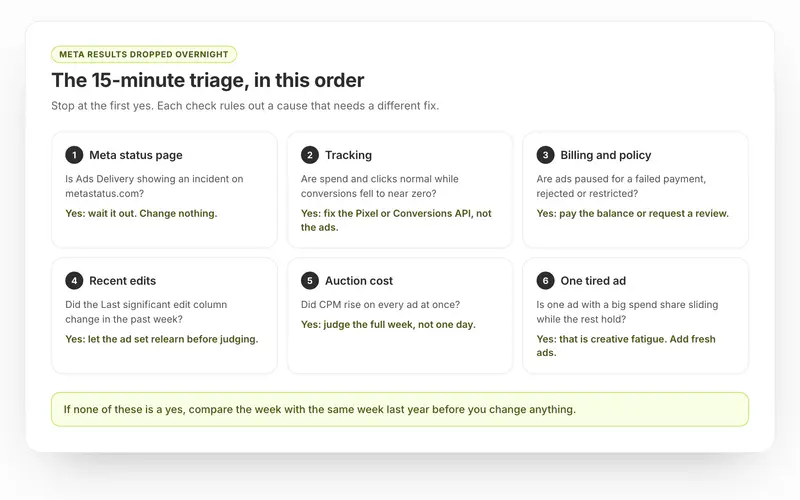
Minutes 0 to 2: Check Meta's status page
Open metastatus.com, click Facebook Ads Manager and read its three lines: Ads Creation and Editing, Ads Delivery and Ads Reporting. The page also has a history and an RSS feed.
Minutes 2 to 5: Check tracking before you touch an ad
Compare spend, impressions and link clicks with yesterday. If those look normal but purchases, leads or installs fell to near zero, the ads are working and the measurement isn't. If spend, clicks and tracking all look normal but sales have been weak for weeks rather than since yesterday, run our 10-minute diagnostic for Facebook ads that aren't converting instead.
Web: open the dataset in Events Manager and use the test events tool, or Meta's free Data Advisor browser extension, which shows information "to verify, troubleshoot, and improve the Pixel." Look for a site, checkout or consent banner change.
Settings that change counts overnight: a Pixel setting called "Measure conversions on customer devices" is on by default for datasets already sending events, and its settings panel reads "Measurement starting November 12, 2026". PPC Land reported on October 27 that Meta plans a gradual rollout from that date and that the feature is not active for people in the EU or the UK. Where it is on, it can lift reported conversions on every ad at once. Comparing across attribution settings can mislead too: Meta's attribution settings page warns that results can't be compared across ad sets with different attribution models.
Apps: iOS results arrive late. Apple's AdAttributionKit docs say "the random delay is 24 to 48 hours for the first postback, and 24 to 144 hours for the second and third postbacks." Yesterday's iOS installs are rarely complete today, so check your MMP before calling it a drop.
Minutes 5 to 7: Check billing, rejected ads and restrictions
A failed card stops everything. Meta's failed payment help page says that when your payment method fails, "your ads are paused and your ad account will be disabled until you've paid the amount due." Once you pay, Meta says it will resume active ads and "attempt to make up for any lost time."
Then open Account Quality, where rejected ads and restricted assets show, with an option to request a review.
Minutes 7 to 10: Check what you changed this week
Add the Last significant edit column in Ads Manager. Meta's significant edits page lists the edits that send an ad set back into learning:
any change to targeting, ad creative or the optimisation event
adding a new ad to the ad set
changing the bid strategy
pausing the ad set for seven days or longer
large budget or bid changes ("USD 100 to USD 1,000" may reset learning; "USD 100 to USD 101" won't)
During learning, Meta says ad sets "are less stable and usually have a higher CPA," and they usually exit "after about 50 results in the week after the ad set's last significant edit." If the drop started the day after an edit, that's your answer.
Minutes 10 to 13: Check whether the auction got more expensive
If CPM rose on every ad and every campaign at once, you're paying more for the same people. Each impression is an auction, and Meta's auction help page notes that "a person can fall into multiple target audiences," so every retailer chasing your buyers this week raises your price. Black Friday is November 27, 2026; a CPM jump this week is normal, not a fault. Our guide to why your Meta CPM is so high covers the other causes.
Two cautions from Meta's performance fluctuations page: daily budgets may spend "up to 75% over your daily budget on some days and less on others", so one bad day can be pacing. And if you optimise for conversions, CPM "may not be a good indicator of performance." Read cost per result over a full week.
Minutes 13 to 15: Check whether one ad was carrying the account
Switch to the ad level and sort by amount spent. If one ad takes a large share of spend (as a rule of thumb, 40% or more) and its CTR or cost per result has slid three days in a row while the others hold, that's creative fatigue, and it pulls the whole account down with it.
How do you tell creative fatigue from a platform drop?
Look at where the drop sits and how it arrived. A platform drop is sudden and everywhere. Fatigue is gradual and concentrated in a few ads.
How Segwise shows whether it's one ad or the account
Segwise checks every ad on every connected network each day against a fatigue rule. Out of the box, an ad is fatiguing when its CTR drops 5% or its CPM rises 5% for three days in a row. You can change the metric, the percentage or the days, with up to five conditions, and watch Meta alone or all networks together. When an ad meets the rule, the alert lands in Slack and email.
In this example, the Meta account's CTR fell 3% to 4% a day, which reads like a platform problem. The ad-level view shows the truth: one static, at 46% of spend, meets the fatigue rule, and the other five are in good shape. From there you can ask the Segwise agent in chat to draft three iterations of the steadiest ad, a creator holding the product to camera, pick the ones to run, and track each new one against your success criteria from launch.
Catch the fatiguing ad early: Segwise Fatigue Tracking lets you set your own fatigue rule and get a Slack alert the day an ad meets it, before it drags the account down. Book a demo.
A worked example: one tired ad, a 30% rise in cost per purchase
Here's how a single fatigued ad makes the whole account look broken. Say an account spends $3,000 a day at a $30 cost per purchase, so 100 purchases a day. One ad takes 46% of spend, $1,380.
That ad fatigues and its cost per purchase doubles to $60. It now brings 23 purchases instead of 46.
The other five ads hold at $30 on their $1,620: 54 purchases.
The account now gets 77 purchases for the same $3,000. Cost per purchase rises from $30 to $38.96, a 30% jump that looks like it happened overnight.
Five of six ads are fine. Pausing the campaign, cutting budget or rebuilding targeting would all be the wrong fix. The fix is a replacement for one ad. For the slower version of this pattern, see why Meta ads stop working after two weeks.
What Meta's own fatigue labels tell you, and what they miss
Meta flags fatigue in the Delivery column. Its creative fatigue page says you'll see "Creative limited" when an ad's cost per result is above your past ads but under twice as much, and "Creative fatigue" when it's "more than or equal to twice as much." Meta also counts "all recent exposures of the ad's image or video, including those from other campaigns from your Page."
The catch: the feature "is only available for ad sets with one creative," and not for dynamic creative or Advantage+ catalogue ads. If you run several ads in each ad set, Meta won't label fatigue on any of them, so you need your own rule at the ad level.
Should you pause or edit when Meta ads drop overnight?
Usually neither, at least not on day one. The right move depends on the cause, and the wrong one costs you twice: once for the drop and again for the learning reset your edit causes.
Platform incident or tracking break: don't touch the ads
A significant edit made during an outage resets learning for no gain. Wait for the status page to read resolved and judge the next full day. For a tracking break, fix the Pixel, the Conversions API or the MMP connection and leave budgets alone. The ads were never the problem.
Learning reset: hold, then batch your edits
If the drop followed an edit, let the ad set collect results. Every new significant edit restarts the clock. When you do need changes, make them together in one session so the ad set relearns once, not three times.
Creative fatigue: add new ads first, pause second
Meta's own fatigue recommendation is to "create a new ad with a new image or video that is materially different from the original," and it notes that "keeping your original ad active instead of pausing or turning it off may maximise results." Adding an ad is itself a significant edit, so add two or three fresh ads at once rather than one a day.
A rule of thumb for pausing the tired ad: pause it only when all three are true.
Its cost per result is about twice what your past ads cost, or more (the line Meta uses for its "Creative fatigue" status).
It has stayed there for three days or longer.
Other ads in the ad set are ready to take its budget.
Don't pause the whole ad set to "reset" it. Pausing for seven days or longer sends it back into learning when you turn it on. If the drop came as you raised budgets, the cause may be scale rather than fatigue; our guide to why ROAS drops when you scale covers that case, and the Andromeda ROAS drop explainer covers drops tied to Meta's ad retrieval changes.
Auction cost: hold budget and compare weeks
When CPM rises across the board, cutting budget mid-week mostly hands those auctions to competitors. Compare this week with the same week last year, not with last Tuesday. If you're planning budget moves after Black Friday, our Meta scaling guide covers when to raise spend and when to hold.
How to make the next overnight drop a two-minute check
Most of the 15 minutes above is looking for information that could arrive on its own. Set up four things once:
Status alerts. Add the Ads Manager RSS feed from metastatus.com to a Slack channel.
An edit log. Note every significant edit with the date, so the next drop can be matched to a change in seconds.
A tracking check. A daily look at purchase or install counts in Events Manager or your MMP, next to spend.
Ad-level fatigue alerts. A rule that fires per ad, not per campaign, so a slipping ad shows up before it moves the account totals.
The last one is the hardest to do by hand across dozens of ads and several networks. This is the rule view on Segwise's Fatigue Tracking page: pick the metric, the drop and the number of days, and it shows which ads would be flagged today.
Segwise also tags each ad's hook, format, offer and people on screen and ties every tag to the same metrics, so you can see what your steadiest ads share. The Creative Generation Agent lets you make statics and videos up to 30 seconds, including AI UGC-style ads, from those patterns. You can use each agent on its own, or do it all in one place by chatting with the Segwise agent: ask how your ads are performing, see what competitors are running, and make new ads from your winners. You can also ask "Are any of my creatives showing signs of fatigue?" from AI tools such as Claude or ChatGPT through the Segwise MCP; it reads your Segwise data but can't change your campaigns.
Segwise has limits here. It doesn't watch Meta's status page, your billing or your Pixel and Conversions API health, so the first three checks stay manual. A rule that needs three days in a row catches gradual fatigue, not a same-hour outage. And if you run one ad account with a handful of ads, the manual checks above are enough.
What to do the next time Meta ads stop working overnight
When Meta results fall overnight, start with Meta's status page; if it is clear, the cause is tracking, billing, a recent edit, the auction or one tired ad. Check them in that order and stop at the first match. Change nothing until you know which one it is, because an edit made in a panic resets learning on top of the original problem. The single next step is to put alerts on the two things you can't see at a glance, Meta's status feed and ad-level fatigue, so the next drop tells you its cause before you go looking.