
Meta ads often fade within weeks: the ad set learns until about 50 results, Meta then runs out of its cheapest opportunities, and frequency climbs among likely buyers. Rule out tracking, learning resets, auction costs and audience first. If one ad slides while its frequency rises, that is fatigue: launch a materially different concept and keep the original running.
Segwise is an AI creative analytics and creative generation platform that helps UA and creative teams catch fatigue across 15+ ad networks and turn their winning patterns into new ads.
This guide is the Meta-specific version of our broader guide to managing creative fatigue. It covers what is happening inside Meta's delivery system around day 14, how to tell fatigue apart from four problems that look identical in your reports, and how to replace a tired ad without resetting the parts that still work.
TL;DR
If your ad died in the first 3 days: that is usually a learning phase problem, not fatigue. Read why Meta ads die after 3 days instead.
If it worked for a week or two and then slid: check in this order: tracking, learning reset, auction costs, audience saturation, and only then the creative.
If you never see Meta's "Creative fatigue" label: that is expected. Meta only shows it for ad sets with one creative, so any ad set with several ads needs your own version of the rule.
If you run dozens or thousands of ads: stop checking ads one by one. Alert on a sustained decline against each ad's own baseline, grouped by concept, and keep a pipeline of new concepts ready.
Why winning Meta ads fail after about two weeks
A Meta ad does not get worse on day 14. The people seeing it change. "Two weeks" is not a Meta rule: it is a common pattern that several widely read fatigue guides describe, and the worked math below shows why it shrinks as budget grows. Three things stack up after launch.
Week one is a learning period. Meta says an ad set leaves the learning phase "after about 50 results in the week after the ad set's last significant edit", and that during learning, ad sets "are less stable and usually have a higher CPA", according to Meta's learning phase guide. How long learning lasts depends on how fast you collect results, not on the calendar. An ad set that gets about 50 results a week has only just settled by the end of its first week.
Then the cheap reach runs out. Meta's own explanation of rising costs is blunt: "The delivery system seeks the highest volume opportunities first. When those lower cost opportunities run out, the system may move on to more expensive options." That line comes from Meta's page on understanding fluctuations in ad performance, which adds that "you may see costs increase over the schedule of your campaign or ad set." In other words, the early stretch tends to buy the cheapest results available, and later results cost more.
Frequency builds among the people who matter most. Meta defines frequency as impressions divided by reach, and its frequency guidance says that if "performance begins to drop as your frequency numbers rise, your target audience may be experiencing ad fatigue." An average can hide this: if delivery keeps returning to the people most likely to act, they see the ad more often than the overall number suggests. Meta also counts "all recent exposures of the ad's image or video, including those from other campaigns from your Page", per its creative fatigue page. If the same video runs in prospecting and retargeting, both campaigns add to the same tiredness.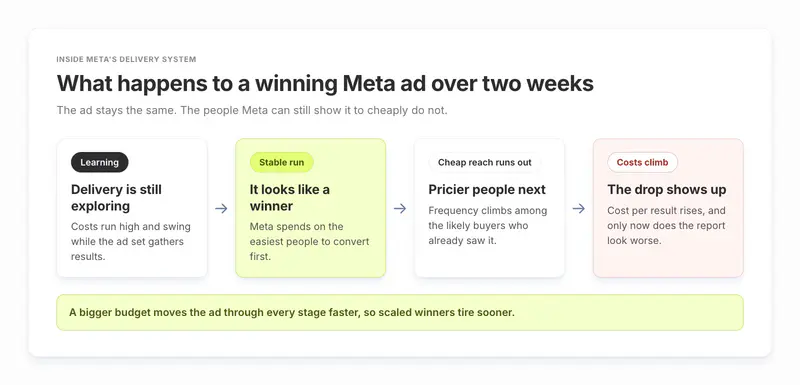
The math behind "two weeks"
Here is a worked example with round, illustrative numbers. Swap in your own.
At $500 a day and a $10 CPM, an ad buys 50,000 impressions a day, so 700,000 in two weeks. If delivery keeps returning to roughly 250,000 high-propensity people, they have each seen the ad 2.8 times on average by day 14. Double the budget and you get there in a week. That is why the "two weeks" in the title moves with spend: a winning ad that you scale lives for fewer days, and a small audience such as a retargeting pool wears out fastest of all.
Is it creative fatigue, or something else? Five causes that look the same
A falling ROAS chart looks the same whatever caused it. Meta's own fatigue fix is to change the creative, but four other causes produce the same chart and need a different fix. Work through them in this order, because the early checks are fast and the later fixes are expensive.

How to check a declining Meta ad in Ads Manager, step by step
These steps work in any Meta account, with no extra tools.
Read the result at the level Meta optimises. Meta advises analysing "results for your campaign as a whole" when you use Advantage+ campaign budget, and the ad set as a whole when you use ad set budgets. Drilling into one hour or one placement can mislead you, an effect Meta calls the "breakdown effect". Compare the last 7 days with the 7 days before, never one day with another. Meta says that on some Ads Manager accounts it can spend "up to 75% over your daily budget on some days and less on others", so single days swing.
Rule out tracking. If conversions fell on every campaign on the same day, the ads probably did not all tire at once. Compare the event count in Events Manager with your store, MMP or analytics. Check that nobody changed the attribution setting: Meta warns that results "cannot be compared" across ad sets with different attribution models, and that the standard view-through window now counts events "within 1 day after an impression", as its attribution settings page explains. For iOS app install campaigns measured through SKAdNetwork, Meta reports results "From Apple's SKAdNetwork" rather than its own windows, so compare them with your MMP over a longer window.
Rule out a learning reset. Add the "Last significant edit" column. Meta's list of significant edits includes any change to targeting or creative, a new optimisation event, a bid strategy change, pausing an ad set for seven days or longer, and "adding a new ad to your ad set". A big budget jump can count too: Meta's example is going from $100 to $1,000. If the decline started the day of an edit, wait out the learning period before you judge the creative.
Rule out auction costs. If CPM climbed on every ad set in the same week, the market moved, not your creative. Meta notes that when you optimise for conversions, CPM "may not be a good indicator of performance", because the system will sometimes buy pricier impressions to get cheaper results. Judge the ad on cost per result.
Check the audience. Add the first-time impression ratio column, which Meta defines as "the percentage of your daily impressions that comes from people seeing your ad set for the first time". Its metric guide says that if this ratio is "dropping significantly along with your ad set's performance", it may be time "to broaden your audience or find a new one". If every ad in the set is sliding together, a new creative alone will not fix it.
Confirm creative fatigue on the ad itself. Look at the Delivery column for "Creative limited" or "Creative fatigue". If your ad set has several ads, you will not see those labels, so read the signals directly: rising frequency, CTR falling against the ad's own first stable week, a shrinking share of the ad set's spend, and engagement rate ranking. Meta's guide to ad relevance diagnostics reads a below-average engagement rate ranking, with quality and conversion rankings holding, as "This ad isn't spurring interest." Rankings need at least 500 impressions.
How to detect creative fatigue early on Meta
The built-in labels arrive late, and many advertisers will not see them at all. Meta's creative fatigue page says the feature "is only available for ad sets with one creative", and excludes Advantage+ catalog ads, dynamic creative and Advantage+ app campaigns. When it does fire, the bar is high: "Creative fatigue" means cost per result is "more than or equal to twice as much" as your past ads, and "Creative limited" means higher than before but less than double. By the time your costs have doubled, you have already paid for the decline. The one early warning Meta does give comes before launch: if it predicts "creative fatigue may occur in the first seven days" of a campaign, it warns you before you publish.
At least one widely read guide says the labels show up "mostly" for single-creative ad sets. Meta's own wording is stricter: any ad set with more than one creative will not show them, so for those ad sets the early warning has to come from you. Two signals you can read before cost per result confirms the decline:
Spend share. When your ads compete for the same people, Meta's auction overlap guide says it enters "the ad with the highest total value" and leaves your other ads out of that auction. So a falling share of the ad set's spend shows the system choosing your other ads more often, and you can see it day by day without waiting for cost per result to confirm it.
CTR and hook rate against the ad's own baseline. Hook rate is the share of impressions that watch the first few seconds of a video. Measure both from the ad's first stable week, after learning, not from day one and not against an account average.
Then combine them into a rule you can act on. The bands below are rules of thumb, not Meta guidance. The 1x and 2x lines borrow the thresholds from Meta's own statuses, but Meta compares against ads you ran in the past, while this table compares the ad with its own early weeks. The 20% line follows the example rule on Segwise's fatigue tracking page, a 20% ROAS decline over 7 days; tune it to your account.
Set the alert where it still gives you time to act. If a replacement takes five working days to brief, make and approve, an alert that fires two days before the ad dies is too late. Our early signs of creative fatigue checklist covers the general version of these signals across networks.
How to fix a fatigued Meta ad without resetting what still works
Make the new ad materially different. Meta's recommendation is a new ad "with a new image or video that is materially different from the original creative." A new background color or a trimmed intro is likely to read as the same ad to people who already saw it. Change the hook, the angle, the format (static to video, polished to UGC-style) or the persona the ad speaks to.
Keep the original running while the new one ramps. Meta notes that "keeping your original ad active instead of pausing or turning it off may maximise results." A fading ad can still convert well for part of the audience. Let the system shift spend to the newcomer, and pause the old ad only when it stops pulling its weight.
Batch your new ads. Adding a new ad to an ad set is a significant edit, so dripping in one ad every other day keeps the set in learning. Add new concepts in one batch on a fixed day each week or fortnight. Meta also warns that with "many ads and ad sets, the delivery system learns less about each", so retire clear losers rather than letting the set grow without limit.
Widen the audience if the whole set is tired. Meta's other fatigue recommendation is to "increase your audience size and reach new people who have not seen your ad too much yet." Broad targeting gives a good creative more fresh people to reach.
Use Advantage+ creative where it applies. Meta suggests it for fatigue, but notes it is "only available for campaigns using the traffic or sales objectives with website destination." It varies one asset for each viewer. It does not replace a new concept.
Plan the next refresh before you need it. Work out how many concepts you need with simple arithmetic. If you want 4 winning ads live and a winner lasts about 14 days on your account, you lose 2 winners a week. If 1 in 5 new concepts becomes a winner, you need about 10 new concepts a week. Use your own life span and hit rate; the point is that refresh volume is a production target, not a reaction.
Tip: Before you launch replacements, score them. A draft that repeats the hook that just fatigued will fatigue faster. Compare each draft against your current winners and drop the ones that look like the ad you are replacing.
What tools help with creative fatigue on Meta ads?
You can do all of the above by hand in Ads Manager. Tools earn their place when you run more ads than you can check, when you run several networks, or when the slow part is making the next ad. For a full ranking, see our comparison of the best creative fatigue detection tools. Here is how the main options fit a Meta-heavy account.
Meta Ads Manager is free and should be your first stop. Automated rules "automatically check your campaigns, ad sets and ads, and then update or notify you of any changes." Rules can use frequency, cost per result, CPM and other conditions at the ad level, with "is greater than", "is smaller than" or "is between" over a time range you choose, according to Meta's list of available conditions. Limitations: the fatigue labels only cover single-creative ad sets, first-time impression ratio is measured per ad set so it cannot single out one tired ad, and we found no documented rule condition that compares an ad with its own earlier weeks, so you set each threshold by hand.
Segwise watches every creative across your networks for a sustained decline in performance and spend share, against a threshold you define, for example a 20% ROAS decline over 7 days. Alerts go to email and Slack, per network or consolidated. Because it tags every hook, visual, CTA and voiceover, you can see which element faded, and asset clustering groups ads that share the same footage so one tired video shows up as one problem, not ten. When a creative fatigues, the Creative Generation Agent drafts fresh variants from your proven winners, each with a "Why this ad" explanation, and Pre-flight Testing scores up to 10 new creatives out of 100 against your winners before you spend. Limitations: it needs connected ad network data to work, and it is not a bid or budget automation tool, so pausing ads and moving budget still happen in Ads Manager. Segwise starts at $499/month for advertisers spending up to $250K/month, with a special 50% discount for startups spending under $50K/month, and includes a 7-day free trial.
Madgicx is built around Meta: its own site says it "optimizes Meta ads only." Its Creative Insights "flags creative fatigue so advertisers know when to refresh", and its automation rules run campaigns on conditions you set. It also sells an AI Ad Generator plan at $29/month. Limitations: optimisation covers Meta only, so it is a weaker fit if a big share of your spend runs on TikTok, Google or app networks.
Birch, the tool formerly called Revealbot, is a rules engine for Meta, Google, TikTok and Snapchat that checks conditions as often as every 15 minutes. It ships an "Identify fatigued ads" template and Slack and email alerts. Limitations: Birch does not document generating ad creative, so it tells you when to swap but not what to swap in, and automated rules need the Pro plan.
Motion is a creative reporting tool for DTC brands and agencies. Its help center shows how to build a creative fatigue report, and its plans include Routines with alerts. Limitations: we found no documented built-in fatigue alert with set thresholds, and Starter costs $999/month for up to $50K of monthly ad spend.
How to monitor fatigue across hundreds or thousands of Meta ads
At high ad volume, the per-ad checklist above breaks. Nobody can read frequency and CTR trends for 2,000 ads every morning. Three changes make it workable.
Group ads by concept, not by ad ID. The same video often runs in many ad sets and campaigns, and Meta counts all of those exposures toward fatigue. Track the concept as one unit, so one tired video shows up once.
Alert on sustained decline, not daily dips. Use a rolling 7-day window against each concept's own early baseline, and require two signals, such as falling spend share plus a rising cost per result, before anyone acts.
Rank alerts by money at risk. A concept carrying a third of your spend that slips 20% can cost more than ten small ads that each slip 40%. Sort by spend times decline.
The agency HiveMinds described the manual version of this problem in its Segwise case study: "Every week we'd spot a creative showing signs of fatigue. But confirming it meant pulling numbers from Meta and Google by hand, and by the time we had, the next round of creative was already in production without that learning." After moving to Segwise, HiveMinds reported that a refreshed credit card campaign for Jio Financial Services cut cost per acquisition by 25% on Meta, according to the HiveMinds case study.
The fix is a new concept, so the teams that handle fatigue well connect the alert to a brief and the brief to a finished ad. Segwise's fatigue tracking and creative generation are built to sit in that one loop, and Pre-flight Testing checks the replacements before they go live.
If your CPMs look high across the board rather than on one tired ad, start with our guide to why Meta CPMs are high before you replace any creative.