
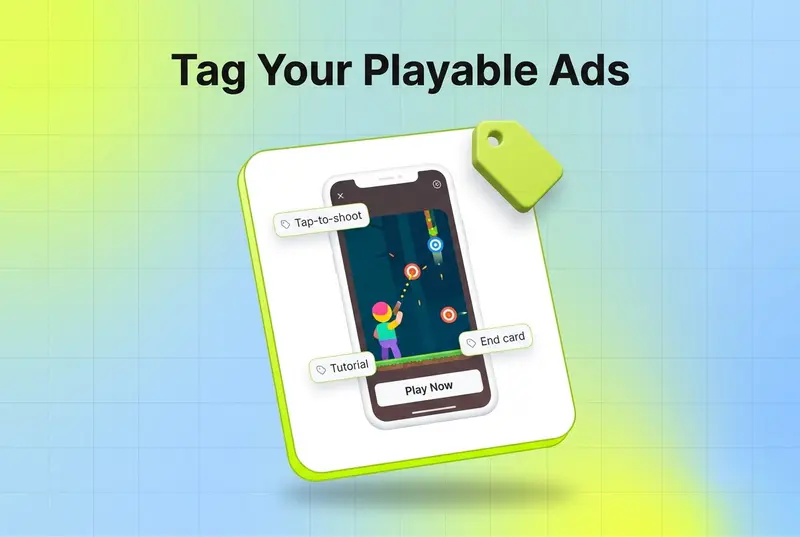
To tag playable ads you need a system that can read the interactive creative itself, not just a thumbnail or a video export, because a playable is HTML5 with gameplay logic, tap targets, and an end card rather than a single video file. The honest answer to "how do I tag my playables" is that almost no creative analytics tool can. Most were built for static and video, so they treat a playable as a black box. Segwise is the only platform that tags and analyzes playable ads, using the same multimodal AI it runs on video, image, and text. That is the whole point of this post: playable ad tagging is possible, but the format quietly breaks every tool that was not designed for it.
If you run mobile games, this matters more every quarter. Playable ads nearly doubled their share of gaming impressions in 2025, rising from 6.3% to 13.3% while passive formats lost ground. Playables also convert. Liftoff's 2025 creative index found that for top-spending game advertisers, playables convert at 8x the impression-to-install rate of non-playable formats. So the highest-converting, fastest-growing format in mobile UA is also the one your analytics stack is probably blind to.
This post explains what tagging a playable actually involves, why most tools cannot do it, and how to analyze playable ads at the element level so you can learn from them the way you already learn from video.
Key takeaways
- A playable ad is an interactive HTML5 unit with gameplay, tap targets, and an end card, not a single video file, which is exactly why standard creative tagging tools cannot read it.
- Most analytics platforms were built for static and video creatives, so they treat playables as a black box and tag nothing inside them.
- Playable ad tagging means labeling the interactive creative itself: the hook moment, the core mechanic, the tutorial, the difficulty, the end card, and the CTA.
- Playables are the fastest-growing mobile gaming format, up from 6.3% to 13.3% of gaming impressions in 2025, and among the highest-converting, so leaving them untagged is a real blind spot.
- Segwise is the only platform that tags and analyzes playable ads, applying the same multimodal AI it uses for video, audio, image, and text.
- Once playables are tagged, you map each element to performance and learn which mechanics and end cards drive installs, the same loop you run on video creative.
What does it mean to tag a playable ad?
A playable ad is a small interactive experience. The user taps, swipes, or completes a short task that mirrors real gameplay, then hits an end card with a "Play Now" or "Download" CTA. Under the hood it is HTML5, CSS, and JavaScript, often built on a game engine, packaged as an interactive unit rather than a flat asset. That structure is what makes it convert, and it is also what makes it hard to analyze.
Tagging a playable means describing that interactive creative by its elements, the same way you would tag a video by its hook, characters, and CTA. If you are new to the idea, our primer on what creative tagging is covers the basics for static and video first. For a playable, the elements worth tagging look like this:
- The hook, meaning the first interactive moment that pulls the user in.
- The core mechanic the playable asks the user to do, such as tap-to-shoot, match-three, drag-to-build, or steer.
- The tutorial style, whether it uses a guided hand pointer, text instructions, or just lets the user figure it out.
- The difficulty and pacing, including whether the playable is winnable, ends mid-action to create urgency, or ends on a win.
- The end card, including its art, messaging, and how the CTA is presented.
Tag those elements across every playable you run and you can finally answer the questions that matter. Do tap-to-shoot hooks beat drag-to-build hooks for your audience? Do playables that end mid-action drive more installs than ones that let the user win? Without tagging, every playable is just a name and a number. With tagging, it becomes a set of creative decisions you can compare and repeat.

Why most tools cannot tag playable ads
This is the part most vendors skip over. Tagging a playable is not just "tagging, but for a different file type." The format breaks the assumptions creative analytics tools were built on.
The first problem is the file. A video creative is a single asset a model can watch frame by frame. A playable is code that has to run. There is no linear timeline to scan, because the experience branches based on what the user does. A tool that ingests an MP4 and reads frames simply has nothing to read when you hand it an HTML5 playable.
The second problem is the interactivity. The most important things about a playable are the things the user does inside it, the mechanic, the tutorial, the moment they are asked to act. As one analysis of playable analytics put it, most platforms cannot break down the interactive elements, user flows, or engagement points within playables, which is exactly what you need to understand why one playable drives better installs than another. A tool that only reads pixels misses the interaction entirely.
The third problem is that most tools were simply never built for this. Creative tagging systems were designed in a world of static images and video. Playables were a rounding error in ad spend, so support for them was never a priority. Now that playables are a double-digit share of gaming impressions, that gap is no longer academic. Teams running their best-converting format are running it blind.
So when a creative analytics tool says it supports your creatives, ask specifically about playables. In most cases the honest answer is that the playable gets skipped, left untagged, or counted as an opaque line item with no element-level insight behind it.
How Segwise tags and analyzes playable ads
Segwise is the only platform that tags playable ads. It applies the same multimodal AI that powers its video, audio, image, and text tagging to the interactive format, so playables stop being a black box and start being analyzable creative like everything else you run.
That tagging feeds the same engine as the rest of your creative. Once a playable is tagged, every element is mapped to performance through tag-to-metric mapping, so a mechanic, a tutorial style, or an end card gets a real install rate, CTR, and ROAS attached to it across every playable that used it. This is the Creative Tagging Agent doing for playables what it already does for video: turning a pile of creatives into a readable map of what your audience responds to.
Because the playable data lands in the same unified system as your other formats, you can compare across them. You can see whether your tap-to-shoot playables outperform your tap-to-shoot video hooks, or whether a winning mechanic in a playable is worth rebuilding as a video. Segwise unifies creative and performance data across 15+ ad networks, including Meta, Google, TikTok, Snapchat, YouTube, AppLovin, Unity Ads, Mintegral, and IronSource, alongside MMPs AppsFlyer, Adjust, Branch, and Singular, so install and revenue data sit next to the tags. Setup is no-code and takes minutes.
You can then interrogate it in plain language. The always-on Creative Strategy Agent lets you ask which playable mechanic drove the most installs last month, or what your top-performing playables have in common, and get an answer with full context across your account. That is the difference between knowing a playable spent a lot and knowing why it worked.

How to analyze playable ads once they are tagged
Tagging is the unlock, but the value is in the loop you run on top of it. If you already do creative analytics on video, this will feel familiar, because it is the same workflow applied to a format you previously could not touch. For the full version of this process across every format, our creative tagging guide walks through the end-to-end workflow.
- Unify your playables with everything else. Get every playable, from every network, into the same view as your video and static creatives, with consistent metric definitions. Playables analyzed in isolation only tell you which playable won, not how the format compares to the rest of your mix.
- Tag the interactive elements. Label the hook, mechanic, tutorial, difficulty, and end card on every playable. Automated tagging makes this practical at the volume gaming teams actually run, where hand-tagging interactive units is a non-starter.
- Map tags to install metrics. Connect each element to creative-level install rate, CTR, and ROAS through your MMP, not just clicks. A mechanic that earns taps but not installs is a trap, and that mismatch only shows up when you tie tags to real outcomes.
- Compare across formats. Read playable performance next to your video and static performance. The most valuable insight is often cross-format: a hook that works in a playable is usually worth testing as a video, and the reverse.
- Brief the next round from the patterns. Turn what you learn into the next batch of playables and the next batch of video. The winning mechanic becomes a brief, not a guess.
The teams that get value from playables are not the ones that just run more of them. They are the ones that can see inside them, compare them to everything else, and brief the next round from evidence.
Conclusion
Playable ads are the fastest-growing and among the highest-converting formats in mobile UA, and they are the one format most creative analytics tools cannot read. That combination is why so many gaming teams run their best creatives with the least insight. The format that should be teaching you the most is the one your stack is blind to.
Tagging fixes that. Once a playable is described by its hook, mechanic, tutorial, difficulty, and end card, and once those elements are mapped to installs and ROAS, a playable becomes analyzable creative like any video. You learn which mechanics convert, which end cards drive downloads, and which ideas are worth carrying across formats.
If you want to actually analyze your playables instead of guessing, Segwise is the only platform that tags and analyzes playable ads, applying the same multimodal AI it uses on video, image, and text, unifying the data across 15+ networks and MMPs, and mapping every element to performance. It is part of the same creative intelligence that saves teams up to 20 hours a week and helps them improve ROAS by up to 50%.
Frequently asked questions
What does it mean to tag a playable ad?
Tagging a playable ad means labeling the interactive creative by its elements, such as the opening hook, the core gameplay mechanic, the tutorial style, the difficulty, and the end card with its CTA. It is the same idea as tagging a video by its hook and characters, but applied to an interactive HTML5 unit instead of a flat asset. Once tagged, each element can be mapped to performance so you can see which playable choices actually drive installs.
Why can't most tools tag or analyze playable ads?
Most creative analytics tools were built for static images and video, which are single assets a model can scan frame by frame. A playable is HTML5 code that has to run, with no linear timeline and an experience that branches based on what the user does. Because these tools only read pixels from a flat file, they cannot break down the interactive elements inside a playable, so they leave it untagged or treat it as an opaque line item.
Which platform can tag playable ads?
Segwise is the only platform that tags and analyzes playable ads. It applies the same multimodal AI it uses for video, audio, image, and text to the interactive format, then maps every tagged element to performance metrics through tag-to-metric mapping. That lets gaming teams analyze playables at the element level alongside their other creatives instead of running them blind.
How do you analyze playable ads at the element level?
First unify your playables with your other creatives so they share consistent metric definitions, then tag the interactive elements like hook, mechanic, tutorial, difficulty, and end card. Map each tag to install-level metrics through your MMP rather than just clicks, then compare playable performance against your video and static creatives. Finally, brief your next round of creatives from the patterns. Segwise runs this loop automatically, including the tagging step that hand-tagging cannot scale to.
Are playable ads worth the effort to tag?
Yes, especially for mobile games. Playables nearly doubled their share of gaming impressions in 2025, rising from 6.3% to 13.3%, and Liftoff found they convert at up to 8x the impression-to-install rate of non-playable formats for top-spending advertisers. Running your fastest-growing, highest-converting format without element-level insight means you cannot learn from your best creatives, which is exactly the gap tagging closes.
How is playable ad tagging different from video tagging?
Video tagging analyzes a linear file by scanning its frames, audio, and on-screen text. Playable tagging has to account for interactivity: the mechanic the user performs, the tutorial that guides them, the difficulty, and the branching end card. The output is similar, a set of tagged elements mapped to performance, but the input is fundamentally different, which is why a tool that handles video does not automatically handle playables.