
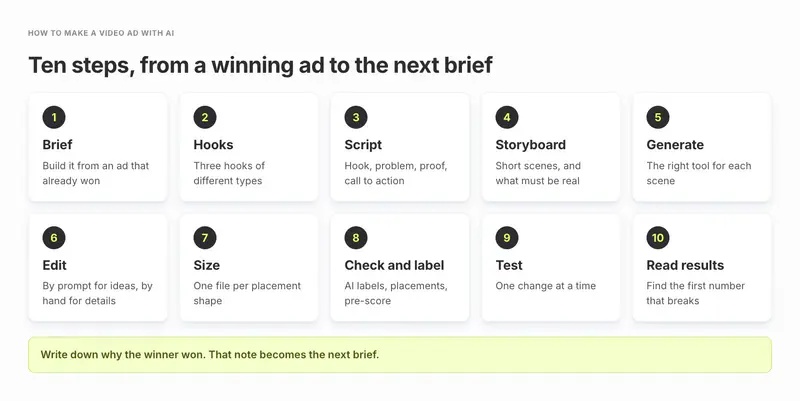
To make a video ad with AI, start from an ad that already wins, not a blank prompt. Write a one-page brief, draft three hooks, script 15 to 30 seconds, storyboard four to six scenes, generate each scene, edit, export 9:16, 4:5 and 16:9, then A/B test one change at a time for at least 7 days, as Meta recommends.
Everything depends on that first step: knowing which of your ads, and which hook in it, actually wins. Segwise is an AI creative analytics and creative generation platform that tags the hooks, CTAs and visual styles in the ads you already run, so you can start from a proven winner, then lets you make videos up to 30 seconds from it, including AI UGC-style ads. Every step below works without Segwise. Where a tool saves time, we name it and give its price from its own site.
This is a how-to. If you want a ranked list of tools, read our guide to the best AI video ad generators.
TL;DR
- If you already have winning ads: build the brief from them. Keep what won (the hook type, the angle, the format) and change one thing per new video. This is the fastest way to a new winner.
- If you are starting from zero: make three short videos with three different hooks on the same body, and let a 7-day test pick the direction before you make more.
- For mobile games: let AI make the hook, the intro and the end card, but show real gameplay. Players install the game they saw.
- For DTC brands and subscription apps: AI UGC-style video and product demos are usually the quickest formats to test at volume. Keep the product, the app screen and every claim real.
- For every team: export one file per placement shape, label AI content where the network asks, and judge each video on cost per result, not on how good it looks.
When does AI video work for ads, and when doesn't it?
AI video works best for short, direct-response ads that need many versions. It works worst when the ad's job is to prove something is real.
When is AI video a good fit for an ad?
Here is a rule of thumb we use. AI video is a good fit when at least two of these five are true:
- The ad is 30 seconds or shorter.
- You need 10 or more new video variants a month.
- You already have a winning ad or pattern to build from.
- The selling point can be shown with a face, an app screen or a simple product shot.
- You buy on Meta, TikTok or app networks such as AppLovin, where fresh creative volume matters.
When should you keep the footage real?
Keep it real (filmed or captured) when:
- The claim needs proof. Before and after results, taste, texture or skin outcomes should be real footage. An AI version can read as a fake claim.
- The ad is a real customer testimonial. An AI presenter can say "I", but it can't be a real person's review.
- It is gameplay. Generated gameplay that doesn't match the game sets up the wrong expectation, which can hurt retention.
- Small product detail matters. AI clips can warp labels, logos and on-screen text. Our guide to turning product images into video ads covers how to protect a label.
- It is a long brand film. Past about a minute, keeping faces and scenes consistent gets hard and the cost of fixing takes rises.

Which type of video ad should you make?
Pick the type before you write a word. Each type gives AI a different job.
| Type | Best for | What AI does well | What to keep real | Typical length |
|---|---|---|---|---|
| UGC-style (a person talking to camera) | Subscription apps, DTC, finance and education apps | The presenter, voice, script and captions | The app screen, the product and the claim | 15 to 30s |
| Product demo | DTC products, apps with one clear feature | B-roll, motion on still product shots, voiceover | The actual product or screen recording | 15 to 30s |
| Motion graphics | Offers, launches, feature callouts | Animated text, icons, transitions | Brand colours, offer terms | 6 to 15s |
| Gameplay | Mobile games | The hook scene, characters, voice, end card | The gameplay itself | 15 to 30s |
For UGC-style video in depth, including disclosure rules and the AI versus human creator trade-off, see our guide to AI UGC video ad tools.
Step 1: Write the brief from an ad that already won
A blank prompt gives you a generic ad. A brief built from a proven ad gives the AI a pattern to follow and gives you one clear thing to test.
Fill in these lines before you generate anything:
- Goal and metric. For example: lower cost per install on Reels and TikTok.
- Audience. Who sees it and what they want, in one sentence.
- The winner you are building from. Name the ad and say why it won: the hook type, the angle, the format.
- The one change. A new hook, a new angle or a new format. One change per video, so the test tells you something.
- Networks and shapes. Which placements, so you storyboard for 9:16 first if most spend is vertical.
- Must-haves. Logo, legal lines, offer terms and the words you can't say.
You can do this by hand from your ad network reports.

Step 2: Write three hooks for the opening seconds
The hook is the opening two or three seconds, and it does most of the work of getting people to watch the rest. Even for the simplest case, turning a still image into a video ad, Meta's conversion testing advice is to put the motion up front and promote a single benefit. Full video ads need a hook that earns attention just as fast.
Write three hooks of different types, so your test compares ideas and not just wording:
- Face and a real moment. A person in a believable situation saying one line. Example: "This app told me to rest today."
- Problem shown, not said. The frustration on screen in the first second.
- Result first. Open on the outcome (the streak, the finished room, the level cleared), then explain.
Put the hook on screen as text too, so it still lands for anyone watching with the sound off. If you want to know which hook types already work for you, our guide to analyzing hook patterns in video ads shows how to tag and compare them.
Step 3: Script 15 to 30 seconds
A simple shape works for most direct-response video:
| Beat | Time | Job |
|---|---|---|
| Hook | 0 to 3 seconds | Stop the scroll |
| Problem or desire | 3 to 8 seconds | Make the viewer nod |
| Proof or demo | 8 to 22 seconds | Show the product doing the thing |
| Call to action | 22 to 30 seconds | One clear next step and a consistent end card |
Plan on about 2 to 2.5 spoken words per second, our working guide for a natural pace. That makes a 30-second script roughly 60 to 75 words. If your draft runs past 80 words, cut, don't speed up the voice.
Any chat assistant can draft scripts. Claude has a free plan, and Pro costs $20 a month billed monthly. Give it your brief from step 1, the three hooks and the beat table, and ask for one script per hook with the same body. Then read every line out loud. If you wouldn't say it, the presenter shouldn't either.
Step 4: Storyboard it scene by scene
A storyboard turns the script into four to six scenes. For each scene, write:
- the time range
- what is on screen
- the voiceover or spoken line
- the on-screen text
- which tool will make it, and what must be real footage
The last line saves the most time. It tells you which scenes to generate, which to film or screen-record and which to pull from your existing ads.
Keep scenes short. Most AI video models make clips of a few seconds at a time, and shorter clips are easier to keep consistent. Four 5-second scenes are easier to get right than one 20-second take.

Step 5: Generate each scene
Use the tool that fits the scene, not one tool for everything.
UGC-style presenters: Arcads, HeyGen and Creatify
Arcads has a library of 1,000+ AI actors. It is credit-based, and its help center says dollar prices are shown inside the app, so we can't quote one. HeyGen has a free plan (3 videos a month with a watermark), and its Creator plan costs $29 a month or $24 a month billed annually. Creatify has a free plan with 10 credits a month. Its Standard plan costs $15 a month, or $10 a month on an annual plan, and Pro costs $55 a month, or $38 on annual.
Cinematic B-roll and scenes with Runway
Runway Standard costs $15 a month, or $12 a month billed annually, for 625 credits, which its pricing page says buys 52 seconds of its Gen-4.5 model.
What a 20-second Runway ad costs in credits
The cost math: Gen-4.5 uses 60 credits per 5 seconds, so 12 credits a second. A 20-second ad cut from four 5-second scenes, with three takes per scene to pick the best, means 60 seconds of generation, or 720 credits. That is more than a Standard month. Runway's Pro plan ($35 a month, or $28 billed annually) gives 2,250 credits, enough for about three ads like this a month at that take rate. Budget for takes, not for finished seconds.
Product demos: real footage with AI around it
Screen-record the app or film the product on a phone, then use AI for the voiceover, captions and B-roll around it.
Gameplay scenes for mobile game ads
Capture real gameplay. Use AI for the hook scene before it, a character intro and the end card.
Generating scenes from your own winners in Segwise
Segwise helps your team draft briefs and storyboards from your tagged winners. The Creative Generation Agent lets you make statics and videos up to 30 seconds, including AI UGC-style ads, from the hooks, CTAs and visual styles your own data shows are winning. Each suggested ad comes with a "Why this ad" note, you can edit it by plain-English note or by hand, and once it is live it is tagged and tracked automatically. Videos come out finished, with clips stitched and voice, music and captions in place, and Segwise can make them in any language, for both the voiceover and the on-screen text. You can use each agent on its own, or do it all in one place by chatting with the Segwise agent: ask how your ads are performing, see what competitors are running, and make new ads from your winners. If you only need a talking presenter and don't run analytics, a presenter tool is the simpler buy.
Generate from what already wins: Segwise lets you make finished video ads, including AI UGC-style ones, from the hooks, CTAs and visual styles your own data shows are winning. Start a free trial.
Step 6: Edit by hand and by prompt
AI gets you a first cut. Editing makes it an ad. There are two kinds of edits, and you will need both.
Edits by prompt: change the idea
Edits by prompt change the idea: a new hook line, a different product shot, a swapped layout, a new voice. You write a plain-English note, such as "open on the recovery ring, and keep the same end card", and the tool reworks that part without starting over.
Edits by hand: fix the details
Edits by hand fix the details: trim each scene to the beat, set the headline position and size, turn captions on, swap a B-roll clip, fix the end card. A timeline editor such as Descript also works; its Hobbyist plan costs $24 per person a month, or $16 billed annually.
Common AI video faults to check before sign-off
Before you sign off, check every video for the usual AI faults:
- warped hands, faces or product labels
- garbled text inside the frame
- lip sync that drifts from the voice
- an app screen or game UI that doesn't match the real one
- a claim the script added that legal hasn't approved

Step 7: Size it for each network
Make one master in the shape where most of your spend runs (usually 9:16), then cut the other shapes from it. Don't let the network crop for you. Meta says that if you don't provide all four aspect ratio variations, it fills the gaps with padding, expansion or cropping, and it asks you to review those crops before publishing.
Video ad shapes and specs by network
| Network and placement | Shape | What the platform says |
|---|---|---|
| Meta Reels and Stories | 9:16 | Keep the top, bottom and sides clear of key text and logos. With a disclaimer on Reels, leave the bottom 40% clear. |
| Meta Feed | 4:5 or 1:1 | 1440 x 1800 recommended for Facebook Feed video, MP4 or MOV, up to 4 GB. |
| TikTok In-Feed | 9:16 | TikTok's small-business video guide recommends 21 to 34 seconds. Its pages disagree on the maximum (its ads policy says 60 seconds, its In-Feed spec page 10 minutes for non-Spark ads), so check Ads Manager. |
| YouTube and Google video | 16:9, 9:16 or 1:1 (4:5 accepted) | 1080p recommended. Length depends on the campaign type. |
| AppLovin (Axon) | 9:16 | MP4 or MOV, up to 1 GB and up to 60 seconds. |
The table draws on Meta's aspect ratio guide, Meta's safe zone guide, Meta's Feed video specs, TikTok's video advertising guide for small businesses, TikTok's In-Feed ad specs, Google's video ad specs and AppLovin's creative specs. Specs change, so check each page before a big batch.
Naming and exporting files for every network
Name every file the same way across shapes (brand, concept, month, market), so results from each network roll up to one concept later.
Segwise exports generated video in the formats, dimensions and specs each network requires, under one consistent file name, and can adapt a winning ad to new languages and markets. For connected TV, it rebuilds your social winners as 15 and 30-second widescreen TV spots through a managed service, where a Segwise creative specialist finishes each spot. Pushing files straight to the networks is not live yet, so you still upload them yourself.

Step 8: Check, label and pre-score before you spend
Three checks before launch:
- Label AI content where the network asks. TikTok's ads policy allows AI-generated or heavily edited media when it carries an AIGC label or a clear disclaimer, and it says undisclosed AI content can be rejected or restricted. Meta adds an "AI info" label to ad images made with its own generative AI tools, and for ads about social issues, elections or politics, advertisers must disclose AI use even with third-party tools, according to Meta's help page on AI labels. Google notes that some AI-generated assets may need labels in some regions.
- Check placement eligibility. Make sure each file fits the placements you picked. If Feed placements get nothing but a 9:16 file, Meta may pad or crop it, so supply a 4:5 cut as well.
- Pre-score if you can. Segwise's Pre-flight Testing scores up to 10 creatives at once out of 100 against the ads already winning in your account, flags placements a file isn't eligible for, and gives a run or hold verdict. It doesn't fix the video; your team reworks it and re-scores.
Step 9: Test three to five variants, one change at a time
Meta's A/B testing best practices give the rules that matter: test only one variable and run for at least 7 days (tests can run up to 30). If your customers take longer than 7 days to convert, Meta suggests a longer test, such as 10 days. Meta's A/B testing overview adds two more: use the same budget for both versions, and don't test by switching ad sets on and off by hand, because audiences can overlap.
A practical setup is three to five variants that share the same body and differ only in the hook. Each variant needs enough results to judge, so we aim for about 50 results per variant before calling a winner. Both numbers are our own working guides, not platform rules.
That makes the budget easy to estimate:
- Mobile app, judged on installs: $2.50 cost per install x 50 installs x 4 variants = $500 test budget.
- DTC brand, judged on purchases: $30 cost per purchase x 50 purchases x 4 variants = $6,000 test budget.
If the second number is out of reach, judge the hook test on a cheaper, earlier signal (such as cost per click or hook rate), then confirm the winner on purchases.
Step 10: Read the results and feed the next brief
Read each video from the top of the funnel down. The first number that breaks tells you which part of the ad to fix. Our working definitions: hook rate is 3-second video plays divided by impressions, and hold rate is ThruPlays (or completed views) divided by 3-second plays.
| If this is weak | The likely problem | What to change next |
|---|---|---|
| Hook rate | The opening doesn't stop the scroll | A new hook type (step 2) |
| Hold rate | The middle drags or the promise isn't paid off | Cut the script, move the proof earlier |
| Click-through rate | The offer or call to action is unclear | A clearer CTA and end card |
| Conversion rate, CPI or CPA | The ad and the landing or store page don't match | Match the page to the ad's promise |
| ROAS | The ad attracts low-value users | Change the angle or the audience it speaks to |
Then write down why the winner won, in the same words you used in the brief (hook type, angle, format). That note is the start of your next step 1.

Which platforms catch fatigue and generate new variations across Google, Meta and TikTok?
Every winning video fades as the same people see it again and again. If you want one platform that spots that fade and helps you replace the ad, here is how the main choices compare, each with a different focus.
Segwise: fatigue alerts and new ads from your winners
Segwise tracks fatigue across connected networks (Meta, Google Ads, TikTok, AppLovin and more), alerts you by email and Slack when performance drops past the threshold you set, and helps you generate new statics and videos from your own winning patterns. It is built for UA and creative teams, including mobile games. Segwise starts at $499/month for advertisers spending up to $250K/month, with a special 50% discount for startups spending under $50K/month, and includes a 7-day free trial. See Fatigue Tracking and Creative Generation.
Creatify Agent: generation and media buying in one chat
Creatify Agent (formerly AdMax) connects Meta, Google Ads, TikTok, Snapchat, Reddit and OpenAI Ads, plus AppLovin for read-only analysis. It proposes changes such as pausing an ad, moving budget or launching a campaign, and nothing runs until you approve. When a winner fatigues, it writes new hooks and renders fresh video and image ads to test. It is a good fit if you want generation and media buying in one chat.
Smartly: enterprise fatigue prediction across networks
Smartly is an enterprise platform whose docs describe fatigue prediction, plus an agent that generates fresh variations mid-flight, across Google Ads, Meta, TikTok and more. It doesn't publish prices.
Madgicx: Meta-first fatigue flags and image ads
Madgicx flags creative fatigue and generates image ads, and its AI Ad Library and Ad Generator plan costs $29 a month. It optimizes Meta only (its reports also pull Google Ads and TikTok), so it suits Meta-first DTC teams more than teams buying across all three.
For a deeper comparison of fatigue tools, see our list of the best creative fatigue detection tools.
How to start your next AI video ad
AI video ads come out best when you build from a proven ad and change one thing per video. Write the brief, draft three hooks of different types, keep the script to 15 to 30 seconds and generate scene by scene, keeping real anything that has to prove a claim. Export a file for each placement shape, then test three to five variants for at least 7 days before you call a winner. The next step is to pick your best-performing ad and write its one-page brief.