
Google Ads shows no "fatigued" status, so compare each asset with its own past. Check the asset report weekly on 14-day windows. Refresh when the asset group slips and two signals slide together: CPA or ROAS, CTR or view rate, rating, or video frequency. In Performance Max, give a new asset the 2 to 3 weeks Google advises, and always add the replacement first.
Google leaves that comparison to you, asset by asset, every week. Segwise is an AI creative analytics and creative generation platform that tracks each Google Ads creative against a fatigue rule you set and alerts you by email or Slack when it slips, with the hook, text and CTA tagged so you can see which part wore out.
This guide is the Google-specific version of our general guide to creative fatigue. It covers Performance Max, Demand Gen, YouTube Video campaigns, App campaigns, responsive display ads and responsive search ads, using Google's own Help Center pages as the source for what each report shows.
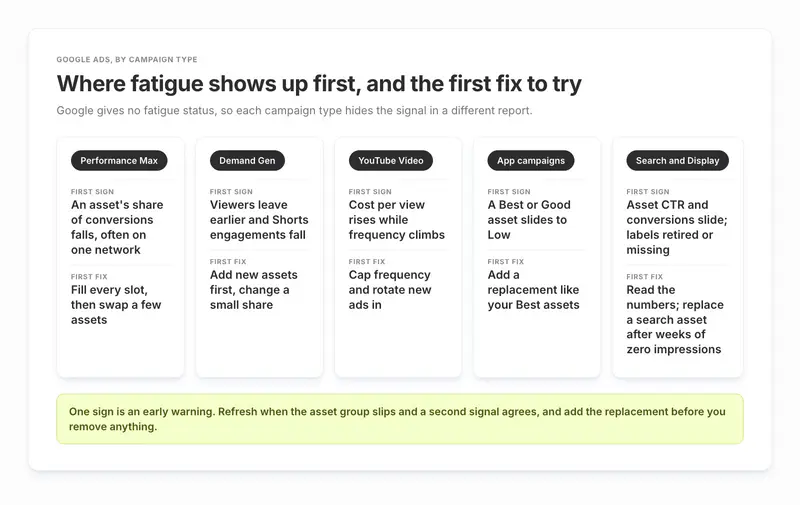
TL;DR by campaign type
- Performance Max: Use the asset report with conversions, cost and impressions added, segmented by network. Judge each asset group as a whole first. Google says to wait 2 to 3 weeks before replacing low performers.
- Demand Gen: Watch asset CTR and conversion value, plus audience retention on the Videos page. There is no frequency cap, so your levers are more assets and new concepts. Google's refresh guidance says to add new assets first, change a small share at a time, and give assets at least 14 days to ramp up.
- YouTube Video campaigns: Watch cost per view: Google says rising CPVs "could be a sign of creative fatigue" once an ad has been live a couple of weeks. Add the "Avg. impr. freq. / user (7 days)" column and frequency distribution too, because rising frequency with flat conversions points the same way. Set a frequency cap.
- App campaigns: The performance rating (Best, Good, Low) uses the last 14 days and ranks each asset against others of the same type in the campaign. A former Best asset falling to Low is your first warning; refresh when a second signal confirms it.
- Responsive search and display ads: Google retired the search label in favour of full statistics, and API exports may now drop display labels too, so read the numbers, not a badge.
- Across Google and Meta: Meta shows a fatigue status in its Delivery column; Google shows none, so you read fatigue from the numbers. If you run both, track each creative on both networks in one place.
How creative fatigue looks on Google Ads compared with Meta
Creative fatigue means your audience has seen a creative so often that it stops working: fewer clicks, fewer conversions, and a higher cost for each result. The cause is the same on every network. What changes on Google is how the symptom shows up.
How Meta flags creative fatigue
On Meta, the unit that tires is usually a whole ad, and Meta tells you. Its Help Center says you will see "Creative limited or Creative fatigue in the Delivery column status" when it believes your audience has seen an ad too many times, and the fatigue status appears when cost per result is twice or more what your past ads cost, according to Meta's creative fatigue page. Even that signal is narrow: Meta says it only works for ad sets with one creative, with a few exceptions.
Why creative fatigue is harder to spot on Google Ads
On Google, most campaign types build ads from parts. You upload headlines, images, videos and logos, and Google mixes them. So the unit that tires is an asset, and we found no fatigue label or status for it anywhere in Google's asset reporting help pages. What Google does say is that "an asset might not receive any impressions if other assets are predicted to perform better." So a weakening image may simply be shown less often while the asset group's results drift, and the report won't say whether fatigue is the reason. Google mentions creative fatigue in its advice, not as a status: its Video campaign tips say "Rising CPVs could be a sign of creative fatigue if your ad has been live for a couple of weeks."
Google Ads vs Meta fatigue signals, side by side
| Google Ads | Meta | |
|---|---|---|
| What tires | One asset inside an asset group or ad | Usually a whole ad |
| Built-in fatigue warning | No fatigue status; relative ratings (Best, Good, Low) on some campaign types | "Creative limited" and "Creative fatigue" in the Delivery column |
| What the report tells you | An asset "might not receive any impressions if other assets are predicted to perform better", with no reason given | Keeps delivering at a higher cost and shows a status |
| Frequency control | Caps on Display and Video campaigns only; none in Demand Gen | Frequency (impressions divided by reach) is a standard metric |
| Platform advice | Don't delete "Low" assets without replacing them | Make a "materially different" new ad and keep the old one running |
That last row is the practical difference. On both networks the fix is a new concept, not a resize. On Google you also have to keep the asset group full while you swap, because removing assets reduces the combinations Google can build.
What Google Ads shows you about asset performance, by campaign type
Google's reporting differs a lot between campaign types, and it changed again in 2025 and 2026. Here is what each one gives you today.
| Campaign type | Asset rating | Asset metrics you can add | Frequency data | Main fatigue blind spot |
|---|---|---|---|---|
| Performance Max | Relative ratings, including "Low" | Conversions, conversion value, impressions, clicks, cost, segmented by network | No campaign frequency cap documented | Conversions are credited to every asset in the ad, so asset totals overcount |
| Demand Gen | Relative ratings, compared by asset type | Clicks, CTR, impressions, all conversion value, view-through conversions | No frequency cap | Product feed assets aren't in the asset report yet |
| YouTube Video campaigns | Not covered by Google's asset rating pages | Per-video results on the Videos page | Frequency cap, 7 and 30-day average frequency, frequency distribution | Frequency is campaign or video level, not per hook |
| App campaigns | Low, Good, Best, Learning, Pending, Unrated, on the last 14 days | Conversions, conversion value, impressions, clicks, cost | None at asset level | Ratings are relative to the same type in the same campaign |
| Responsive display ads | Best, Good, Low, Learning, Unrated in the help page | Conversions, conversion value, impressions, clicks, cost | Frequency cap available | Labels may be missing in API exports |
| Responsive search ads | Label retired | Full statistics from June 5, 2025 | Not applicable | Ratios are directional only |
A few details from Google's documentation matter for fatigue.
Performance Max: asset metrics segmented by network
Google's asset-level metrics page lists conversions, conversion value, impressions, clicks and costs for each asset, and a "Network (with search partners)" segment that splits each asset's results across YouTube, Display, Search, Discover, Gmail and Maps. That segment is how you see that a video is tiring on YouTube while the same asset group still works on Search. The channel performance report adds day-by-day charts by channel. Our guide to Performance Max creative analytics goes deeper on reading those reports.
Demand Gen: asset ratings and audience retention
Google's Demand Gen asset report page warns that "a 'low' rating for an image/video is not the same as 'low' for a headline", so only compare like with like. For video, the Videos page has an Analytics tab with audience retention, "the percent of viewers that made it to each second of your video." A retention curve that drops earlier than it used to is fatigue showing up in the opening seconds. When you refresh, Google's Demand Gen refresh guidance says to "add new assets first" before removing or replacing existing ones, change "a small portion of your total assets periodically", and keep top performers running.
App campaigns: asset ratings on the last 14 days
Google's App campaign asset report page says the rating is a percentile ranking "based on its average daily cost", that "Low", "Good" and "Best" are relative to other assets "within the same campaign and of the same type", and that "These insights are based on the last 14 days of data." Changing the date range doesn't change the rating. The same page says a "Low" asset could be replaced, and for a "Best" one, "Consider adding more assets like this to improve ad performance." So when an asset slides to Low, model its replacement on your Best assets. When Google launched these ratings in 2020, its announcement also said it rates App assets "only against other assets with the same source and orientation". The current page doesn't repeat that, so treat it as likely rather than certain.
Responsive search ads: full statistics instead of labels
Google deprecated the "Performance label" column for RSAs and replaced it with full statistics per asset, available "for dates on or after June 5, 2025." Its campaign level RSA asset reporting page adds a rule you can act on: "If an asset receives zero impressions for several weeks, consider replacing the asset with a new one."
Reporting through the API: asset labels may be missing
A Supermetrics change note says Google stopped returning asset performance labels for Search and Display campaigns from September 21, 2026, while Performance Max and Demand Gen still return them. Google's Display help page still describes the ratings, so check what your own account and exports show before you build alerts on labels.
What a "Best" or "Low" rating does and doesn't tell you
The ratings are relative. A "Low" asset is one of the weakest of its type in that campaign right now. It can still be profitable. A "Best" asset is one of the strongest of its type. Neither rating says whether the asset is fresher or more tired than it was last month.
So the fatigue signal is movement, not the label itself: a "Best" or "Good" asset that slides to "Low" while nothing else changed. In App campaigns the 14-day window makes that slide visible within two weeks. In Performance Max, read the ratings together with the metrics, because the ratings can't tell you why an asset dropped.
Why Google's asset numbers don't add up, and how to read them anyway
Google is open about this. Its asset-level metrics page says that if one ad impression includes three assets, "those 3 assets will each register one impression," and that ratios like CTR, CPA and ROAS at the asset level "should be used as directional indicators only." In Performance Max, conversions are credited to every asset in the ad: an ad with a headline, a description and an image that drives one conversion shows three conversions at the asset level and one at the asset group level.
That breaks any comparison of one asset's CPA against another's. It doesn't break a comparison of an asset with its own past. Here is a worked example with illustrative numbers:
- Last fortnight, an asset group drove 100 conversions, and one image appeared in ads that drove 60 of them. It took part in 60% of the group's conversions.
- This fortnight, the group drove 110 conversions and the same image took part in 33. That's 30%.
- The group is fine, so there is nothing to swap yet, because the weekly check below starts with the asset group. But the image has halved its role, which is often how a tiring asset first shows up on Google.
Treat a drop like that as an early warning: queue a replacement so it is ready once the asset group slips and the rule below fires. Tracking that participation share for your key images and videos gives you a signal that survives Google's overcounting.
How to detect creative fatigue in Google Ads: a weekly check
This works without any third-party tool, using only reports Google already gives you.

Step 1: Set two 14-day windows
Compare the last 14 days with the 14 days before. That matches the App rating window and smooths out daily noise. For low-volume accounts with only a few conversions a week, use 28-day windows instead (a rule of thumb).
Step 2: Open the asset report for each campaign type
Go to Campaigns, then Assets. Add conversions, conversion value, cost and impressions. For Performance Max, add the "Network (with search partners)" segment.
Step 3: Start at the asset group or campaign level
Google recommends judging "at the asset group level or campaign level, rather than at the individual asset level." If the asset group's CPA or ROAS is steady, there is no problem to fix yet.
Step 4: If the group is slipping, find the asset that moved
Look for three patterns: a rating that fell from Best or Good to Low; an asset whose share of impressions or conversions fell while others rose; and, for video, a falling CTR or view rate.
Step 5: Check cost per view and frequency on video
Google's Video campaign tips say rising CPVs can mean creative fatigue once an ad has run a couple of weeks, but also "increased pressure in the auctions", so compare CPV with frequency before you decide. In YouTube Video campaigns, add "Avg. impr. freq. / user (7 days)" from the reach columns and the frequency distribution, which shows how many people saw your ad 1+, 2+, 3+, 4+, 5+ and 10+ times. Frequency climbing while conversions stay flat usually means the same people are tiring of the same video.
Step 6: Check the asset's age
The "Last updated" column on the Assets page shows when each asset was added or edited. Google itself says this helps "identify which assets may need refreshing."
Step 7: Rule out causes that aren't creative
A change to bids, budget, targets or conversion tracking, a seasonal dip, or a competitor's big push can all look like fatigue. If every asset dropped at once, the cause is probably not the creative.
Step 8: Set an alert so you don't rely on memory
Google Ads automated rules can "trigger automated emails when specific conditions occur". They work at the asset group level in Performance Max and the ad group level in App campaigns, not on single assets, so use them to catch a slipping group and then find the asset by hand.
Tip:
In Demand Gen, an in-stream video earns an engagement at 10 seconds of watch time, while a Shorts or feed video earns one at 5 seconds, according to Google's Demand Gen metrics page. When engagements fall on Shorts but not on in-stream, the opening seconds of the hook are usually what wore out.
Turn the weekly check into alerts: Segwise lets you set your own fatigue rule for each creative and get email or Slack alerts when one crosses it, on Google Ads and your other networks. Start a free trial.
When to refresh: a decision rule with numbers
Google gives you one firm number on timing: "We recommend waiting 2-3 weeks before deciding to replace low performing assets", from its asset group best practices page. Beyond that, you need your own rule. Here is ours. It's a rule of thumb, not a Google figure, and the thresholds are a starting point to tune for your account.
The 2-of-4 rule for refreshing a Google Ads asset
The rule applies to an asset you found in step 4 of the weekly check, so the asset group is already slipping. Refresh that asset when 2 of these 4 are true over the latest 14 days, compared with its own previous 14 days:
- CPA or cost per install is up 20% or more, or ROAS is down 20% or more.
- CTR, or view rate for video, is down 20% or more.
- Its rating fell from Best or Good to Low.
- For video, 7-day average frequency is rising while conversions are flat or falling.
When not to refresh a Google Ads asset yet
Don't refresh yet if any of these is true:
- The asset group's CPA or ROAS is steady. Queue a replacement instead, because Google is already serving other assets in its place.
- The asset hasn't had Google's waiting time (2 to 3 weeks in Performance Max, at least 14 days to ramp up in Demand Gen), or its rating still reads Learning or Pending.
- The asset group is below Google's recommended counts. Google's advice is to reach an "Excellent" Ad Strength by adding assets "up to the maximum allowed, before replacing or refreshing assets."
- Every asset in the group dropped at the same time. That points to the auction, budget or tracking, not one creative.
How often to review Google Ads assets, by situation
| Situation | How often to review | When to refresh |
|---|---|---|
| New asset still in Google's waiting period | Watch, don't judge | After Google's waiting period |
| Asset group with conversions most days | Weekly, on 14-day windows | When the 2-of-4 rule fires, 1 to 3 assets per round |
| Low volume, a few conversions a week | Every 2 weeks, on 28-day windows | On a clear rating drop plus a trend in the same direction |
| Video-heavy YouTube or Demand Gen | Weekly frequency and retention check | When frequency rises and view rate or CTR falls |
| Seasonal promotion | Daily during the sale | Google suggests starting 2 to 3 weeks early, then swapping in sale assets |
Swapping only 1 to 3 assets per asset group per round is also a rule of thumb, in line with Google's Demand Gen advice to "only change a small portion of your total assets periodically." It keeps the asset group full, and it keeps the change small enough that you can tell what the new asset did. For a network-general view of cadence, see our guide on how often to refresh ad creatives.
How to prevent creative fatigue on Google Ads
You can't stop an audience getting bored, but you can slow it down and make sure you have a fresh asset ready when it happens.
Give Google more assets and formats to rotate
- Fill every asset slot. Google's best practices for asset groups say to add as many assets as possible, "including up to 15 headlines, 5 descriptions, 20 images in different orientations", and the video table on the same page allows up to "15 videos across all types". More assets means more combinations, and each one is shown less often.
- Cover every orientation. Performance Max takes video in 16:9, 9:16 and 1:1, and Google's 2020 App announcement said App assets were rated against others of the same orientation (the current App page doesn't repeat this, so treat it as likely rather than certain). A missing format means the few you have carry all the serving. If you upload no video at all, Performance Max may auto-generate one from your other assets.
- Upload your own video. An auto-generated video can be the one your audience sees most, and you can't control how it wears.
Cap frequency and keep fatigue inside one asset group
- Cap frequency where Google lets you.Frequency capping works in Display and Video campaigns, by impressions, views or both, per day, week or month. In Video campaigns it applies only to in-stream and bumper ads. Demand Gen doesn't support it, so there the levers are more assets and new concepts. Google's video tips also suggest "rotating 2 or 3 different ads in and out of the auction to avoid 'ad fatigue.'"
- Split asset groups by theme or audience. Google recommends separating asset groups "by content category, theme, language, or target audience." Then one tired theme drags down one group, not the whole campaign.
Keep fresh concepts ready to swap in
- Refresh concepts, not just sizes. A new crop of the same image reads as the same ad. Change the hook, the message or the format. On a Jio Financial Services credit card campaign, agency HiveMinds traced which message themes drove sign-ups and refreshed to a simpler, benefit-first ad. That refreshed creative cut cost per acquisition 28% on Google and 25% on Meta, a customer-reported result in Segwise's HiveMinds case study. In the case study, HiveMinds' Santhosh TR says: "We stopped trying to fit three benefits into one ad."
- Keep a queue. New assets can take "up to 48 hours for review before they can serve", so have the next batch approved before you need it.
How to fix a fatigued Google Ads asset
- Add the replacement before you remove anything. Google is explicit: "Don't delete the assets with 'low' ratings without replacing them with new ones."
- Keep what still works, change what tired. If the CTA and offer still convert but the opening shot has worn out, change the hook and keep the rest. This is where knowing which element faded saves a full rebuild.
- Match the asset type and format. Replace a tired portrait video with a new portrait video, so it fills the same format and you compare like with like.
- Give it Google's waiting period. In Performance Max, that's the waiting time from the asset group best practices page above. In Demand Gen, its refresh guidance says to remove or replace assets only once they have "had sufficient time to ramp-up for at least 14 days" and underperform your campaign goal. Judge the result by how the whole asset group or campaign performs.
- Retire the tired asset once the new one is serving. In Performance Max, a low performer may still be adding conversions, so remove it only after the replacement has taken on its share.
- For video, rebuild the first seconds. Audience retention in Demand Gen shows where viewers now leave. If they leave earlier than before, a new opening on the same story is often enough.
- Write down what you changed. Note the date, the asset and the element you swapped, so the next fatigue cycle starts from evidence.
Where Segwise fits in Google Ads fatigue tracking
The weekly check above works, but it gets slow when you run several Google campaign types, and slower again when the same creative also runs on Meta, TikTok or AppLovin's Axon. Segwise helps with three parts of it.

Fatigue alerts across networks, including Google Ads
Segwise connects to 15+ ad networks, including Google Ads (YouTube inventory comes in through that connection), and to five MMPs (AppsFlyer, Adjust, Branch, Singular and Kochava), though an MMP is optional. Setup is no-code: some networks sign in with OAuth, while others, such as AppLovin, Mintegral, Unity and Moloco, need an API key from the network's dashboard. Its Fatigue Tracking "detects continuous decline in performance metrics and spend share", and you set the rule, for example "a 20% ROAS decline over 7 days." Alerts arrive by email and Slack, for one network or consolidated across all of them.
Element-level tagging that shows what wore out
Segwise's multimodal AI tags each element of every creative, such as the hook, characters, on-screen text, CTA and audio, with 20+ standard tags plus your own. Each tag is mapped to metrics like ROAS, CPA and CTR. Instead of "image 4 is Low", you see that bold-headline hooks are tiring on Google faster than on Meta while the CTA still works, as in the demo view for the fitness app Pulse below. Asset clustering also groups the same footage across networks, so you see one creative's full story.

A faster replacement for a tired creative
When a creative tires, the Creative Generation Agent lets you make statics and videos up to 30 seconds, including AI UGC-style ads, from your own winning patterns, exported to each network's specs. Before any spend, Pre-flight Testing lets you score up to 10 candidates, each out of 100. Competitor Tracking covers the Meta, TikTok, LinkedIn and Google ad libraries, so you can see what rivals run before you brief the refresh. Your team still reviews, edits and ships every ad.
You can use each agent on its own, or do it all in one place by chatting with the Segwise agent: ask how your ads are performing, see what competitors are running, and make new ads from your winners.
As Santhosh TR, AVP of Paid Media at HiveMinds, put it about the time before Segwise: "Every week we'd spot a creative showing signs of fatigue. But confirming it meant pulling numbers from Meta and Google by hand, and by the time we had, the next round of creative was already in production without that learning."
What Segwise doesn't do in Google Ads
Segwise is not a bid or budget automation tool. It alerts and analyses, and your team makes the changes in Google Ads; pushing finished assets to networks is listed as coming soon. Its fatigue view depends on the data Google reports, so Google's overcounting at asset level still applies, and Segwise reads trends rather than fixing that. History import covers 14 days on the free trial and 3 months on paid plans.
When you don't need a fatigue tool for Google Ads
If you run one or two Google campaign types, have a few dozen assets and don't run the same creatives elsewhere, the weekly check plus Google's automated email rules is enough. A tool pays off once you manage fatigue across several networks or hundreds of creatives. Our list of creative fatigue detection tools compares the options. Segwise starts at $499/month for advertisers spending up to $250K/month, with a special 50% discount for startups spending under $50K/month, and includes a 7-day free trial.
Your weekly Google Ads creative fatigue routine
Google Ads won't label an asset as fatigued, so the signal is an asset slipping against its own past while its asset group slips too. Run the weekly check on 14-day windows, refresh when two of the four signals move together, and give a new asset Google's waiting period before you judge it. Add each replacement before you remove the asset it replaces, and change the concept rather than the size. Start this week by opening the asset report for each campaign type and comparing the last 14 days with the 14 before.