
You have three ways to give ChatGPT or Claude your Meta and Google Ads data. Export a report as CSV and upload it: free, five minutes, stale tomorrow. Connect an MCP server: Meta hosts one you add with a URL and a Facebook sign-in, while Google's you run yourself on a Google Cloud project. Or use the APIs or a third-party connector when you need scheduled, repeatable pulls.
All three give the model results by ad, and Meta's server can also pull each ad's creative details and previews. None labels the hook, scene or offer inside every ad and ties those labels to results, so the model can rank ads but can't tell you which ideas the winners share. Segwise is an AI creative analytics and creative generation platform that tags the hook, visuals, on-screen text and CTA in every Meta and Google ad and joins those tags to your results, so through the Segwise MCP you can ask ChatGPT or Claude which hook drove your cheapest purchases on both networks.
TL;DR
- You ask about ad data once a week or less: export a CSV from Meta Ads Reporting or a Google Ads table and upload it. Works on free plans.
- You check Meta every week, or across accounts: add Meta's hosted MCP server as a connector. It is in open beta and can edit campaigns, so set rules first.
- You need Google Ads data live: Google's Ads MCP server is open source, but you run it yourself on a Cloud project. It can't touch campaigns, budgets or bids.
- You want dashboards or scheduled jobs: use the Meta Marketing API and Google Ads API, or a connector such as Windsor.ai or Supermetrics.
- You want to know why ads win: add tagged creative data. The Segwise MCP lets the model answer which hooks, scenes and CTAs win, across Meta and Google.
CSV, API or MCP: which way should you connect ad data?
Pick the route by how often you ask and whether the model should be allowed to act. Here is what each one takes, as each vendor documents it in November 2026.
| Route | What you set up | How fresh | Can it change campaigns? | Cost |
|---|---|---|---|---|
| CSV or XLSX export, uploaded | A saved report in Meta Ads Reporting or a Google Ads table download | As of the download | No | Free plans work (ChatGPT Free allows three uploads a day) |
| Meta's ads MCP server | Server URL plus Facebook sign-in in your AI tool | Live | Yes, if you approve; new campaigns start as drafts | Free from Meta; ChatGPT needs Plus ($20/month); Claude Free allows one connector |
| Google Ads MCP server | Cloud project with Google Ads API access, run locally or on Cloud Run | Live | Assets and labels only, never campaigns, budgets or bids | Open source; you pay for any hosting |
| Meta Marketing API or Google Ads API | A Meta app or Cloud project, tokens and code | Live or scheduled | Yes, with write permissions | Developer time |
| Third-party connector | Install a plugin, sign in, authorize the ad account | Synced by the vendor | Some can, such as Windsor.ai | Windsor.ai: free for one source, paid from $19/month billed annually |
| Segwise MCP | Server URL plus your Segwise login | Your Segwise data, across networks | No | Available on every Segwise account |
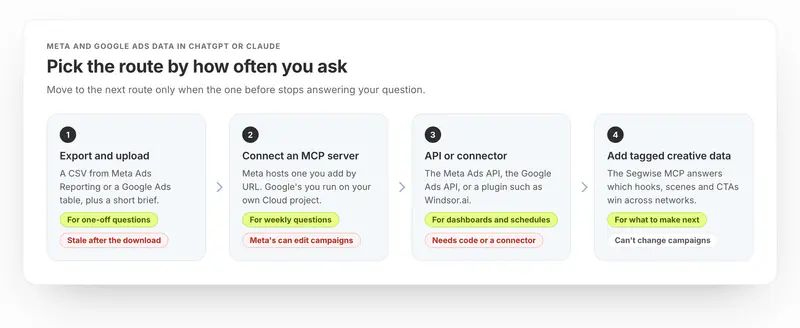
A decision rule with numbers
These are rules of thumb, not vendor guidance:
- One ad account, a question less than once a week: export and upload. Anything more is setup you won't use.
- Weekly questions, or two or more ad accounts: connect an MCP server so the model pulls the numbers itself. Meta's takes minutes; budget an afternoon for Google's if nobody on the team has used Google Cloud. Our Meta ads MCP and Google Ads MCP explainer covers setup and permissions for each.
- More than about five client accounts, or numbers that feed a dashboard: use the APIs or a connector, so the same query runs on a schedule rather than in a chat.
- More than about 20 live creatives: ad-level rows stop explaining why something wins. Add tagged creative data before you ask for the next brief.
How do I get Meta Ads data into ChatGPT?
Two routes cover most teams: an export or Meta's hosted MCP server. The steps are the same for ChatGPT and Claude; only the connector screens differ.
Export a report from Meta Ads Reporting
Meta's help page on exporting reports says you can export a report "as an .xlsx or .csv file, or as a link", and that you need administrator, advertiser or analyst access to the ad account.
- In Ads Manager, open the Reports drop-down and select Create custom report.
- Choose the level (campaign, ad set or ad), the date range and the columns: ad name, amount spent, results, cost per result, CTR and frequency are a good start.
- Save the report, then select it and click Export. Pick CSV.
- Upload the file to ChatGPT or Claude with a short brief: what you sell, your target cost per result and which ads you think worked.
Mind the limits. OpenAI says CSV files and spreadsheets have "a size limit of approximately 50 MB", and Free accounts get three uploads a day. Claude accepts up to 500 MB per file and 20 files per chat, and you must turn on code execution and file creation to upload XLSX files.
Tip: Ask the model to show the rows behind every number it gives you. With a file, both tools run the maths in code, so you can check any answer against Ads Manager in a minute.
Connect Meta's hosted ads MCP server
An MCP (Model Context Protocol) server lets an AI tool call another system's functions. Meta's ads MCP server works with "ChatGPT, Claude, and Perplexity", and Meta says standard setup takes minutes: "enter one URL in your AI tool and sign in with Facebook." You don't need a Meta developer app.
- In Claude: go to Customize, then Connectors, add a custom connector with the URL
mcp.facebook.com/ads, and sign in with Facebook. Anthropic allows one custom connector on the Free plan. - In ChatGPT: open Plugins on the web, select the plus button, then Add custom MCP server, and enter the same URL with OAuth sign-in. OpenAI's pricing page lists Developer mode, which this needs, from Plus at $20 a month.
Once connected, Meta's help article says the model can pull reporting, create and edit campaigns, manage audiences, catalogs and A/B tests, read the activity log, and "retrieve details about existing/uploaded ad creative and request previews". Two caveats from Meta: the connectors are "currently in open beta", and "Not all ad accounts have access yet due to phased rollout." Our comparison of ChatGPT vs Claude for Meta ads covers how each tool handles permissions on this connector.
How do I get Google Ads data into ChatGPT or Claude?
Google Ads is easy to export and harder to connect live, because Google doesn't host an MCP server for you.
Download a Google Ads report
On any page with a statistics table, click the download icon above the table, click Download and pick a format. Google's reports help page lists "Excel CSV, TSV, PDF, XLSX, XML, and Google Sheets". Upload it in the same chat as your Meta export to compare the two networks.
Run Google's open source Google Ads MCP server
Google's Google Ads MCP server is "a standardized bridge to the Google Ads API" that you deploy, not a hosted URL. Here is what setup takes:
- Create or pick a Google Cloud project and turn on the Google Ads API.
- Get production access. Google sunset developer tokens on September 9, 2026, so access levels now sit on the Cloud project. Explorer access allows 2,880 operations a day on production accounts; Basic needs brand verification and allows 15,000.
- Run it locally with Python 3.10 or later, or host it on Cloud Run with an OAuth web client ID and secret.
- For Claude or ChatGPT on the web, add your own Cloud Run URL, ending in /mcp, as a custom connector with OAuth.
Google describes the current mode as "Read and partial mutate": the model can query reports with search, create assets, upload videos and manage labels. Google says the server "cannot create, modify, pause, or enable campaigns, ad groups, ads, budgets, or bids", and you can set it to a "strictly read-only deployment" in its tools_config.yaml file. For most teams that read-only setting is the right default.
What can ChatGPT or Claude do with your ad data?
It depends on what you connected. All three routes support the same core jobs: summarize a week, find the ads with the lowest cost per result, spot spend shifting between campaigns, and compare Meta with Google on one metric. Meta's server adds campaign drafts, change history and creative previews; Google's adds reporting queries and new assets.
What none of the routes give the model
Meta's Insights API asset breakdowns return IDs: "The ID of the image asset involved in impression, click, or action." Meta lists no breakdown by hook, scene or offer. Meta's server can fetch an ad's creative details and previews, but it doesn't label them across your account or join those labels to results. So the model can tell you ad 14 beat ad 9. It can't tell you that both winners open on a face. Nor can it see that five color variants of one product shot are really one idea taking a third of your spend. For that, every ad needs the same labels, applied the same way each time.
Adding tagged creative data with the Segwise MCP
This is the missing layer: each ad labeled element by element, with the labels tied to results.

Ask why, not just which: Segwise lets you ask ChatGPT or Claude which hooks drive your cheapest purchases on Meta and Google, answered from your own tagged ads. Book a demo.
Segwise connects to Meta and Google Ads, and its creative tagging watches, listens to and reads every ad. It labels the hook, scenes, people, on-screen text, audio and CTA, then maps each tag to metrics such as CTR, CPA and ROAS, and to custom events from your MMP if you connect one. The Segwise MCP brings that tagged data into Claude, ChatGPT, Cursor, Codex and Grok Bot, so the question changes from "which ad won?" to "which idea should the next batch use?"
A DTC team could ask: "Which hook tags drove our lowest cost per purchase on Meta and Google in the last 30 days?" In the example below, ads that open on a face cost $12.40 per purchase on Meta, against $17.80 for the product close-up statics. That points to whether next week's batch leads with a person or the product, and the next question can be "show me the Google ads behind the close-up result."

Setup works like the other connectors: add mcp.segwise.ai/mcp as a custom connector and sign in with your Segwise login. The MCP is available to all Segwise accounts. It has three tools (list your organizations, start a query, get the answer), it reads your data and answers questions, and it can't change your campaigns, budgets or tags or generate ads. It needs at least one connected ad network or MMP, and deeper questions can take several minutes because each one runs as a background job. Our Segwise MCP guide has the setup steps for each AI tool and example questions. Segwise starts at $999/month for advertisers spending up to $250K/month; startups spending under $50K/month pay $499/month (limited eligibility).
Inside Segwise, the Creative Strategy Agent works from the same tags. Ask it what your top 5 ads share that your bottom 5 don't, and it answers with charts and can draft a brief from the pattern. The Creative Generation Agent lets you make statics and videos up to 30 seconds, including AI UGC-style ads, from your own winning patterns. You can use each agent on its own, or do it all in one place by chatting with the Segwise agent: ask how your ads are performing, see what competitors are running, and make new ads from your winners.
When does the Meta Ads API or a connector make sense?
Go the API or connector route when the numbers have to flow on a schedule, not only when someone asks in a chat.
The Meta Ads API
The Meta Ads API for reporting is the Insights API, which Meta describes as providing "performance data and statistics for Meta ads" at the ad account, campaign, ad set and ad level. You need a Meta app and the ads_read permission (ads_management to change ads). New apps start on Limited access, which Meta calls "Heavily rate-limited per ad account. For development only." Full access requires at least 500 Marketing API calls in the last 15 days with an error rate under 15%.
The API makes sense when a developer is building something that runs without a chat: a nightly pull into a warehouse, a dashboard, or a script that writes a summary file you then hand to the model. For questions in a chat, the hosted MCP server does that job with no code.
The Google Ads API and third-party connectors
Google's API is the route for scheduled Google pulls, with the same Cloud project and access levels as its MCP server. If no one on the team writes code, a connector does the plumbing. Windsor.ai installs as a ChatGPT plugin and uses "an MCP connector that collects and structures your Facebook Ads data"; its free plan covers one data source and the last 30 days, and paid plans start at $19 a month billed annually. Supermetrics offers a ChatGPT plugin covering Facebook Ads and Google Ads. Both say their plugins can create, pause or change campaigns, so treat them with the same care as Meta's server.
Is it safe to connect your ad accounts to ChatGPT or Claude?
It can be, if you control two things: who sees the data, and what the model may change.
Who sees your data
Uploads and connector results become part of your chat. OpenAI says that on ChatGPT Free, Plus and Pro "data sharing is enabled by default"; turn off Improve the model for everyone under Settings, then Data controls, to stop chats being used for training. OpenAI does not train on Business, Enterprise or Edu workspaces by default. Claude's consumer plans use a Model Improvement setting in Privacy Settings, and Anthropic says it does not use inputs or outputs from its commercial products for training by default. For client data, an agency should be on a business plan of either tool. Either way, upload only the columns your question needs.
What the model may change
Meta's server can create and edit campaigns. Meta says "Any actions taken on your behalf require your authorisation through the AI agent", and new campaigns start as drafts. If you have full control of the business portfolio, go to Settings in Meta Business Suite, then Integrations, then Ads MCP server, and block actions per ad account: switch Create campaigns to Blocked, or block any budget above an amount you set. On whether connecting risks a ban, Meta says "it's unlikely that an account would be banned simply for using it."
Which servers to trust
OpenAI warns: "Only connect to MCP servers you trust. An untrusted server may access or steal information shared through app use, or trick ChatGPT into using tools in unintended ways, including changing or deleting data." Anthropic notes that custom connectors allow connections to unverified services. Use the vendor's own server URL, not one copied from a forum.

A one-week plan to connect your ad data
- Day 1: turn off model training in your AI tool, or move to a business plan. Write a one-paragraph brief on your offer and target cost per result.
- Day 2: export 30 days of ad-level results from Meta and Google, upload both and ask for the five cheapest ads on each, with the rows shown.
- Day 3: set the Ads MCP server rules in Meta Business Suite, then connect Meta's server to one ad account.
- Day 4: ask the Day 2 question through the connector and check the numbers match your export.
- Day 5: if you need Google live, set up the Google Ads MCP server in read-only mode on one account.
- Day 6: if you run more than about 20 live creatives, bring in creative tags and ask which hooks your cheapest ads share.
- Day 7: make one brief and one batch of changes. Review what the model got right before you widen access.
For more on what these assistants can and can't do in a live account, see our guide to AI copilots for performance marketing and our list of the best AI agents for performance marketing. If you also want competitor ads in the same chat, read how to spy on competitor ads with Claude and an MCP.
Which route should you use to connect Meta and Google Ads data to AI?
Start with a CSV export, because it answers most one-off questions on any plan. Connect Meta's hosted MCP server once you check results weekly, with rules set in Business Suite before you sign in, and run Google's server in read-only mode if you need Google live. Save the APIs and connectors for numbers that must flow on a schedule. Your next step is the Day 1 brief, then bring in creative tags when the question becomes why your best ads win.