
Buy a creative analytics tool once two of these five are true: you run three or more ad networks, ship more than about 50 new creatives a month, tag video or playables by hand, spend more than six hours a week on reporting, or spend above $50K a month. Build in-house only if a data engineer has spare time and your question is about metrics, not about what is inside the ad.
Segwise is an AI creative analytics and creative generation platform. It pulls creative and performance data from 15+ ad networks and five MMPs, tags every creative element with multimodal AI, and helps teams turn the patterns that win into new ads. This guide compares it with Motion, Hawky, the creative modules from MMPs like AppsFlyer and Singular, and building it yourself.
You already do this work by hand. Spend lands in a sheet from Meta, TikTok and Google, installs or revenue come from an MMP export, someone tags the ads by eye, and a Looker or BI dashboard sits on top. It works until the Monday meeting asks "which hook is winning?" and nobody can answer before Wednesday. A sheet or a BI dashboard joins numbers well, but neither reads hooks, characters or audio. That gap is what you pay to close, either in staff hours or in a subscription.
TL;DR
If your setup is small: stay on sheets. Spreadsheets fail on content and joins, not on size. Google Sheets allows 20 million cells, far more than a creative report needs.
If you are counting the cost of doing it by hand: an analyst hour costs about $54 once benefits are counted. A $499 a month tool pays for itself if it saves a little over two hours a week.
If you are thinking of building: half a developer costs about $5,700 a month in wages and about $8,100 with benefits. Raw MMP data tells you how a creative ID performed, not why, and tagging is a separate machine-learning project.
If you are buying: use the trigger count above. Segwise fits teams on several networks, including DTC brands that want tagging, fatigue alerts and ad generation. MMP modules fit teams tied to that MMP, and Motion fits DTC teams that run only Meta and TikTok and mainly want reporting.
Build, spreadsheet or buy: the options side by side
How to decide: count your buying triggers
Count how many of these five are true for your team today. The thresholds are our own rules of thumb, not benchmarks from a study, so adjust them to your numbers.
You pull from three or more ad networks.
You ship more than about 50 new creatives a month.
You tag video or playables by hand.
Creative reporting takes more than six hours a week.
You spend more than $50K a month, so a creative that fatigues unseen for a week costs real money.
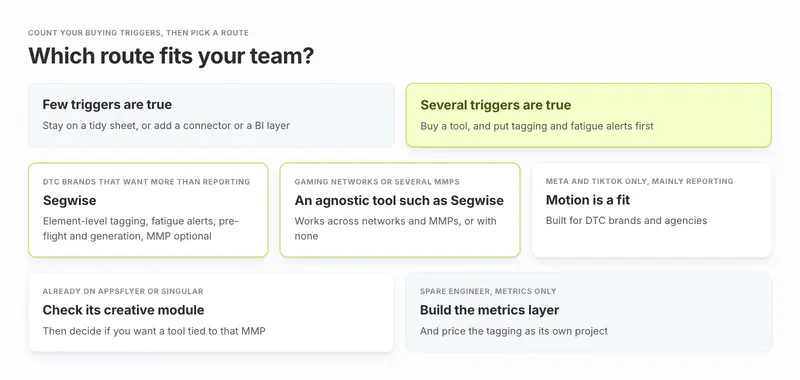
If you are a DTC brand that wants element-level tagging, fatigue alerts, pre-flight scoring or ad generation on top of reporting, Segwise fits, and it works without an MMP. Motion is also a good fit for DTC brands and agencies that run only Meta and TikTok and mainly want creative reporting and analysis. If your MMP is AppsFlyer or Singular, check its creative module first, then ask whether you want a tool tied to that MMP. If you run mobile gaming networks like AppLovin, Unity, Mintegral or Moloco, or use more than one MMP, a network-and-MMP-agnostic tool such as Segwise is the closer fit. For agencies, see how Segwise supports growth agencies.
A tool does not remove the need for enough data. In a 2021 Motion panel, media buyer Ryan Kovach suggested giving each ad two to three times the product's average order value in spend before judging it. That was one buyer's rule of thumb, but the point stands: no dashboard changes how much data an ad needs.
Why spreadsheets and BI dashboards stop working
Teams rarely outgrow a spreadsheet because the file got big. Google's own help page puts the limit at 20 million cells or 100MB, far beyond a weekly creative report. They outgrow it for three other reasons.
The join gets heavier every week. Spend and creative thumbnails sit in each ad network. Installs, revenue and retention sit in the MMP. Nothing links them. WGT's user acquisition manager Heedrin Bustamante described the routine in WGT's case study: pull data from the MMP, then cross-reference it by hand against the live creative in each network. His summary was "There were no shortcuts."
Native connectors cover little of this. Cometly's guide to marketing spreadsheets notes that Google Sheets has native connectors for Google Ads and Google Analytics. Meta, TikTok, Snapchat and the rest need a third-party connector, which is usually paid. Supermetrics Starter allows 2 data sources and Growth allows 7, and warehouse destinations like BigQuery sit on its quote-only Enterprise plan. A team on Meta, TikTok, Google, AppLovin, Snapchat and an MMP is already at 6.
Errors compound quietly. In his 2015 EuSpRIG paper, researcher Raymond Panko reports an average cell error rate of 3.9% across 14 laboratory studies with 967 people. Per-cell errors are small, but he concludes that in large spreadsheets at least one wrong bottom-line value is very likely. A creative report with campaign, ad set, creative and tag columns is the kind of file where those errors can hide.
Names are not content. A sheet can group ads by the naming convention your team types into the ad name. It cannot tell you that the winning hook opens on a person's face, or that the losing ones start with a logo. Someone has to watch each ad and write that down. AdStellar, a vendor of automated tools, says that for teams running dozens or hundreds of creatives, manual upkeep "can become a full-time job". Treat that as a vendor's view.
Meta's own reporting is also less clean than it looks. The Marketing API offers image, video and title asset breakdowns, but states that "Insights breakdown values are estimated", and for Dynamic Creative the image and video asset breakdowns are not available at the ad account level. Your sheet inherits those limits.
A real example of the whole pattern is ecobee. In its Segwise case study, analysts opened each ad platform, exported numbers and lined them up in a spreadsheet, and harder questions meant hand-labelling hundreds of creatives or waiting for a BI analyst to write queries. The case study puts that at 20 to 30 hours a week across the team, with spend on six platforms. Creative strategist Eddie Hanson said: "The answer I needed used to be a day of exporting and cleaning up spreadsheets." Those are customer-reported figures.
What building creative analytics yourself involves
Building is a real option. If your data already lives in BigQuery or Snowflake and you have an engineer with room, you can get a long way on metrics alone. A full build has four parts, and only the first is a dashboard job.
Data pulls. Network APIs for each platform, plus MMP exports, on a schedule, with retries when an API changes.
Creative identity. The same video runs under different names and IDs on Meta, TikTok and AppLovin. AppsFlyer's documentation says its module matches the same creative across networks with AI and computer vision regardless of naming conventions or IDs. That is a product feature a DIY build must recreate.
Tagging. Mixpeek, which sells a multimodal API, lists the building blocks as embeddings, clustering and LLM-named themes, plus feature extraction such as scenes, faces, OCR and transcripts. It adds that tying these to your own performance data is pilot work, not an off-the-shelf feature.
Alerts and upkeep. Fatigue thresholds, Slack delivery, and the maintenance when a network changes its reporting.
The cost is not only money. A custom build also leaves one person who understands the pipeline, and the report stops when that person is on holiday.
If the real reason to build is that your team wants to query creative data from its own AI tools, there is a middle path. Segwise has a read-only MCP server with three tools that works with Claude, ChatGPT, Cursor and Codex, and the account manager turns it on by request. It only reads data: it cannot generate ads, change tags or touch your ad networks.
What it costs: analyst hours, a developer or a tool
You can price all three routes with public numbers. Swap in your own where you have them.
Price an hour of reporting time. The US Bureau of Labor Statistics puts the median market research analyst wage at $78,760 a year, or $37.87 an hour, as of May 2025. Wages are only 70.0% of what private employers pay per worker once benefits are added, according to the BLS June 2026 compensation survey. So a fully loaded analyst hour costs about $54. A UA manager or data scientist costs more.
Count the hours. A weekly creative report usually means exporting from each network, pulling MMP numbers, matching ad names across the two, tagging the week's new creatives, updating pivots, checking for slipping ads and writing the summary. Time it once for a real week rather than guessing. Here is what different totals cost:
These hour counts are examples, not survey data. For a real one, ecobee's team put its own figure at 20 to 30 hours a week.
Find your break-even. Segwise at $499 a month is about $6,000 a year. At $54 an hour, that equals about 111 hours, or a little over two hours a week. If a tool saves your team more than that, it pays for itself on time alone, before you count a single better creative decision.
Tip: Break-even in one line: hours saved a week, times your loaded hourly cost, times 52, against the tool's yearly price.
Price the build. The BLS puts the median software developer wage at $135,980 as of May 2025. Half of that is about $5,700 a month in wages. With benefits at the same 70% wage share, the real cost is about 40% higher, or about $8,100 a month, before tooling and any model API bills. That is our arithmetic, not a vendor quote, and half a developer is a guess. For scale, Motion's Starter plan is $999 a month for accounts spending up to $50K, and Segwise starts at $499/month for advertisers spending up to $250K/month, with a special 50% discount for startups spending under $50K/month.
To be fair to the build side, a tool will not take your hours to zero. Someone still reads the results, argues about them and writes the brief. What a tool removes is the assembly work: exporting, joining, tagging and checking. It should not remove the thinking.
Is AppsFlyer's AI better than analysing raw attribution data yourself?
If your MMP is AppsFlyer, its module usually beats a raw-data build on creative matching and tagging. Raw attribution data gives you rows per creative ID, with installs, events and revenue. AppsFlyer's Creative Optimization adds creative matching, AI breakdowns of video into scenes and elements, and custom tags. Its docs say it is a separate subscription, that the scene and element breakdowns need its Advanced or Premium plan, that it runs on AppsFlyer attribution data, and that full cost data such as ROAS needs an ROI360 subscription. Pricing is not published. For Meta Advantage+ and Google multi-asset ads, AppsFlyer notes that it uses data modeling to divide performance across assets, because networks do not report asset-level results.
Building on raw rows only beats that if you have people to build and maintain the tagging and the cross-network matching yourself. What AppsFlyer does not document is generating new ads, or proactive fatigue alerts: fatigue is read by hand from IPM and cost trends. For the full side-by-side, see our Segwise vs AppsFlyer Creative Optimization comparison.
What to buy, by situation
If two or more triggers are true, these five tools cover most buying situations for teams leaving spreadsheets.
Segwise: best for UA and creative teams on several networks, with or without an MMP
Key features. Segwise connects to 15+ ad networks and five MMPs: AppsFlyer, Adjust, Branch, Singular and Kochava. The MMP is optional, so a DTC brand can run it on ad network data alone. Setup is no-code and OAuth based. Its creative tagging reads video, audio, image, text and playables, and it plays each playable end to end, the way a player would, before tagging the mechanic, tutorial and end card. It uses 20+ standard tags, custom tags, and tags pulled from your naming convention, each mapped to ROAS, CPA, IPM and CTR. It groups the same creative across networks, so one video running under three names shows as one asset.
Fatigue tracking alerts by email and Slack, per network or consolidated across networks, against thresholds you set. A Creative Strategy Agent answers questions about your own data. The platform also generates statics, video up to 30 seconds and AI UGC-style video from winning patterns. Playables and CTV spots are managed services, where the Segwise team finishes each one. Pre-flight Testing scores a creative out of 100 before it runs. The creative analytics view shows thumbnails next to metrics, and seats, view-only users, reports and dashboards are unlimited on every plan.
Customer-reported results.
- HiveMinds, the agency running Meta and Google for Jio Financial Services, cut its weekly creative review from about 2 hours to about 30 minutes, and a refreshed credit card campaign cut cost per acquisition 25% on Meta and 28% on Google, according to the HiveMinds case study.
- WGT cut its early concept-to-test cycle from 2 to 3 weeks to 2 to 3 days, with MMP and network data joined in one view, in the same case study quoted above.
- Mode Mobile replaced its manual cross-network pull with automated reporting into Slack, so insights reach the team without anyone compiling data first.
Pricing. Segwise starts at $499/month for advertisers spending up to $250K/month, with a special 50% discount for startups spending under $50K/month, and includes a 7-day free trial.
Limitations. Segwise is not an MMP, so mobile teams keep their MMP for attribution.
Motion: best for DTC brands and agencies on Meta and TikTok
Key features. Motion covers Meta, TikTok, YouTube and LinkedIn, with video analysis, a competitor ad library, and an AI agent called Runneth that posts routines and alerts to Slack. AI tagging uses 8 fixed categories.
Pricing.Motion's pricing page lists Starter at $999 a month for up to $50K of monthly ad spend, read 23 October 2026. Pro and Growth are "Let's chat". There is a 14-day free trial.
Limitations. AI tagging works for Meta creatives only, custom tags are applied one at a time, and no MMP or mobile gaming network such as AppLovin, Unity or Mintegral is listed in its integrations. That fits a DTC team well and a mobile app team poorly.
AppsFlyer Creative Optimization: best for teams already measured by AppsFlyer
Key features. Creative-level performance from 19 listed ad partners, AI scene and element breakdowns for video on the Advanced and Premium plans, naming-convention tags, CSV custom dimensions and up to 30 custom metrics.
Pricing. Not published. It is a separate Creative Optimization subscription, and full cost data needs ROI360 on top.
Limitations. Data comes from AppsFlyer attribution, and there is no documented support for another MMP. Dashboards refresh once a day, and no automatic fatigue alert is documented.
Singular Creative IQ: best for teams on Singular, or analysing creatives across networks
Key features.17 out-of-the-box AI tags on every video and image, up to 20 custom AI dimensions, hook tags for a video's opening seconds, and custom alerts on creative dimensions delivered by email. Singular says it can ingest data from a third-party MMP through a connector.
Pricing. Not published for Creative IQ. The Creative IQ page offers a 14-day free trial with no credit card.
Limitations. Singular's docs say analytics-only customers may not see ROI per creative. No creative generation is documented.
Hawky: best for brands that want agents to run media as well as analyse it
Key features. Element-level tagging, fatigue alerts on every tier, and two always-on agents plus a Copilot. The Performance Agent can change bids, budgets and pauses inside spend caps, and Creative Studio generates static images; Hawky's homepage lists video as coming next. Hawky covers Meta, Google, YouTube and TikTok.
Pricing.Hawky's pricing page lists every tier as "Talk to sales", priced per brand with unlimited users. There is no self-serve trial.
Limitations. Mobile gaming networks such as AppLovin and Unity are not listed, and an agent that touches budgets is a different risk decision from a reporting tool.
When not to buy anything
Stay where you are if no triggers from the count above are true, or if you spend under about $5K a month on one network, one person already reads every ad, and your question is "is this campaign working" rather than "which creative element works". At that scale a tidy sheet and a weekly review is the right answer. Buying early also adds a tool nobody has time to learn.
Do not buy as a fix for a team problem either. If nobody acts on the weekly report, automating it will not change that.
How to move off spreadsheets in 30 days
For anyone who decides to buy, a low-risk order looks like this:
Week 1. Connect your ad networks and, if you have one, your MMP. Segwise setup is no-code and history imports on its own, 14 days on the trial and up to 3 months on paid plans, so you can compare against the sheet the same day.
Week 2. Run both side by side. Check ten creatives where you already know the answer. Note every mismatch and why. If more than two of the ten are tagged wrongly, tune the tags before you retire manual tagging.
Week 3. Retire the manual tagging. Let the tool tag everything, then correct tags that look wrong. Human review stays in the loop.
Week 4. Turn on fatigue alerts for your top spend, and archive the old sheet for any history older than what your plan imports.

Related reading: how to unify scattered creative data, the workflow case for card view over spreadsheets, and manual vs AI creative tagging.
Build or buy: what to do this week
Count your triggers, run the break-even with your own hourly cost, and if both point to buying, prove it with one side-by-side week before you commit. Keep your sheet or BI dashboard for finance reporting either way.