
The best dynamic creative optimization tool for most advertisers in 2026 is the one already sitting in the ad account. Meta's Advantage+ creative and Advantage+ catalog ads and Google's Performance Max asset automation assemble creative per impression at no license fee, and they are what the majority of advertisers actually run. You buy a DCO platform when you need assembly those products will not do: Confect (from $299 per month) or Hunch (pricing not published) for catalog ad design across Meta, TikTok, Snapchat and Pinterest, Smartly for cross channel assembly plus media buying at enterprise scale, Criteo DCO+ for commerce media retargeting, and Google Studio with Display & Video 360 or Innovid (formerly Flashtalking) when your own ad server has to serve the variants. Segwise is the measurement layer that sits above whichever of those assembles the ad and maps the elements inside it to the metrics you track across 15+ networks and MMPs. We ranked these nine on what each one assembles at delivery time, where it can serve, what it needs from your product feed, and what it actually costs on the vendor's own price list.
Segwise is an AI creative-analytics and generation platform that auto-tags every element across 15+ networks, ties each to performance, and generates new variations from what is winning, so your DCO is fed by proven elements.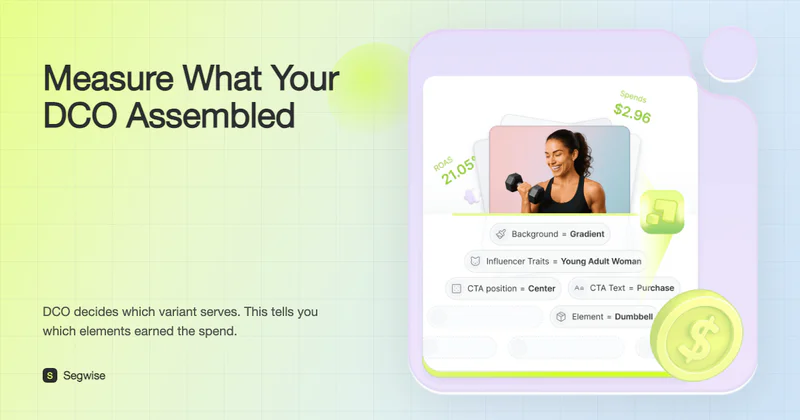
Most DCO buying guides skip the two products that matter most, because nobody pays commission on them. Meta and Google both build dynamic assembly straight into the buying interface, both turn parts of it on by default, and both have spent the last two years absorbing the controls that used to be separate features. Any honest shortlist has to start there and then explain what a paid platform adds.
The second thing these guides skip is the cost of letting the platform assemble your ads. When the auction picks the combination, your creative report describes an ad your team never put together. That is a real measurement problem, not a sales angle, and it changes what you should ask a DCO vendor for.
This page covers delivery time assembly: producing variations against a product feed or an audience signal and serving them at the moment of the impression. It is not a list of tools for making, resizing and localising large volumes of assets. Those are a different job with a different buying process, and they are covered on our creative automation and production scaling page, linked below.
Disclosure: this guide is published by Segwise, one of the 9 options reviewed here. Every price was checked at the vendor's own pricing page in September 2026, Segwise gets the same limitations treatment as everything else on this page, and any Segwise performance figures are self-reported by our customers and labeled as such.
What counts as DCO on this page, and what we sent elsewhere
DCO has become a label vendors apply to anything that touches more than one ad variation. Three different jobs get sold under the same word, and mixing them is how teams end up paying for a tool that does not solve the thing that hurts.
Two consequences of drawing the line there. Celtra, Bannerflow, The Brief (the platform Creatopy rebranded to in 2026), Storyteq and Bannerwise are not on this list, even though they appear on most DCO roundups including our own earlier ones. They are production platforms, and putting them next to Criteo DCO+ in a table implies a comparison that does not exist. Smartly is the genuine exception: it assembles variants from templates and feeds and it buys the media, so it belongs here on the assembly job while also appearing on the production page. It is the one tool dual listed across both.
Every option below was judged on five things: what it assembles at the moment of delivery, which channels it can serve into, what it needs from your catalog or feed before it works, whether it reports anything about the elements it assembled, and what the vendor publishes about price. Where a vendor publishes no price we say so rather than repeating a number from a third party listing.
All 9 DCO options compared
What decides your DCO setup
Find the row that describes you and start there. The thresholds below are the ones that actually change the answer, and they matter more than any feature list.
Start with the DCO you already own: the native platform products
Meta and Google both ship dynamic assembly inside the buying interface. There is no license fee, no integration, no procurement cycle, and in Google's case part of it is switched on unless you switch it off. Any comparison that leaves these out is comparing paid tools against a blank page rather than against the thing you are already running.
1. Meta Advantage+ creative and Advantage+ catalog ads

Meta splits its dynamic work into two products. Advantage+ creative applies AI adjustments and generates ad variations across single image, video and carousel formats, and Meta's own documentation says your media options may appear in any format and with any combination of text. You can accept the bundle or opt into individual enhancements one at a time, and Meta notes that some optimizations are shown to everyone who sees the ad while others are applied only when they are likely to appeal to a particular person.
Advantage+ catalog ads, which Meta previously called dynamic ads, are the feed side. You upload a catalog once, and Meta generates a per person ad for the products someone showed interest in, across broad prospecting audiences or retargeting. That is textbook DCO, it is free, and it covers most of what a mid sized ecommerce advertiser needs on Meta.
One thing to know before you plan around this: Meta keeps moving the controls. Dynamic creative at the ad set level gave way to the flexible ad format, and format level options such as flexible media now live inside the Advantage+ creative panel. Check what your account actually shows in Ads Manager today rather than what a blog said last quarter, including our own earlier posts.
When native Meta is enough: you sell on Meta, your catalog is under a few thousand products, and your creative variations are text plus a handful of media options rather than designed layouts with badges, prices and localised copy burned into the image.
When it is not: you want control over how the product image looks (frames, price badges, discount overlays, brand backgrounds, per market rules), you need the same design ruleset on TikTok, Snapchat and Pinterest as well, or you need an ad server outside Meta to own the version logic.
2. Google Performance Max and Demand Gen
In Google Ads the equivalent is the asset group. You supply headlines, descriptions, images, logos and video, and Google renders combinations across Search, YouTube, Display, Discover, Gmail and Maps. Two automation layers sit on top. Text customization, which Google used to call automatically created assets, adds headlines and descriptions generated from your landing page and existing ads, and Google's documentation states it is turned on by default and has to be unchecked in setup or campaign settings if you do not want it. Generated images are optional, and Google curates and suggests images from your site, your previously used assets, stock and new AI generated images.
If you run programmatic display rather than Google Ads, note that Ads Creative Studio was sunset in March 2025. Google's own sunset notice points display advertisers to Studio or to third party creative partners. Any guide still describing Google Studio as part of Ads Creative Studio, this page included until this update, is out of date. See option 8 below for what the enterprise route actually is now.
Demand Gen campaigns work the same way on YouTube, Shorts, Discover and Gmail: you load the assets, Google renders the format. The real choice on Google is rarely which DCO tool to buy. It is how much of the asset pool you are willing to let the system write for you.
When native Google is enough: your spend is inside Google inventory, your creative is asset based rather than designed as a single locked layout, and you are willing to let the system pick combinations in exchange for reach.
When it is not: you need a designed dynamic unit rather than an assembled asset group, you are buying through DV360 or your own ad server, or you need per combination reporting that Google does not provide (see the measurement section below).

The 7 paid DCO platforms worth shortlisting in 2026
Ordered by what most teams need next rather than by contract size. Measurement comes first because it changes what you buy afterwards, then the assembly platforms in order of how narrow the job is.
3. Segwise: the measurement layer over whatever assembles your ads
Segwise does not assemble ads at impression time, and it is on this list for the opposite reason. Once you hand assembly to Advantage+ creative, Performance Max, Smartly or an ad server, the question that decides your next quarter is which elements inside the served ads are working, and none of those systems answer it across more than their own inventory.
The platform runs on four agents over a shared data layer. The Creative Tagging Agent applies multimodal AI to every creative you run, tagging visual elements, scene changes, on screen text, dialogue, hook lines, voiceover style, background music, characters, CTAs and emotional tone across video, image, audio and text, and it is the only platform in this comparison that also tags playable ads. The Creative Strategy Agent is the AI chat layer: it answers questions about your creative data in plain language, and it also drafts creative briefs and concepts. The Creative Generation Agent produces new creatives from your winning patterns, including static, video and playables. The Competitor Tracking Agent tags competitor ads with the same logic.
What it does that the assembly tools do not:
Tags map to any metric you track. Not just ROAS, CPI and CTR. If your account measures day 7 retention or trial starts, the tags map to that.
One view across 15+ ad networks and MMPs. Meta, Google, TikTok, Snapchat, Axon (AppLovin), Unity Ads, Mintegral, Moloco and Liftoff among the networks, plus AppsFlyer, Adjust, Branch, Singular and Kochava on the attribution side. Connection is no code OAuth, about 5 minutes per source and 10 to 15 minutes to connect everything.
Fatigue detection with your own thresholds. Set the rule (for example a 20% ROAS decline over 7 days) and get alerted by email or Slack before spend follows the decline down.
Asset clustering. Groups ads built from the same underlying footage or image and isolates which treatment moved the numbers, which is the closest you can get to a clean read when the platform is choosing combinations for you.
An MCP. You can query your own creative data from an external agent or client rather than only inside the dashboard.
When you should try it: you are running DCO at volume, your variant count has passed the point where anyone reads the reports, and scaling decisions are still being made on campaign level ROAS. It fits mobile game studios on Axon, Unity Ads and Mintegral, DTC brands scaling Meta and TikTok, subscription apps optimising preview videos, and agencies running many accounts at once.
Limitations, plainly: it does not serve or assemble ads, so it never replaces the tool that does. Competitor tracking covers the Meta, TikTok, LinkedIn and Google ad libraries. Below roughly 20 active creatives the tagging depth is more than the decision needs. And it cannot reconstruct which combination the platform served, because neither Meta nor Google reports that (the next section explains why).
Pricing: Segwise starts at $499/month for advertisers spending up to $250K/month, with a special 50% discount for startups spending under $50K/month. A 7 day free trial runs with no credit card. Historical data backfills automatically, up to 2 weeks on the trial and up to 3 months on paid plans. See creative tagging and fatigue tracking.
4. Hunch: feed driven assembly and campaign launch across paid social

Hunch connects to your product feed, applies design templates, and then launches and updates the campaigns that carry the resulting variants. The distinction that matters against Confect is that Hunch keeps going past design into campaign automation, so the same tool that builds the variant also manages the ad set it lives in.
Key features:
Dynamic product ads and catalog product video built from feed fields
Template library and creative studio with AI background removal
Hyper local campaign automation, useful for multi location and franchise advertisers
Campaign launch and management across Meta, TikTok, Snapchat, Pinterest, Google and Reddit
Cross channel insight reporting inside the platform
When you should try it: a large catalog, more than one paid social channel, and nobody on the team who wants to hand build a creative per SKU. Onboarding and support come up repeatedly as strengths in user reviews, which matters because feed work is where implementations stall.
Limitations: reviewers have flagged TikTok and Pinterest workflows as thinner than the Meta one, and single click launch of the same campaign across several platforms as a work in progress. Element level diagnostics stop at the platform's own reporting.
Pricing: not published. Hunch describes it as pay for what you use with no seat limits, quoted after a demo. Third party listings quoting a monthly figure are not confirmed by Hunch and should not be planned against.
5. Confect: catalog ad design per SKU, with a published price list

Confect is the narrowest tool here and the easiest to evaluate, because it does one job and publishes what it costs. It sits on your product catalog and applies design rules to the ads the platforms then serve dynamically: frames, backgrounds, price and discount badges, sold out states, per market copy, all driven by feed fields rather than by hand.
Key features:
Full design editor with advanced design rules driven by catalog fields
AI background removal, scheduled design changes and multiple designs inside one ad
A/B testing and analytics on the designs themselves
Story and video catalog ads on the higher tiers
Unlimited users, designs and custom product fields on every plan
When you should try it: DTC and retail teams whose catalog ads currently look like raw feed images, and who want the same design system across Meta, TikTok, Snapchat, Pinterest and Reddit. The 30 day trial is long enough to actually ship designs and read a result, which is rare in this category.
Limitations: it is a design and rules layer for catalog ads, not a media buying tool and not a general purpose DCO server. Plans are bounded by markets and product counts, so a fast growing catalog moves you up tiers. Non commerce advertisers with no catalog get nothing from it.
Pricing: published on the Confect pricing page. Local is $299 per month for 1 market and up to 3,000 products, Pro is $499 per month for up to 3 markets and 10,000 products, Global is $999 per month for up to 10 markets and 30,000 products, and Enterprise is custom above that. Annual billing saves 20%, and every plan has a 30 day free trial.
6. Smartly: cross channel assembly plus the media buying around it

Smartly is the one tool on this page that genuinely does both jobs, which is why it is also listed on our production scaling page. Here it earns its place on assembly and delivery: templates and feeds produce the variants, and the same platform runs the campaigns, budgets and bidding that put them in front of people. It is organised as a Creative Suite, a Media Suite and an Intelligence Suite, and it reaches social, connected TV across streaming services, video and the open web through major DSPs.
Key features:
Template and feed driven creative variants scaled across placements and channels
Campaign, budget and bidding automation in the same platform as the creative
Spreadsheet driven campaign management, still the reason many enterprise teams choose it
Multi account, multi channel reporting with custom dimensions
Support for Meta catalog formats, Instant Experience, Instant Form and placement customisation
When you should try it: you are past the point where one channel dominates, you have structured campaign data and a team that maintains it, and the coordination cost across channels is bigger than the design cost. Multi location brands, large agencies and enterprise advertisers are the natural fit.
Limitations: the learning curve is real and reviewers routinely advise budgeting for a specialist during onboarding, measured in weeks rather than days. It reports well on what it ran and much less on what you ran elsewhere, so element level analysis across non Smartly inventory needs an outside layer.
Pricing: not published. Quoted on spend volume after a sales conversation.
7. Criteo DCO+: per shopper assembly on commerce media

Criteo's Dynamic Creative Optimization+ is the most literal DCO product here. Its Real Time Creative Optimization engine picks design elements from a brand framework in microseconds using predictive models over what Criteo describes as 120+ shopper intent signals, such as products viewed and sites visited, drawing on behavioural data from what it reports as 1.2 billion or more monthly active shoppers. Criteo's own figures for the product are up to 31% better click through engagement and, for a recent enhancement, up to 12% more sales for its advertisers. Those are vendor numbers from Criteo's product page, not independent results.
Key features:
Real Time Creative Optimization choosing layout and design per impression
Design frameworks built with Criteo's creative services team rather than by you alone
Product recommendation logic tied to Criteo's commerce data
Dynamic elements including CTAs, logos, product descriptions and ratings
Support for Meta catalog placements alongside Criteo inventory
When you should try it: retargeting and retail media are central to your plan, your catalog is large, and you already spend enough with Criteo for the creative services relationship to be worth having.
Limitations: the optimisation depends on Criteo's own commerce signals, so value drops sharply if you want the same creative logic on inventory Criteo does not touch. It assumes meaningful spend and is a poor fit outside commerce.
Pricing: not published. Tied to spend and to the data integration.
8. Google Studio with Display & Video 360: the enterprise programmatic route

This is the correct name for Google's enterprise DCO path in 2026, now that Ads Creative Studio is gone. Per Google's Studio documentation, a dynamic creative is an HTML creative file that frames dynamic images, video and copy, plus a Studio profile that holds the rules and maps creative elements to content. The content itself comes from profile fields you update on the fly or from a dynamic feed, which is a spreadsheet or dataset holding every content variation the creative can display. Studio integrates with Campaign Manager 360, and DV360 traffics the result.
Key features:
Dynamic profiles that map feed rows and rules to creative slots
HTML5 dynamic creatives built in Google Web Designer or by hand
Audience list and line item targeting rules inside the dynamic profile, with Google noting audience lists need 500 or more members before an ad will serve to them
Native trafficking into DV360, Campaign Manager 360, YouTube and authorised exchanges
When you should try it: you buy programmatically through DV360, you have or can hire HTML5 and ad ops capability, and the version logic has to live in your ad server rather than in a social platform.
Limitations: this is ad ops work, not a marketing tool. Most teams need a certified partner or an agency to run it. It gives you very little if your spend lives on Meta, TikTok and the mobile gaming networks. And Google's recent history here, with Ads Creative Studio shut down in March 2025, is a reason to ask about roadmap commitments before building a workflow on it.
Pricing: not published separately. Access comes with Campaign Manager 360 or DV360, sold through Google or a reseller, and serving fees apply.
9. Innovid (formerly Flashtalking): independent ad server DCO
Almost no DCO roundup lists an ad server, which is odd, because for large advertisers the ad server is where dynamic versioning has lived for a decade. Flashtalking was the independent option, and after Mediaocean acquired Innovid in February 2025 the two merged and Innovid became the single brand for the combined ad tech business. Its stack covers ad authoring, interactive and dynamic ads, ad serving, social ad management, and measurement across CTV, digital, social and linear.
Key features:
Dynamic ad versions decided at serve time, independent of any single media owner
One ad server across CTV, digital, social and linear, with measurement in the same system
Interactive and CTV formats alongside standard display and video
Agency and holding company workflows, given the Mediaocean relationship
When you should try it: you are a large advertiser or agency that wants versioning and measurement decoupled from the platforms selling you the media, and CTV is a meaningful part of the plan.
Limitations: this is enterprise ad tech with a procurement cycle to match, and it is the wrong shape entirely for a self serve performance team buying only on Meta and Google. Pricing is not published.
DCO breaks creative measurement, and nobody sells you the fix
Here is the part vendors leave out of the demo. When the platform assembles the ad, you often cannot tell which combination won, which means your creative report may be describing a creative your team never made.
Both platforms document this themselves, in plain language, if you read the reporting pages instead of the product pages.
Google credits every asset in the ad for the same conversion. Google's documentation on conversion reporting by asset states that conversions are not split across the components of an ad: if an ad with a headline, a description and an image drives one conversion, all three assets are credited with that conversion, so the asset level total reads three while the asset group level reads one. The same applies to conversion value, and Google explicitly says you cannot add the asset level numbers up to get the asset group total. The asset report is designed around relative performance labels, Best, Good and Low within the same asset type, rather than around a clean per asset conversion count.
Meta reports assets, not combinations. Meta's Insights API breakdowns include asset level dimensions such as body_asset, title_asset, image_asset, video_asset and call_to_action_asset. There is no breakdown for the combination that was actually assembled and served. Meta also documents that dynamic creative asset breakdowns support only a limited set of metrics, and that image and video asset breakdowns are not available at the ad account level for assets used in dynamic creative. So you can see how each headline did across every combination it appeared in, and you cannot see which headline and image pairing carried the result.
Three practical consequences.
Asset level numbers do not add up, and should not be presented as if they do. If your reporting deck sums asset conversions to a campaign total, the total is inflated by design. Read labels and relative rank, not absolute credit.
Delivery is not even, so absence of data is not evidence. The auction concentrates spend on a few combinations early. An asset that looks weak may simply never have been given enough delivery to prove itself, which is a different decision from retiring it.
The variable you control is the input, not the combination. You choose which assets enter the pool. That is the level at which you can still learn something, so it is the level worth measuring properly: which hooks, which opening frames, which price framings, which characters, which CTAs went in, and how the pool performed when each was present.
This is the honest version of why element level analysis matters with DCO, and it is a narrower claim than the one usually made. A tagging layer such as Segwise can tell you how the assets you supplied performed, across every network at once, mapped to whatever metric you actually optimise. It cannot recover the combination Meta or Google served, because they do not report it, and no tool that claims otherwise is reading a data source the rest of us cannot see. Judge DCO measurement claims against that limit.
What DCO needs from your feed before any tool works
Most DCO rollouts that disappoint fail upstream of the platform. The tool was fine. The inputs were not.
A catalog that is complete in the fields you want to design with. If you want a price badge, the price field has to be populated and correct for every SKU, in every market. Design rules fail silently on missing fields, and the ad still serves.
Availability and price sync you trust. Feed driven ads promote sold out and mispriced items faster than any human ever could.
A dynamic feed or profile if you are going the ad server route. Google's Studio dynamic creatives need a profile holding the rules plus, optionally, a dynamic feed containing every content variation the creative can display. That artefact has an owner and a maintenance cost, and it is usually the thing nobody was assigned.
Naming conventions that survive assembly. If assembled variants land in reporting with platform generated names, joining them back to your creative library later is manual work. Decide the convention before launch, not after.
Audience minimums. Small segments do not serve. Google documents a 500 member minimum on audience lists for a Studio dynamic ad to show, and personalisation logic that slices below that produces empty variants.
Enough time and enough conversions per variant. Give any DCO test a window long enough that each variant has accumulated a meaningful number of conversions, not a fixed number of days. Reading a combination on a handful of conversions is how teams retire creative that was working.
Which DCO setup fits your team
Four questions to ask in a DCO demo
Which of my channels do you assemble for, and which do you only report on? Vendors answer these as one capability. They are not. Get the list split in writing.
What does your system decide, and what do I still decide? Ask them to walk through one impression: who chose the layout, who chose the product, who chose the copy. If the answer is the ad platform for all three, you are paying for design and workflow, not optimisation.
Show me your element level report on a live account. Not the deck. Watch whether the report describes assets you supplied or combinations the platform assembled, and ask where each number comes from.
What is the price model and what triggers a tier change? Spend based, impression based, product count, market count and seat count all behave differently as you grow. Confect publishes tiers by market and product count, most of the others quote after a call.

Where DCO ends and the rest of the creative stack begins
DCO is one job in a chain of four, and the tools that do the other three are deliberately not ranked above.
Making the assets: volume production, resizing, localisation and versioning belong to creative automation and production scaling tools. Celtra, Bannerflow, The Brief and Abyssale live there.
Inventing new creative: generating concepts and finished ads is covered in best AI ad generation tools.
Reading what happened: element level analysis across networks is covered in best ad creative analysis tools, and the early warning side in creative fatigue detection tools.
So which DCO tool should you actually start with
Start with the native product, and prove it is not enough before you buy anything. Turn Advantage+ creative and Advantage+ catalog ads on properly on Meta, build a real asset group in Performance Max, and see where the ceiling is. When you hit it, the ceiling names the tool: design control on a catalog points to Confect, catalog work plus campaign automation across several social channels points to Hunch, cross channel assembly with the media buying attached points to Smartly, commerce retargeting points to Criteo DCO+, and version logic that has to live in your own ad server points to Studio with DV360 or Innovid. Then fix the measurement problem that all of them create, because the assembly is the easy half.
Frequently Asked Questions about dynamic creative optimization tools
What are the best dynamic creative optimization tools in 2026?
For most advertisers the best DCO tools are the native ones: Meta's Advantage+ creative and Advantage+ catalog ads, and Google's Performance Max asset groups, both included at no license fee. Among paid platforms, Confect is the best value for catalog ad design from $299 per month, Hunch adds campaign launch and management across paid social, Smartly covers cross channel assembly plus media buying at enterprise scale, Criteo DCO+ is strongest on commerce media retargeting, and Google Studio with DV360 or Innovid are the routes when your own ad server has to own the version logic. Segwise sits above whichever one assembles the ad and maps the elements inside it to your metrics.
What is dynamic creative optimization (DCO)?
Dynamic creative optimization is the practice of assembling an ad at or near the moment of the impression, choosing images, copy, CTAs or catalog products per person from a pool you supplied, instead of serving one fixed ad to everyone. It is different from ordinary ad personalisation, which changes who sees a fixed creative rather than changing the creative itself, and different from creative analytics, which measures what happened after the ads ran. On Meta and Google the assembly is done by the platform. In programmatic display and CTV it is usually done by an ad server such as Studio or Innovid.
Is dynamic creative optimization free on Meta and Google?
There is no separate license fee for the native products. Advantage+ creative and Advantage+ catalog ads are part of Meta Ads Manager, and Performance Max asset automation is part of Google Ads, including text customization, which Google documents as on by default. You pay media, not software. Paid DCO platforms charge on top of that media, which is why the native option should be your baseline for comparison.
What is the difference between DCO and creative automation?
DCO assembles and serves variations at delivery time, driven by a feed or an audience signal. Creative automation makes, versions, resizes and localises finished assets before anything is trafficked. A tool that produces 500 banner sizes overnight has not done any DCO, and a tool that picks a product per shopper has not done any production. Smartly is the main platform that genuinely does both.
Can I tell which creative combination won in Meta dynamic creative?
Not at the combination level. Meta's Insights API exposes asset level breakdowns such as body_asset, title_asset, image_asset and call_to_action_asset, with a limited metric set, and no breakdown for the specific combination that was served. You can see how each individual asset performed across all the combinations it appeared in, which is useful but different. Plan tests so that the thing you want to learn about is an asset you supplied.
Why do asset level conversions add up to more than my campaign total in Performance Max?
Because Google credits every asset in the ad with the whole conversion. Google's documentation states that conversions are not split across ad components, so an ad with a headline, a description and an image gives all three assets credit for one conversion, and the asset level total reads three against one at the asset group level. The same holds for conversion value. Use the relative performance labels and rank, and never sum the column.
Do I need a product feed to run DCO?
For catalog and commerce DCO, yes, and the feed quality decides the outcome. Confect, Criteo DCO+ and the catalog side of Hunch, Smartly and Meta all read from your catalog. For non commerce DCO you can run on audience signals and rules instead, which is how Studio dynamic profiles and most CTV and display versioning work.
Which DCO tool is best for mobile app and game campaigns?
None of the classic DCO platforms fit well, because most mobile gaming inventory, Axon, Unity Ads and Mintegral among it, has no DCO product to buy and expects finished creatives. App teams get more from network native tools plus an element level analysis layer that reads all those networks and your MMP together. Segwise reads 15+ ad networks and MMPs, including AppsFlyer, Adjust, Branch, Singular and Kochava, and is one of very few platforms that tag playable ads.
Is Google Ads Creative Studio still available?
No. Google sunset Ads Creative Studio in March 2025 and its own notice points display advertisers to Studio or to third party creative partners. Dynamic creatives for programmatic display are built in Studio, which integrates with Campaign Manager 360, and trafficked through DV360. Guides still describing Google Studio as part of Ads Creative Studio are out of date.
How much does a DCO platform cost?
Confect is the only vendor here with a public rate card: $299 per month for one market and up to 3,000 products, $499 for three markets and 10,000 products, $999 for ten markets and 30,000 products, with 20% off annual billing and a 30 day trial. Hunch, Smartly, Criteo DCO+, Innovid and the Google enterprise stack all quote after a demo. Treat any specific monthly figure you see for those on a third party listing as unverified.
Can I use more than one DCO tool at once?
Yes, and most mature setups do, usually by channel: native assembly on the platforms that offer it, a feed driven design tool for catalog channels, and an ad server for programmatic and CTV. The part that breaks is reporting, because each system reports only its own inventory. Pick one layer to hold the cross network view before you add the second assembly tool, not after.
How long before DCO results are trustworthy?
Long enough for each variant to accumulate a meaningful number of conversions, which depends on your conversion rate rather than on a fixed number of days. Two things make the wait longer than people expect with DCO: delivery concentrates on a few combinations early, so weaker looking assets may be under delivered rather than genuinely weak, and asset level credit is duplicated across components, so the numbers look bigger and more decisive than they are.