
The best AI storyboard generator for a video ad depends on where the idea comes from. Pick Segwise when the board should be built from your own winning ads, Boords when a client must sign off, Katalist, LTX Studio or Frameliq when the board should become AI video, and Adobe Firefly Boards or Higgsfield Popcorn to start for $0 to $9 a month.
Segwise is an AI creative analytics and creative generation platform: it tags every element of every ad across 15+ ad networks and 5 MMPs, finds the hooks, scenes and CTAs that win, and helps your team turn those patterns into scene-by-scene storyboards, briefs and finished statics, videos, playables and CTV spots. The other 8 tools on this list start from a script, a prompt, reference images or a video you choose.
TL;DR: the best AI storyboard generator for video ads, by use case
You want the next board built from what already performs: Segwise. It drafts the storyboard from your tagged ad data and adds a "Why this ad" note on what the draft builds on.
You are an agency or brand team that needs client sign-off:Boords. Clients comment on frames and approve without making an account.
You upload a script and want every deliverable at once:Storyboarder.ai turns one script into a shot list, storyboard, animatic and pitch deck.
The board should turn into AI video in the same tool:Katalist for performance teams that swap products into winning creatives, LTX Studio for one workspace from script to edit, or Frameliq for long, character-driven pieces.
You already review cuts with clients in one place:Krock.io keeps its AI storyboard tool inside a video review platform, with a free plan.
You are exploring on little or no budget:Adobe Firefly Boards is free with an Adobe account, and Higgsfield Popcorn runs on a $9 a month plan.
The 9 AI storyboard generators compared
What makes a video ad storyboard different from a film storyboard?
Most reviews of AI storyboard tools are written for filmmakers. A film board serves a shoot. An ad board serves a test: it has to fit a 15 or 30 second cut, open strong with the sound off, carry its own text and end on an action. That changes what you need from the tool.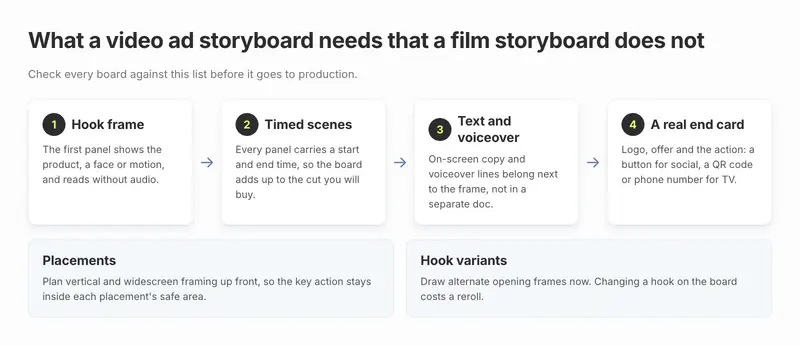
Use this as the check for any board, whichever tool made it:
A hook frame. The first panel shows the product, a face or motion, and it reads without audio. If you want to know which openers win in your own account, start with how to analyze hook patterns in video ads.
Timed scenes. Every panel has a start and end time, so the board adds up to the cut you will buy. Segwise's own CTV demo board, shown further down, splits a 30 second spot into 5 scenes.
Text and voiceover on the panel. On-screen copy and voiceover lines belong next to the frame, not in a separate doc.
A real end card. Logo, offer and the action: a button for social, a QR code or phone number for TV.
Placements. Plan vertical and widescreen framing up front, so the key action stays inside each placement's safe area.
Hook variants. Draw two or three alternate opening frames now. Changing a hook on the board costs a reroll. Changing it after the shoot costs a reshoot.
A storyboard is also not a brief. The brief says what to make and why (audience, angle, hook, CTA). The storyboard says how it plays, scene by scene. If you still need the "what", see our list of the best AI creative brief generators, then come back here for the board.
How much does an AI storyboard cost per video ad?
Plan prices are hard to compare because each tool meters something different: images, credits or projects. So we priced one job: an 8-frame board for a 30 second ad (5 scenes plus 3 alternate hook frames). This frame count is our rule of thumb, not a vendor figure.
The image cost is close to nothing. The expensive part is drawing the wrong idea. A board that tests a hook your audience already ignored still costs a production slot and a week of media. That is why the decision below starts with where the idea comes from, not with price.
How to choose an AI storyboard generator for video ads

A rule of thumb, based on the plan limits above:
Fewer than 2 new video concepts a month: a free plan is enough. Boords Free allows 5 active storyboards, Krock.io's free plan includes its storyboard tool, and Firefly Boards is free with an Adobe account. Storyboarder.ai's free trial watermarks exports and bars commercial use, so treat it as a test only.
2 to 5 concepts a month, with a client or manager signing off: Boords Solo at $26 to $39 a month.
2 to 5 finished scripts a month, with no outside sign-off: Storyboarder.ai Starter, which caps you at 5 projects a month, at $41 to $53 a month on a promo that ends October 31 (list price $116).
The board must become AI video, not a shoot: Katalist, LTX Studio or Frameliq, at $19 to $49 a month before extra video credits.
You test 8 or more new video concepts a month across 2 or more ad networks: the bottleneck is no longer drawing frames. It is choosing what to draw. That is where a board built from your performance data, such as Segwise, earns its price.
Before you pay for any plan, check three things on its pricing page: that it allows commercial use, that it exports the formats your editor needs, and whether video costs extra.
The 9 best AI storyboard generators for video ads, reviewed
1. Segwise

Best for: UA leads, creative strategists and agencies at mobile games, apps and DTC brands who already run video ads and want each new board to start from what is winning.
Segwise is not a drawing tool. It reads your ad accounts first. The Creative Tagging Agent watches and listens to every ad you run and tags hooks, scenes, characters, on-screen text, CTAs and audio, then maps each tag to metrics like ROAS, CPI, IPM and CTR. The Creative Generation Agent uses those patterns to draft the next storyboard, so the board starts from what has already worked for you.
Key features
Scene-by-scene video storyboards and briefs drafted from your tag-to-metric data, not from a blank prompt. Each suggested ad comes with a "Why this ad" note that points to the patterns and competitor gaps behind it.
Hand off or generate. Send the board to your own designers or agency, or turn it into a video of up to 30 seconds inside Segwise.
Edit by plain-English note. Change the hook, copy, product shot or layout without rebuilding, on the brief before generation and on the ad after it, as the Creative Teams page describes.
Exports built to each network's specs, for video and statics, for each network you run on.
CTV spots with a storyboard included.CTV Ad Generation is a managed service: you get 15 and 30 second TV spots plus the script and a scene-by-scene storyboard for each, polished by a Creative Specialist. The first CTV ad is free.
Score before you spend.Pre-flight Testing rates up to 10 finished creatives out of 100 against your own winners before any budget moves.
The loop closes. Once a generated ad goes live, Segwise tags and tracks it, and the result feeds the next round of boards.

Pricing: Segwise starts at $499/month for advertisers spending up to $250K/month, with a special 50% discount for startups spending under $50K/month, and includes a 7-day free trial.
Limitations
It needs connected ad network data to ground the board. A brand with no ad history gets less from it than from a script-first tool.
It is priced as a creative analytics and generation platform, so it costs more than any storyboard-only tool here if all you need is frames.
For agency client sign-off with frame-level comments and approval links, Boords is built more squarely for that job.
Playable and CTV generation are managed services, run with the Segwise team rather than fully self-serve.
2. Boords

Best for: video agencies and brand teams who storyboard client ads and need sign-off before a shoot.
Boords calls itself "the AI storyboard generator built for video agencies & brand teams", and says marketing teams use it to "storyboard social ads in an afternoon". Its strength is everything around the frames. Paste a script or client brief and it builds a structured board with a shot list, camera angles and scene notes. When a client asks for a change, you mark part of a frame and only that area regenerates.
Key features
Script or brief to storyboard, with automatic shot breakdowns.
A saved cast of characters, locations and props you can @mention in any frame, so faces stay consistent.
Frame-level comments, versions and approval status. On every plan, clients review without making an account.
Animatics with audio, and export as PDF, deck or MP4, or straight into Premiere Pro, DaVinci Resolve or After Effects.
It now connects to Claude and ChatGPT.
Pricing: a free plan with 5 active storyboards and 8 one-off sample AI images. Solo is $39 a month, or $26 on annual billing, with 250 AI images. Pro is $75 or $50 yearly (up to 5 users), Team $125 or $85, and Agency $250 or $165.
Limitations: Boords stops at stills and animatics; we found no AI video generation on its storyboard or pricing pages. Script conversion is a snapshot, so later script edits do not update existing frames. We found no page describing a connection to ad performance data, so the idea still comes from you.
3. Katalist

Best for: performance and agency teams who want to refresh a video that already worked, across many products or clients.
Katalist has moved from a pure storyboard app to what it now calls "an AI creative studio for performance teams". You write or import a script, it breaks the script into shots and draws a storyboard with consistent characters, and then you turn the shots into video. Its standout feature is product swap: upload a product photo and Katalist replaces the item in a shot or video, keeping the label and colours.
Key features
Script to shots to storyboard to video in one project.
Product swap, character and voice replacement, and localization of a winning video for a new market.
Video models including Runway Gen-4, Google Veo 3.2, Kling, Sora 2 and LTX-2.
Adobe Premiere Pro integration on Pro and above.
Pricing: a 7-day free trial on every plan. Essential is $19 a month (200 image and 700 video credits, 5 projects), Pro $39 a month (700 image and 1,500 video credits), and Unlimited $99 a month (unlimited images, 3,000 video credits, 2 seats).
Limitations: Katalist starts from a winning video you pick; we found no page describing a connection to ad network performance data, so judging which video "worked" is still your job. Essential's 5 project limit runs out fast for an agency.
4. LTX Studio

Best for: teams who want one workspace for script, storyboard, generated video and edit, without stitching tools together.
LTX Studio pitches itself as "Script, storyboard, and edit in one workspace." Upload a script and it generates scenes and storyboards, then renders shots with its own LTX video models or third-party ones. Reusable "Elements" keep characters and objects consistent across shots, and it can build a pitch deck from the board.
Key features
Script upload to scenes and AI storyboards.
The LTX-2.5 video model on all plans, with Kling, Seedance and Veo models on higher tiers.
Saved Elements for consistency, and pitch decks.
Node-based automation ("Flows") for repeat jobs.
Pricing: Free has 800 one-time credits and blank storyboards only, under a personal use license. AI Storyboards and the commercial license start on Standard at $35 a month ($28 on an annual plan), with 28,000 credits. Pro costs $125 a month, $100 billed yearly.
Limitations: the cheaper Lite plan ($15, or $12 yearly) does not include AI Storyboards, so the real entry price for this job is Standard. Credits are shared between images and video, so heavy video rendering eats into storyboard budget.
5. Storyboarder.ai

Best for: creators and small agencies who upload a finished script and want a storyboard, shot list and pitch deck in one pass.
Storyboarder.ai's promise is simple: "Upload your script and get a complete storyboard, shot list, screenplay, and animatic." Paid plans include unlimited image generation, so you can reroll a frame as many times as you like, and a 3D camera tool lets you reframe a shot from a single image.
Key features
Script import in standard screenplay formats, or start from an idea.
Unlimited image generations on paid plans, with camera angle control.
Animatic generation and pitch deck export.
Image-to-video clips: 10 video generations included on Starter, 15 on Pro Unlimited and 3 on the free trial, with a video add-on for more.
Pricing: a free trial with 2 projects, 6 shots per project and watermarked exports. Starter is $53 a month, or $41 paid annually (5 projects a month, stories up to 10 pages). Pro Unlimited, which the site pitches for "commercials, ad campaigns", costs $77 a month, $59 billed yearly. These are limited-time promo prices until October 31; the struck-through list prices are $116 for Starter and $168 for Pro Unlimited. Video is an add-on from $49 a month.
Limitations: the free tier bars commercial use. Video beyond the included generations needs the add-on, from $49 a month. It boards whatever you upload; we found no page describing a link to ad performance data, so choosing the concept is still your job.
6. Frameliq

Best for: brand films and longer, story-led ads where character continuity across many shots matters.
Frameliq is a "script-to-video AI studio". It builds a story from an idea or imports a screenplay, makes a character and environment "bible", then lets you plan 1 to 4 storyboard frames per story beat before rendering each shot with models like Kling 3.0, Veo 3.1 Fast or Seedance 2.0.
Key features
Story engine for loglines, characters, environments and timed beats.
Storyboard frame lab with inpainting and character portraits.
First-last frame mode to animate between two keyframes.
Dialogue, music, sound effects and lip-sync, with MP4 export up to 1080p and EDL export for editors.
Pricing: Creator is $19 a month if you bring your own fal.ai key, Creator Plus is $29 a month with 800 media credits, Studio is $49 a month and Studio Pro $99 a month. Yearly billing gives two months free.
Limitations: it is built for "serious filmmakers", so the workflow is heavier than a 15 second social ad needs. Exports top out at 1080p, and the bring-your-own-key plan bills generation to your own fal account.
7. Adobe Firefly Boards
Best for: designers already on Adobe who want free mood boards and rough storyboards on one canvas.
Adobe says its storyboard generator "converts simple descriptions into dynamic storyboard images and videos in minutes." Boards is an infinite canvas where you mix generated and reference images, keep lighting and characters consistent across panels, and export frames or the full board.
Key features
Text or scene description to storyboard panels.
Consistency of characters, settings and tone across panels.
Export as JPEG, PNG or MP4.
Free daily generations from text prompts and reference images.
Pricing: free with a free Adobe account, using free daily generations. Paid Firefly plans start with Firefly Standard (2,000 generative credits a month), but Adobe shows that price in local currency by region, so check the plans page for yours.
Limitations: Firefly Boards lets you share boards and collect feedback, but we found no scene timing fields or approval status on its storyboard page. Plan to add timing, voiceover lines and the end card yourself.
8. Higgsfield Popcorn

Best for: creators who generate video in Higgsfield and want a cheap visual plan first.
Popcorn is Higgsfield's storyboard mode. It "creates a storyboard that lets you plan and visualize your idea before generation", guided by up to 4 reference images, so you can check look and continuity before spending video credits. Higgsfield itself is a wide AI image and video platform, which we cover in our list of the best AI video ad generators.
Key features
Auto and manual storyboard modes.
Up to 4 reference images to guide or extend a board.
A direct path into Higgsfield's video models once the board looks right.
Pricing: Popcorn costs 1.5 credits per image. Higgsfield Basic is $9 a month billed yearly with 120 credits, about 80 Popcorn images. Pro is $29 a month, or $23 billed yearly.
Limitations: on the Popcorn page we found no scene timing, script fields or approval flow, so treat it as a frame generator rather than a production document. Higgsfield's plan page runs heavy promotions, so check the current price before you buy.
9. Krock.io

Best for: production teams and agencies that already review cuts with clients in Krock.io and want the storyboard in the same place.
Krock.io is a video review platform first; its homepage headline is "Video Review Software for Creative Teams". Its Storyboard AI sits inside that platform. In Krock's own words, "You add your scene descriptions as text or upload a CSV shot list, choose a visual style, and it generates a frame for each shot." The same frames then go into client review, where reviewers comment on each frame and the project moves on through animatic and final video approval.
Key features
Scene descriptions as text, or a CSV shot list, to one AI frame per shot, in several visual styles.
Frame-specific comments and client review, with unlimited reviewers on every plan.
Storyboard export to PDF or CSV, plus animatic export.
Time-coded video review for the finished cut, on the same platform.
Pricing: a free plan with 1 user, 2 GB of storage, 2 projects and the storyboard tool, no credit card needed. Pro is $10 per user a month, with unlimited projects and 2 TB of storage. A 7-day free trial is available on paid plans.
Limitations: most of what you pay for is review and storage, not storyboarding. We found no page describing AI video generation from the frames, and no connection to ad performance data. The free plan's 2 projects fill up quickly.
Which tools did we check and leave out?
These came up in other roundups, but they did not fit an "AI storyboard generator for video ads" list when we checked their own pages on October 23, 2026:
StudioBinder: a strong production planner (scripts, shot lists, call sheets) that creates a storyboard panel from any script line, but you supply the images. We found no built-in AI image generation. Starter is $29 a month.
Canva: storyboard templates plus general AI image tools. We found no Canva page describing script-to-storyboard generation.
invideo: turns ad copy into a video timeline. That is a video generator, covered in our video ad generator list.
How to turn an AI storyboard into a live video ad
Start with a brief, not a blank prompt. Write down the audience, the angle and the hook you are testing, and the one metric that will decide it.
Board the hook first. Generate the opening frame with two or three variants before you draw the rest.
Time every scene to the cut you will buy, 15 or 30 seconds, and put text and voiceover on each panel.
Get sign-off on the board, not on the edit. Feedback on frames is cheap; feedback on a finished video is not.
Produce or generate the video, then export each placement you buy, vertical and widescreen.
Score it before spend if you can, then launch and tag the result, so the next board starts from what this one taught you. Our piece on turning top creatives into AI video storyboards walks through that loop.
Tip: Before you pay for any plan, run the same 30 second script through two free tiers, such as Boords Free and Firefly Boards, and hand both boards to whoever edits or generates your video. Buy the one they can work from without a call.
When you do not need a paid AI storyboard generator
You can skip a paid tool if you make one or two video ads a month, your format is simple (talking head, screen recording or a single product shot), and nobody outside the team signs off. A free Firefly or Boords plan, or a hand-drawn six-box grid, covers that. Pay once a client needs to approve frames, once you board more than a few concepts a month, or once you want the board to come from your own ad data rather than from a guess.