
To see which creatives work in AppsFlyer, connect every ad network under Optimize > Creative Optimization, wait about 24 hours for the 90-day backfill, check that coverage reads "High", then rank creatives in the Overview dashboard by D7 ROAS and IPM. No Creative Optimization subscription? Group the Cohort dashboard by Ad and read your naming convention instead.
Segwise is an AI creative analytics and creative generation platform that connects to AppsFlyer as one of five supported MMPs. It tags every element of every ad, flags fatigue by Slack and email, and helps teams turn winning patterns into new ads. This guide is for AppsFlyer customers first: everything in the steps works without Segwise.
TL;DR
If you have Creative Optimization: connect all networks, check coverage, then work in the Overview dashboard (UA view) and the Discovery AI dashboard (creative view). Scene, element and text breakdowns need the Advanced or Premium plan.
If you don't: put the creative's name in the ad name (
af_adon non-integrated links), then group the Cohort dashboard by Ad. You lose creative matching across networks and any view of what is inside the ad.If you monetize with ads: set up ad revenue at device or impression level, or your ROAS by creative will undercount ad-funded users.
If you need more: AppsFlyer's documented AI breakdown is for video, fatigue checks are manual, and nothing in its docs generates new ads. That is where a creative tool sits on top of AppsFlyer, not instead of it.
What you need before you start
When AppsFlyer's creative numbers look thin or wrong, setup is a good first suspect. Check these first.
AppsFlyer does not publish a price for Creative Optimization. Its pricing page lists Zero, Growth and Enterprise attribution plans, and Creative Optimization appears only as a product link. Ask your account manager which plan you are on before you plan the analysis, because it decides whether the scene and element breakdown in the weekly routine below is open to you.
How to set up creative-level data in AppsFlyer
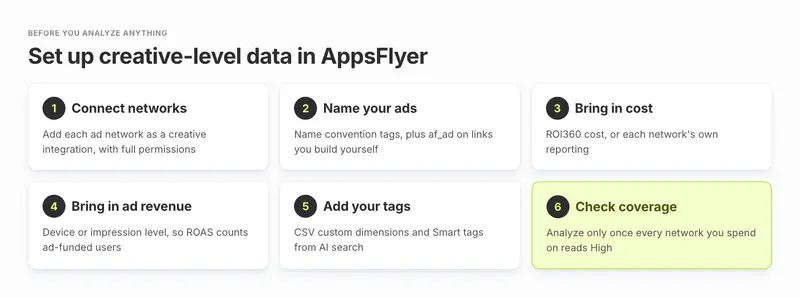
Step 1: Connect each ad network as a creative integration
In Creative Optimization, click + Add new integration (or the three-dot menu, then Creative integrations, then + New integration), pick the partner, pick the apps and sign in. AppsFlyer lists 19 creative partners, including Meta Ads, Google Ads, TikTok, AppLovin, Unity Ads, Mintegral, Moloco, Liftoff, Snapchat, Reddit and X Ads. ironSource is on the list too, but Unity stopped serving ironSource Ads direct-demand campaigns on 30 April 2026, so that connection now mainly matters for historical data.
What to expect, according to the partner integrations guide:
AppsFlyer backfills 90 days of creative and performance data, usually within 24 hours.
AppLovin is the exception. Its asset API has no historical lookback, so AppLovin coverage builds from the day you connect and is usually complete within 30 days. (The main guide mentions 45 days of AppLovin history, so expect some variation.)
For Google Ads, connect with the same user who set up ROI360, if you have it.
Some ad types report at ad level only, not creative level: Meta Catalog/DPA, Google non-UAC types, ironSource Offerwall, Moloco CTV, and TikTok and Snapchat Collection ads.
Step 2: Name your ads so AppsFlyer can tag them
AppsFlyer matches the same creative across networks with computer vision, so names are not needed for matching. They are needed for grouping by concept, hook or version.
Use Name convention tags (three-dot menu). You set a separator and a number of sections, then map each section to a tag. A name like btd_jumphook_vid_15s_en_v3 with _ as the separator gives six tags: game, hook, format, length, language and version. AppsFlyer allows up to 10 naming types, and the file extension is ignored. Keep the section count fixed, because each naming type has one section count.
For non-integrated networks and owned media, put the creative name in the af_ad link parameter (100 characters at most) and creative traits in af_sub1 to af_sub5. AppsFlyer's own link parameter guide gives this example: add af_sub3=blue to every blue ad to compare color templates.
Step 3: Bring in cost
With ROI360, cost comes from AppsFlyer's consolidated cost data. Without it, cost comes from each network's own reporting, and that partner cost stays in the dashboards and does not flow into Creative ETL. Also turn cost on in each partner integration: the Discovery AI guide says impressions and clicks need it.
Step 4: Bring in revenue, including ad revenue
Creative Optimization's revenue and ROAS columns are cohorted at D0 to D90 and, says AppsFlyer, aligned with its Cohort dashboard. In-app purchases arrive through your in-app events. Ad revenue needs its own setup under Settings > Revenue Settings > Ad revenue, and the type you pick matters for creative analysis:
Aggregate (S2S API): daily revenue by country, divided evenly across a trigger event such as app open. Fine for campaigns, too blunt for comparing two creatives.
Device-level (S2S API): revenue per user, attributed to the source that brought the user. AppsFlyer calls it its most accurate type.
Impression-level (SDK), ideally with device-level on top: the freshest data, and the type AppsFlyer recommends.
We found no AppsFlyer line saying whether Creative Optimization splits in-app purchase from ad revenue. If you are a hybrid-monetized game, confirm with your CSM which revenue the ROAS column includes before you rank creatives on it.
Step 5: Add your own tags
Two options, from the Creative Optimization guide:
CSV custom dimensions: download the creatives file, add a column per dimension (for example "Theme"), upload it back. Up to 15 dimensions, one tag per dimension per creative, 1 MB per file, live in about 30 minutes.
Smart tags: save any Discovery AI search ("female character in a gym with motivational voiceover") as a tag. It tags every matching creative and becomes a group-by option in the Overview dashboard. AppsFlyer's setup steps still mark parts of search and Smart tags as "coming soon", so check what your account shows.
Step 6: Check coverage before you trust any ranking
Open Creative integrations and read the Coverage status column. "High" means the creatives AppsFlyer pulled cover more than 85% of the app's installs in the last 30 days, or more than 85% of cost if you have ROI360. "Low" or "Partial" means some ads are missing, and your top-10 list may be missing a top creative. Fix permissions before you analyze.
How to analyze creative performance in AppsFlyer, step by step
This is a weekly routine for a UA manager. It uses only AppsFlyer features and follows AppsFlyer's own use cases in the Overview dashboard guide.
Set the filters. Pick the app, a date range and the User Acquisition view (not Unified, which mixes in retargeting). Remember the data is LTV: a creative's numbers are for the users it brought in during that range.
Pick one metric for the question you are asking. Use the table below. Ranking on installs alone rewards cheap users.
Rank in the table. Group by Creative, turn on "Show only creatives with preview" so you can see each ad, and sort by your metric. Add Appearances to see how many campaigns each creative runs in.
Check new creatives. Filter Creative age to under 14 days, then open the stacked area graph grouped by Creative and Share of cost. New ads that the networks are giving spend to are your early winners.
Find durable winners. Set the range to at least 90 days, group by Creative and Share of cost, and look for steady spend share with healthy IPM, eCPI and ROAS. These are the ads to iterate on, not replace.
Look for fatigue. In the comparison graph (minimum 3-day range), plot IPM, eCPI and cost for your top spenders. AppsFlyer defines fatigue as a drop in IPM with flat costs and rising eCPI.
Break down the winners. In Discovery AI, open Scenes, Elements and Texts (Advanced or Premium) and sort by your metric. Use Compare to put up to 4 Smart tags side by side, such as "gameplay in first 5 seconds" versus "UGC opening".
Compare versions. Group by Creative similarity to compare near-identical versions (portrait versus landscape, English versus Spanish), and by End card on AppLovin, ironSource, Moloco, Unity Ads, Snapchat and YouAppi.
Save and share. Save the setup as a shared view so the creative team opens the same cut, or export the table. Use "Export aggregated rows only" if you want the file to match the screen.
When to trust a result: a rule of thumb
Don't rank a creative on D7 ROAS until its D7 cohort is complete and it has roughly 100 installs. Call it fatiguing when its IPM sits 20% or more below its first two weeks while eCPI rises and its spend share holds. These thresholds are our rule of thumb, not AppsFlyer guidance. Raise them for high-variance games, where a few payers swing ROAS.
How to read AppsFlyer's modeled and network-reported numbers
Two kinds of numbers sit in the same dashboard, and mixing them up is a common source of arguments between UA and creative teams.
AppsFlyer data versus partner metrics. Most columns come from AppsFlyer attribution. Columns marked "Partner" come straight from the network. They won't match. For Google, partner metrics use the asset view while AppsFlyer uses the ad group view. Meta doesn't report iOS installs at asset level at all.
Modeled splits for multi-asset ads. Meta Advantage+ and Google App campaigns mix several assets in one ad. AppsFlyer's attribution stops at the ad on Meta and at the ad group on Google, so it models the split using the network's own asset numbers. Its own example: Meta reports 100 installs for an ad, 60 from asset A and 40 from asset B. AppsFlyer attributes 50 installs to the ad, so it gives asset A 30 (60% of 50) and asset B 20. Revenue and ROAS follow the same ratio.
What this means in practice: the ranking between assets inside a multi-asset ad follows the network's view, and AppsFlyer's attribution sets the total. If the network favors one asset because it served it more, AppsFlyer's split inherits that. Treat asset-level ROAS in these ad types as a direction, not a measurement, and confirm big calls with a separate test. Also note Meta Flexible ads show only the best-performing asset.
What AppsFlyer's 2025 and 2026 creative reports tell you to check
AppsFlyer's State of Creative Optimization 2025 looked at 1.1 million video creative variations from 1,300 apps and $2.4 billion of spend from Q1 2024 to Q1 2025, according to its April 2025 press release. Three findings turn into checks you can run in your own account:
Spend concentration. In gaming, the top 2% of creatives drove 53% of spend; in non-gaming, 43%. Check yours: set last month, open the stacked area graph by Creative and Share of cost. If 50 creatives ran, the top 2% is a single ad. If one or two ads carry most of your spend, you are exposed when they fatigue, so test more.
UGC tutorials against testimonials. The report found that "UGC Tutorials and Reviews drive stronger performance than Testimonials": in Social apps, UGC tutorials delivered 45% higher IPM and 17% stronger Day 7 retention. Save Smart tags for "UGC tutorial" and "UGC testimonial" and compare their IPM and D7 retention in your own account.
Storytelling hooks. They took just 6% of spend in Social and Search, yet the report found they delivered the highest Day 7 retention, at 8.4%. Tag them and see whether your networks are underfunding a concept your users like.
AppsFlyer published a 2026 edition in late September 2026. It analyzed 1.2 million creative variations across 10 gaming and non-gaming verticals, and for the first time puts video and static image side by side. Its summary says the top video creatives are pulling further ahead, while image spend spreads more evenly. So run the spend-concentration check twice, once filtered to video and once to images, rather than on the whole account.
These are AppsFlyer's averages, not targets. Your account is the benchmark that counts.
Is AppsFlyer's AI better than building your own analysis on raw attribution data?
It depends on the question. Raw attribution data, through raw data reports or Data Locker, gives you rows per ad name and ad ID with installs, events and revenue. That answers "which ad ID performed best" well, and a data team can build it.
What raw data does not give you is the hard part:
Matching. The same video runs under different names and IDs on Meta, TikTok and AppLovin. AppsFlyer's computer vision merges them. In-house, you would have to build that matching.
What is inside the ad. Raw rows carry no hooks, scenes or on-screen text. AppsFlyer's Discovery AI breaks video into scenes, elements and texts and lets you search by content.
The asset split for multi-asset ads, described above.
Build your own if you have a spare data engineer and your questions are about ad names and metrics. Use AppsFlyer's AI if your questions are about what is in the winning videos. You can do both: on the Premium plan, Custom Creative ETL sends AI tags to your warehouse next to the performance data. For the metrics side, see our guide to measuring ad creative performance.
Where AppsFlyer's creative analysis stops
AppsFlyer does a lot well: cross-network matching, cohorted ROAS from the attribution source itself, end-card data, web campaigns and creative uploads through Creative Management. These are the limits we found in its own docs, as of October 2026.
Two more practical limits: all money is in USD, and Creative Optimization runs on AppsFlyer attribution, and no AppsFlyer doc describes using it with another MMP's data.
Which setup fits your team
A rule of thumb, ours rather than AppsFlyer's:
If only the first three rows apply, AppsFlyer alone is enough. Don't buy a second tool to read numbers you already have.
How Segwise works on top of AppsFlyer
Segwise does not replace AppsFlyer. Segwise is not an MMP, so keep AppsFlyer for attribution and as your source of truth for installs and revenue. You connect it with an AppsFlyer V2.0 API token from the Security center, as the Segwise AppsFlyer setup guide shows, and Segwise maps every creative to ROAS, CPA and LTV, including your custom events.
What it adds where AppsFlyer's docs stop:
Element tags on every format.Creative tagging covers video, image, audio, on-screen text and playables. Segwise plays each playable end to end and tags the mechanic, tutorial, end card and CTA. It also reads your naming convention, so the work from step 2 carries over.
More networks in one view. 17 live ad network connectors, including the main gaming networks and several outside AppsFlyer's creative list, such as LinkedIn, StackAdapt, Taboola, Outbrain, Tapjoy, Vibe and Bidease.
Fatigue alerts.Fatigue tracking watches for a sustained drop against thresholds you set, such as a 20% ROAS decline over 7 days, and alerts you by Slack and email.
Scores before spend. AppsFlyer's Creative Management grades new creatives A to C. Segwise has its own version: Pre-flight Testing scores up to 10 new images or videos at a time out of 100, against the ads already winning in your account, and gives a run-or-hold verdict with its reasoning.
New ads from what wins. Segwise drafts statics, video up to 30 seconds and AI UGC-style video from your top patterns, for your team to edit and ship. Playables and CTV spots come as managed services.

The gap it closes is the one WGT described before using Segwise: "To identify top-performing assets, we had to pull data from our MMP and then manually cross-reference it against the live creative sitting in each individual ad network." WGT reports its early concept-to-test cycle got 5x faster, from 2 to 3 weeks to 2 to 3 days.
Honest limits: Segwise imports up to 14 days of history on the free trial and 3 months on paid plans, against AppsFlyer's 90-day backfill. Competitor tracking covers Meta only. And pushing finished ads straight to networks is not live yet, while AppsFlyer's Creative Management already uploads to six networks (to the creative library only, for Unity and Mintegral).
Segwise starts at $499/month for advertisers spending up to $250K/month, with a special 50% discount for startups spending under $50K/month, and includes a 7-day free trial. For a feature-by-feature view, read Segwise vs AppsFlyer Creative Optimization, and for a wider list, the AppsFlyer Creative Optimization alternatives. If you are still choosing an MMP, start with our mobile measurement partners guide.
A 30-minute weekly checklist for AppsFlyer users
Coverage status is High for every network you spend on.
New creatives (under 14 days) are getting spend share, or you know why not.
Top 5 spenders show no IPM drop with rising eCPI.
Each winner has its hook, format and length readable from its name or tags.
You have one hypothesis for next week's creatives, taken from the scenes or tags that won.
Tip: Save this routine as a shared view in Creative Optimization, starred as the default, so everyone on the team opens the same filters on Monday.