
Performance agencies use AI agents in three places: the weekly client report, the analysis behind it, and the production of new ad variations. Give each client its own workspace and logins, let AI read and draft, and keep budgets, strategy and anything the client sees with a person. Then price on output, not hours.
The hard part across ten or twenty accounts is comparing them without mixing them up. Segwise is an AI creative analytics and creative generation platform that keeps clients' data apart, tags the hooks, offers and CTAs in all their ads, and joins each ad to its client's own metric, ROAS for one and cost per subscriber for another. Your team can ask "which five ads should we talk about in this week's review, and why?" for one client, then make that client's next ads from its winners.
TL;DR
- Reporting: let AI build the weekly draft for each client from live data. A person reads it, adds the "so what", and sends it.
- Analysis: ask questions across accounts in plain English, but name the client in every question and keep one thread or project per client.
- Production: generate variations from a client's own winners, on its brand, and review every ad before it runs.
- Access: connect AI tools with each person's own login, scoped to the accounts they work on. Keep write access off until rules are set.
- Pricing: about a third of agencies in one survey had been asked for an AI discount. In a follow-up, 52% of agencies seeing several gains from AI were keeping or raising prices.
How do agencies use AI agents across client accounts today?
An AI agent here means an AI assistant (ChatGPT, Claude, an in-product chat) connected to real account data, often through MCP. MCP, the Model Context Protocol, is a standard way to plug a data source or tool into an AI assistant. Agencies get the most from that setup in reporting, analysis and production, plus the briefing and QA work around them.
Reporting: the weekly client update starts from a finished draft
Most of a weekly client update is the same work every week: pull spend and results per network, find what moved, write it up. That is the part to hand over. In Segwise, for example, you can ask for a report in plain English, save it to that client's space and schedule it to email or Slack daily, weekly or monthly. The account lead's time goes into the two or three sentences that explain why a number moved and what the agency will do next.
Analysis: answering "what's working" without a day of exports
The old review meant exporting from Meta and Google separately and comparing ads by hand. HiveMinds, the agency that runs paid media for Jio Financial Services, describes exactly that in its case study. The account team is three or four people. Before Segwise, its weekly creative review took at least two hours, mostly spent finding out what had already happened. With every ad tagged and ranked in one view, the customer-reported review time dropped to about 30 minutes. The deeper work that used to wait for spare time, such as competitor reviews and comparing offer-led with product-led messaging, became routine.
Production: more variations per client, on brand
Ad networks reward a steady flow of new creative, and agencies carry that load for all their clients at once. Medialicious, an agency running paid user acquisition across a multi-brand portfolio, added each brand's decks and style guides to Segwise and now pulls about 150 assets a week across four apps, according to its case study. Generated creatives carry about 30% of its total ad spend. Chris Aust, its Head of Marketing Operations, puts the change as a shift that "lets my team focus on strategy instead of production."
Briefing and QA: first briefs and pre-launch checks
AI is good at turning a finding into a first brief ("make three statics that lead with the no-fee benefit") and at checking work against a list: specs, sizes, mandatory disclaimers, naming conventions. In regulated categories this matters most. HiveMinds' generated ads have to clear correct logo use, approved colors, tone and mandatory disclaimers before anyone reviews them.
If you want a wider view of which tools do which of these jobs, our roundup of the best AI tools for ad agencies compares them by category and price.
What can AI agents change inside a client's ad account?
Before an agency connects anything, it should know which tools can only read and which can act. Here is what each vendor documents today.
| Connection | How access is scoped | What it can change | Guardrail you can set |
|---|---|---|---|
| Meta ads MCP server | Facebook login on ad accounts you can manage; open beta, not every account has access yet | Creates and edits campaigns, ad sets and ads; new ones start paused, and activating one starts spend | Rules per ad account in Business Suite (limited availability); a partner can set rules that apply to its own employees |
| Google Ads MCP server | You host it; client accounts through a manager account login; production needs an approved API access level | Creates assets, uploads videos, manages labels; cannot create, change, pause or enable campaigns, ads, budgets or bids | Propose-and-confirm on every change, or a read-only mode |
| Segwise MCP | Each person signs in with their own Segwise login; each request is checked against their organization access | Starts query jobs and may save conversation history; cannot change campaigns, budgets, tags or settings, or generate ads | Per-person login; by default the assistant confirms which organization to query before it asks anything |
Two lines from these docs matter most for agencies. Meta's help page says that when a client gives a partner access to its ad account, the partner "can also set ads MCP server rules for the ad account shared with them," and those rules apply only to the partner's own people. Meta's example rule blocks any budget over a ceiling such as USD 1,000. On Google, the server reaches client accounts through your manager account, so whoever runs it can see every client that manager account can see.
For the longer version of what each assistant gets right and wrong on ad data, see ChatGPT vs Claude for Meta ads.
How do I keep client data separate when AI tools touch every account?
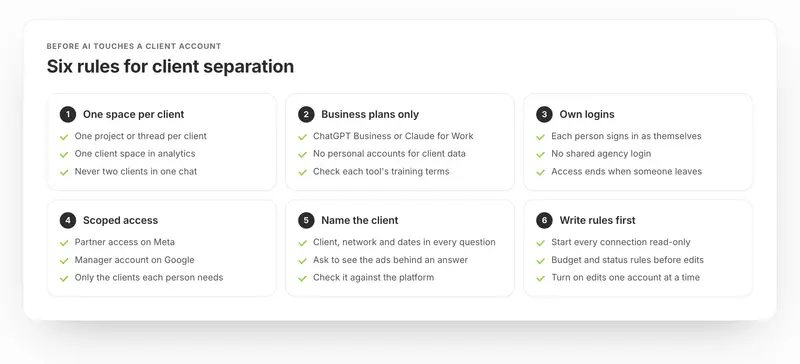
Client data usually leaks through everyday slips: a CSV from one client pasted into a chat that already holds another client's numbers, or a shared login that sees every account. Six habits stop most of it.
Six rules for client separation
- One space per client, everywhere. One project or thread per client in your AI assistant, one client space in your analytics tool, one folder of exports. Never mix two clients in the same conversation.
- Use business plans, not personal ones. OpenAI says it does not train on data from ChatGPT Business, Enterprise or its API by default. Anthropic says the same for its commercial products such as Claude for Work and the API. Consumer plans follow different terms, so agency work belongs on the business tier.
- Each person signs in as themselves. MCP connections that use each person's own login (Meta, Segwise) mean access ends when that person leaves or is removed from the account. Avoid one shared agency login in an AI tool.
- Scope access to the accounts a person works on. Use partner access on Meta and a manager account on Google, and give each team member only the client accounts they need.
- Name the client in every question. "For Echo, last 7 days, on Meta" beats "what's working?". It stops the assistant from blending accounts and gives you an answer you can check.
- Keep write access off until rules exist. Start every new connection read-only. Turn on edits for one account at a time, after budget and status rules are in place.
What a client-separated workspace looks like
In Segwise, Studio View keeps every client's accounts, reports and ads in a separate space inside one agency workspace. Every client's ads are tagged the same way, so you can compare how a hook does for a cereal brand and a language app, while each one is ranked on the metric that client cares about. Clients get view-only seats or a secure link, and see only their own account.

See your clients side by side: Segwise lets you keep every client apart and send each one a scheduled report on the metric it runs on. Book a demo.
What should stay human at an agency?
AI should do the work that repeats and can be checked. People should own anything that spends money, sets direction or reaches the client.

A rule of thumb for what to automate
Automate a task across client accounts when all three of these are true:
- It repeats at least weekly for three or more clients. Below that, setting it up costs more than it saves.
- A person can check the output in under five minutes. A ranked list of ads or a draft report passes. A new channel strategy does not.
- It can't spend money or reach the client on its own. Drafts, paused campaigns and saved reports pass. Activating a campaign or emailing a client does not.
If a task fails any one of the three, keep a person on it and use AI as the assistant, not the owner. This is a rule of thumb from how agencies describe their workflows, not a law.
Four jobs that stay with the strategist
- Budget and bidding calls. Even Meta's own server starts new campaigns paused for human review, and activating one starts spend.
- The story to the client. AI can say a hook's ROAS is falling. The account lead decides whether that means "refresh the hook" or "the offer has run its course".
- Strategy and positioning. Which customer to chase next quarter, which message to bet on, when to enter a new channel.
- Brand and compliance sign-off. A person approves every ad before it runs. At HiveMinds, every generated asset has to clear logo, color, tone and disclaimer rules before anyone reviews it. Of the 400 to 500 statics and 20 to 25 videos the team generated in Segwise, 50 to 60 went live as generated, and the team built another 150 to 200 itself from what Segwise showed. Together that is 40 to 50% of everything shipped for the account.
Will clients pay less if the agency uses AI?
Some clients will ask, but the survey data so far shows no wave of AI discounts. Productive, a software company for agencies, found that around a third of the 180+ agencies in its first survey had already been asked for an AI discount, and nearly half expected to be. Its follow-up survey of 174 agencies that use Productive, run in March 2026, found clients "haven't increased the rate of asking for discounts." Among agencies reporting several positive AI results, 52% were keeping or raising prices with better margins. The sample skews European, so read these as a direction, not a US benchmark.
Worked example: where the saved hours go
Take an agency with eight clients and a two-hour weekly creative review per client, the starting point HiveMinds described. That is 16 hours a week. At about 30 minutes per review, it falls to 4 hours, so 12 hours a week come back. This is our arithmetic on one customer's reported time, not a promise.
What keeps the fee is what those 12 hours buy. Spend them on work the client can see:
- a weekly competitor read on what rivals are putting money behind
- two or three extra tested concepts per client each month
- a clearer "what we're changing and why" line in every report
Price the output, not the hours
If the retainer is sold as hours, AI makes the hours look padded. If it's sold as output and results (reports, tested concepts, a CPA target), AI makes the agency look faster. Productive's report found value-based billing is the preferred direction for agencies changing their pricing. Move production lines in the contract from "hours of design" to "concepts tested per month" before the client raises it.
A 30-day rollout across client accounts
Week 1: pick two clients and connect read-only
Choose one client with lots of creative volume and one with a simple account. Connect their ad networks to your analytics layer and your AI assistant with read access only. Ask the same five questions you answer in every weekly review and check the answers against the platforms.
Week 2: move the weekly report to a draft
Have AI build both clients' reports. The account lead edits and sends them. Track how long each one takes, before and after. Our paid social client reporting guide covers what each report should include.
Week 3: generate variations from winners
Pick the two best ads for each client and make five variations of each, following the client's brand guide. Review them, run the ones that pass, and tag them so you can see how they do against human-made ads.
Week 4: set the rules, then add clients
Write down what AI may and may not do per client: which tools may edit, budget ceilings, who approves what. Then add three more clients using the same setup. Our AI copilot guide for performance marketing covers the wider tool landscape if you need more than creative work.
Where Segwise fits for agency teams
Segwise covers the creative side of the loop for every client. It connects to 15+ ad networks and your MMP, tags every ad down to the hook, offer, visual and CTA, and ties each tag to the spend, installs, ROAS or custom events of the account it came from. Fatigue alerts and scheduled reports go out by email or Slack, so the weekly update starts from what changed.
The Creative Generation Agent lets you make statics and videos up to 30 seconds, including AI UGC-style ads, from a client's winning patterns, inside the brand rules you set for that client, with a "Why this ad" note your team can judge before any spend. You can use each agent on its own, or do it all in one place by chatting with the Segwise agent: ask how your ads are performing, see what competitors are running, and make new ads from your winners.
Through the Segwise MCP, your team can ask the same questions from Claude, ChatGPT, Cursor, Codex or Grok Bot. If your login covers more than one Segwise organization, for example one per client or brand, the assistant shows the names and confirms which one to query first.

Limits to know: Segwise reports on paid ad creative from connected ad networks and MMPs, so SEO, email or organic social reporting needs another tool. The MCP reads data and answers questions; it can't change campaigns or make ads, and generation happens inside Segwise. Segwise starts at $999/month for advertisers spending up to $250K/month; startups spending under $50K/month pay $499/month (limited eligibility). See the growth agencies page for how agencies set it up.
What AI tools for marketing agencies should change first
Start where the work repeats and the output is easy to check: the weekly client report and the "what's working" review. Keep clients in separate spaces with separate logins, and keep budgets, strategy and client conversations with people. Then use the hours you save on work the client can see, so the AI conversation becomes a reason to stay, not a reason to cut the fee. Your next step: pick two clients and run the week 1 setup on Monday.